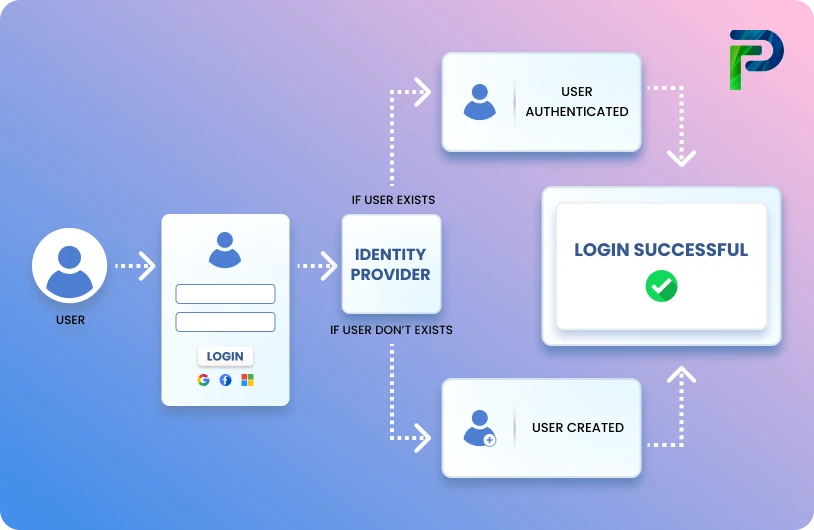
What Is Access Provisioning?


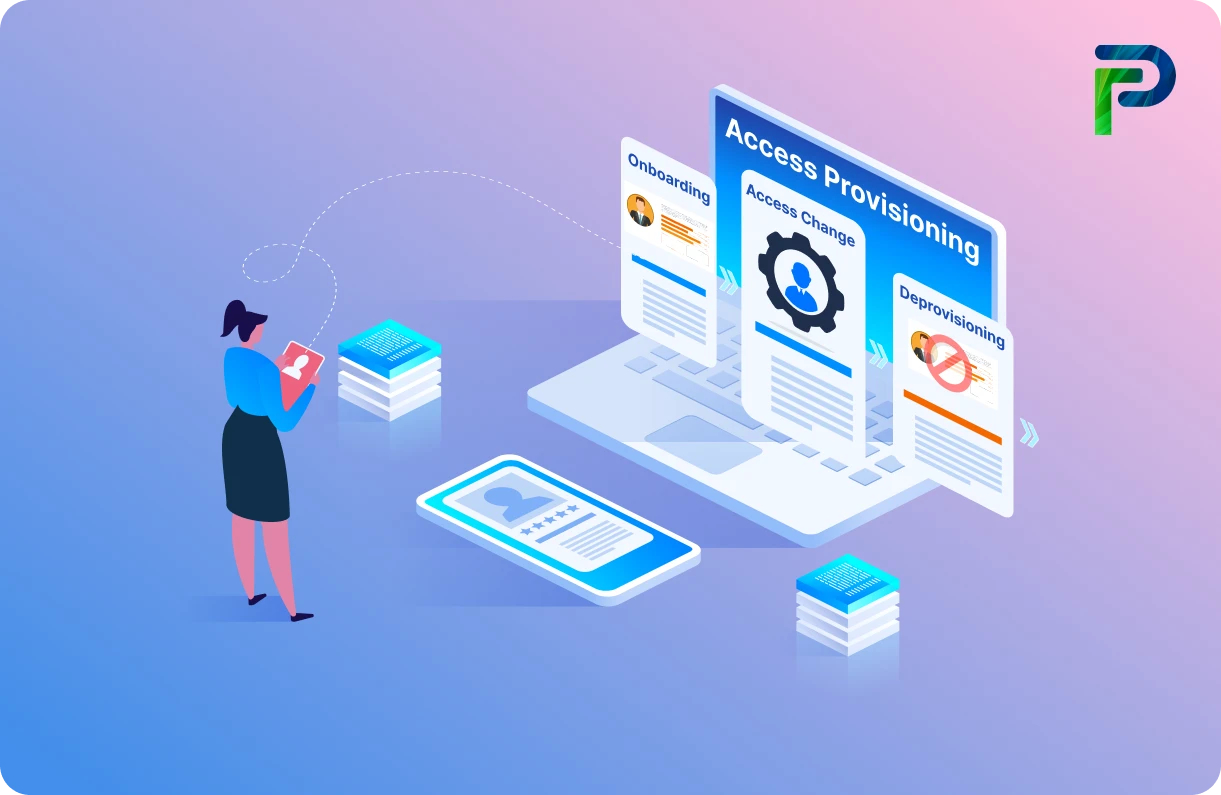
Access provisioning is a controlled procedure that allows an administrator to create, update, and delete user access in the organisation. As employees start with the company, change positions, or exit the company, access must also be updated through the official provisioning system. The entire process of applying the requested changes to all of the applications used by each employee involves successful access provisioning to dozens of applications.
The foundation of this strategy is that no user is given more privileges than necessary for them to do their job. Each additional privilege creates additional vulnerability for that user, should they experience a breach. Thus, if the privileges of each user are restricted to only what that user needs to do their job, then the total effect of any compromise on that user is limited to the privileges that have been granted to them.
Access provisioning connects identity management (verification of who you are) with access control (determination of what you can access). It encompasses both granting access when needed and deprovisioning; the equally critical process of revoking access when circumstances change.
The overlooked problem: When employees change roles, revocation of irrelevant permissions from their prior role is often not prioritized and gets overlooked. This oversight leads to the accumulation of access rights over time, a major security concern for modern organizations. Without proper provisioning and deprovisioning, organizations end up with unclear permissions, orphaned accounts after departures, and untracked access across systems.
Key Takeaways:
- Access provisioning controls user access through the employee lifecycle, limiting breach blast radius
- Automated provisioning drastically reduces credential breach detection time through least privilege access
- Compliance requires documented approval trails and reviews-automation creates this, manual processes cannot
- Hybrid RBAC + ABAC approach balances simplicity with contextual control at scale
- Quarterly access certifications reduce unnecessary access by 25-35% in year one
Why Access Provisioning Matters
Access provisioning directly impacts three critical areas: security, compliance, and operations.
1. Reduced Attack Surface & Credential Breach Prevention
Compromised credentials account for 16 percent of all breaches and take an average of 292 days to identify and contain a longer than any other attack vector. Attackers with legitimate credentials operate invisibly, accessing systems like normal employees. Security tools don't trigger alerts because the activity appears legitimate.
The core problem: Most organizations over-provision access. Employees accumulate permissions they don't actually need. When credentials are compromised, attackers inherit that bloated access profile; reaching databases, financial records, and systems the employee never worked with.
Access provisioning solves this through controlled access: Every account gets exactly the permissions it needs for that specific role, nothing more. A developer's account only accesses code repositories and staging; not production databases. A marketing employee's account only accesses marketing tools; not HR or financial systems. When someone changes roles or leaves, those permissions are automatically removed.
The security outcome: Even if credentials are compromised, attackers reach only the systems that person actually uses. It's like giving someone a key to one room instead of a master key to the entire building. This dramatically limits damage and reduces breach costs.
2. Fewer Mistakes = Stronger Security
Manual access provisioning relies on humans. Someone sends an email: "Please add Sarah to the finance folder." IT grants access; sometimes too much. Someone changes roles, and their old access gets forgotten. A typo and access goes to the wrong person. These human errors accumulate and weaken the security posture.
Automated provisioning eliminates these mistakes: Policy-driven decisions replace human judgment. Every request follows the same approval rules. Every access grant follows the same logic. Every role change triggers the same revocation process. Mistakes don't disappear; they're dramatically reduced because processes are consistent, not dependent on who handles the ticket.
The security outcome: Consistent enforcement of least privilege. Access decisions are reliable and repeatable, not dependent on individual judgment or attention to detail.
3. Compliance Governance as a Competitive Advantage
Regulatory frameworks demand proof that access is governed. HIPAA requires staff access only to the records they need. GDPR requires that evidence of contractor access ends at contract termination. SOX requires proof that no single person creates and approves transactions. PCI-DSS requires documented access reviews. Audit failures result in significant fines, litigation, and reputational damage.
Manual systems fail compliance: No documented reason why someone received access. No approval trail. No evidence access was reviewed or removed. Organizations scramble through emails and spreadsheets during audits, unable to prove governance happened.
Access provisioning creates intentional governance: Every access grant logs the approver, date, business justification, and policy that triggered it. Quarterly certifications are documented, including what was reviewed, approved, and revoked. The system creates an auditable record of intentional governance decisions.
The compliance outcome: Organizations shift from reactive (scrambling during audits) to proactive (governance happens automatically). They demonstrate consistent, policy-driven access control. Auditors see clear evidence of who decided what, when, and why, transforming compliance from a painful audit process into demonstrated organizational strength. Beyond audit readiness, documented access governance directly reduces the risk of unauthorized access and the violations that trigger fines.
4. Employees Productive on Day One
New hires and employees switching teams wait days (sometimes weeks) for system access. They chase down approval tickets, track down email responses, and follow up with IT. Meanwhile, they can't be productive because they can't access the tools they need.
Access provisioning eliminates the wait: The right access shows up automatically or through quick self-service requests. New employees log in on day one and find email configured, tools ready, and role-specific access active. Employees changing roles experience the same immediate transition. No waiting. No productivity loss.
The operational outcome: Day-one productivity instead of days of setup delays. New hires contribute immediately instead of sitting idle waiting for access.
5. IT and Security Teams Focus on Strategy
Without automation, IT and security teams spend significant time on routine requests: "Can you give X access to Y?" "Sarah needs access to this system." "Can you remove James from these groups?" These routine tickets pile up, consuming half the week for IT staff.
Automation handles the routine work: Onboarding, role changes, and offboarding; all handled by the provisioning system. Approval workflows enforce policies without manual review. Access removals happen automatically based on role changes or certifications.
The operational outcome: IT and security teams shift from permission janitor work to strategic projects. Incident response, security improvements, compliance initiatives; work that requires expertise instead of routine ticket processing. The team's time becomes valuable strategic capacity instead of being consumed by repetitive requests.
How Access Provisioning Works
Understanding the mechanics helps identify operational gaps and evaluate solutions.
Step 1 - Request and Approval
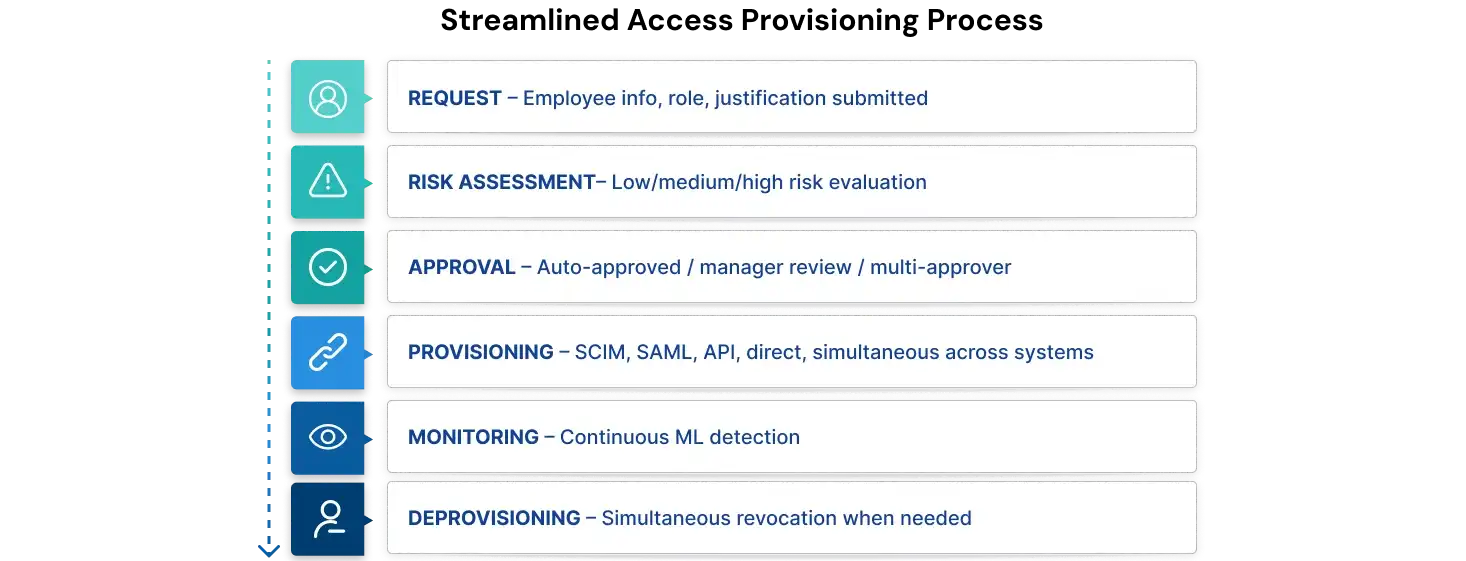
Access provisioning begins with a request. A new hire needs access, or an existing employee requests access to a new system. The request enters a risk-based approval workflow that determines who must approve.
Three-tier approval structure:
- Low-risk requests (email, collaboration tools) are auto-approved by policy
- Medium-risk requests (role-specific systems, department tools) route to the manager for approval
- High-risk requests (production databases, sensitive data, financial systems) require multiple approvers: manager, system owner, and security lead
This tiered approach prevents unauthorized access and creates clear accountability. Policies enforce who approves what. Approvers explicitly verify access is necessary for that person's specific role.
Once approved, the system orchestrates account creation: The identity management system generates a unique username, provisions a directory and email account, and creates a home directory on the appropriate file server. It automatically provisions role-specific resources: a developer gets code repository access, a marketing employee gets collaboration platform access, a finance employee gets accounting system access. Each account is configured for the specific role, not generic company-wide access.
Account claiming and activation: The new account credentials are sent to the employee for claiming (confirming identity) and activation (setting the initial password). The system records the entire flow: request approval, account creation, credential delivery, and activation confirmation. This creates an auditable record from request to active account.
Step 2: Access Creation and Assignment
Once approved, access is implemented using one of two approaches.
Role-Based Access Control (RBAC): Assigns permissions to predefined roles. A "Developer" role includes code repository, development environment, and read-only log access. Simple and scalable. Best for organizations with well-defined, stable roles.
Attribute-Based Access Control (ABAC): Evaluates attributes—user type (employee/contractor), department, location, time of day, device type—and grants/denies access dynamically. A finance employee gets report access from the office during business hours on a company device, but not from home at midnight on a personal device. Best for complex requirements needing real-time contextual control.
Hybrid approach (most common): RBAC baseline (all engineers get "Engineer" role) + ABAC refinement (only payment-team engineers access payment systems). Combines simplicity with flexibility. Attribute changes automatically trigger role updates, preventing manual errors.
Technical implementation: SCIM provisions cloud apps. SAML federates identity. REST APIs handle integrations. Direct provisioning handles legacy systems. One request activates access across all systems simultaneously.
Step 3: Monitoring and Access Reviews
Provisioning is not a one-time event. Access must be continuously monitored and regularly reviewed to ensure it remains appropriate and excess permissions are removed.
Access certification is the formal review where managers validate their team's access. Quarterly or semi-annually, managers confirm what access is still needed and mark what should be revoked. This prevents access creep, the accumulation of unnecessary permissions from multiple roles and assignments over time.
Continuous monitoring runs alongside certifications. Machine learning detects unusual access patterns, unused access, and policy violations, catching problems faster than quarterly reviews alone.
Without regular reviews and monitoring, employees retain access they no longer need. Over time, this accumulation becomes a major security liability.
Methods of Access Provisioning
Organizations use different provisioning methods depending on their complexity, compliance needs, and organizational structure. Here are four core approaches.
1. Role-Based Access Provisioning (RBAC)
Access is granted based on job role. An "Accountant" role receives access to accounting systems. A "Marketing Manager" receives access to marketing tools. Permissions are tied to the role, not individual decisions.
Best for: Organizations with clear, stable job titles where all people in the same role need identical access. Reduces administrative overhead and ensures consistency.
2. Attribute-Based Access Provisioning (ABAC)
Access decisions evaluate multiple attributes in real-time: who the user is (employee/contractor), what department they belong to, where they're located, what time it is, what device they're using. Access grants or denies based on the combination of these attributes.
Best for: Organizations requiring contextual control. A healthcare worker accesses patient records from the hospital during shift hours, but not from home at midnight. A contractor accesses project files, but not company financial data.
3. Rule-Based Access Provisioning
Access follows predefined business rules and policies. Example rule: "All marketing department employees get Salesforce access" or "Only finance department members access the GL module." Rules automatically apply to matching users.
Best for: Organizations with clear departmental boundaries and consistent access requirements. Rules ensure compliance with segregation of duties and policy enforcement.
4. Temporary Access Provisioning (TAP)
Access is granted for a specific purpose with a built-in expiration. A contractor gets project access for 6 months, then automatic revocation. A developer gets production access for a 2-hour incident, then automatic revocation. No manual cleanup required.
Best for: Contractor access, incident response, special projects, or temporary assignments. Prevents forgotten access and automatically enforces the principle that access should exist only as long as needed.
Access Provisioning Lifecycle
Access provisioning spans the entire employee journey. Each phase has distinct requirements and risks.
Onboarding (Joiner)
When a new employee is hired, provisioning begins before day one. HR inputs employee information into the system. The provisioning platform automatically creates accounts across all necessary systems: email, directory, HR portal, and building access. All happening without manual tickets because new hire provisioning is predictable.
On day one, the employee logs in with credentials already configured. Email works. VPN works. Collaboration tools work. Role-specific access is ready. This coordinated approach means productivity starts immediately, not days later.
Critical principle: provide minimal access. New employees don't receive elevated permissions until they complete training and their manager confirms competency. This prevents day-one mistakes or intentional damage.
Role Changes (Mover)
When an employee changes roles, provisioning must shift their access. The HRIS reflects the new role. The provisioning system automatically revokes old role access and grants new role access. This happens coordinated across all systems. The employee logs in with appropriate access for their new role.
Provisioning also handles temporary access. An employee needs six months of access to a system outside their normal role for a special project. The system creates an automated grant that expires in six months and revokes automatically. No human remembers to remove it because automation is reliable; manual processes are not.
This prevents the "mover problem": incomplete deprovisioning when roles change. Without automation, employees keep old role access plus new role access, accumulating unnecessary permissions over their career.
Understanding the difference between service accounts and user accounts is important during these transitions, as different account types require different handling.
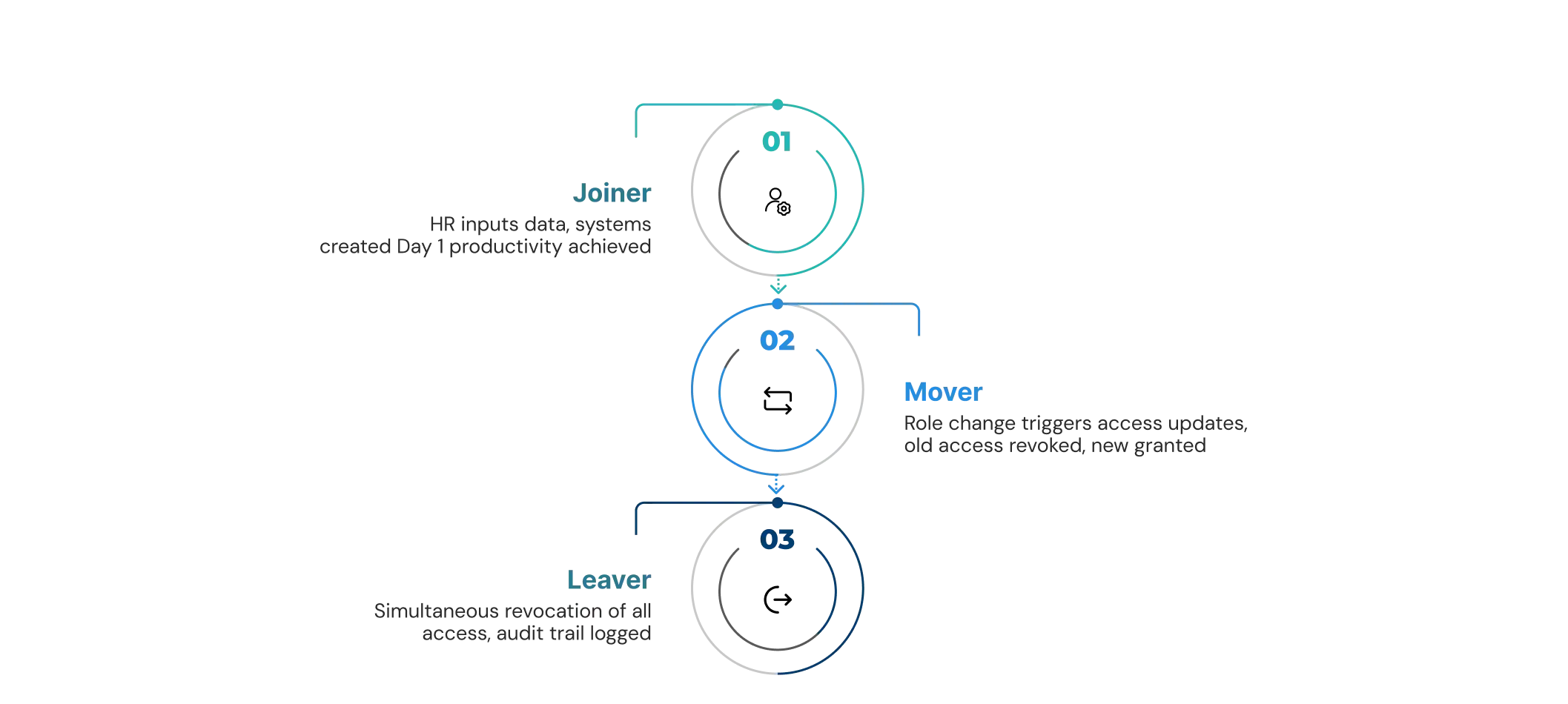
Offboarding (Leaver)
When an employee departs, deprovisioning must be rapid and comprehensive. A departing employee represents an immediate security risk. Every moment they retain access is exposure.
Automated deprovisioning revokes access across all systems simultaneously: email disabled, VPN access revoked, building card deactivated, laptop locked, database credentials revoked, group memberships removed, cloud app access terminated, SSH keys invalidated. Not deleted. Disabled and logged for audit purposes.
One overlooked credential becomes a breach vector. An SSH key left active, an AWS access key not rotated, a shared database password still working—any of these becomes an entry point. Incomplete offboarding also enables lateral movement attacks where compromised users can reach systems they shouldn't access. Organizations with comprehensive automated deprovisioning reduce breach costs by 15-20 percent compared to scattered manual offboarding.
Access Provisioning Best Practices
These practices work across organizations of any size.
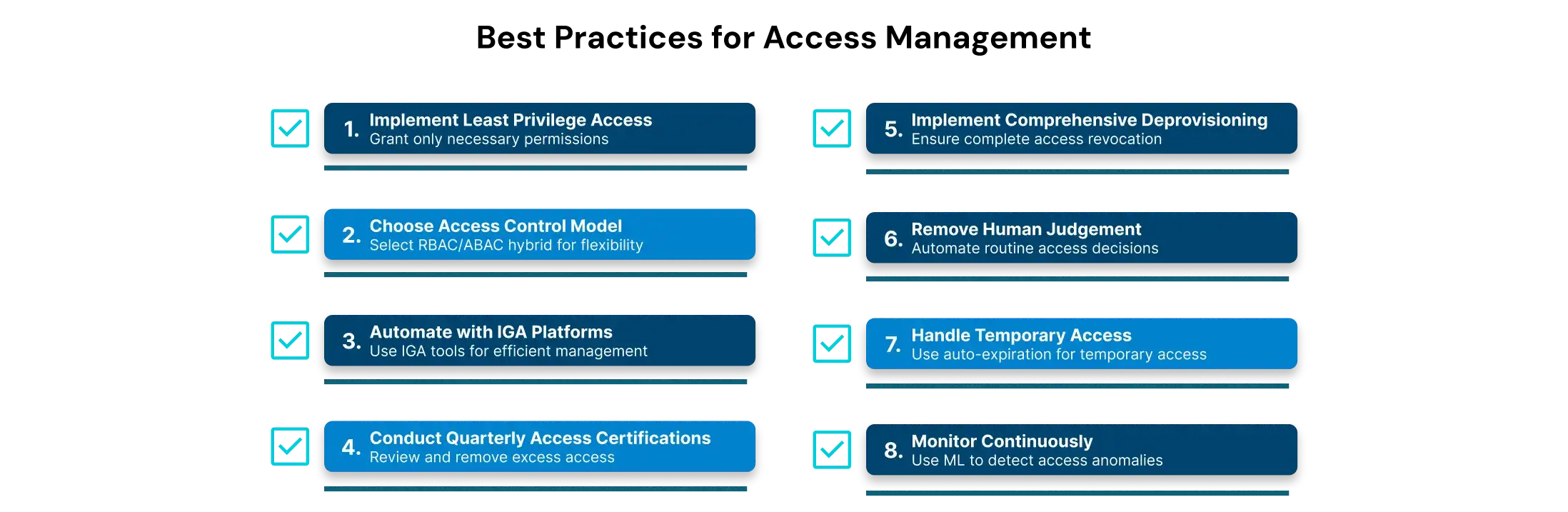
Implement Least Privilege Access
Principle of Least Privilege (PoLP) means granting every user the minimum access necessary for their specific role. Not broad access that might help, but narrow access that actually performs the job.
Every excess permission is a security liability. If an account is compromised, attackers gain whatever access that account has. Minimal access limits damage. Different roles and functions require different access levels. Each user gets specific access, nothing more.
Organizations often fail least privilege by defaulting to broad access for convenience. In reality, users need specific access. Most development happens on staging, not production. Production access should be granted only when actively troubleshooting production issues, restricted to the specific systems needed. Least privilege means granting specific access, not general access.
Choose Your Access Control Model
Use RBAC when your organization is small or your roles are stable. Clear job titles map directly to responsibilities. Everyone in the same role needs the same access.
Use ABAC when your organization is large or access varies significantly by context. Different access is required for different conditions. Shift-based access varies. Contractor access differs from employee access. Geographic access restrictions apply. ABAC handles this by evaluating attributes in context.
Most realistic approach: hybrid. Use RBAC for baseline provisioning. Layer in ABAC for fine-grained control. This combines RBAC's simplicity with ABAC's flexibility.
Automate with IGA Platforms
Identity Governance and Administration (IGA) platforms automate the entire access provisioning lifecycle. They integrate with HR systems to trigger provisioning automatically when employee data changes. They enforce access policies consistently. They generate audit trails automatically.
Benefits are measurable. Access appears in hours instead of days of manual ticket management. Policies apply consistently every time. Every action logs automatically for auditors. Compliance evidence is automatic. Deprovisioning is comprehensive across all systems instead of missing some.
Identity Governance and Administration (IGA) platforms automate the entire access provisioning lifecycle. Many vendors offer solutions in this space. Tech Prescient's Identity Confluence platform provides real-time provisioning orchestration with policy enforcement and continuous compliance across hybrid environments. The specific platform matters less than having automation versus manual processes.
Conduct Regular Access Certifications
Access certification is a quarterly or bi-annual review where managers validate their team's access is still necessary. Managers review team members and current access. They confirm needed access and mark what should be revoked. The system records decisions for audit.
This one practice prevents the most common access control failure: access creep. Employees accumulate access from multiple assignments over the years. Without certification, unnecessary permissions persist indefinitely.
When managers actively confirm access quarterly, unnecessary permissions get removed continuously. Organizations implementing quarterly certifications reduce excess access by 25-35 percent in the first year alone.
Common Provisioning Challenges and Solutions
Organizations face these problems repeatedly.
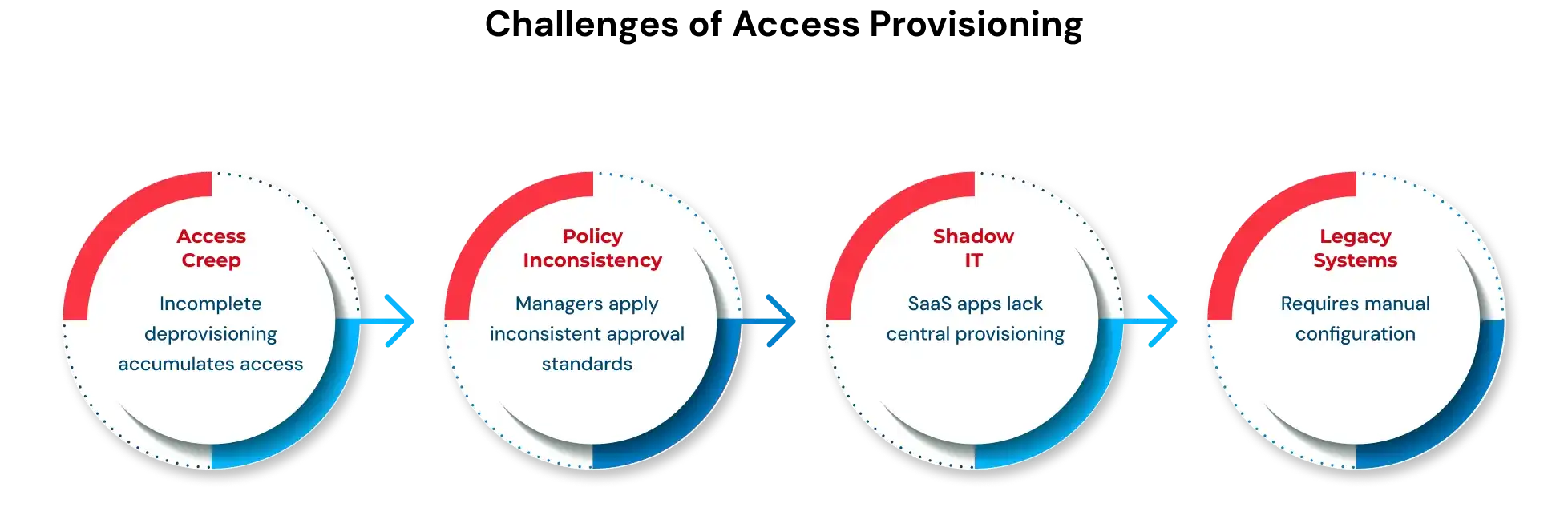
1. Access Creep from Incomplete Deprovisioning
The problem: When someone changes roles, old role access sometimes gets revoked, sometimes doesn't. When someone departs, access at inactive systems gets missed. Over years, employees accumulate unnecessary access.
The solution: Implement comprehensive deprovisioning workflows where old role access is explicitly revoked when new role access is granted. Use automated discovery tools to find access at all systems. Conduct quarterly certifications to catch accumulation. Make deprovisioning as mandatory as provisioning.
2. Manual Approvals and Policy Inconsistency
The problem: Different managers apply different approval standards. Some requests are approved quickly, others languish. No consistent policy drives decisions.
The solution: Codify access policies so provisioning decisions are rule-driven, not manager-discretionary. Define what access each role receives. Remove human judgment from routine decisions. Reserve manager approval for exceptions only.
3. Shadow IT and Unmanaged SaaS Applications
The problem: Employees use SaaS applications without IT knowledge. These create accounts and store data outside the central provisioning system. Auditors cannot verify controls apply everywhere.
The solution: Implement SaaS discovery tools to identify shadow IT applications. Negotiate corporate accounts for approved applications so provisioning is central. Extend provisioning and deprovisioning to shadow IT. Block high-risk apps at the network level if they cannot be managed.
4. Legacy Systems Without Modern Integration
The problem: Critical legacy systems don't expose APIs or support standard provisioning protocols. Access must be manually configured. Manual work defeats automation benefits.
The solution: Evaluate legacy system integration capabilities when selecting provisioning platforms. Choose platforms with broad legacy connector support. Some platforms provide adapters. Consider retiring legacy systems in favor of modern alternatives.
Implementation Roadmap
Here's how to move from understanding access provisioning to implementing it.
Phase 1: Audit and Baseline (Weeks 1-4)
Understand your current state before implementing anything. Audit: How many users exist? How many systems? How long does provisioning take currently? Are access reviews conducted? What's the deprovisioning process?
Document all this. You'll measure improvement against this baseline. Most organizations discover they're provisioning manually in 3-5 days, never conducting reviews, and deprovisioning incompletely. After implementation, your baseline becomes "provisioning in 24 hours, quarterly certifications, automatic deprovisioning."
Phase 2: RBAC Foundation (Weeks 5-8)
Define your organizational roles. Define what each role needs. Map roles to systems. Implement basic RBAC provisioning. When a new hire is assigned a role, they automatically receive appropriate access. No tickets. No waiting. This Phase alone reduces provisioning time from days to hours.
Phase 3: Access Certifications (Weeks 9-12)
Implement quarterly access reviews. Managers review their team's access. System records decisions. Access marked for revocation is revoked. Track completion. Target 100 percent.
Phase 4: ABAC Refinement (Weeks 13-16)
Layer in contextual controls. After RBAC baseline, add attributes. Create policies that evaluate access based on context. This enables compliance and security requirements that RBAC alone cannot address.
Phase 5: Automation and Optimization (Weeks 17+)
Automate everything. HR system feeds directly into provisioning system. New hire data triggers provisioning automatically. Role changes trigger automatic updates. Terminations trigger automatic deprovisioning. Certifications happen automatically. Continuous monitoring flags anomalies automatically.
After Phase 5, access provisioning is a background process. Humans intervene only for exceptions.
The Future of Access Provisioning
Access provisioning is evolving from static, role-based access to dynamic, contextual, and time-bound access.
Just-In-Time (JIT) Access
JIT Access grants access only when needed for exactly how long it's needed, then automatically revokes it. Instead of standing access, JIT is temporary and time-limited.
When critical incidents occur, elevated access is requested. A security approver reviews the incident ticket and confirms legitimacy. Access is granted for a defined period. A timer starts. When the period ends, access automatically revokes. This limits blast radius compared to permanent access.
AI-Driven Access Recommendations
Machine learning models predict what access a user will need based on role, project assignments, and historical patterns. When someone is assigned a new project, the system predicts likely access needs and pre-stages them for approval.
This speeds onboarding and reduces forgotten access requests. It's valuable for non-standard assignments where access needs are unclear.
Zero Trust Integration
Zero Trust assumes no access is inherently trusted. Every request is evaluated based on the current context: Who is accessing? From what device? From where? At what time? Is the device compliant? The provisioning system feeds context to Zero Trust evaluation engines. Access decisions integrate user identity, device security, location, and time.
Conclusion
Access provisioning is the foundation of secure identity governance. It converts identity management (who are you) into access management (what can you access). Automated provisioning across the employee lifecycle achieves three critical outcomes:
Stronger security through least privilege access, limiting breach blast radius, and comprehensive deprovisioning, preventing orphaned accounts. Compliance confidence through automated audit trails proving controls exist, access certifications demonstrating inappropriate access is removed, and policy enforcement ensuring consistency.
Operational efficiency through elimination of manual delays, new employee day-one productivity, and comprehensive deprovisioning instead of scattered revocation. The business case is clear. Manual access provisioning is a security and compliance liability. Automated provisioning through IGA platforms is how modern organizations secure access control at scale.
Take the Next Step
Ready to audit your current state and understand your gap?
Take the Identity Security Assessment to measure where you are, identify gaps, and understand the ROI of automation.
Frequently Asked Questions (FAQs)
1. What does "access provisioned" mean in practical terms?
It means a user has been formally granted specific permissions to access systems or data, with documented approval, business justification, and an audit trail.2. How does access provisioning differ from user provisioning?
User provisioning creates accounts and credentials. Access provisioning determines what those accounts can access.3. What's the standard access provisioning workflow?
Request → Approval → Provisioning → Monitoring → Deprovisioning. All steps are documented for audit.4. Why is deprovisioning as important as provisioning?
Forgotten access becomes breach vectors. One overlooked credential becomes the initial compromise in the next breach.5. Should we use RBAC or ABAC?
Start with RBAC - layer in ABAC when roles alone don't capture your security requirements. Most organizations use a hybrid: RBAC baseline plus ABAC refinement.6. Why do access certifications matter when we have automated provisioning?
Automation handles provisioning accuracy. Certifications handle access creep from accumulated access over time. You need both.7. How long does implementation typically take?
Phase 1-2: 8-12 weeks. Phase 3-4: 4-8 weeks. Phase 5: 4-6 weeks. Total: 4-6 months for mid-sized organizations. ROI is typically realized within 6-12 months.8. What's the difference between access provisioning and privileged access management (PAM)?
Access provisioning handles all user access across all systems. PAM handles elevated access specifically (database admins, system admins). PAM is a subset of access governance.


Blogs You Might Like