




On this page
See Tech Prescient in Action
Automate access, reduce risk, and stay audit-ready
SCIM (System for Cross-domain Identity Management) is an open standard protocol used to automatically create, update, and delete user accounts across cloud applications. SCIM provisioning refers specifically to the automated synchronization of user identities between an identity provider (IdP) and service providers using REST APIs and JSON.
SCIM provisioning is the automated process of creating, updating, and removing user accounts across cloud applications using a standardized protocol. Instead of manually managing user access in each application, SCIM allows your identity provider (Azure AD, Okta, Google Workspace) to automatically synchronize user information with all your connected applications in real time. Think of SCIM as the nervous system connecting your HR data to your entire application ecosystem.
Here's a scenario you've probably lived: Your organization hires 50 new employees in a month. Each needs access to 15+ applications. Without SCIM, your IT team manually creates accounts in each system. That's 750 manual account creations. That's nightmare fuel.
Key Takeaways
- Automates user provisioning across 15+ applications in 2-5 minutes instead of 2-4 manual hours per employee.
- Saves $60K+ annually in IT labor for mid-market organizations by eliminating manual account creation.
- Prevents orphan account breaches by instantly removing access when employees depart (79% of healthcare orgs currently have 1,000+ orphaned accounts).
- Enables continuous identity governance compliance for HIPAA, GDPR, SOX, and NIST by automating audit-ready access controls.
- Provides the provisioning foundation for comprehensive identity governance and risk-based access decisions.
What Is SCIM (System for Cross-domain Identity Management)
SCIM stands for System for Cross-domain identity management. It's an open standard protocol that unifies and normalizes how employee identity data is stored, synchronized, and managed across your cloud ecosystem.
Here's why SCIM matters to IT leaders: Most organizations already have robust access controls, authorization policies, and security frameworks in place. The challenge isn't building governance from scratch; it's extending what you already have seamlessly into your cloud applications.
SCIM makes that seamless. Instead of customizing how each cloud app receives, stores, and manages user data, SCIM enables seamless automated provisioning across applications—your access controls work the same way in Slack as they do in Salesforce or GitHub; no custom coding, no bespoke workflows. Add a new app next quarter? Your governance framework is already there, working out of the box. It eliminates reinvention, reduces security blind spots, and scales without operational burden.
Understanding the Technical Foundation
SCIM is built on HTTP REST APIs and uses JSON (JavaScript Object Notation) for data exchange. If you've worked with modern web APIs, you already understand SCIM. It uses the same HTTP methods (GET, POST, PUT, PATCH, DELETE) that power the entire internet. This familiarity makes SCIM simpler to implement than proprietary protocols that require learning new authentication methods, new data formats, and new error codes.
The current standard is SCIM 2.0, published by the Internet Engineering Task Force (IETF) in September 2015. This matters because SCIM 2.0 introduced three critical improvements: it requires TLS 1.2 encryption (preventing man-in-the-middle attacks), it standardized authentication methods across all implementations, and it formalized how different types of changes (create, update, delete) are handled, reducing implementation variations that led to security gaps.
Identity Providers and Service Providers: The Core Relationship
SCIM works because of two key players. Your identity provider (the client) is the system of truth for employee data; maintained by your HR team and fed by your HRMS (Workday, SuccessFactors, BambooHR). It knows who works for you, what departments they're in, who their managers are, and what roles they hold; examples include Azure AD (Microsoft Entra ID), Okta, Google Workspace, and other providers.
Service providers (the servers) are the applications where employees need access: Slack, GitHub, Salesforce, Zoom, AWS, Google Workspace, Jira, ServiceNow, and thousands of others. Each service provider runs an SCIM server that listens for requests from identity providers. When your IdP sends "Create user John Smith with developer role," the service provider's SCIM server creates that account with appropriate permissions. When your IdP sends "Delete user John Smith", the service provider removes the account. No human intervention required.
A Real SCIM Provisioning Cycle: From Hire to Productive
Day one morning: Your HR team enters a new employee (name, email, title, department) into your HRMS. Within minutes, that information syncs to your identity provider. The IdP detects a new employee and starts preparing to provision them across your configured applications; let's say Slack, GitHub, AWS, Salesforce, Google Workspace, Jira, and four internal systems.
Day one, same hour: Your identity provider sends SCIM CREATE requests simultaneously to all nine applications. Each application's SCIM server receives the request, validates the data, creates a new account, assigns appropriate permissions based on the employee's title and department, and responds with confirmation. All nine accounts are created within 2 to 5 minutes.
Day one, end of day: The new employee logs in. If your organization uses single sign-on, they use their corporate credentials once and access all systems. If not, they use the credentials they received. Either way, they're fully operational on day one instead of waiting a week while IT manually creates accounts in each system.
From Hiring to Role Changes to Departure
Three months later: The employee gets promoted to Senior Developer. Their title and team change in the HRMS. The identity provider detects this within minutes and sends PATCH requests to update permissions across all systems; GitHub updates team membership and repository access, Slack updates channels, Salesforce updates roles, and others adjust accordingly. Fast forward to departure day: HR marks the employee as terminated. SCIM immediately sends DELETE requests to all connected applications simultaneously. Within seconds, the departing employee loses access everywhere: Slack, GitHub, AWS, Salesforce, and all systems. No orphaned accounts. No forgotten access. No manual reminders or "forgot to disable" scenarios. The entire lifecycle from hire to departure is automatic, complete, and auditable.
What Does SCIM Stand For?
SCIM stands for System for Cross-domain Identity Management. It is:
- An open standard defined by the IETF
- Built on REST APIs
- Uses JSON for data exchange
- Designed for automated user lifecycle management
How Does SCIM Provisioning Actually Work
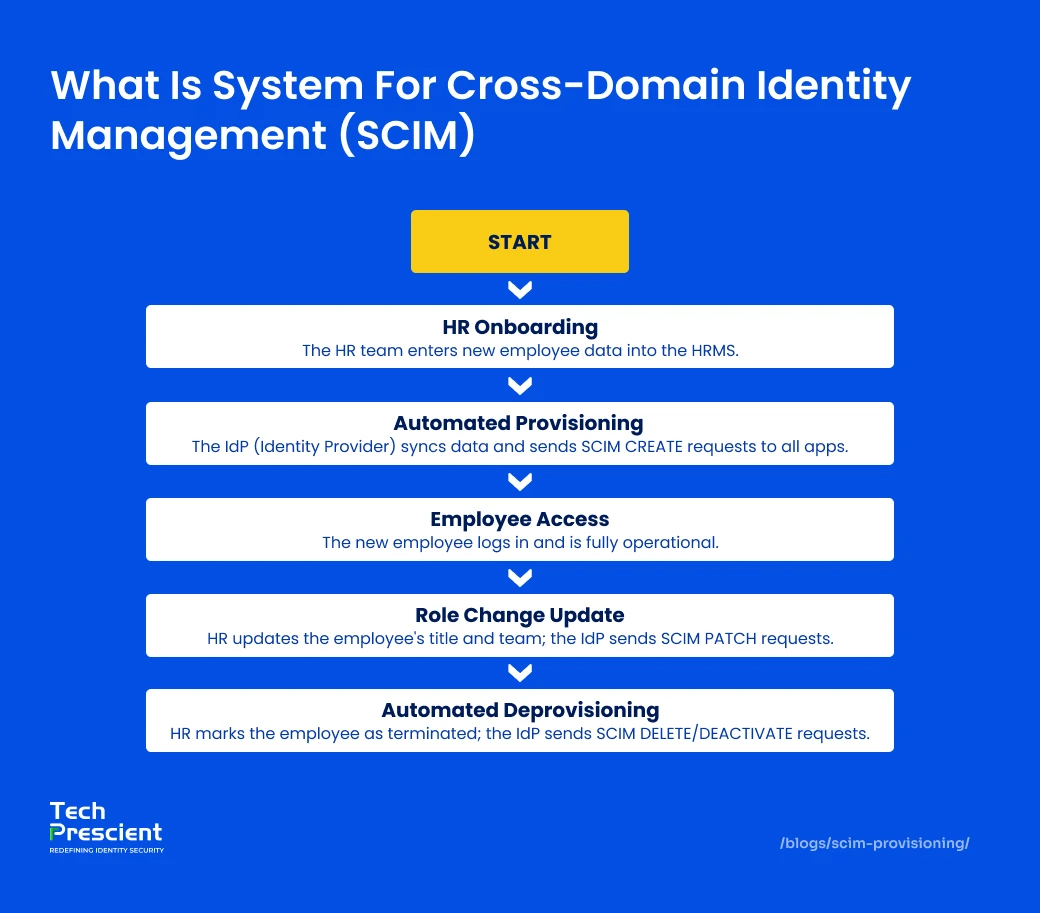
Let's walk through the actual mechanics, so you understand not just what SCIM does, but how it does it.
The Three Components Working Together
The SCIM client (your identity provider (IDP)) is the initiator. It's your centralized identity directory, where employee information lives and gets updated (think Active Directory, Okta, or Google Workspace). The client syncs with your HRMS through multiple pathways; it can fetch data directly on a schedule, or it can ingest event-driven updates when your HR system triggers changes. The client then propagates this data outbound to all configured cloud applications. However, it can only sync what each cloud application is configured to accept. Each service provider defines its own SCIM schema; the fields, formats, and requirements it supports. The client respects those boundaries and manages the timing of syncs (real-time or batched), plus handles failures if an app goes temporarily offline.
Here's the real power: whenever an employee's information changes, department transfer, manager change, or permission update, SCIM automatically syncs that change across every cloud application. Your apps always have accurate, current identity information. End users get seamless access with correct permissions reflecting their actual role; no profile mismatches, no stale permissions. SCIM uses HTTP (the protocol powering your browser) and JSON (a simple data format), creating one standardized integration pattern that works with thousands of applications instead of requiring custom code per vendor.
Service providers (your applications) run SCIM servers that listen for HTTP requests. CREATE requests create accounts. PATCH requests update attributes. DELETE requests deactivate or remove accounts based on the application's compliance requirements; some hard-delete immediately, others archive or disable for audit trails. The protocol defines the contract: the client sends the operation, and the service provider executes it. No custom integration logic. No bespoke workflows per application.
How Data Actually Flows Through SCIM
SCIM provisioning follows a simple, automated sequence:
The Flow:
- HR team updates HRMS
- HRMS syncs to the identity provider
- IdP applies business rules (assign groups, set starting access)
- IdP identifies configured apps for this employee (based on role/department)
- IdP sends SCIM requests to each app's SCIM endpoint
- Each app validates and creates/updates/deletes accounts
- Apps respond with status
- IdP logs the entire cycle for audit purposes
The Speed: Full access provisioning takes seconds to 5 minutes, depending on how many apps you've connected and whether your IdP syncs them in parallel or sequentially.
The Contrast:
- Manual provisioning across a dozen cloud applications: 30 minutes to 2 hours per employee
- SCIM provisioning: Seconds to 5 minutes per employee
- Labor savings per hire: 2 to 8 hours (depending on application footprint)
- Annual impact: Thousands of hours your IT team can redirect to strategic security work instead of repetitive account management
Security: All SCIM requests travel over HTTPS and authenticate via bearer tokens or OAuth credentials.
Quick Summary: How SCIM Works
- HR updates employee record
- Identity provider detects change
- SCIM sends API request (CREATE, PATCH, DELETE)
- Applications execute change
- IdP logs action for audit
Provisioning happens in seconds, not hours.
How Does SCIM Implementation Differ Between Okta, Azure AD, and Google Workspace?
While all major identity providers support SCIM 2.0, implementation differences exist.
| Provider | SCIM Role | Notable Strength |
|---|---|---|
| Okta | Built-in SCIM connectors | Large app integration catalog |
| Azure AD (Entra ID) | Enterprise-grade provisioning engine | Deep Microsoft ecosystem integration |
| Google Workspace | Directory-focused provisioning | Strong SaaS-first workflows |
Note
The SCIM protocol remains standardized, but configuration interfaces, attribute mapping flexibility, and governance controls differ by provider.
The Security Impact: Why Security Teams Are Moving to SCIM
The Orphaned Account Crisis (And Why It Matters)
Orphaned accounts are user accounts that remain active in systems even though the person no longer works for the organization. These aren't theoretical risks. According to security research by Varonis, 79% of healthcare organizations have more than 1,000 orphaned accounts. 64% of financial services firms face the same challenge. 44% of manufacturing companies have extensive orphaned account populations.
Why is this catastrophic? A compromised orphaned account from a departing employee can be the entry point for a data breach. The former employee might have been a high-level manager with access to sensitive data. Their account sits there, dormant, ripe for exploitation. Or a malicious actor breaches the account, knowing it might not be monitored because the person no longer works there. SCIM eliminates this entire category of risk by deprovisioning automatically and instantly. The moment HR marks someone as terminated, SCIM removes access everywhere simultaneously. No orphaned accounts. No weeks-long window where a departing employee retains access.
Credential Compromise: The Attack Vector You Can't Ignore
Stolen or compromised credentials are the most common initial attack vector in data breaches, accounting for 16% of all breaches. Once an attacker has compromised credentials, the average detection time is 292 days before organizations realize the breach occurred.
SCIM mitigates this attack vector in three ways. First, it reduces active accounts. Inactive employees no longer have accounts that can be compromised. Second, it ensures accounts match actual employment status. When someone leaves, their account no longer exists. They can't use old credentials because there's nothing to authenticate against. Third, SCIM enables role-based access control, reducing the attack surface. If a developer's credentials are compromised, the attacker can only access systems the developer actually needs - not every application in the organization.
The Operational Efficiency Dimension: Saving Time and Money
The Real Cost of Manual Provisioning
Manual user provisioning takes an average of 7 hours per new employee and 8 hours for deprovisioning. Additionally, 50% of companies take more than a week to fully remove departed employee access.
Let's do the math for a mid-sized organization with 500 employees and 10% annual turnover (50 new hires, 50 departures): That's 850 hours of IT staff time annually spent on provisioning and deprovisioning alone. At a fully loaded cost of $75 per hour, you're looking at $63,750 in annual labor cost dedicated to account creation and removal. That's not including the cost of employee onboarding delays (new hires waiting for access) or security incidents from deprovisioning failures.
With SCIM, automated provisioning and deprovisioning are automated. Those 850 hours shrink to perhaps 40 hours annually for configuration management and exception handling. That's $60,000+ in annual cost savings and freed-up IT capacity that can focus on strategic security improvements instead of repetitive account creation.
Accelerating Employee Productivity and Retention
New employees can't be productive when they're waiting for access. Without SCIM, the typical scenario is: New hire arrives Monday. IT creates their account in Active Directory. Throughout the week, IT fields 20 requests to grant access to various applications. New hire spends the first week waiting while IT manually creates accounts in Slack, GitHub, Salesforce, Jira, and ten other systems. By the time all accounts are ready, the new hire has been at the company for a week with limited access.
With SCIM, new hires' accounts exist before they arrive. They log in on day one and immediately access every tool they need. Research on employee onboarding shows that this immediate access improves time-to-productivity and increases first-year retention. New hires feel welcomed and productive immediately, rather than frustrated by access delays.
Compliance Requirements: Meeting HIPAA, GDPR, SOX, and NIST Mandates
HIPAA Requires Unique User Identification and Access Control
HIPAA (Health Insurance Portability and Accountability Act) is explicit about access controls. Title 45 CFR 164.312 requires that access be granted to authorized users only and that user access be revoked when no longer needed. It requires unique user identification so that every action in a system can be attributed to a specific person.
SCIM directly addresses these requirements. Every account creation is logged with a timestamp, user attributes, and IdP approval. Every account removal is logged. Access is based on role definitions enforced automatically through provisioning policies. Users cannot access systems if their account doesn't exist. During a HIPAA audit, your organization can generate comprehensive reports showing all access provisioned and deprovisioned, proving that access controls are properly managed.
GDPR Article 25 Mandates Data Protection by Default
GDPR Article 25 mandates data protection by default. Specifically, organizations must ensure that only the minimum number of individuals have access to personal data. This principle of data minimization requires active limiting of access.
SCIM enables data minimization by ensuring employees have access to only the systems they need for their role. A customer service representative doesn't get access to financial systems. A marketing employee doesn't get access to product roadmap repositories. SCIM enforces these boundaries automatically through role-based provisioning policies. When an employee changes roles, SCIM automatically removes them from systems they no longer need and provisions access to their new systems.
SOX and NIST Require Documented Access Controls
SOX (Sarbanes-Oxley Act) Sections 302 and 404 require adequate internal controls over financial data access. While SOX doesn't mandate specific technologies, it requires organizations to demonstrate that they control who accesses financial data. NIST Cybersecurity Framework 2.0 explicitly requires organizations to demonstrate that access is managed according to least-privilege principles.
SCIM provides the foundation for these requirements by creating auditable access controls. Organizations can prove that access is provisioned based on documented policies, that deprovisioning happens promptly, and that all changes are logged. Rather than proving compliance during audit season, SCIM enables continuous compliance. Access controls are built into the system, not bolted on during audit week.
SCIM vs SAML vs SSO: Understanding What Each Actually Does
SCIM vs SAML: Why You Need Both
SAML (Security Assertion Markup Language) is an XML-based standard that authenticates users based on credentials stored in your enterprise IAM system. It's effective for managing access to applications your organization directly controls; users log in once, and SAML verifies their identity consistently across your internal ecosystem.
But SAML alone is insufficient for cross-domain identity management. While SAML can carry user attributes for basic just-in-time provisioning during initial login, it cannot support ongoing account updates, bulk operations, or reliable deprovisioning. When your organization adopts cloud-based applications hosted by external providers, SAML reaches its limit: it verifies who the user is, but it doesn't manage what happens to their accounts across those external domains. Role changes, permission updates, and departures remain manual tasks that IT administrators must handle in each cloud provider individually; a complex, error-prone burden.
SCIM addresses this gap. It automates the complete provisioning and deprovisioning workflow across all external cloud services and applications you use. Organizations leveraging cloud solutions need both SAML for authentication to existing accounts and SCIM for reliable account creation, updates, and removal across your entire cloud ecosystem. Together, they form a complete identity infrastructure.
SCIM vs SSO: Complementary, Not Interchangeable
SSO (Single sign-on) enables users to authenticate once against a centralized identity provider and access multiple applications without repeated logins. Users authenticate once and access all their applications without re-entering passwords. This reduces password exposure and eliminates credential fatigue across your application ecosystem.
But SSO only works on accounts that exist. If an employee joins and no account has been created in your applications, SSO can't authenticate them to something that doesn't exist. That's where SCIM's role becomes clear: it's not an authentication mechanism; it's a provisioning mechanism. SCIM automatically creates user accounts across your cloud environment, while SSO authenticates against those accounts and grants seamless access.
Their distinction is fundamental. SCIM answers, "Does the account exist?" SSO answers "Who is this user, and are they authorized?" SCIM without SSO means accounts get provisioned automatically, but users face multiple login screens. SSO without SCIM creates blind spots in ongoing account management. While initial account creation might happen through JIT provisioning during first login, everything after that requires manual intervention: role transitions, department changes, and employee offboarding. Without automated synchronization, accounts linger and access permissions become stale, leaving security exposure across your ecosystem.
| Technology | What It Does | What It Doesn't Do | Use Case |
|---|---|---|---|
| SAML | Verifies user identity during login | Create accounts. Manage lifecycle. Remove access. | Authentication only. Checks: "Are you who you claim?" |
| SCIM | Creates, updates, and removes user accounts automatically | Handle authentication or login. Verify identity. | Account lifecycle automation. When to provision/deprovision. |
| SSO | One login credential accesses all assigned apps | Create accounts. Manage access. Verify identity. | User experience. Eliminates multiple passwords. |
Why You Need Both SCIM and SSO (Not Either/Or)
SSO alone: Users can efficiently authenticate across systems using one credential. But accounts must still be manually created. New hires wait days for IT to create their accounts in each system.
SCIM alone: Accounts are automatically created everywhere with the right permissions. But users enter different passwords in each system. They don't experience seamless single sign-on.
SSO and SCIM together: Accounts are automatically created with correct access, and users authenticate seamlessly. This is the gold standard - frictionless for users, efficient for IT, and secure for the organization.
SCIM vs Competitors Like SailPoint or Okta Identity Governance
Here's where organizations often get confused. Many organizations offer SCIM provisioning, but that's just the starting point. SCIM gets accounts created and removed. It doesn't answer: "Should this person still have access after six months?" or "Does this user have excessive permissions?" or "Are there unused accounts we should delete?"
This is where comprehensive identity governance platforms differ from SCIM-only solutions. SCIM is the provisioning layer. Governance is the layer on top asking continuous questions about whether access is still appropriate, whether permissions are excessive, and whether compliance is being maintained. Tech Prescient's Identity Confluence combines SCIM provisioning with governance, analytics, and compliance automation - thinking beyond just provisioning accounts to managing them strategically.
Real-World Implementation: Where SCIM Delivers Maximum Impact
Global Organizations Hiring at Scale
A multinational technology company with 15,000+ employees across 20 offices hires 100+ new employees monthly. Each needs access to 30+ different applications depending on their role. Without SCIM, onboarding requires manually creating accounts in GitHub, Slack, Salesforce, AWS, Jira, Google Workspace, internal financial systems, internal HR systems, and 20+ others. That's approximately 3,000 manual account creations monthly. With IT staff typically spending 30 to 90 minutes per new hire on manual provisioning, this would consume 50 to 150 hours monthly across the cohort of new hires.
With SCIM, HR enters new employee information into the HRMS. The identity provider applies provisioning policies based on role (engineers get GitHub, AWS, Jira, Slack, and 20 other systems; salespeople get Salesforce, HubSpot, Slack, and others). SCIM sends CREATE requests to all configured applications simultaneously. Every account is created within 2-5 minutes. The new employee logs in on day one and accesses everything they need. IT frees up approximately 50–130 hours monthly for strategic security work instead of account creation.
Regulated Industries Managing Compliance
A bank with 5,000 employees must demonstrate for annual SOX and regulatory audits that access controls are properly managed. Every employee's access must match their role. When someone changes roles, their access must be updated within 24-72 hours. When someone departs, their access must be revoked within 1-24 hours (immediately for privileged systems). During an audit, the bank must provide proof that these controls are functioning.
Without SCIM, the audit process is manual and laborious. Auditors request access lists. IT extracts data from multiple systems (Active Directory, Salesforce, AWS, and internal tools) and reconciles them. The data doesn't match perfectly because some systems update faster than others. Auditors find employees with access they shouldn't have. They find former employees still active. The bank must remediate and document corrective actions. Audits take weeks and create significant risk exposure.
With SCIM, the identity provider becomes the single authoritative source of truth, automatically pushing changes to all connected applications. Auditors request a report and immediately see every user, every application they access, when access was provisioned, and when it was removed. The report is accurate because it reflects the authoritative provisioning system. Audit evidence gathering and review typically shrink from 2-4 weeks to 1-5 business days.
Implementing SCIM: The Practical Roadmap
Before You Start: Critical Foundations
You need three things: an identity provider with SCIM support (all major providers have this; Azure AD, Okta, Google Workspace), API credentials from each application you want to provision, and a clear understanding of which users get access to which applications based on role or department.
Define your provisioning policies before implementation. Don't wing it. Document: "All engineers automatically get GitHub, AWS, Slack, and Jira. All salespeople get Salesforce, HubSpot, and Slack. All departing employees are deprovisioned from Salesforce, GitHub, and AWS immediately."
The Implementation Process (7 Steps)
Choose a Starting Application
Choose one application to start with (Slack or Google Workspace; frequently used but not critical for day-to-day operations).
Enable SCIM
Enable SCIM on that application and copy the SCIM endpoint URL and API token.
Configure Your Identity Provider
Configure SCIM in your identity provider, entering the endpoint and token.
Map User Attributes
Map user attributes (email, name, department, manager, etc.) to what the application expects.
Define Provisioning Scope
Define which users get provisioned to this application (by department, role, or group).
Test with a Small Group
Test with a small group. Verify that new users are created, attributes are correct, updates work, and removal works.
Expand and Repeat
Expand to all configured users. Repeat for each additional application.
Beyond Provisioning: Identity Governance Is the Next Level
SCIM automates account creation and removal. Identity Governance ensures that access remains appropriate over time.
SCIM answers: "Does the account exist?" Governance answers: "Should this account still have this access?"
Identity governance asks continuous questions SCIM can't answer by itself.
Once access is provisioned, a new set of continuous questions emerges:
- Does this access remain appropriate six months later?
- Are users overprivileged for their role? Are accounts being actively used, or are they dormant?
- Are all departures handled completely across every system?
These aren't provisioning questions; they're governance questions that require continuous monitoring, access reviews, analytics, and risk assessment.
Identity Governance builds on SCIM by adding access reviews and certifications (managers verify their team should have current access), identity analytics (detect unusual access patterns and unused entitlements), compliance automation (generate audit-ready reports automatically), and risk-based access (adjust access based on real-time risk signals). SCIM is the foundation. Governance is the intelligence layer on top.
This is why comprehensive IGA platforms matter. They don't replace SCIM; they build on SCIM. Identity Confluence is built specifically to work with SCIM provisioning, adding the governance layer that transforms provisioned access into strategic identity management. Organizations that combine SCIM with governance automation move from "we provision accounts automatically" to "we continuously validate that access aligns with role requirements, meets regulatory standards, and maintains security posture throughout the employee journey."
Final Thoughts: Making SCIM Work for You
SCIM isn't bleeding-edge; it's mature, proven across thousands of organizations, and essential infrastructure in today's cloud-first world. The question isn't whether to implement SCIM. It's whether you'll implement it before your competitors do, before a security incident exposes your deprovisioning gaps, before auditors document your access control weaknesses. Organizations that have solved identity management didn't just stop at provisioning. They built governance on top, continuous access reviews, risk analytics, and compliance automation, transforming identity from an IT operations task into a strategic enabler of secure, compliant business operations.
Ready to Move Beyond Manual Provisioning?
Book a personalized demo to see how Identity Confluence combines SCIM automation with continuous identity governance, access reviews, and compliance reporting.
FAQs
SCIM stands for System for Cross-domain Identity Management. It's a standard protocol for automatically managing user account lifecycle (creation, updates, removal) across applications.
Yes. SSO handles authentication. SCIM handles provisioning. Both solve different problems. Together, they provide frictionless, secure access. SSO without SCIM means accounts are still manually created; SCIM without SSO means accounts are automatic, but users need multiple passwords.
No. SAML is an authentication protocol (proves who you are at login). SCIM is a provisioning protocol (creates and removes accounts). They work at different times in the user lifecycle and solve different problems.
All major providers support SCIM, including Azure AD (Microsoft Entra ID), Okta, Google Workspace, and others.
Configuration for your first application typically takes 2-4 weeks. Each additional application takes 1-2 weeks as your process becomes routine and predictable.
Yes. Set provisioning policies with automatic access expiration dates. When the date arrives, SCIM automatically deactivates their access. No manual follow-up required.
Use alternative integration methods (CSV import, manual provisioning, custom API connectors). However, most modern SaaS applications now support SCIM.
Yes. SCIM 2.0 requires TLS 1.2 encryption, uses OAuth 2.0 authentication, and provides detailed audit logs. Security depends on proper configuration - don't reuse API tokens across systems, rotate tokens regularly, and monitor provisioning logs for failures.
SCIM delivers more value as organizations scale and application footprints grow. Small organizations can benefit from manual provisioning until they reach 50+ employees and 10+ applications.
SCIM 2.0 is the current standard. Key improvements: JSON-only (1.1 had XML), mandatory TLS 1.2 encryption (1.1 had weaker), better PATCH operations. Use SCIM 2.0 for new implementations.
SCIM provisioning means automatically creating, updating, and removing user accounts in cloud applications using a standardized API protocol.
No. SSO handles authentication, while SCIM handles account provisioning. They solve different problems but work best together.
Yes. When an employee is marked as terminated in the HR system, SCIM automatically sends DELETE requests to connected applications to remove access instantly.
Share



Brinda Bhatt
Digital Marketing Strategist
Primarily works to help leverage complex ideas, especially around identity governance, to business and technical audiences. She is led by a logical, data-driven approach to content creation and explores optimal and constructive storytelling.
Most Popular Blogs
Identity Security· 21 min read
Data Access Governance Solutions: How to Secure Sensitive Data at Scale
Compare data access governance solutions for 2026: how DAG platforms discover sensitive data, run access reviews, automate remediation, and prove compliance.
Brinda Bhatt· September 7, 2026
Identity Security· 24 min read
What Is Zero Trust Network Access (ZTNA)?
Learn what Zero Trust Network Access (ZTNA) is, how it works, and why it’s replacing VPNs for secure, identity-based access control.
Yatin Laygude· August 14, 2026
Identity Security· 24 min read
Cyber Essentials Certification: Complete Guide
Learn Cyber Essentials certification, cost, requirements, and steps. Compare Cyber Essentials vs Plus and get certified faster.
Yatin Laygude· August 10, 2026