
What Is Single Sign-On (SSO) and How It Works
Last Updated date: July 13, 2026
On this page
See Tech Prescient in Action
Automate access, reduce risk, and stay audit-ready
Single Sign-On (SSO) is an authentication framework that allows users to access multiple applications after a single successful login. An external Identity Provider (IdP) verifies the user's identity and issues authentication assertions or tokens that trusted applications accept.
Instead of authenticating separately to each system, the user establishes a session once. Connected applications rely on the identity provider's assertion, eliminating repeated credential entry while maintaining centralized control.
Organizations adopt SSO to reduce authentication friction while strengthening identity governance. By consolidating authentication under a unified trust model, IT and security teams can enforce consistent access policies, monitor login activity, and manage user lifecycle events from a central authority.
This model is particularly relevant in cloud and remote-first environments where users interact with numerous SaaS applications daily. Credential reuse remains common; research from HIPAA Journal reports that 49% of employees reuse the same credentials across work applications, highlighting the operational and security risks of fragmented authentication models.
SSO does not eliminate risk. It concentrates authentication trust in the identity provider, which increases the importance of strong session controls, multi-factor authentication (MFA), and continuous monitoring.
In this blog we will cover everything you need to know about SSO: what it is, how it works, its benefits for users and organizations, associated security considerations, the key protocols (SAML, OAuth, OpenID Connect), real-world examples, how to implement SSO in your organization, how it fits into the broader identity and access management (IAM) landscape, and a look ahead at the future of cloud native and passwordless authentication.
Key Takeaways:
- Learn what Single Sign-On (SSO) is and how it enables one login for multiple applications.
- Understand how SSO authentication works through tokens like SAML, OAuth, and OpenID Connect.
- Explore the key benefits and security considerations of using SSO.
- Compare major SSO protocols and real-world examples from Google, Microsoft, and Okta.
- Discover how to implement SSO and its evolving role in future identity security.
What Is Single Sign-On (SSO)?
Single Sign-On (SSO) enables users to authenticate once and access multiple applications through a centralized Identity Provider (IdP). It simplifies authentication workflows while enforcing consistent access controls.
Single Sign-On (SSO) is an authentication method that allows users to access multiple applications or systems using a single set of credentials. Rather than logging in separately to each service, users authenticate once with a trusted identity provider, which establishes a session recognized by integrated applications.
For example, when a user signs in with a Google account, that authentication event can grant access to connected services such as Gmail, Google Drive, or YouTube without requiring additional credential entry. In enterprise environments, the same principle applies: employees authenticate once to access corporate email, CRM platforms, HR systems, and cloud-based tools within an established trust framework.
At its core, SSO uses secure authentication protocols such as SAML (Security Assertion Markup Language), OAuth, or OpenID Connect to verify user identity across multiple platforms. This ensures that users remain authenticated across all integrated systems without compromising security.
Why It Matters?
Single Sign-On (SSO) is a cornerstone of modern Identity and Access Management (IAM) strategies. By authenticating users once and securely managing their sessions across multiple applications, organizations can achieve:
- Reduced password fatigue and fewer helpdesk password reset requests
- Stronger access control through centralized authentication policies
- Improved security visibility with consolidated access logs and audit trails
- Enhanced user experience with seamless access to connected systems
Ultimately, SSO streamlines authentication processes while maintaining stringent security standards, empowering users with effortless yet secure access to all their business-critical applications.
How Does Single Sign-On Work?
SSO works through a trust relationship between an Identity Provider (IdP) and Service Providers (SPs). After authentication, the IdP issues a secure token that allows users to access connected applications without re-authenticating.
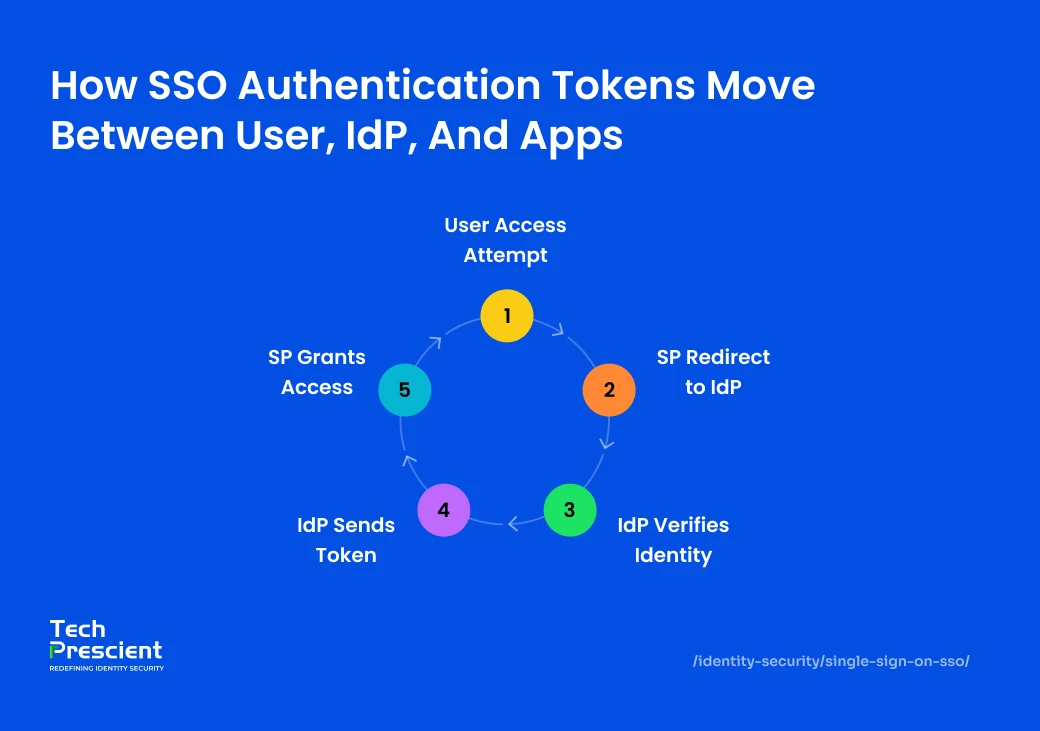
This framework is typically implemented using digital certificates and standardized authentication tokens such as SAML assertions, JSON Web Tokens (JWTs), or OpenID Connect (OIDC) tokens. These mechanisms securely communicate verified identity information across systems. Once authenticated by the IdP, users can access integrated applications without re-entering credentials during the active session.
In essence, SSO acts as a bridge between users and applications, centralizing authentication while distributing access securely. To understand this better, let's break down how the SSO process works step by step.
Step-by-Step Process
User Initiates Login
The process begins when a user tries to access an application or website, known as the Service Provider (SP). Instead of the SP managing authentication locally, it redirects the login request to a centralized Identity Provider (IdP) that is responsible for verifying user credentials.
This ensures that authentication happens only through the IdP, maintaining consistent security standards across all applications. The SP acts as the entry point, while the IdP handles the actual verification, simplifying login management for both the user and the organization.
Service Provider Redirects to Identity Provider
The SP generates a secure authentication request and redirects the user to the Identity Provider. This exchange commonly uses industry standards such as SAML, OAuth 2.0, or OpenID Connect.
Redirecting authentication to the IdP centralizes credential verification and limits direct exposure of sensitive authentication data within the Service Provider environment.
User Authenticates with Credentials
Once redirected, the IdP checks if the user already has an active session. If not, the user is prompted to log in using credentials such as a username and password, or through advanced mechanisms like Multi-Factor Authentication (MFA), adaptive authentication, or device trust validation.
This step ensures that only authorized individuals gain access to the connected applications. The IdP's verification methods can also include contextual checks such as device, location, or IP address to further strengthen identity assurance.
Identity Provider Issues Authentication Token
Upon successful authentication, the IdP generates a digitally signed authentication token, typically formatted as a SAML assertion, JSON Web Token (JWT), or OIDC token. This token contains verified identity attributes like the user's email address, username, and access rights.
The digital signature ensures that the token cannot be forged or modified. This token is then passed back to the Service Provider through the user's browser or a secure backend channel, confirming the user's identity in a verifiable and tamper-proof manner.
Service Provider Validates Token and Grants Access
The Service Provider receives the authentication token and validates it against the trust relationship previously established with the Identity Provider. If the token's signature and contents are verified successfully, the SP grants the user access to the requested application or resource.
From this point onward, as long as the session remains active, the user can access any other application within the same SSO ecosystem without re-entering their credentials. This streamlined experience reduces login fatigue while maintaining centralized security oversight.
Example
Consider the experience of signing into Microsoft 365. When a user logs in once through Microsoft's Identity Provider, that single authentication session grants automatic access to multiple Service Providers within the ecosystem such as Outlook, Teams, and OneDrive.
The underlying trust relationship between the IdP and these applications ensures that each service validates the same authentication token, confirming the user's identity without requiring another login. This unified access model not only enhances productivity but also strengthens overall security through centralized identity control.
Benefits of Using SSO
SSO reduces password fatigue, improves productivity, centralizes access control, and strengthens enforcement of security policies such as MFA and Zero Trust.
Implementing Single Sign-On (SSO) brings significant advantages for both users and organizations by enhancing security, simplifying authentication, and improving overall efficiency. By unifying access control under a trusted Identity Provider (IdP), SSO not only reduces password-related vulnerabilities but also streamlines daily operations, enabling users to focus more on productivity and less on login hassles.
Let's explore how SSO benefits both users and organizations.
For Users
No Need to Remember Multiple Passwords
With SSO, users authenticate once through a centralized Identity Provider and gain access to authorized applications within the trust domain. This reduces reliance on multiple usernames and passwords across systems.
Limiting credential sprawl lowers the likelihood of password reuse and weak credential creation, two common contributors to credential-based attacks. Users maintain a single strong primary credential, often reinforced with multi-factor authentication or adaptive authentication controls.
SSO eliminates this scenario by reducing all logins down to just one.
By simplifying authentication, SSO provides users with both security and convenience, ensuring a smooth and frustration-free access experience across all platforms.
Faster, Seamless Access to Apps
By removing repeated login prompts, SSO delivers a fluid and frictionless experience across both cloud-based and on-premise applications. Whether employees are switching between productivity tools or customer management systems, authentication happens instantly in the background.
This streamlined login process saves valuable time and improves productivity, particularly in hybrid or remote work environments. Moreover, when combined with Multi-Factor Authentication (MFA) or adaptive authentication, users enjoy fast access without compromising on security.
For Organizations
Centralized Control Over Access
SSO consolidates authentication and access policy enforcement within a centralized identity system. Security and IT teams can define and manage role-based access controls (RBAC), session policies, and authentication requirements from a single administrative interface.
Centralized authentication also supports compliance initiatives such as HIPAA, GDPR, and SOC 2 by enabling consistent logging, monitoring, and audit visibility across integrated systems.
Reduced Helpdesk Costs from Password Resets
Password management represents one of the most time-consuming IT challenges. With SSO, password-related helpdesk tickets drop significantly since users need to remember and reset only one credential.
Research shows that the average password reset takes about 10 minutes of employee time. In a company of 100 users resetting passwords twice a year, this can add up to over 33 hours of lost productivity. SSO not only minimizes this inefficiency but also frees IT teams to focus on strategic initiatives instead of routine password requests.
Simplified and Stronger Password Policy Enforcement
When authentication is centralized, password and session policies can be enforced consistently across applications. Requirements such as password complexity standards, lockout thresholds, or authentication frequency are managed once at the identity layer rather than individually within each system.
Central policy enforcement reduces configuration drift and strengthens governance across distributed application environments.
Stronger Enforcement of MFA and Zero Trust
SSO acts as a foundation for implementing advanced security frameworks like Zero Trust Architecture (ZTA). It enables organizations to enforce Multi-Factor Authentication (MFA) and other security checks such as device trust, geolocation, or risk scoring at a single point of authentication.
By combining SSO with identity federation and adaptive access controls, businesses can ensure that only verified users access sensitive systems. This layered approach strengthens defense against credential theft, session hijacking, and unauthorized data access while simplifying security management across the enterprise.
Single Sign-On (SSO) not only enhances user convenience and productivity but also empowers IT and security teams with centralized visibility, better compliance control, and reduced operational overhead. It is a foundational step toward building a secure, scalable, and user-friendly identity ecosystem that aligns with modern digital workplace demands.
Did You Know?
Most credential-based breaches start with password reuse or weak credentials. SSO reduces password sprawl, but only if strong password policies are enforced at the identity layer.
Is SSO Secure?
SSO is secure when implemented with strong authentication controls, adaptive access policies, and continuous monitoring. However, because it centralizes authentication, poor configuration or weak protections can create a single point of failure.
Single Sign-On (SSO) simplifies access and reduces credential fatigue by allowing users to log in once and gain access to multiple applications. However, because it consolidates authentication into a single access point, a weak or misconfigured SSO setup can become a single point of failure. To ensure robust protection, SSO must be paired with strong Multi-Factor Authentication (MFA), adaptive access controls, and continuous monitoring.

Pro Tip
SSO without adaptive MFA turns convenience into concentrated risk. Always pair SSO with contextual authentication and risk-based access controls.
Security Advantages
Fewer Credentials Reduce Phishing
An effective SSO solution from a trusted provider strengthens enterprise security by minimizing the number of credentials users must manage. Instead of maintaining multiple weak passwords across different platforms, users rely on a single, strong set of credentials managed by an Identity Provider (IdP). This consolidation drastically reduces the risk of phishing attacks and credential reuse across vulnerable systems.
IT teams can also leverage centralized security policies that adapt to user behavior and login context. Built-in monitoring and threat detection tools help identify and block suspicious login attempts in real time, enhancing the organization's defense against credential theft and brute-force attacks.
Easier to Enforce MFA and Password Policies
SSO simplifies the enforcement of critical security controls such as multi-factor authentication (MFA), password complexity, and access governance from one central interface. Administrators can define global authentication policies and apply them instantly across all connected applications.
For example, when an employee leaves the organization, IT can revoke all associated access in a single step, reducing the risk of unauthorized entry. This centralized approach also supports advanced MFA methods, including biometric verification and risk-based authentication, to deliver a secure yet seamless login experience.
Strengthened Compliance and Security Governance
Consolidated authentication improves visibility into user access activity. Central logging, consistent policy enforcement, and unified audit trails support compliance initiatives such as GDPR, HIPAA, and SOC 2.
By maintaining a single authoritative source for authentication events, organizations improve traceability, reporting accuracy, and access governance oversight.
Security Risks
If SSO Credentials Are Compromised, All Linked Apps Are at Risk
While SSO enhances convenience, it also concentrates access risk. If a hacker compromises a user's SSO credentials, they could potentially gain entry to all connected applications under that account. This risk increases when MFA is not enforced or when users become susceptible to push fatigue, approving fraudulent MFA prompts without verifying their legitimacy.
Moreover, misconfigured SSO integrations can create vulnerabilities that attackers may exploit. For example, incorrect token handling or poor session management can allow lateral movement across systems. Organizations must ensure that their SSO tokens are properly secured and automatically revoked if suspicious activity is detected.
Dependence on Uptime of the Identity Provider
SSO introduces operational dependence on the Identity Provider. If the IdP experiences outage, misconfiguration, or network failure, access to dependent applications may be disrupted.
Organizations mitigate this risk by implementing high-availability architectures, redundancy, failover capabilities, and defined incident response procedures. Strong providers also support token revocation, adaptive reauthentication triggered by risk signals, and passwordless authentication methods such as hardware-backed credentials or biometrics.
When properly configured and monitored, SSO strengthens authentication governance. When poorly implemented, it amplifies risk concentration. Security outcomes depend on architecture, policy enforcement, and operational discipline.
Quick Reality Check
If your IdP goes down, can employees still access critical systems? High availability and failover planning are just as important as strong authentication.
Common SSO Security Risks
While SSO improves authentication control and reduces credential sprawl, misconfigurations or compromised credentials can extend risk across multiple systems due to centralized trust.
Credential Compromise
If a user's primary SSO credential is compromised and Multi-Factor Authentication (MFA) is not enforced, attackers may gain access to all connected applications within the trust domain.
Because SSO centralizes authentication, the impact of a single compromised identity can be broader than in isolated login models.
Token Hijacking
Authentication tokens such as SAML assertions, JSON Web Tokens (JWTs), or OpenID Connect (OIDC) tokens may be intercepted or replayed if transport security, token signing, or session protections are improperly configured.
Improper validation, excessive token lifetime, or unsecured storage mechanisms increase exposure to session replay and impersonation attacks.
Misconfigured Trust Relationships
SSO relies on precise configuration between the Identity Provider (IdP) and Service Providers (SPs). Incorrect certificate management, improper audience validation, or overly permissive federation settings can allow unauthorized access.
Configuration drift across environments further increases risk if integrations are not regularly reviewed.
Identity Provider Downtime
Because authentication is centralized, availability of the Identity Provider directly affects access to dependent systems. Service disruption, network failure, or configuration errors at the IdP layer may temporarily block user access across applications.
High-availability architecture and failover planning are essential to mitigate operational impact.
Mitigation Best Practices
- Enforce Multi-Factor Authentication (MFA) across all authentication flows
- Use short-lived, signed tokens with strict validation controls
- Monitor authentication activity for anomalies and enforce adaptive reauthentication
- Apply Zero Trust principles, including continuous verification and least-privilege access
- Regularly audit and validate IdP–SP integrations, certificates, and session configurations
Properly implemented, SSO strengthens identity governance. Misconfigured, it concentrates risk. Security outcomes depend on configuration discipline, monitoring maturity, and enforcement consistency.
Different Types of SSO (Single Sign-On)
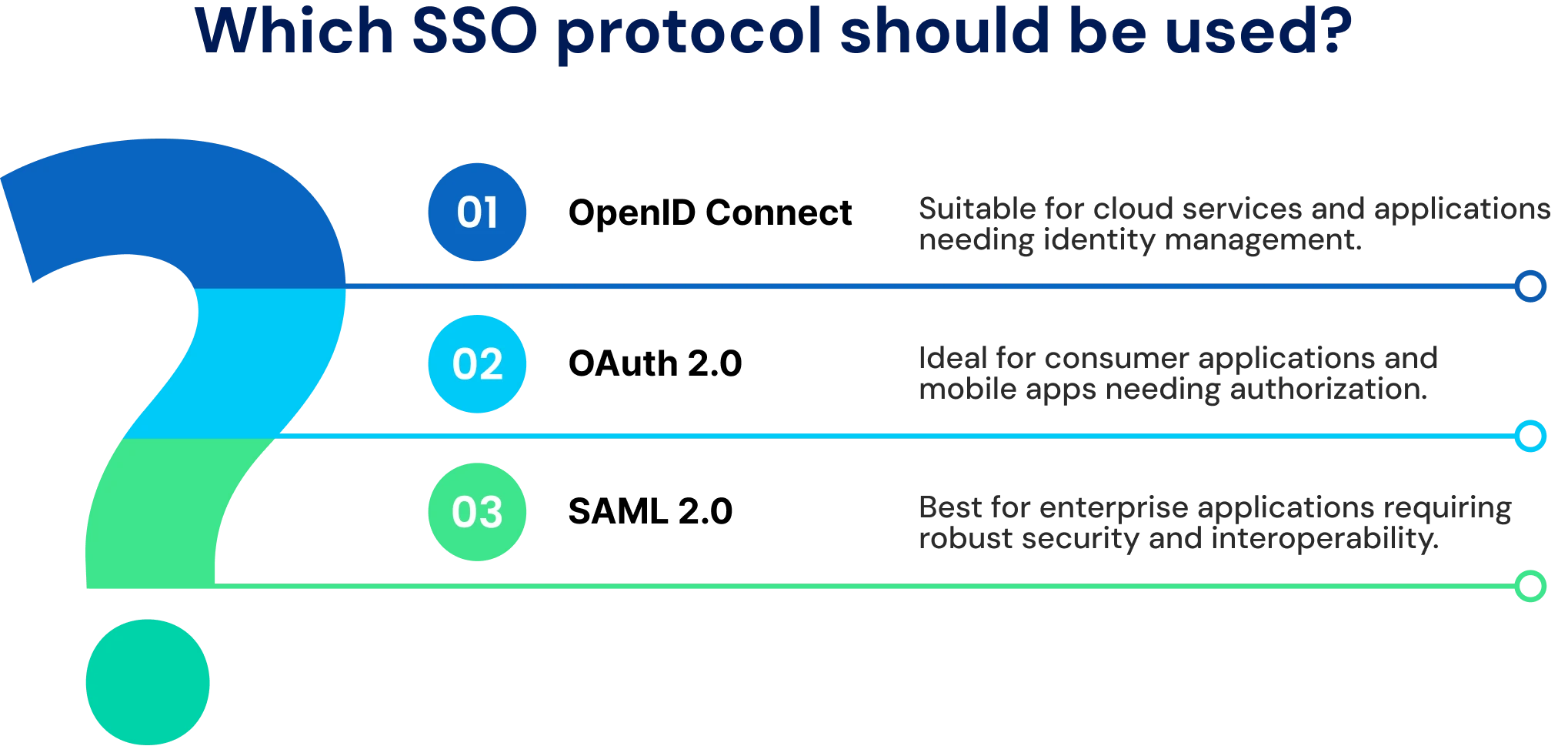
SSO implementations vary based on architectural design, trust relationships, and underlying protocols. Understanding related identity standards clarifies how SSO operates within broader identity and access management frameworks.
Federated Identity Management (FIM)
Federated Identity Management establishes a trusted relationship between two or more independent identity domains or systems. In simpler terms, it is a framework that allows users from one organization or domain to access resources in another without needing separate credentials.
SSO typically operates as a capability within a FIM setup. While FIM defines the trust framework, SSO provides the authentication experience enabled by that trust.
OAuth 2.0
OAuth 2.0 is an authorization framework designed to allow secure sharing of user data between systems without exposing credentials. Unlike an authentication system, OAuth does not verify who the user is. It simply grants permission for one system to access specific information or resources from another.
Think of it like this: "Allow this app to use certain details from your account elsewhere." OAuth ensures this happens in a secure and controlled way.
OpenID Connect (OIDC)
OpenID Connect builds on top of OAuth 2.0 to add authentication, which is the process of verifying a user's identity. OIDC enables true Single Sign-On by allowing users to authenticate once and gain access across multiple applications.
Today, most modern web and cloud applications implement OIDC and OAuth 2.0 together, using OAuth for authorization and OIDC for authentication.
Security Assertion Markup Language (SAML)
SAML is one of the earliest and most established standards for Single Sign-On, especially in enterprise environments. It uses XML-based messages to exchange authentication and authorization data between identity providers and service providers.
While it is considered older technology, SAML remains common in large organizations and legacy systems because of its reliability and compatibility.
Same Sign-On (Not the Same as SSO)
Same Sign-On is often mistaken for Single Sign-On but works quite differently. Here, users have the same username and password across multiple systems, usually because credentials are synchronized. However, each system still requires a separate login event.
Since there is no federated trust or token-based authentication involved, Same Sign-On is less secure than true SSO and does not offer seamless session continuity.
Enterprise SSO
Enterprise SSO is typically deployed within internal corporate environments and often integrates with directory services such as Active Directory.
It enables employees to authenticate once and access internal systems, legacy applications, and enterprise platforms under centralized identity governance.
Web-Based SSO
Web-based SSO is commonly implemented in cloud environments and is typically powered by OAuth 2.0 and OpenID Connect.
This model supports browser-based authentication flows and API-driven integrations across SaaS platforms.
Social SSO
Social SSO allows users to authenticate using third-party identity providers such as Google or Microsoft.
In this model, the application delegates authentication to an external identity provider and relies on token validation to grant access. Social SSO is common in consumer-facing applications but can also be integrated into enterprise environments where appropriate trust boundaries are defined.
Common Identity Systems Supporting SSO
Single Sign-On relies on underlying identity systems that manage user credentials, access, and authentication across applications. These systems act as the backbone for enabling seamless and secure access within or across organizations. Below are some of the most widely used identity systems that support or integrate with SSO.
Active Directory (AD / ADDS)
Microsoft's Active Directory is a centralized directory service that manages users and access within Windows environments. Using protocols like Kerberos and NTLM, it allows users to sign in once and access all connected systems, effectively providing SSO within an internal network.
Active Directory Federation Services (ADFS)
ADFS extends Active Directory's capabilities beyond the internal environment. It supports standards such as SAML and OIDC, enabling federated authentication across organizations or with cloud identity providers such as Azure AD. This makes it possible to achieve secure SSO across different domains.
Lightweight Directory Access Protocol (LDAP)
LDAP is not an authentication protocol in itself. It is a standard for organizing and accessing directory data. It helps systems look up and verify user attributes such as identity and group membership before granting access.
While solutions like OpenLDAP can integrate authentication extensions such as SASL, LDAP alone does not deliver Single Sign-On. Instead, it supports access management as part of a broader identity system.
| SR No. | Term | What It Does | Role in SSO |
|---|---|---|---|
| 1 | FIM | Federated Identity Management establishes trust between two or more identity systems or domains. | Single Sign-On typically functions within this federated trust framework. |
| 2 | OAuth 2.0 | OAuth 2.0 provides a secure way to authorize one system to access specific data from another without sharing login credentials. | It enables secure, cross-domain access and facilitates authorization in SSO workflows. |
| 3 | OIDC | OpenID Connect verifies user identities while working alongside OAuth 2.0. | It provides true, modern, web-based Single Sign-On for cloud and web applications. |
| 4 | SAML | SAML authenticates users by exchanging XML-based assertions between identity and service providers. | It supports enterprise-level Single Sign-On, especially in corporate or legacy environments. |
| 5 | Same Sign-On | Same Sign-On allows users to use the same credentials across multiple systems without actual federated authentication. | It is often confused with SSO but is not true Single Sign-On, as it requires separate logins. |
| 6 | AD / ADDS | Active Directory serves as a centralized directory service that manages user credentials and permissions. | It provides internal Single Sign-On within Windows-based networks. |
| 7 | ADFS | Active Directory Federation Services extends AD capabilities to external systems using federated authentication protocols. | It connects internal AD users to external identity providers for secure, federated SSO. |
| 8 | LDAP | LDAP defines how directory data is organized, queried, and accessed across systems. | It assists in verifying user identities and access control but does not perform Single Sign-On on its own. |
Real-World SSO Examples
SSO simplifies access across ecosystems like Google Workspace and Microsoft 365, proving vital for both enterprise and consumer identity management. It brings together convenience and security, ensuring users can move seamlessly between tools and platforms without juggling multiple credentials.
In the real world, Single Sign-On is present across both personal and professional digital environments. Whether logging into cloud applications or internal business systems, SSO ensures every authentication request is consistent, secure, and user-friendly.
Google Workspace (Gmail, Docs, Drive)
Within Google Workspace, a single authentication to a Google account enables access to services such as Gmail, Google Docs, and Google Drive without repeated credential entry.
Google's identity infrastructure issues secure tokens that each service validates before granting access. Authentication remains centralized, while application access is distributed across the ecosystem under consistent policy enforcement.
Microsoft 365 (Outlook, Teams)
In Microsoft 365, users authenticate through Microsoft Entra ID (formerly Azure Active Directory). Once authenticated, they can access applications such as Outlook, Microsoft Teams, SharePoint, and OneDrive without additional login prompts.
Organizations can apply centralized controls, such as Multi-Factor Authentication (MFA), conditional access, and device-based policies, across the full application suite from the identity layer.
Corporate Systems Using Okta or Ping Identity
For large enterprises that manage a mix of on-premises and cloud applications, identity providers like Okta form the foundation of SSO. Employees authenticate once through a secure company portal and can then access various business applications such as Salesforce, Zoom, and internal HR systems without repeated logins. These solutions not only simplify access but also give IT teams better visibility, control, and compliance across all connected systems.
In essence, these examples show how SSO acts as the connection point between users and systems. Whether in cloud-based ecosystems like Google and Microsoft or in enterprise setups powered by Okta and Ping Identity, SSO improves security, reduces login friction, and delivers a seamless experience across all digital touchpoints.
Implementing SSO in Your Organization
Deploying SSO in an organization involves seamless integration between identity providers (IdPs) and service applications. The goal is to create a unified, secure, and frictionless authentication experience for users while ensuring strong identity governance and compliance.
Steps to Implement
Choose an Identity Provider (IdP)
Begin by selecting a trusted Identity Provider (IdP) such as Okta, Azure AD, or Ping Identity. The IdP will store and manage all user identities and credentials. Ensure your chosen solution is scalable, compliant, and supports both on-premises and cloud-based environments depending on your organization's needs.
Before finalizing, define clear implementation goals:
- Who are your different user groups, and what are their access requirements?
- Will the solution adapt to future business growth and integration needs?
- What security controls (like MFA or Device Trust) are essential for your environment?
Integrate via SAML/OIDC Protocols
Next, establish trust between your IdP and each Service Provider (SP), which are the applications and services that will leverage SSO. Integration typically occurs using standards such as SAML 2.0 or OpenID Connect (OIDC).
During setup:
- Configure authentication flows that redirect users from the SP to the IdP.
- Ensure authentication assertions or tokens are signed and encrypted to maintain integrity and confidentiality.
- Validate that the chosen protocol aligns with your existing systems and compliance standards.
Enforce Multi-Factor Authentication (MFA)
To strengthen authentication, implement MFA or Adaptive Authentication as part of your SSO flow. This ensures that only trusted users and devices can access your systems. Additional measures like IP Allow Listing or Device Trust policies can further reduce unauthorized access risks.
Follow the Zero Trust and the principle of least privilege, meaning users should only have the minimum permissions needed to perform their roles.
Monitor and Audit Login Activities
Once your SSO solution is live, continuous testing and monitoring are key.
- Conduct pre-deployment testing to verify all integrated applications work as expected.
- After rollout, regularly audit authentication logs to detect anomalies, potential vulnerabilities, or unauthorized activity.
- Reassess integrations periodically as your ecosystem evolves to ensure sustained compliance and security.
In short, a successful SSO implementation is not just about connecting applications. It is about building a secure, adaptive, and user-first authentication framework that evolves with your organization's growth and risk landscape.
SSO in Identity and Access Management (IAM)
SSO is a core Identity and Access Management (IAM) capability focused on authentication. IAM encompasses a broader framework that includes identity governance, authorization policies, lifecycle management, and access monitoring.
Single Sign-On (SSO) verifies user identity once and enables access across integrated applications within a defined trust domain. IAM extends beyond authentication to determine what users are authorized to access, how access is approved, how permissions are reviewed, and how identities are provisioned or deprovisioned throughout their lifecycle.
For SSO to operate effectively within IAM, it must integrate with access control mechanisms, audit logging, and behavioral monitoring systems. Authentication alone does not ensure appropriate authorization or compliance. Effective IAM requires coordinated enforcement across identity verification, access policy, and governance controls.
How SSO Compares to Other Access Management Solutions
SSO vs. MFA
Single Sign-On (SSO) and Multi-Factor Authentication (MFA) address different but complementary aspects of access management.
- SSO simplifies access by enabling users to log in once and gain access to multiple applications, improving convenience and productivity.
- MFA strengthens security by requiring multiple verification factors before granting access, significantly reducing the risk of unauthorized entry.
When implemented together, SSO and MFA balance ease of use with robust authentication, ensuring secure yet seamless access across enterprise systems.
SSO vs. Federated Identity
SSO and Federated Identity Management (FIM) both simplify access, but they differ in scope.
- SSO works within a single organizational domain, allowing users to access multiple internal applications using one set of credentials.
- Federated Identity extends this capability across organizational boundaries, enabling users to securely access external resources through trust relationships and standards like SAML and OAuth.
While SSO focuses on internal efficiency, Federated Identity enables interoperability and secure collaboration between different organizations.
Identity-as-a-Service (IDaaS)
Identity-as-a-Service (IDaaS) platforms deliver comprehensive IAM capabilities through a cloud-based model. These typically include SSO, adaptive MFA, user directories, and automated provisioning. By centralizing identity operations, IDaaS simplifies security management, improves user experience, and enhances operational efficiency for organizations of all sizes.
Ultimately, SSO is only one element of a complete IAM strategy. While it focuses on authentication, it must work alongside access controls, permission policies, and activity monitoring to ensure comprehensive identity protection. Without accurate identity verification, no system can effectively authorize or restrict user actions. To achieve end-to-end governance and compliance, it's equally important to understand how Identity Governance and Administration (IGA) complements IAM.
SSO vs IAM: What's the Difference?
| Sr No | Feature | SSO | IAM |
|---|---|---|---|
| 1 | Primary Focus | Authentication | Authentication + Authorization + Governance |
| 2 | Scope | Access convenience | Full identity lifecycle |
| 3 | Example | One login for apps | Provisioning, RBAC, audit logs |
| 4 | Security Role | Streamlines login | Enforces compliance & policy |
In short: SSO verifies identity once. IAM governs what users can do after authentication.
Future of SSO and Cloud Security
The future of SSO includes passwordless authentication, decentralized identity, AI-driven access decisions, and enhanced token security for cloud-native environments.
As organizations adopt Zero Trust and AI-driven identity security, SSO is evolving from a convenience feature into a dynamic security control layer. Future SSO systems will continuously validate identity, context, and device posture rather than relying on one-time authentication.
Passwordless authentication
The shift toward passwordless authentication will be one of the most significant advancements in SSO. By replacing passwords with biometrics such as facial recognition, fingerprints, or retinal scans, organizations can eliminate one of the weakest links in security, credential theft. This approach enhances both security and convenience, enabling users to authenticate seamlessly across cloud and enterprise applications.
Decentralized Identities
With advancements in blockchain and other emerging technologies, organizations are moving away from relying on centrally stored credentials. This decentralized approach not only minimizes the risks associated with a single point of failure but also strengthens user privacy and control over personal data.
Token and Session Security
As cyberattacks increasingly target the authentication tokens used in SSO systems through methods such as malware injection or token interception, security practices are adapting accordingly. Modern strategies now emphasize frequent token rotation, shorter token lifespans, and continuous monitoring to quickly detect and respond to potential compromise attempts.
Adaptations for Cloud and Hybrid Environments
The growing complexity of cloud-first and hybrid infrastructures demands that SSO solutions become more adaptive and intelligent. Modern SSO platforms are expected to scale efficiently across multiple environments, automate key identity management functions such as user provisioning, and maintain consistent enforcement of access and security policies across all connected systems.
Final Thoughts
Single Sign-On (SSO) has become a cornerstone of modern identity management, offering secure, seamless access across multiple applications with a single login. By reducing password fatigue and centralizing authentication, SSO strengthens both user experience and enterprise security.
Evolving alongside Zero Trust, AI, and passwordless technologies, SSO is shaping a future of intelligent, context-aware access that delivers simplicity without compromising protection.
FAQs
Single Sign-On (SSO) is an authentication method that allows users to log in once and securely access multiple applications without re-entering credentials. It uses centralized identity management to simplify access while maintaining strong security across systems.
Yes, when properly configured and paired with Multi-Factor Authentication (MFA), SSO can significantly enhance security. It reduces password-related risks like phishing and credential reuse while ensuring centralized control over user access.
Popular examples of SSO include Google Workspace, where one login grants access to Gmail, Drive, and Docs, and Microsoft 365, which connects Outlook, Teams, and OneDrive. Many enterprises also use Okta or Azure AD to power secure, unified access.
SSO works through a trust relationship between an Identity Provider (IdP) and connected Service Providers (SPs). When a user logs in, the IdP verifies their credentials and issues a secure token that allows seamless access to all linked applications.
SSO simplifies the login experience, boosts productivity, and enhances security by minimizing password fatigue. It also reduces IT helpdesk requests for password resets, helping organizations save time and operational costs.


GET A PERSONALIZED DEMO
See Identity Confluence in Action
“One platform to govern identities, automate access decisions, and prove compliance; across every app, user, and system in your environment.”



Murli Ramsunder
Senior Architect, Vonage