What Is Authentication? Definition & Basics



Hackers attempt to breach organizational systems approximately every 39 seconds. What do they use? Stolen passwords. We’re not scaring you, according to IBM's latest breach report 74% of all data breaches are due to compromised credentials, costing organizations on average $4.88 million.
Authentication is the process of verifying who or what is accessing a system. It ensures that only legitimate users gain access to sensitive data and networks.
In today's hybrid workplace, authentication is happening all the time. Employees log in to your cloud apps from home. Partners access portals across the globe. APIs share data between systems every millisecond. In order to perform each of these actions, you must validate identity, and the method of validation will either keep your data secure or make your data tomorrow's headline.
Key takeaways:
- Discover what authentication means and how it safeguards enterprise data
- Learn how different verification types work - passwords to passwordless
- Understand authentication vs authorization for complete security
- Master common challenges with practical solutions
- See how Identity Confluence transforms identity management
What is Authentication?
Authentication is the process of determining whether someone or something is who or what they say they are. It's the technology that provides access control for systems by checking if a user's credentials match those stored in a database of authorized users or a data authentication server. Through this verification process, authentication ensures that systems, processes, and enterprise information remain secure.
Think of it like showing your ID to enter a secure building. Digital verification works the same way - proving identity before accessing protected resources. But in modern enterprises, it's far more complex than a simple password check.
Today's organizations verify more than just people. Applications need API authentication to access databases. IoT sensors require certificates to transmit data. Bots use service accounts for automated workflows. Each digital entity needs appropriate identity verification - API keys and secrets that rotate frequently (30-90 days), device-bound or embedded certificates with expiration dates, and privileged credentials with strict controls.
Zero Trust changed everything about verification. The old "trust but verify" approach? Dead. Now it's "never trust, always verify." Every request needs explicit proof of identity, whether from your CEO's laptop or an internal server. This continuous verification treats every access attempt as potentially hostile until proven otherwise.
What transforms modern verification from basic to brilliant is identity governance integration. Instead of just checking passwords, platforms like Identity Confluence track the complete identity lifecycle. New employee onboarding triggers account creation. Role changes adjust access automatically. Suspicious behavior prompts additional checks. Termination instantly revokes all credentials. This context makes authentication systems intelligent rather than just functional.
How Authentication Works
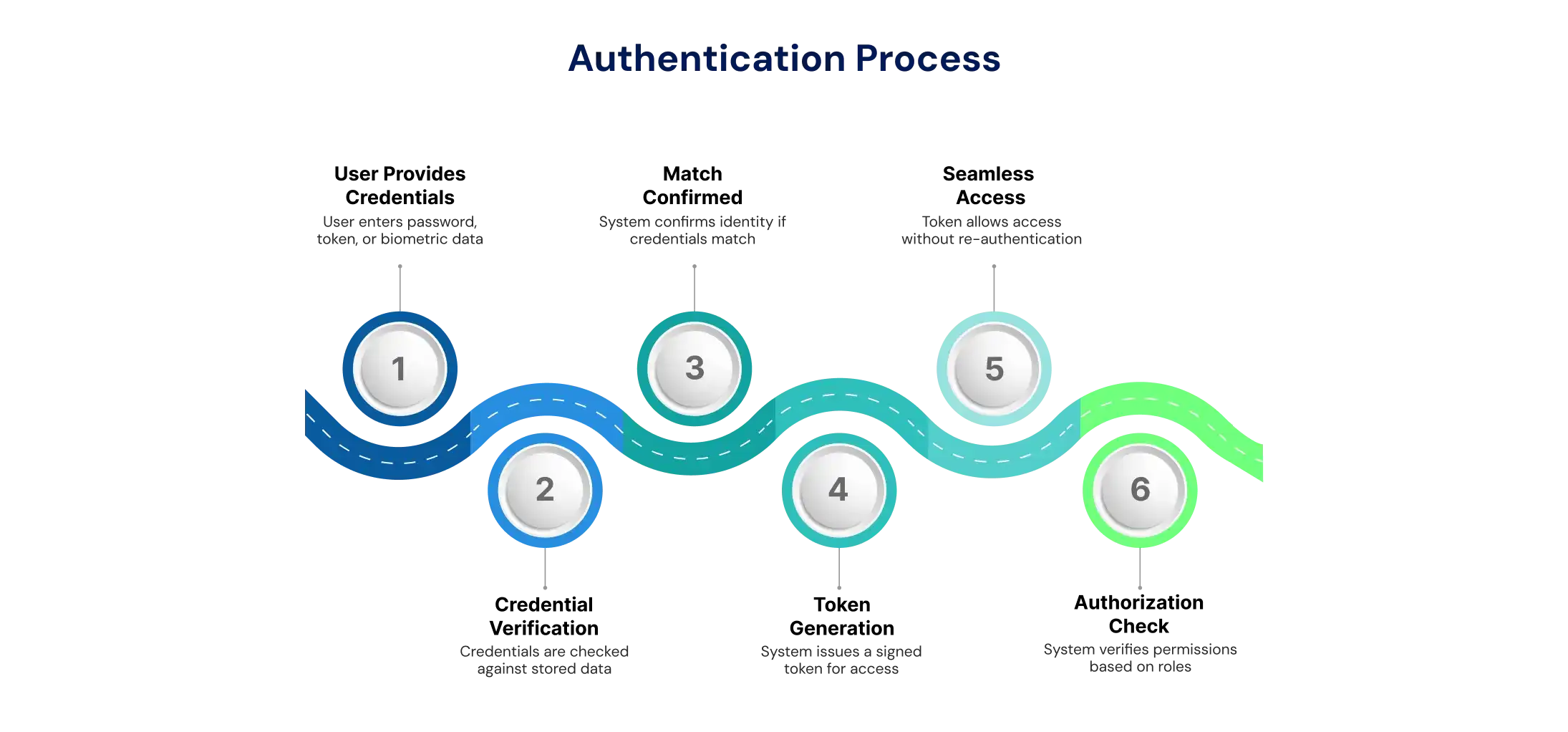
Authentication verifies identity by checking provided credentials-like passwords, tokens, or biometrics-against stored data before access is granted.
Authentication involves confirming someone's identity by validating their credentials against stored data before allowing system access. Let's break down what actually happens when you log in.
Step 1: Proving Who You Are
You want to access something - maybe your company laptop, a cloud application, or customer database. You provide credentials as proof of identity. This could be something you know (password or PIN), something you have (security key or phone for MFA), or something you are (fingerprint or face scan). This kicks off when you click "Log in" or unlock your device.
Step 2: Credential Verification
Your credentials travel securely over encrypted channels to an authentication service. This service compares what you provided against stored information. That storage might be local (like your phone's face unlock) or centralized (Microsoft Entra ID, Okta, Active Directory). Here's the clever part - passwords never get stored as plain text. They're transformed through one-way hashing plus salting, creating mathematical fingerprints. Even if hackers steal the database, they can't reverse-engineer your actual password.
Step 3: Match Confirmed
When credentials match, authentication succeeds - the system now knows "this is really you." Wrong password? Access is denied, usually with account lockout after multiple failures. But authentication doesn't mean authorization yet - proving identity is just the first step.
Step 4: The Magic Ticket - Tokens
Here's where modern systems shine. Old systems made you log into each application separately. But HTTP/HTTPS is stateless - without help, you'd need to re-authenticate for every click. The solution? After successful authentication, you receive a signed token - like a festival wristband proving "security already checked me."
Common token types include JWT (JSON Web Tokens) for modern apps, SAML assertions for enterprise systems, session cookies for websites, and Kerberos tickets for internal networks. These tokens expire (minutes to hours) and can be instantly revoked if something looks suspicious.
Step 5: Seamless Access
Your browser or application automatically attaches this token to every request. Servers see the valid signed token and grant access without asking for passwords again. It's like showing that festival wristband at each venue - one verification, multiple entries. Modern IAM platforms orchestrate millions of these token exchanges simultaneously, translating between protocols so legacy systems work with cloud applications seamlessly.
Step 6: Authorization Kicks In
Remember, authentication answers "Who are you?" while authorization answers "What can you do?" Even after login, every resource checks your permissions based on roles (RBAC), attributes (department, location), and context (time, device). You might read files but not delete them, access systems only during business hours, or view reports but not payroll data. This separation ensures verified users only access what they should.
This entire process happens in milliseconds, orchestrated by modern IAM platforms that handle millions of verifications daily. Understanding this flow helps organizations choose the right authentication methods for their specific security needs - from basic passwords to advanced biometric systems.
Types of Authentication
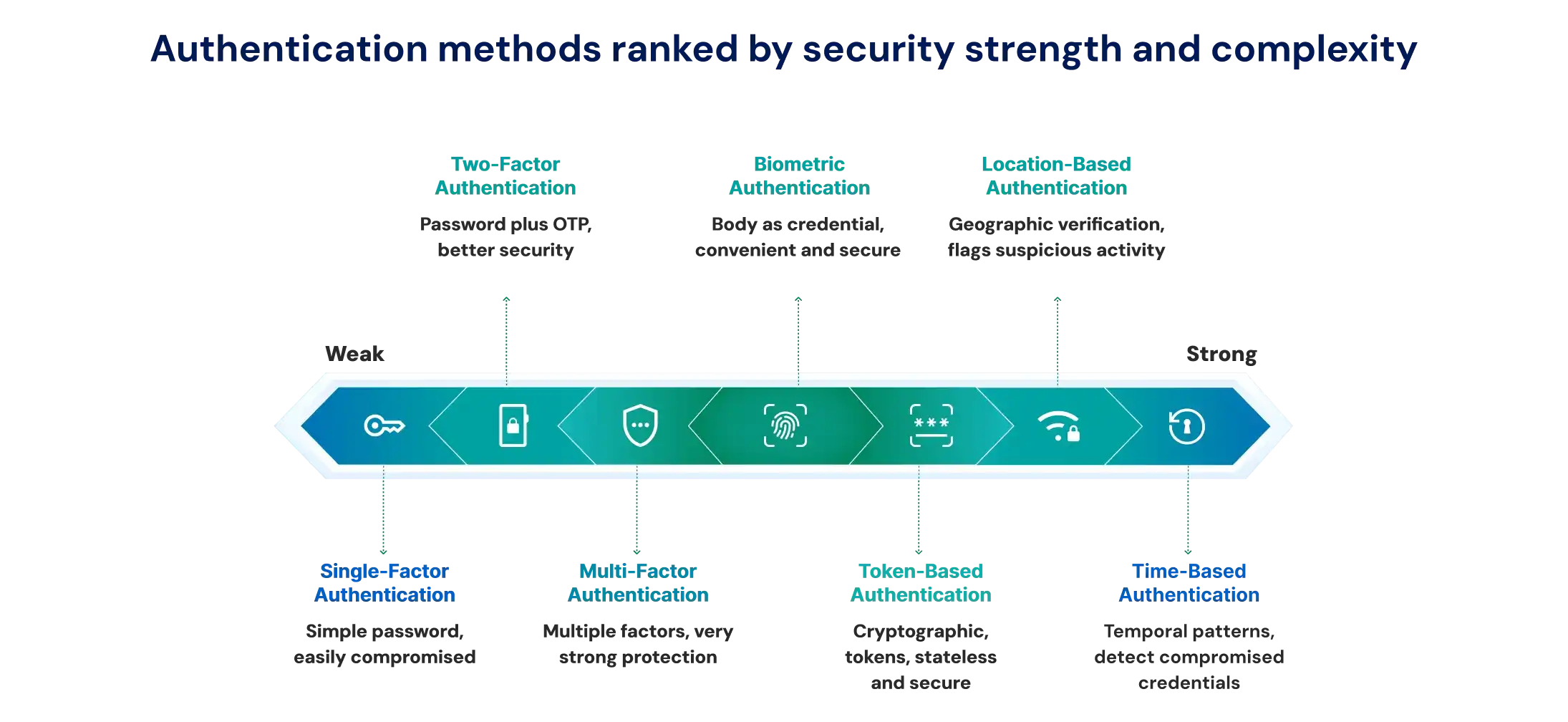
There are various methods that authenticate identity in a variety of ways, using knowledge, possession, or invoking biometrics.
1. Single-Factor Authentication (SFA) - Password only - Simple and weak
Password authentication alone is outdated security....It’s like securing your house with a padlock, and you live in a neighborhood filled with power tools. Unfortunately, enterprises with legacy systems do not have a choice. They will either have to accept the risk associated with compensating controls or, they will have to move to another less secure means of authentication/administering access.
2. Two-Factor Authentication (2FA) - Password + OTP or device code
When you add a second factor of authentication, you have substantially increased the security. 2FA is when you need BOTH your password AND your phone. Simply put, the attacker would need both factors of authentication to gain access to your account. SMS codes work everywhere, but have the risk of being vulnerable to SIM-swap attacks. App-based codes are more secure but require more management, as you have to manage the device you are using.
3. Multi-Factor Authentication (MFA) - 2+ factors for stronger access control
Smart MFA is flexible and adapts to the context of the risk assessment. Checking email? Maybe a password will suffice. Accessing payroll? You may want to trigger some biometric authentication. Microsoft has reported that, using an MFA protocol, enterprises block 99.9% of automated attacks, and thus an MFA approach is reasonable for any enterprise security strategy.
4. Biometric Authentication - Fingerprint, face, voice ID
With biometric authentication, your own body is your credential. There are no passwords to forget, and no tokens to lose. However, a fingerprint reader will fail if you have wet fingers, and facial recognition will not work if the lighting is not good for the camera. Any smart implementation will include multi-modal capability with some kind of redundancy for credential authentication.
5. Token-Based Authentication - Uses OAuth, API keys, or session tokens.
Modern applications use cryptographic tokens. Hardware keys offer unphishable verification. JWT tokens support stateless authentication for microservices. At the crux of any token scheme is effective lifecycle management - expiration occurs quickly, it is easy to refresh for user sessions, and it is also easy to revoke when compromised.
6. Location-Based Authentication - Geographic verification as a supplemental factor
Your physical location becomes an additional security layer in location-based authentication. Systems determine your position through GPS on mobile devices or by analyzing network addresses and routing patterns. While not precise enough as a standalone method, location verification excels at flagging suspicious activity.
Consider this scenario: if you normally log in from New York but suddenly an access attempt comes from Russia minutes later, the system blocks it - you physically couldn't travel that fast. Organizations often combine location with other factors, creating geographic boundaries where certain resources are only accessible from specific offices or countries. This helps prevent attackers in remote locations from impersonating legitimate users.
7. Time-Based Authentication - Temporal patterns strengthen security
Time-based verification adds another contextual layer to access control. Systems track when users typically authenticate and flag unusual temporal patterns. This factor often works hand-in-hand with location verification.
For instance, if you authenticated at noon in California, an attempt from Tokyo an hour later would fail - the time-location combination is impossible. Some organizations restrict sensitive system access to business hours only, automatically denying authentication attempts at 3 AM when no legitimate work should occur. Like location, time factors supplement primary authentication methods rather than replacing them, but they're remarkably effective at detecting compromised credentials being used by attackers in different time zones.
Real-World Examples of Authentication
Authentication isn't just digital, it's in-person, too. Go to any bank, and there is a layered verification that happens. Employees badge into the building (physical), unlock their workstations with Windows Hello (biometric), and then access customer data via SSO. But when it comes to wire transfers, those require a hardware token. High-value transactions require approval from a manager. This graduated approach keeps high-value transactions secure without impeding low-value transactions.
In healthcare, we face a different set of challenges. The emergency room doctor accesses their workstation using their proximity badge. But when it comes to prescribing controlled substances, they need both the DEA number and biometric verification. Every move is tracked and audited to meet compliance expectations while allowing clinicians to work at their own pace.
Retail during busy seasons needs to tend to an enormous number of transactions. On Black Friday, there could be millions of customers logging in on a daily basis, on an hourly basis. Device fingerprinting recognizes trusted phone devices. Risk engines flag disparate purchases. Also, access control to employees prevents internal theft, and employee access control - if a return exceeds $500, there must be a biometric confirmation from a manager.
The B2B portal approach could be extended to third parties and partners. To view the order, they would log in without full validation. When updates to payment information occur, their phone should get a callback. To view technical specifications on the product, a hardware token is required. The vendor is also reviewed once a quarter to ensure they have permission to access products specified in a contract.
Authentication vs Authorization
Authentication answers "Who are you?" and Authorization answers "What are you allowed to do?"
Many confuse these concepts, but they're fundamentally different. Verification of identity versus determination of permissions. Like a hotel - showing ID at check-in is authentication, but your keycard only opens specific rooms (authorization).
Consider SharePoint access. Active Directory confirms your identity through authentication. But that doesn't grant universal document access. Authorization checks your groups and roles. Marketing has full control over campaign files. Finance gets read-only budget access. HR remains completely hidden. Same verified identity, different permissions.
Technical architecture reflects this split. SAML and OpenID Connect handle identity verification through cryptographic proofs. OAuth and RBAC manage permission frameworks. IAM platforms bridge both, translating verified identities into appropriate access decisions.
Zero Trust makes both continuous. Systems constantly re-verify identity while dynamically adjusting permissions. Downloading one file? Normal. Downloading thousands? Trigger re-verification and alerts. Identity Confluence orchestrates this dance, adapting both verification and permissions to real-time risk.
| Aspect | Authentication | Authorization |
|---|---|---|
| Purpose | Verifies identity | Controls access permissions |
| Question Answered | "Who are you?" | "What can you do?" |
| When It Occurs | Before accessing the system | After identity verification |
| Failure Result | Access denied entirely | Limited or no permissions |
| Common Methods | Passwords, MFA, biometrics | RBAC, ABAC, ACLs |
| Management Tools | Identity providers, SSO | Identity governance, PAM |
| Audit Focus | Login attempts and methods | Access usage and changes |
| Compliance Relevance | Proves user verification | Demonstrates least privilege |
Why Authentication Matters in Cybersecurity
Strong authentication protects organizations from breaches, identity theft, and insider threats.
Weak verification isn't just a technical problem - it's a business crisis. With enterprises using 1,000+ cloud services, each represents a potential breach point. One compromised account cascades through single sign-on connections, turning minor incidents into major disasters.
Beyond breach costs, poor identity verification drains budgets silently. Password resets. Lost productivity. Customer abandonment. Yet modern approaches like passwordless authentication actually improve both security and satisfaction simultaneously.
Compliance adds urgency. HIPAA, PCI DSS, SOX, and GDPR all mandate strong verification with serious penalties. Failures trigger not just breaches but massive fines and reputation damage. Identity governance platforms automate compliance reporting, but only if the underlying verification meets standards.
The magic happens when verification integrates with identity analytics. Modern platforms detect compromised accounts through behavioral analysis. Unusual patterns trigger alerts. Machine learning identifies threats humans miss. This transforms basic login checks into intelligent security systems.
Common Challenges in Authentication
Weak passwords, user friction, and poor integration make authentication difficult to manage.
Password chaos leads every challenge list. Users juggle 200+ credentials, inevitably reusing "Password123!" everywhere. Help desks are drowning in reset requests. Password managers help, but create new risks - one master password compromise exposes everything.
Friction frustrates everyone. Too many verification steps drive users to competitors or shadow IT. Too few invite breaches. Risk-based authentication provides the answer - seamless for routine access, strict for sensitive operations.
Legacy systems create nightmares. Ancient mainframes accepted only 8-character passwords. Manufacturing equipment is lacking modern protocols. Medical devices are changeable without regulatory approval. Wrapping these with privileged access management costs millions yet leaves gaps.
Social engineering evolves constantly. "MFA bombing" overwhelms users with prompts until they approve. Fake IT support calls capture verification codes. Even sophisticated companies fall victim, proving technology alone isn't enough.
Future of Authentication - Passwordless and Beyond
The future is passwordless-leveraging biometrics, device-based verification, and continuous monitoring for seamless access.
Passwordless isn't coming - it's here. FIDO2 standards use cryptographic keys that never leave devices, eliminating phishing. Google went passwordless and eliminated account compromises. Support tickets plummeted. Users celebrated.
Continuous verification changes the game entirely. Systems analyze typing patterns, mouse movements, and navigation habits. Behavior changes trigger additional checks automatically. Legitimate users work uninterrupted while impostors get caught instantly.
Blockchain enables self-sovereign identity. Users control their credentials, sharing only necessary attributes. Prove you're over 21 without revealing your birthdate. Confirm employment without exposing salary. Privacy-preserving verification becomes reality.
AI orchestrates intelligent authentication systems. Hundreds of risk signals are analyzed instantly. Verification requirements adjust in real-time. Friction reduces for legitimate users while security strengthens against sophisticated attacks.
Final Thoughts
Authentication has evolved from simple password checks into the cornerstone of organizational security. As digital operations expand and threats grow more sophisticated, the stakes have never been higher. Yet this challenge presents an unprecedented opportunity. Organizations can finally achieve both ironclad protection and frictionless user experiences through passwordless technologies, continuous verification, and AI-powered risk assessment. The convergence of authentication with identity governance and Zero Trust principles transforms what was once a compliance burden into a competitive advantage.
The path forward is clear: start with MFA for privileged accounts, implement SSO to eliminate password chaos, and begin piloting passwordless solutions with technical teams. But success requires more than just technology, it demands a platform that understands the complete identity lifecycle.
Tech Prescient's Identity Confluence orchestrates this transformation, reducing support costs by 60% while strengthening your security posture.
The future of cybersecurity is not about building taller walls but about knowing who is at the gate and what they should be able to access once they get through the gate.
Frequently Asked Questions (FAQs)
1. What do you mean by authentication?
It's verifying someone's identity before granting system access. Like showing ID at a secure building, digital authentication confirms users through passwords, biometrics, or tokens, creating audit trails for compliance.2. What are the three factors of authentication?
Three categories: something you know (passwords), have (phones/tokens), and are (fingerprints). Combining factors improves security — why banks use passwords plus SMS codes.3. How is authentication different from authorization?
Authentication proves identity (who you are). Authorization manages permissions (what you can do). First comes identity verification, then resource access determination.4. What are some common authentication methods?
Passwords (universal but weak), SMS codes (convenient, hackable), authenticator apps (secure, growing), hardware tokens (strongest), and biometrics (user-friendly). Most organizations combine methods based on risk.5. What are the challenges of authentication?
Password overload (200+ per user), legacy limitations, social engineering attacks, and balancing security with user experience while managing costs and compliance.


Blogs You Might Like