
How Correlation Rules Improve Identity Reconciliation
Last Updated date: November 19, 2026
On this page
See Tech Prescient in Action
Automate access, reduce risk, and stay audit-ready
Identity reconciliation helps organizations maintain visibility into accounts across connected applications. However, identifying an account is only part of the process. Organizations also need to establish which identity or individual should be associated with it.
This becomes particularly important when managing Non-Human Identities (NHIs) such as bots, service accounts, and automation identities. Without proper ownership, these accounts can become difficult to govern and monitor.
Correlation rules help connect accounts with the appropriate identities or owners. By introducing a defined association and approval process, organizations can improve identity visibility and strengthen accountability.
TL;DR
- Identity reconciliation identifies and classifies accounts across connected applications.
- Potential NHIs can be identified through account reconciliation.
- In Identity Confluence, administrators can use the Correlation feature to associate an account with a specific person or account name.
- Saving a correlation request sends a notification to the manager.
- Managers can approve or cancel the correlation request.
- Once approved, the bot is mapped to the designated user through Identity Confluence, inheriting the user's existing access permissions to the selected application.
Why Do Correlation Rules Matter?
An account existing within an application does not automatically establish who is responsible for it.
For example, an organization may have a bot operating within an application, but its ownership may not be clearly established. Without proper association, administrators may struggle to determine who is accountable for that identity.
This creates several challenges:
- Ownership Gaps: Accounts may exist without clearly established ownership.
- Limited Visibility: Administrators may struggle to distinguish human and non-human identities.
- Governance Challenges: Unassociated accounts are harder to monitor and manage.
- Access Accountability: Organizations need a defined process to establish ownership and authorize access.
Correlation rules help address these challenges by connecting accounts with the appropriate identities through a structured process.
How Does Correlation Work in Identity Confluence?
Identity Confluence provides account reconciliation capabilities that help administrators identify and manage different account types.
The process can be represented as:
Application Selection → Account Reconciliation → Potential NHI Detection → Correlation → Manager Approval → NHI-User Mapping
1. Application Reconciliation: Identifying Potential NHIs
Log in to Identity Confluence and navigate to Access Governance → Applications.
Select the application you want to examine.
The application provides access to several governance sections:
- Account Reconciliation
- Policies
- User Access Reviews (UAR)
- IT Roles
- Non-Human Identities (NHIs)
Under Account Reconciliation, administrators can review different account classifications:
- In Sync
- Permission Mismatch
- Orphan Accounts
- Potential NHIs
- Inactive Accounts
Selecting Potential NHIs displays a list of accounts identified as potentially belonging to non-human identities.
Administrators can review these accounts and choose from the available actions, including Deprovision, Non-Human Identity, and Correlation.
2. Correlation: Associating Accounts with Owners
Select the Correlation option for the NHI account you want to associate.
Identity Confluence provides an Assign To field where administrators can enter a specific account name or person's name.
This establishes the proposed association between the NHI account and its intended owner.
Once the details are entered, select Save Correlation to submit the request.
3. Manager Notification and Approval
Saving the correlation sends a notification to the manager for review.
The manager can then choose between two actions:
- Approve: Accept the proposed correlation.
- Cancel: Cancel the correlation request.
This introduces a managerial approval step before the association is finalized.
4. Access Assignment
When the manager approves the correlation, the bot gets mapped to the selected user from the organization.
This connects account identification, ownership association, and managerial approval within the identity governance process.
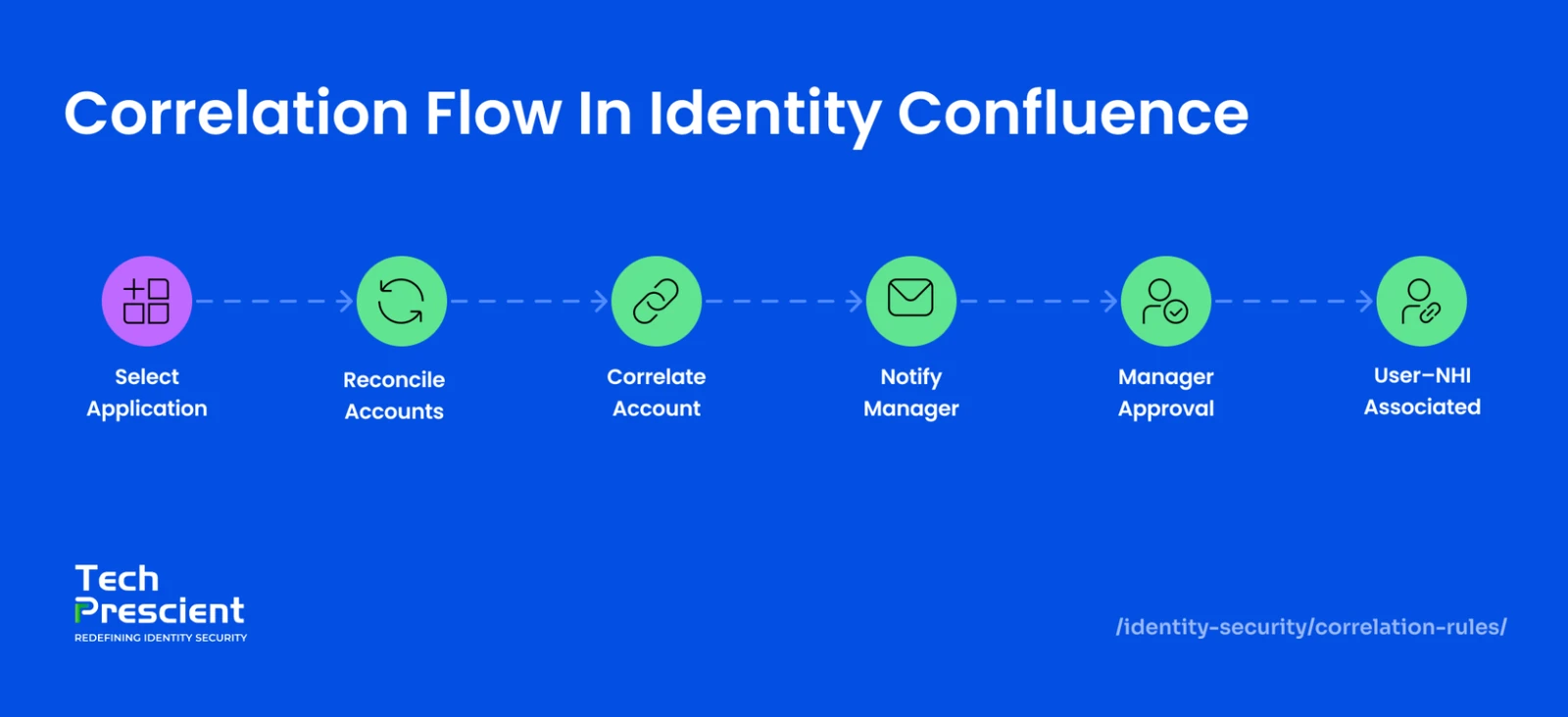
- Select Application: Choose the target application.
- Reconcile Accounts: Identify potential NHIs.
- Correlate Account: Link the account to an owner.
- Notify Manager: Send the approval request.
- Manager Approval: Approve or cancel the request.
- User–NHI Association: Associate the user with the Non-Human Identity (NHI).
Example: Correlating a Potential Non-Human Identity
Consider an organization that uses a bot to perform automated operations within an application.
During account reconciliation, Identity Confluence identifies an account as a Potential NHI.
An administrator selects the account and chooses Correlation. In the Assign To field, the administrator enters the relevant person's or account's name and saves the correlation.
The manager receives a notification and reviews the request.
If the manager approves it, the bot gets access to the selected application. If the manager cancels the request, the proposed correlation is not approved.
The process can be represented as:
Potential NHI Detection → Correlation → Assign To → Save Correlation → Manager Notification → Approval or Cancellation → Access Assignment
This provides a structured way to associate non-human identities and establish accountability through managerial approval.
How Identity Confluence Brings It Together
Identity Confluence connects account reconciliation, NHI identification, correlation, and manager approvals within one identity governance platform.
Administrators can identify potential non-human identities, associate accounts with the appropriate person or account name, and submit correlation requests for managerial review.
By introducing an approval step, Identity Confluence helps organizations establish accountability around non-human identities and manage their application access through a structured governance process.
Next Steps
As organizations increasingly depend on bots, service accounts, and automated identities, establishing clear ownership becomes essential.
Correlation rules help connect identified accounts with the appropriate owners, while managerial approvals introduce accountability into the process.
Identity Confluence brings these capabilities together to improve identity reconciliation and strengthen governance across human and non-human identities.


GET A PERSONALIZED DEMO
See Identity Confluence in Action
“One platform to govern identities, automate access decisions, and prove compliance; across every app, user, and system in your environment.”



Murli Ramsunder
Senior Architect, Vonage