
How to Automatically Detect and Deprovision Orphan Accounts
Last Updated date: November 25, 2026
On this page
See Tech Prescient in Action
Automate access, reduce risk, and stay audit-ready
When an employee leaves an organization, their primary identity may be deactivated, but their accounts across applications such as Salesforce, Jira, and AWS may remain active.
These unowned accounts are known as orphan accounts. They can retain access to organizational resources, creating security and compliance risks.
Automated orphan account management combines application reconciliation and workflow automation to identify these accounts, deprovision them, and notify relevant stakeholders.
TL;DR
- Orphan accounts are application accounts that remain active even after the user has left the organization.
- Application reconciliation identifies orphan accounts across connected applications.
- A Reconciliation Event can trigger an automated workflow.
- Deprovision Orphan Accounts removes identified accounts from the selected application.
- Notifications and Execution History provide visibility into remediation activities.
Why Does Orphan Account Management Matter?
Deactivating an employee's primary identity does not necessarily remove their access across connected applications.
For example, an employee may leave while their Salesforce or AWS account remains active. These accounts can introduce several risks:
- Unauthorized Access: Unowned accounts may retain access to sensitive resources.
- Security Exposure: Unmanaged accounts increase the potential for unauthorized access.
- Compliance Gaps: Organizations may struggle to demonstrate consistent access removal.
- Operational Overhead: Administrators must manually identify and remove accounts across applications.
Organizations need a consistent way to identify and deprovision these accounts.
How Does Automated Orphan Account Management Work?
The process combines application reconciliation with workflow automation.
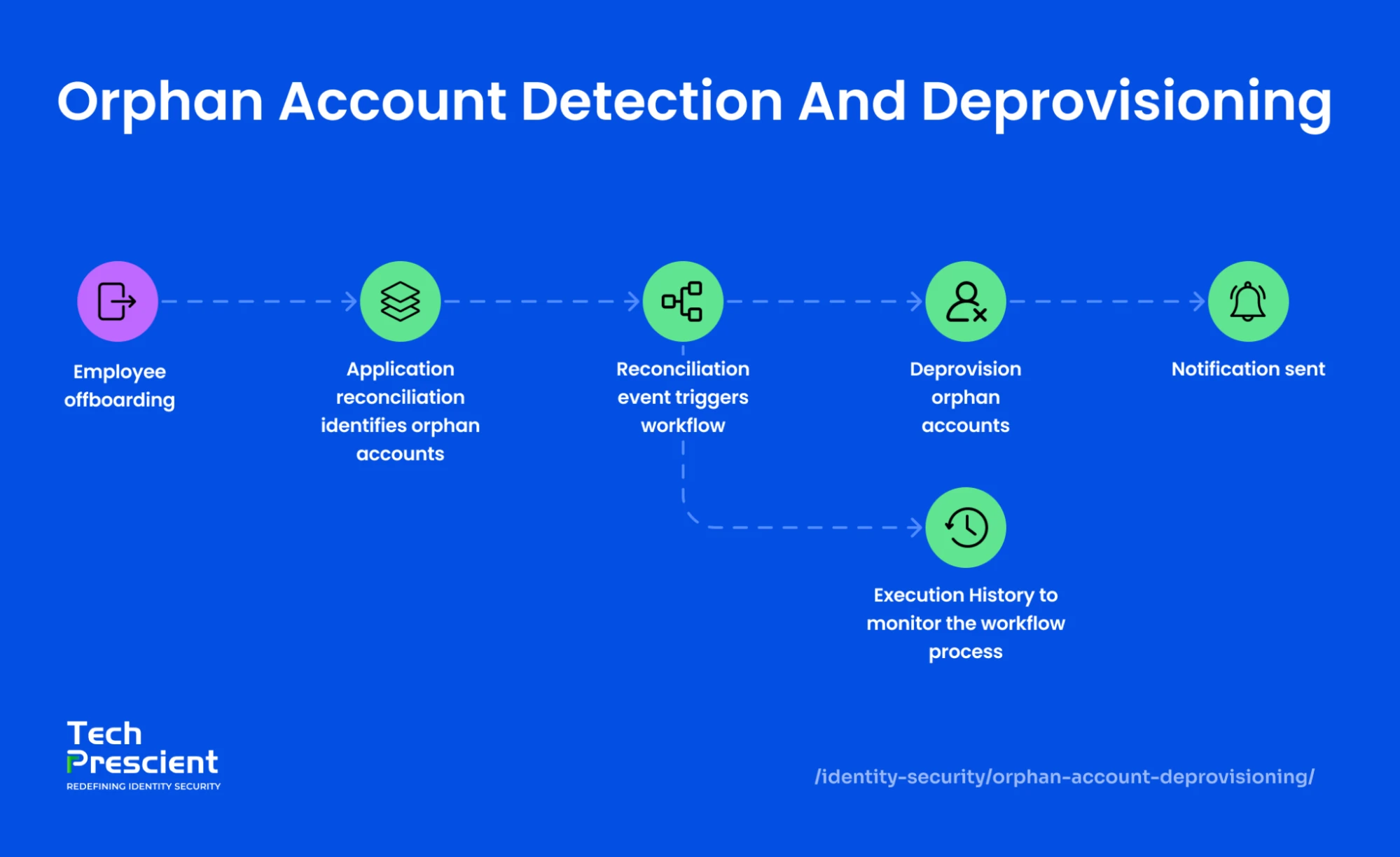
Connected Application → Account Reconciliation → Orphan Account Identification → Workflow Trigger → Deprovisioning → Notification → Execution Monitoring
1. Application Reconciliation: Identifying Orphan Accounts
Application reconciliation provides visibility into account ownership and access across connected applications.
In Identity Confluence, navigate to Access Governance → Applications and select the application you want to examine.
The platform displays the following reconciliation details:
- Reconciliation Status
- Last Reconciliation Date
Under Account Reconciliation, administrators can view account categories such as In Sync, Permission Mismatch, Orphan Accounts, Potential NHIs, and Inactive Accounts.
Selecting Orphan Accounts displays accounts without an associated owner, helping administrators identify accounts that require remediation.
2. Workflow Automation: Connecting Detection with Remediation
Identifying orphan accounts is only the first step. Organizations also need to automate their removal.
Identity Confluence provides a no-code workflow builder with components such as:
- Triggers: Initiate workflows based on events.
- Actions: Execute predefined operations.
- Logic: Define conditions and decision paths.
- Human Input: Incorporate approvals and decisions.
- Flow Control: Manage workflow execution.
- Integration: Connect with external systems.
For orphan account management, the Reconciliation Event trigger connects account reconciliation with automated deprovisioning.
3. Reconciliation Event Trigger
Navigate to Automation → Workflows → Add New Workflow and select Reconciliation Event as the trigger.
This configures the workflow to initiate when the relevant reconciliation event occurs, connecting account detection with the remediation process.
4. Deprovision Orphan Accounts Action
Under Actions, select Deprovision Orphan Accounts and specify the application.
When reconciliation is triggered for a specific application, the workflow executes the configured action to deprovision identified orphan accounts within the selected application.
This reduces the need for administrators to remove accounts individually.
5. Notifications and Execution Monitoring
Add a Send Notification action and specify the recipient's email address, such as the manager or IT administrator.
Administrators can monitor workflow executions and deprovisioned accounts through Execution History.
They can also return to Access Governance → Applications to review the reconciliation status, last reconciliation date, and number of accounts deprovisioned.
Example: Automatically Deprovisioning an Orphan Account
Consider an employee who has accounts across Salesforce, Jira, and AWS.
When the employee leaves, their primary identity is deactivated, but their Salesforce account remains active without an associated owner.
During reconciliation, Identity Confluence identifies the account under Orphan Accounts. The configured Reconciliation Event triggers the workflow, which executes the Deprovision Orphan Accounts action for Salesforce.
A notification is sent to the designated administrator, who can review the execution and deprovisioning activity through Execution History.
The process can be represented as:
Employee Offboarding → Reconciliation → Orphan Detection → Workflow Trigger → Deprovisioning → Notification
How Identity Confluence Brings It Together
Identity Confluence connects application reconciliation and workflow automation to identify unowned accounts and automate their removal.
Its reconciliation capabilities provide visibility into orphan accounts across connected applications, while the workflow builder enables event-driven remediation through predefined triggers and actions.
This helps identity teams reduce manual intervention, strengthen access governance, and monitor account remediation activities.
Next Steps
Orphan accounts highlight a gap in identity lifecycle management. Deactivating a primary identity is not enough if application accounts remain active.
By combining application reconciliation with workflow-driven deprovisioning, organizations can identify unowned accounts, automate their removal, and maintain visibility into remediation activities.
Identity Confluence helps organizations streamline this process and strengthen identity governance across connected applications.


GET A PERSONALIZED DEMO
See Identity Confluence in Action
“One platform to govern identities, automate access decisions, and prove compliance; across every app, user, and system in your environment.”



Murli Ramsunder
Senior Architect, Vonage