
Preventing Toxic Access with Policy Violation Detection
Last Updated date: September 17, 2026
On this page
See Tech Prescient in Action
Automate access, reduce risk, and stay audit-ready
A user can have access to two applications that are completely valid on their own. The problem begins when those two accesses should not exist together.
For example, a user may be able to create vendor records and approve vendor payments. Individually, both permissions may be legitimate. Together, they can give one person excessive control over a sensitive business process. This is known as toxic access.
Toxic access often develops over time. A user receives one application for their role and later receives another for a new responsibility. Each request may be approved separately without considering the other access the user already holds.
For organizations managing sensitive processes, Segregation of Duties requirements, and complex application environments, identifying these conflicts is essential.
Identity Confluence helps address this challenge through Policy Violation Detection. Organizations can define applications, roles, or entitlements that should not coexist. If a user already has both conflicting accesses, Identity Confluence identifies the combination as a policy violation. It gives administrators the option to revoke or deprovision the access that creates the conflict.
TL;DR
- Toxic access occurs when individually valid permissions create a risky combination.
- Conflicting access can build up as users gain new responsibilities.
- Identity Confluence evaluates existing user access against defined conflict policies.
- Users with both conflicting accesses are identified as policy violations.
- Administrators can review, revoke, or deprovision unnecessary access to resolve the conflict.
The Problem: Conflicting Access Can Already Exist
Most organizations review access one request at a time.
A manager approves access to Application A because an employee needs it. Later, the same employee receives Application B for a new project. Both decisions may be correct individually, but the combination may create a conflict.
| First Access | Second Access | Risk |
|---|---|---|
| Create vendor records | Approve vendor payments | Excessive control |
| Modify financial data | Approve transactions | SoD conflict |
| Deploy production changes | Approve those changes | Lack of separation |
Organizations often identify these conflicts through manual reviews, spreadsheets, audits, or periodic compliance checks.
The problem is that access is often managed across different applications and teams. The risk may not be visible when each permission is reviewed separately. It only becomes clear when the user's access is evaluated as a combination.
Another challenge appears when a new conflicting-access policy is introduced. Some users may already have both accesses before the policy is applied. Without evaluating existing access, those conflicts can remain in place.
The Solution: Policy Violation Detection
Policy Violation Detection in Identity Confluence helps close this gap.
Administrators define which applications, roles, or entitlements should not coexist for the same user. Identity Confluence then evaluates existing access against the policy.
If a user already has both conflicting accesses, the combination is shown as a policy violation. The administrator can review the violation and determine which access should remain. The conflicting access can then be revoked or deprovisioned.
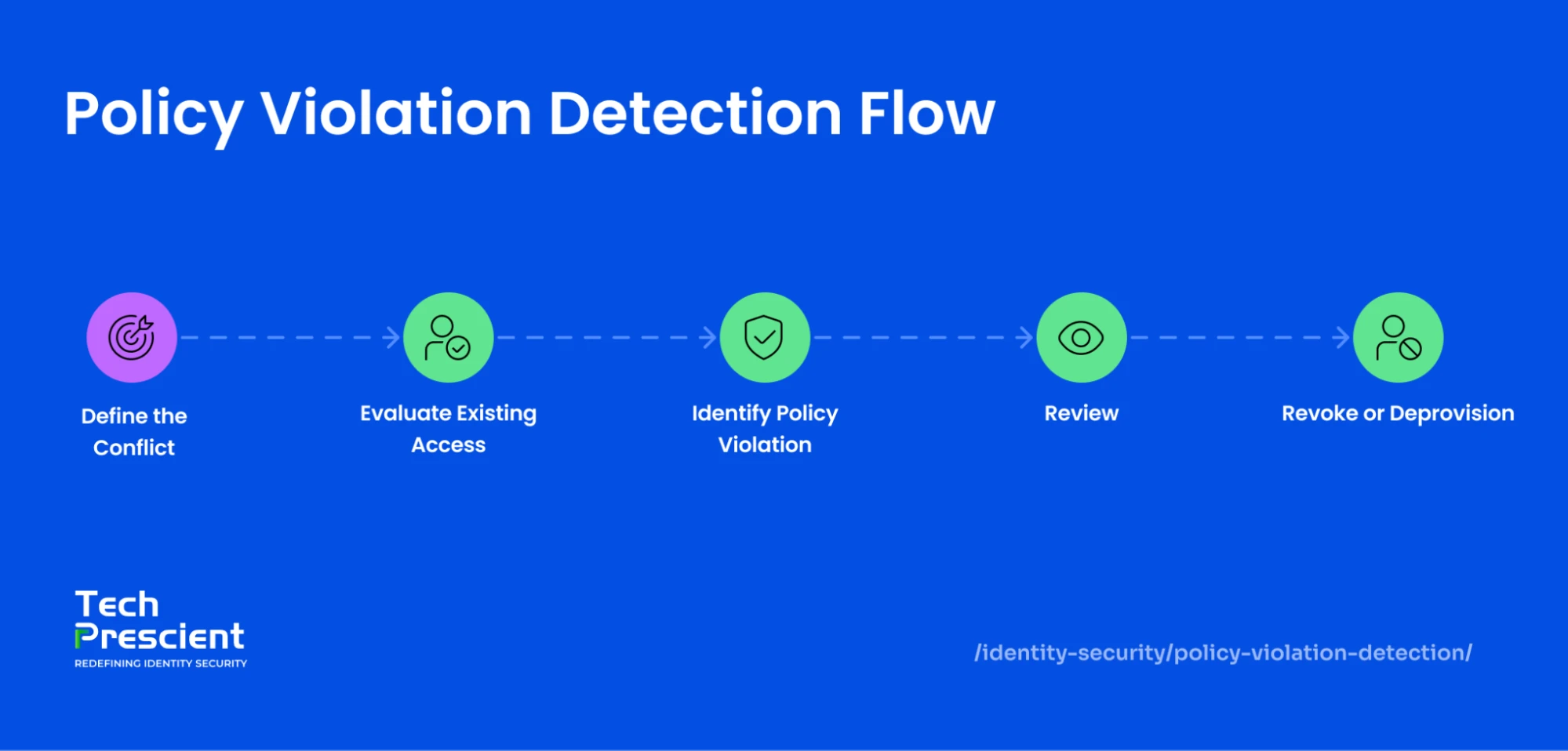
Define the policy → Evaluate existing access → Detect the violation → Review → Revoke or deprovision
Application Insight
A policy can do more than control future access. It can also identify users who already hold conflicting access and require remediation.
How It Works
Define the Conflict
The organization defines applications, roles, or entitlements that should not coexist.
For example:
Vendor Management + Payment Approval = Conflict
This creates a clear rule for identifying toxic access.
Evaluate Existing Access
Identity Confluence checks whether users already hold the access combination defined as conflicting.
This matters because toxic access may exist before the policy is introduced.
For example, if a user already has Application A and Application B, and both are defined as conflicting, the user's access is evaluated against that policy.
Identify the Policy Violation
When a user holds both sides of a defined conflict, the combination is shown as a policy violation.
This makes the risk visible instead of leaving it hidden across separate application access records.
Review and Remediate
The administrator reviews the violation and determines whether both accesses are still required.
If one access is unnecessary, it can be revoked or deprovisioned. Detection identifies the problem, while remediation helps remove the risk.
Real-World Use Cases
Finance
Scenario: A user can create vendor records and approve vendor payments.
Trigger: Both capabilities are defined as conflicting.
Process: Existing access is evaluated against the policy.
Outcome: If the user has both accesses, the conflict is identified as a policy violation and the unnecessary access can be removed.
IT Operations
Scenario: An IT user can deploy production changes and approve those same changes.
Trigger: Deployment and approval are defined as conflicting responsibilities.
Process: The system checks the user's existing access.
Outcome: The violation is identified, allowing the organization to review and remove the access that creates excessive control.
HR
Scenario: A user can modify employee records and approve payroll-related actions.
Trigger: The combination is defined as an SoD conflict.
Process: Identity Confluence evaluates the user's access.
Outcome: The conflict is shown as a policy violation, allowing administrators to review which access should be revoked or deprovisioned.
Best Practices
Define conflicts around real risks. Focus on access combinations that create excessive control, SoD issues, or compliance concerns.
Check existing access. When creating a new policy, identify users who may already have the conflicting combination.
Review before removing access. Consider the user's current role and business requirements before revoking or deprovisioning access.
Assign remediation ownership. Make it clear who is responsible for reviewing and resolving violations.
Conclusion
Toxic access often develops gradually. Each access assignment may appear legitimate on its own, but the risk becomes visible when those accesses are evaluated together.
Identity Confluence helps organizations address this through Policy Violation Detection. Organizations can define access combinations that should not coexist, identify users who already have those conflicting accesses, and take action to revoke or deprovision unnecessary access.
Define what should not coexist → Find users who already have it → Identify the violation → Review the access → Remove the conflict
Explore Policy Violation Detection with Identity Confluence
Explore Identity Confluence to see how policy-based access governance can help identify toxic access, strengthen Segregation of Duties controls, and remediate conflicting access before it creates a larger security or compliance risk.


GET A PERSONALIZED DEMO
See Identity Confluence in Action
“One platform to govern identities, automate access decisions, and prove compliance; across every app, user, and system in your environment.”



Murli Ramsunder
Senior Architect, Vonage