
How Segregation of Duties Enforcement Works in IGA
Last Updated date: September 4, 2026
On this page
See Tech Prescient in Action
Automate access, reduce risk, and stay audit-ready
A single permission does not always create access risk. Often, it appears when two individually valid privileges are assigned to the same identity.
That is the problem Segregation of Duties (SoD) enforcement is designed to address. In Identity Confluence, administrators can define specific roles or entitlements that cannot coexist under defined business conditions. Instead of blocking access to an entire application, the policy targets the exact combination that creates the conflict.
For example, a QA Tester on Project 7451 may need Datadog to monitor and troubleshoot. They can have either the Datadog – Admin role or the Datadog – Read-only role. But if those roles are defined as conflicting, Identity Confluence prevents both from coexisting on the same identity.
TL;DR
- SoD prevents defined access combinations from existing on the same identity.
- Policies can be scoped to attributes such as Project Code rather than the entire organization.
- Administrators can evaluate conflicts at the IT Role or Entitlement level.
- The rule applies consistently regardless of job seniority.
- SoD targets the conflicting access combination without unnecessarily restricting the application itself.
The Problem: Individually Valid Access Can Become Risky Together
Traditional access decisions are often evaluated one request at a time.
A user requests Datadog access. Approved. Later, they request another Datadog role. Approved again.
Each decision may appear reasonable in isolation. The conflict becomes visible only when the user's complete access profile is evaluated together.
For a QA Tester, Read-only access may be appropriate for monitoring application behavior. Admin access may also be appropriate for specific troubleshooting activities. But allowing both roles simultaneously may create more privilege than the user's responsibilities require.
SoD changes the question from:
"Is this access valid?"
to:
"Can these accesses exist on the same identity at the same time?"
That distinction is what makes SoD useful for controlling conflicting privileges without blocking legitimate access altogether.
How Identity Confluence Enforces SoD
Identity Confluence manages SoD policies through Business Roles. Administrators can select from Compliance, Segregation of Duties, and Policy-Based controls.
When Segregation of Duties is selected, the policy is built around four elements:
User condition → Application → Roles or Entitlements → Conflicting access
This lets administrators define not just what is restricted, but exactly who the rule applies to and which access combination creates the conflict.
Define the User Condition
The policy begins by defining the population it applies to.
For the Datadog example:
Project_Codes IN 7451
This means the policy applies to users associated with Project 7451 rather than automatically applying across the organization.
Select the Application
Next, the administrator specifies the application being evaluated:
App Name = Datadog
The policy is not saying that Project 7451 users cannot use Datadog. It is evaluating specific access within Datadog.
Select Roles or Entitlements
The administrator then chooses whether the conflict should be evaluated using IT Roles or Entitlements.
For this example, the policy evaluates IT Roles:
- Datadog – Admin role
- Datadog – Read-only role
This distinction allows the policy to operate at the appropriate level of access.
Define What Cannot Coexist
The selected roles are then placed under Then Cannot Coexist.
The resulting rule is straightforward:
A Project 7451 user cannot hold both the Datadog Admin and Datadog Read-only roles simultaneously.
See the Policy in Action: QA Tester on Project 7451
Consider a QA Tester who already has the Datadog – Read-only role and later requests Datadog – Admin.
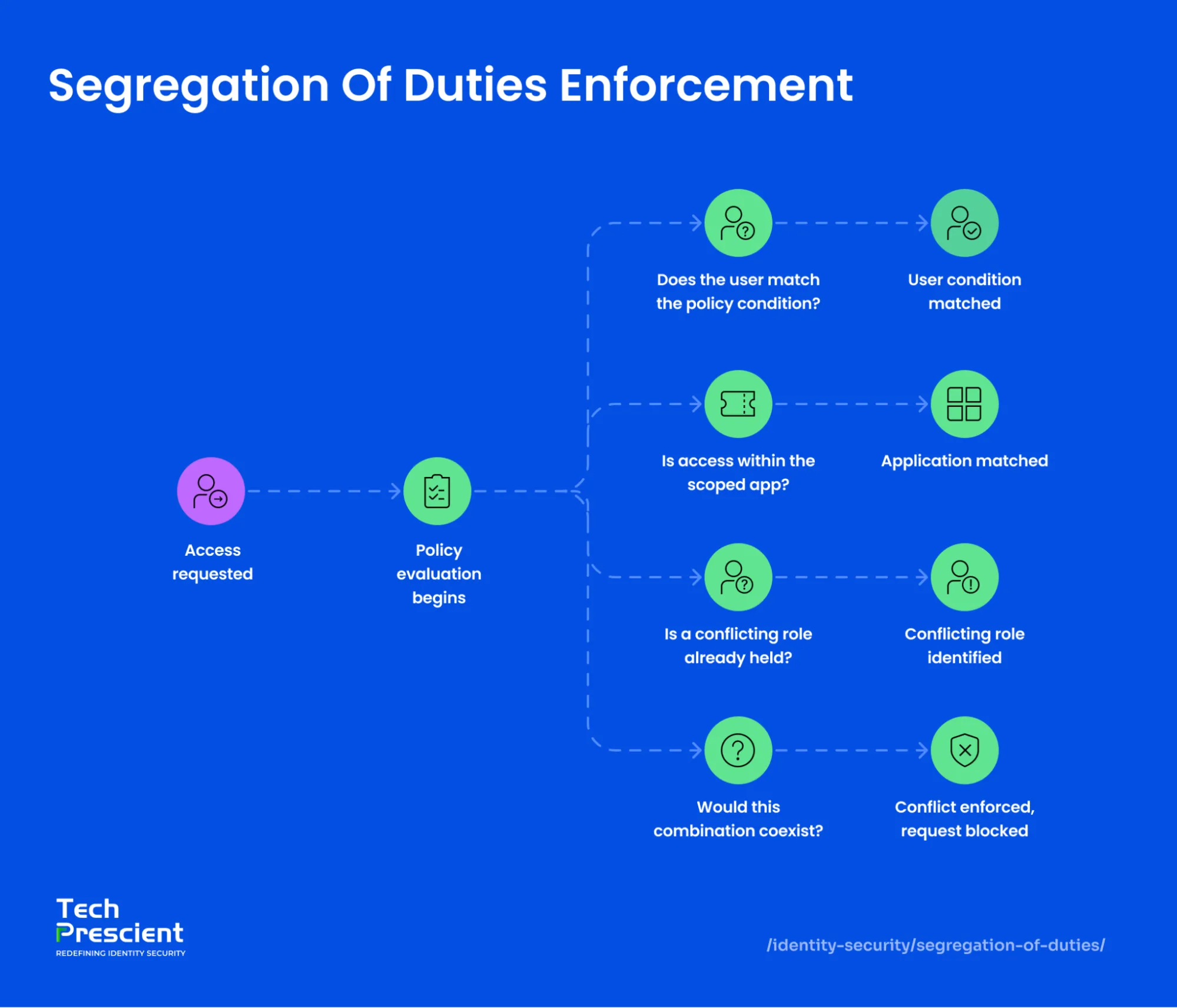
Identity Confluence evaluates the request against the policy conditions:
- Is the user associated with Project 7451?
- Is the requested access within Datadog?
- Does the identity already hold one of the conflicting roles?
- Would the requested role create the defined conflict?
Because Admin and Read-only are configured as conflicting roles, the combination cannot coexist.
The important point is what the policy does not do.
It does not say:
"QA Testers cannot access Datadog."
It says:
"These two Datadog roles cannot exist together for this defined user population."
That makes the control more precise and avoids restricting access that does not create the defined conflict.
Seniority Does Not Override the Conflict
SoD is based on the access combination and policy conditions, not simply the user's job title.
A QA Manager on Project 7451 who already has Datadog Read-only and requests Datadog Admin encounters the same policy evaluation.
The rule remains focused on:
Project → Application → Access combination
This provides a consistent control regardless of whether the requester is a tester, manager, or another employee covered by the policy.
Where SoD Fits in Identity Governance
SoD complements other identity governance controls because it addresses a specific type of access risk.
- RBAC determines access associated with a role.
- ABAC can constrain access based on attributes and context.
- Compliance controls address defined regulatory or organizational requirements.
- Policy-Based controls apply broader conditional logic.
- SoD identifies access combinations that should not coexist.
A user can therefore have access that is individually appropriate while still violating an SoD rule because of how multiple privileges combine.
Best Practices for SoD Policies
- Define the conflict before building the policy. Start with the responsibilities or privileges that should remain separated.
- Scope the policy appropriately. Use Project Code or another relevant condition when the conflict applies only to a specific population.
- Choose the right access level. Use IT Roles for role-level conflicts and Entitlements when the conflict needs to be defined more narrowly.
- Target the combination, not the application. Restrict only the access that creates the conflict.
- Apply the rule consistently. Avoid making seniority an implicit exception to the defined conflict.
- Review policies as access changes. New projects, roles, and application requirements can introduce new combinations that need governance.
From Policy Definition to Ongoing Governance
Defining an SoD rule is only the first step. Identity and access change as employees move between projects, receive new responsibilities, and accumulate additional application access.
That makes the quality of the policy definition important. The right users, applications, roles, and entitlements need to be identified so the control continues to address the actual conflict.
For Project 7451, the outcome is simple: users can continue using Datadog for their work, while the specific Admin and Read-only combination remains governed by the defined SoD policy.
Conclusion
Identity Confluence gives administrators a structured way to enforce Segregation of Duties without treating every application access request as a binary allow-or-deny decision.
Through Business Roles → Segregation of Duties, administrators can define the applicable users, identify the application, select roles or entitlements, and specify which combinations cannot coexist.
For organizations evaluating SoD enforcement, the key capability is not simply detecting conflicting access. It is being able to define the conflict precisely enough to control it without unnecessarily restricting legitimate access.
Explore Identity Confluence to see how SoD policies can be defined across users, applications, roles, and entitlements.


GET A PERSONALIZED DEMO
See Identity Confluence in Action
“One platform to govern identities, automate access decisions, and prove compliance; across every app, user, and system in your environment.”



Murli Ramsunder
Senior Architect, Vonage