
How Identity Confluence Builds a Unified Identity Inventory
Last Updated date: November 27, 2026
On this page
See Tech Prescient in Action
Automate access, reduce risk, and stay audit-ready
Modern enterprises often manage employee identities across multiple Identity Providers (IDPs), directories, and business applications. A single employee may have accounts in Microsoft Entra ID and Okta, depending on the applications, resources, and services they need to access. While these accounts belong to the same individual, the information and access permissions maintained across these systems may differ.
For example, an employee may use Microsoft Entra ID to access Microsoft 365 applications, Okta to access other enterprise applications, and AWS IAM Identity Center to manage access to AWS accounts and resources. When these identity systems are managed independently, it becomes challenging to maintain a unified view of the employee’s identity, attributes, roles, and access privileges across the organization.
Tech Prescient's Identity Confluence addresses this challenge through a unified identity inventory. It consolidates identity information from connected sources and provides visibility into primary and secondary identity records, including a comparison of their attributes when multiple matched records exist.
How It Works in Identity Confluence
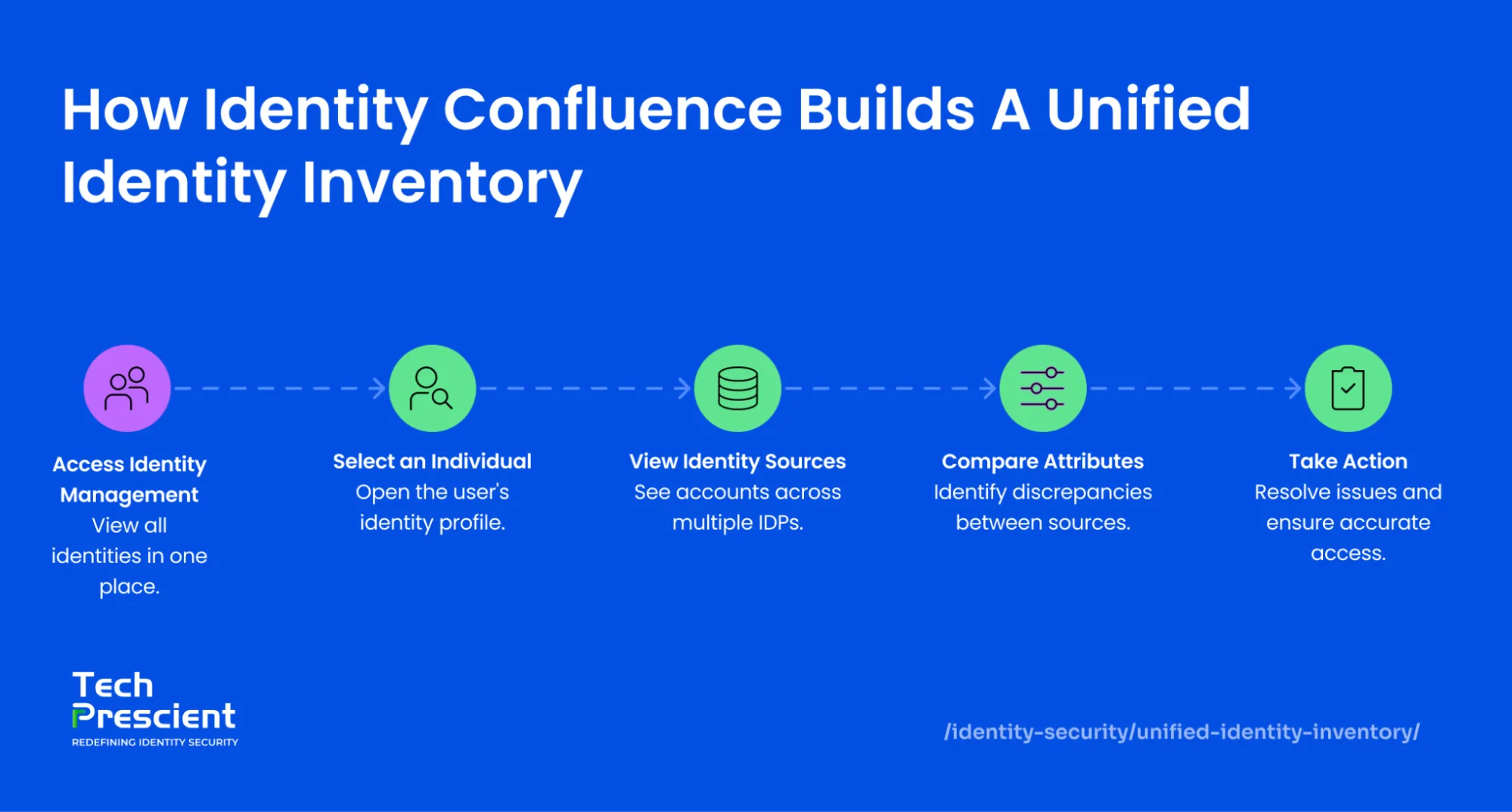
1. Accessing Identity Management
To view the consolidated identity inventory, navigate to:
Identity Life Cycle → Identity Management
This section displays a centralized list of identities collected from connected identity sources.
The identity inventory provides the following information for each individual:
- Name
- Identity
- Source
- Job Title
- Manager
- Department
- Business Roles
- Groups
- Risk Score
- Identity Status
This gives administrators a consolidated view of employees and their associated identity information without having to navigate between individual identity providers.
2. Viewing Individual Identity Details
Administrators can select an individual from the identity inventory to view their detailed identity information.
For example, selecting Aarush opens his identity profile, which includes:
- Identity Source: The system from which the identity information originates.
- Additional User Attributes: Extended attributes associated with the individual.
- IDP Attributes Change History: A record of changes made to identity provider attributes.
The identity source information helps administrators understand where an employee's identity data originates and which connected systems maintain their accounts.
3. Identifying Primary and Secondary Identities
In many enterprises, employees require access to multiple identity providers based on their job responsibilities and application requirements.
For example, an organization may use Microsoft Entra ID to access Microsoft 365 applications, Okta to access other enterprise applications, and AWS IAM Identity Center to manage access to AWS accounts and resources. When these identity systems are managed independently, it becomes challenging to maintain a unified view of the employee’s identity, attributes, roles, and access privileges across the organization.
In such cases, the same individual may have identity records in both systems.
Identity Confluence supports this scenario by associating the corresponding identity records with the same individual. A unique email address is required across the primary and secondary identity records to establish the association.
When both identity records are available and matched, the system identifies the additional record as a secondary user.
4. Comparing Identity Provider Attributes
When an individual has matched identity records across two identity providers, Identity Confluence provides an identity source comparison.
For example, consider Aarush, who has accounts in both Microsoft Entra ID and Okta.
When an administrator opens his identity profile, the Identity Source section displays a comparison of information from both providers.
This comparison helps administrators identify discrepancies between the two identity sources, including differences in the employee's attributes.
For instance:
- Which groups Aarush belongs to in Entra ID.
- Which groups Aarush belongs to in Okta.
- Differences in the attributes maintained by both providers.
- Variations in the identity information available across the two sources.
By presenting information from both IDPs, administrators can identify inconsistencies and understand how an individual's identity and associated access differ across connected systems.
5. Handling Identities Available in Only One Source
Not every employee will have accounts across multiple identity providers.
For example, if Aarush has an account only in Microsoft Entra ID and no corresponding account in Okta, Identity Confluence displays only the available identity record.
In this scenario:
- No secondary user is associated with the identity.
- No identity source comparison is displayed.
- The administrator can view the available identity information from the single connected source.
The comparison functionality is therefore available only when the individual has matched records across multiple identity providers.
Example: Reviewing a User with Access in Two IDPs
Consider an organization where Aarush works on AWS provisioning and also needs access to other products. His Entra ID account supports the first, and his Okta account supports the second.
The security team wants to confirm what he holds across both systems.
With Identity Confluence, the administrator can:
- Log in and navigate to Identity Life Cycle → Identity Management.
- Locate Aarush in the identity list.
- Review his job title, manager, department, business roles, groups, risk score, and identity status.
- Open his profile to view the identity source, additional user attributes, and IDP attributes change history.
- Review the identity source comparison for differences between Entra ID and Okta.
- Compare the groups and attributes he holds in each IDP.
The administrator gets one identity and both sources in a single view, with no separate investigation in each system.
How Identity Confluence Brings It Together
Identity Confluence builds its unified identity inventory by consolidating identities from connected sources into a single list, attaching source and governance attributes to each record, and linking primary and secondary records through a unique email address.
This enables organizations to:
- Maintain one inventory of identities across connected sources.
- See where each identity originated.
- Review job title, manager, department, business roles, groups, risk score, and status in one place.
- Identify primary and secondary identity records for the same person.
- Compare attributes and groups when matched records exist across IDPs.
Instead of reconciling records across systems, administrators work from a single, consistent view of each person.
Next Steps
Governance decisions are only as reliable as the identity data behind them. Access reviews, risk scoring, and deprovisioning all start with knowing who a person is and what that person holds.
With Identity Confluence, the Identity Management view brings identities from different IDPs into one inventory, highlights discrepancies, and links primary and secondary records through a unique email address.
The objective is simple: one person, one identity, with every source visible in a single view.


GET A PERSONALIZED DEMO
See Identity Confluence in Action
“One platform to govern identities, automate access decisions, and prove compliance; across every app, user, and system in your environment.”



Murli Ramsunder
Senior Architect, Vonage