
Onboarding Applications in Days, Not Months
Last Updated date: October 11, 2026
On this page
See Tech Prescient in Action
Automate access, reduce risk, and stay audit-ready
Every identity governance program runs on one assumption: that the applications it governs are actually inside the platform. The faster you can get an application connected, configured, and governed, the faster the rest of the program (access reviews, certifications, ownership, risk scoring) starts working on it.
That is where most platforms lose months. Application onboarding in traditional IGA setups means custom integration work, connector builds, scoping calls, and back-and-forth with the vendor. By the time the application is live in the governance program, the access landscape has already shifted.
The cost of this delay is visible. Today's enterprises run around 305 SaaS applications and add another dozen each month on average.
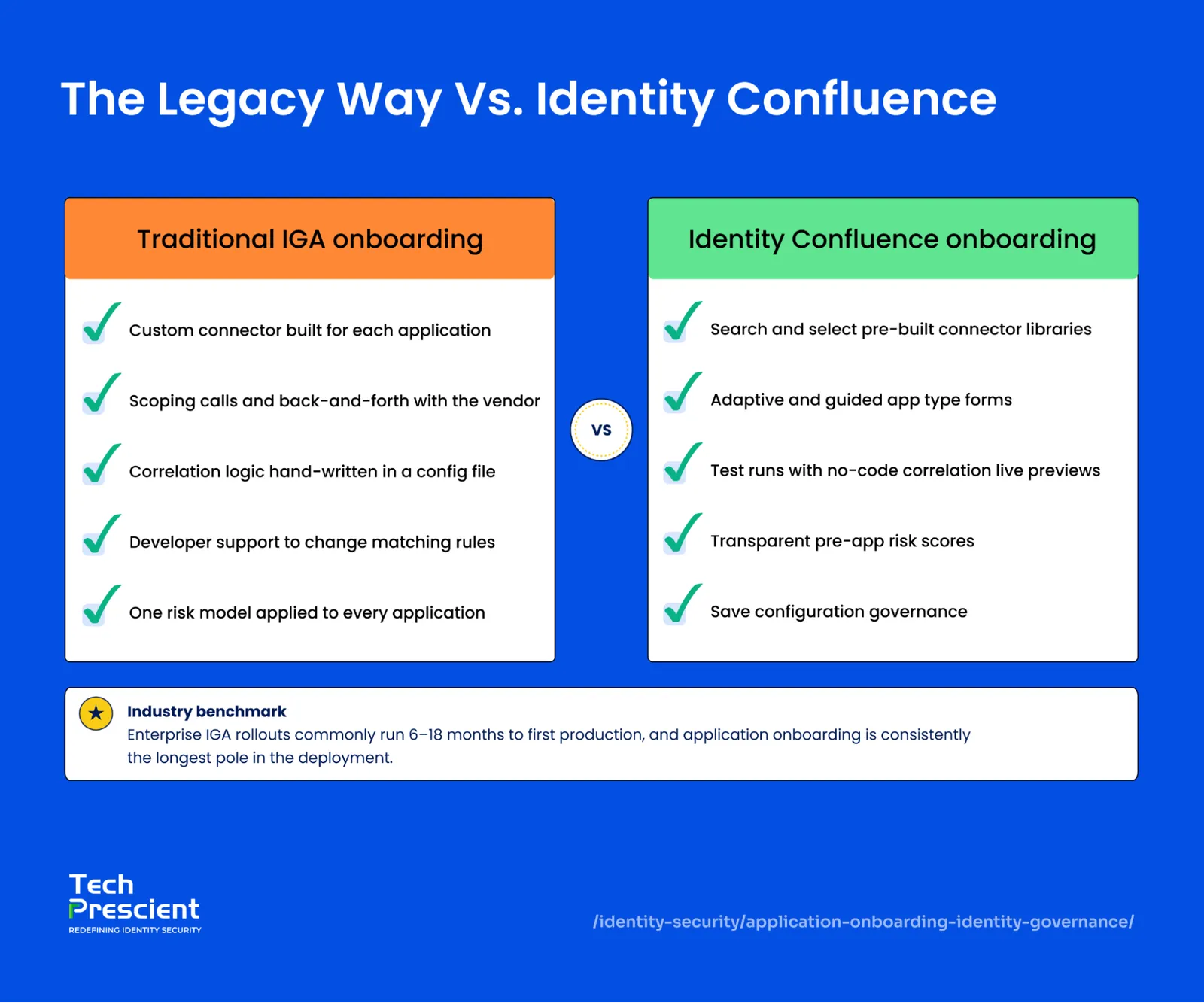
Enterprise IGA rollouts already run 6 to 18 months to reach first production, and application onboarding is the longest stage of all.
Identity Confluence compresses that cycle. Pre-built connectors, a no-code correlation setup, and per-application risk scoring replace custom integration work with a guided configuration workflow, with the entire governance framework available the moment configuration is saved.
TL;DR
- Identity Confluence ships with a built-in connector library covering identity providers, SaaS, cloud platforms, HR systems, and RPA tools
- Configuration is a guided form, not a custom build, with fields adapting to the application type
- Identity correlation is configured through a guided pipeline with a live preview, not a hand-written config file
- Risk scoring is set per application using a transparent, multiplier-based formula
- Connection status appears directly on the Applications dashboard, with Connected, Failed, and Total counters visible at a glance
Why Does Application Onboarding Slow Governance Down?
In identity governance, application onboarding means connecting an application to the IGA platform to govern its accounts. Until that connection is made, that application will remain outside the IGA platform's reviews, certifications, and risk scores.
The longer an application sits outside the governance program, the bigger the gap between what your platform can prove and what auditors expect to see. Service accounts get created. Permissions drift. Access reviews skip the application entirely because it has not been onboarded yet.
The slowdown usually traces back to three things: custom integration work that eats weeks per application, correlation logic that is too rigid to change without developer support, and a risk model that scores every application the same way, so the platform cannot tell a low-risk reporting tool from a high-risk admin console.
How Identity Confluence Onboards Applications
None of these is inevitable. Identity Confluence removes each one, a ready-made connector instead of a custom build, on-screen correlation instead of a config file, and a risk formula tuned to each application instead of a single model for all of them.
A Pre-Built Connector Library
Onboarding starts from a built-in catalog of pre-built connectors. Identity providers, major SaaS platforms, cloud environments, HR systems, security tools, and RPA frameworks are all represented. Admins search the catalog, select the application, and move directly to configuration. No custom development cycle. No waiting on a connector build.
That changes the starting point. The connector already exists, the integration is supported, and setup happens through a guided form.
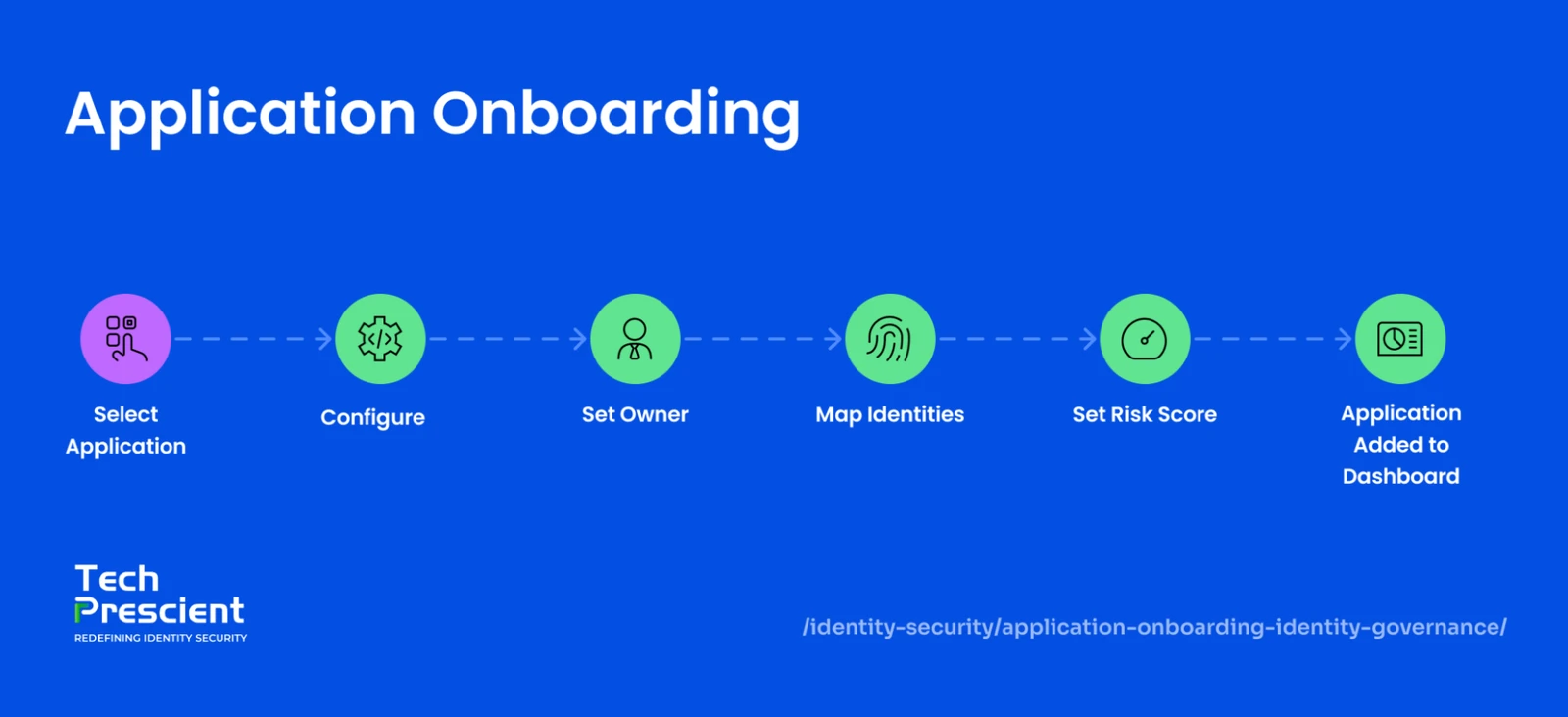
Configuration That Adapts to the Application
Every application has its own configuration screen with two tabs: Configuration and Risk Scoring.
The Configuration tab handles the standard onboarding fields: application name, description (auto-generated based on selections, editable), tags, application criticality, and the credentials needed to authenticate against the target system. Application owners are assigned here, too, so the application has a named accountable person from day one.
What changes is the credential section. A SaaS application like Grafana asks for a credential type, username, and password. An enterprise application like Atlassian asks for a user provisioning API token, an admin username, and an API token. An RPA tool like Agentic RPA Playwright introduces a custom metadata builder where admins define their own sections and fields for identity mapping. The form adapts to what the application actually needs.
The configuration screen also carries a configuration guide link, opening contextual documentation for that specific connector.
Identity Correlation Without Custom Code
Once an application is connected, Identity Confluence needs to know which account inside it belongs to which person. An account labeled j.smith in one system and john.smith@company.com in another may be the same individual, and the platform has to recognize that.
Traditionally, this matching logic is written by hand in a configuration file. Identity Confluence handles it on screen instead. The admin sets up the rules through a guided panel, cleaning up identifiers where formats differ and defining how accounts line up with known identities. A preview shows the setup as it is built, and a test option runs the rules against real data before anything is saved.
The matching logic is the same; it is set up and verified in the interface instead of written as code.
Onboarding is step 1. What you do next decides whether access stays clean.
Get the Provisioning & Deprovisioning Playbook to see how identity teams keep joiner, mover, and leaver access under control.
Risk Scoring Configured Per Application
The Risk Scoring tab exposes the account risk formula directly. Every multiplier in the formula is configurable: application risk tier, privileged access, PII access, identity type, user type, and NHI control category. The formula sits at the top of the screen, so admins know exactly how the score is calculated.
A score summary panel updates as rules are added, showing the maximum and minimum possible scores for the configuration. Risk scoring is configured per application, so a low-risk reporting tool and a high-risk admin console are not scored the same way.
For non-human identities, an additional layer of multipliers applies based on the type of account: application accounts, API integration accounts, service accounts, and machine identities each carry their own weight.
Non-human identities now outnumber human ones many times over - Palo Alto Networks' 2026 Identity Security Landscape puts the ratio at 109 to 1 - and a single service account often holds more access than the person who created it.
What Onboarding Produces
The moment the configuration is saved, the application enters the governance program. It appears on the applications dashboard with its connection status, named owner, and risk score visible. The Connected, Failed, and Total Applications counters update automatically. From here, access reviews, certifications, ownership succession, and reconciliation all run on it.
For applications without a direct integration, Identity Confluence supports a disconnected application workflow using CSV-based user lists, so legacy systems enter the same governance framework even without a connector.
What Comes Next
Application onboarding is the entry point into the rest of identity governance. Discovery, access reviews, certification, and ownership all run on what onboarding has connected.
See how Tech Prescient's Identity Confluence turns application onboarding from a months-long project into a configurable workflow, with pre-built connectors, no-code correlation, and risk scoring tuned to each application. Request a demo to walk through it on your own stack.
FAQs
Applications will go live the moment that their configuration is saved. Since the connectors are pre-built and the correlation is set up directly on screen for administrators, no custom integration is required to onboard the application. Therefore, the onboarding process will take place in days instead of the weeks or months it could take to develop a custom connector for the application.
Yes. The onboarding process begins with a built-in catalog of pre-selected applications in various categories. From this catalog, administrators can select the required application and begin configuring it for use within Identity Confluence. For those without a direct connector, the system also features a CSV-based import to bring the application within Identity Confluence.
It handles correlation through a guided panel instead of a hand-written config file. Admins clean up identifiers where formats differ (for example, j.smith and john.smith@company.com), define how accounts line up with known identities, preview the result, and run a test against real data before saving. The matching logic is the same as a coded approach — it is just built and verified in the interface.
Yes. Identity Confluence supports a disconnected-application workflow using CSV-based user lists, so legacy or niche systems enter the same governance framework even without a direct integration. They appear on the Applications dashboard and take part in access reviews and certifications like any connected app.
Risk scoring is set per application on a dedicated tab. The account-risk formula sits at the top of the screen, and every multiplier - application risk tier, privileged access, PII access, identity type, user type, and NHI control category, is configurable. A summary panel shows the maximum and minimum possible scores as rules change, so a low-risk reporting tool and a high-risk admin console are never scored the same way.
It enters the governance program immediately. The application appears on the Applications dashboard with its connection status, named owner, and risk score, and the Connected, Failed, and Total counters update automatically. From there, access reviews, certifications, ownership succession, and reconciliation all run on it.


GET A PERSONALIZED DEMO
See Identity Confluence in Action
“One platform to govern identities, automate access decisions, and prove compliance; across every app, user, and system in your environment.”



Murli Ramsunder
Senior Architect, Vonage