
User Access Reviews: Process, Best Practices & Checklist
Last Updated date: July 3, 2026
On this page
See Tech Prescient in Action
Automate access, reduce risk, and stay audit-ready
User Access Reviews (UARs) are a formal, periodic process used to verify that users have only the access they need to perform their current job responsibilities, and nothing more. During a user access review, organizations evaluate who has access to systems, applications, and data, confirm whether that access is still required, and remove permissions that are excessive, outdated, or risky.
User access reviews are a foundational identity governance control used to prevent privilege creep, eliminate orphaned accounts, reduce insider risk, and meet compliance requirements such as SOX, SOC 2, ISO 27001, HIPAA, GDPR, and PCI DSS.
Today's business reality is that access doesn't always evolve with users. Employees leave roles, contractors finish assignments, and third parties wrap up engagements, but only a handful of accounts get disabled, or users retain too much privilege. These gaps lead directly to privilege creep, orphaned accounts, and audit failures, creating unnecessary risk. This is precisely where User Access Reviews (UARs) play a critical role.
In this blog, we'll break down what UARs are, why they matter, and provide a step-by-step process that you can use to strengthen your access governance program.
Key Takeaways
- UAR helps prevent unauthorized access and reduce privilege creep.
- It ensures regulatory compliance (SOX, SOC 2, ISO 27001, HIPAA, GDPR, PCI DSS).
- Disables orphaned accounts and closes gaps left from changes in employee roles or leavers.
- Reviews enforce least privilege, improving defenses against insider threats and credential-based attacks.
- Automated review processes improve audit readiness by creating documented, repeatable review workflows.
- UARs leverage automation and IGA tools to reduce manual effort in periodic reviews.
- Streamlined reviews reduce administrative overhead and improve operational efficiency.
What Is a User Access Review? (UAR Definition)
A user access review (UAR) is a structured access governance process that confirms whether a user's permissions still align with their job role, responsibilities, and business justification. The goal is to ensure least privilege by approving required access and revoking access that is no longer necessary.
User access reviews apply to employees, contractors, vendors, service accounts, and privileged users. Reviews typically assess access across applications, systems, cloud platforms, databases, and sensitive data repositories.
At its core, a UAR ensures that only the right users have the access they need, and nothing more. Regular access reviews help organizations identify and remediate misaligned permissions before security or compliance issues occur.
User access reviews serve some major purposes:
- Increasing security by reducing risks related to credential misuse, privilege creep, and orphaned accounts.
- Supporting compliance with regulatory acts that require periodic user access reviews, such as SOX, SOC 2, ISO 27001, HIPAA, and GDPR.
- Ensuring least privilege by making it easier to know that users have the minimum amount of access they need to do their job, not excessive access.
- Cleaning up accounts by identifying unused, duplicate, or unnecessary entitlements that can clutter identity systems and also represent risk.
When conducted periodically, and using a good solution, UARs can mitigate the opportunity for unauthorized access while streamlining audits, improving hygiene, and enabling a stronger identity governance framework.
User Access Review Example
To appreciate the role of user access reviews in practice, consider the common Joiner-Mover-Leaver model found in the real world:
Joiners
When a new employee or contractor joins, they should receive the role-related access that they need and nothing more. A common mistake is over-provisioning access to help employees "hit the ground running".
Movers
Employees who move from one role to another often keep all of their previous access, in addition to the access associated with the new role. This accumulation of access over time, known as privilege creep, creates unnecessary risk.
Leavers
Accounts of former employees, contractors, or partners who have left and remain active in some systems present one of the largest insider threat risks. Accounts may be dormant or, in fact, actively abused by malicious actors.
Conducting a user access review ensures that these scenarios are consistently reviewed; the joiners only receive exactly what they need, movers will have their access appropriately updated in line with their responsibilities, and leavers will have their access revoked in a timely manner across all systems.
User Access Review Checklist
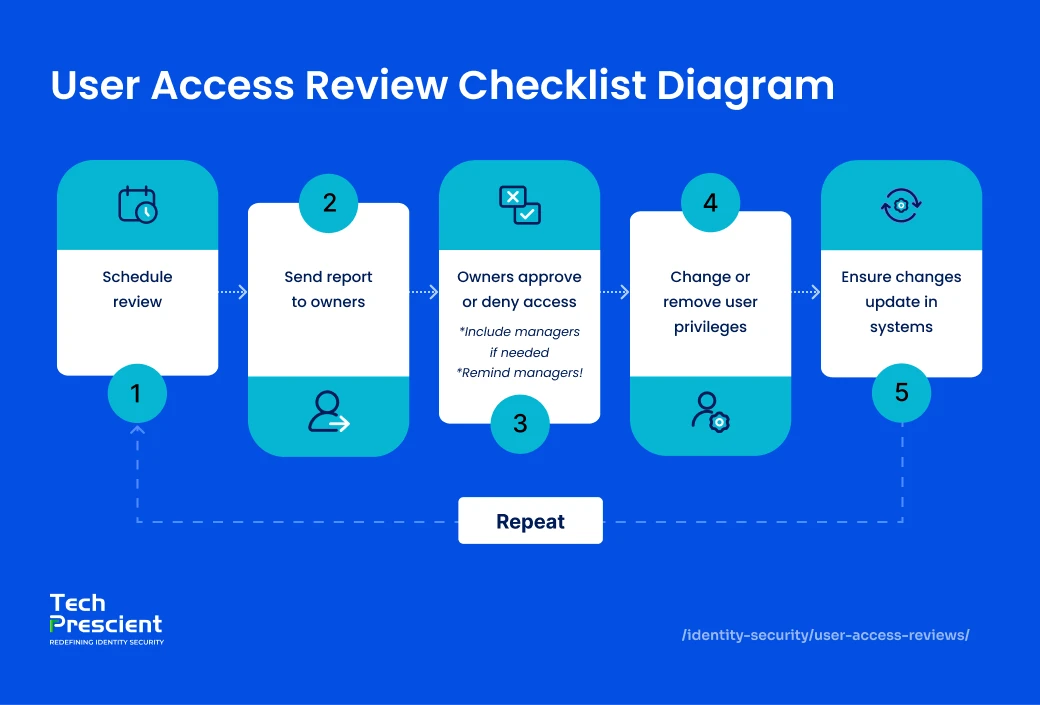
A standard user access review checklist should include the following steps:
- Identify the scope of the review (systems, applications, data, privileged accounts)
- Compile a list of all users and their current access rights
- Validate access against job role, department, and business need
- Identify excessive, unused, or conflicting permissions (SoD violations)
- Approve required access and revoke unnecessary access
- Document reviewer decisions and remediation actions
- Generate audit-ready reports for compliance evidence
This checklist ensures reviews are consistent, repeatable, and defensible during audits.
Plan Your Access Reviews Properly
Avoid reviewer chaos and last-minute audit scrambling
Why are User Access Reviews Important?
User access reviews are more than a simple review activity to be done during an audit; they are the first line of defense to avoid security breaches, compliance failures, and operational inefficiencies. By validating whether users have only the access needed, organizations minimize their risk exposure and maintain better control of their sensitive systems and data.
1. Reduce Security Risks
One of the foremost threats organizations currently encounter is privilege creep, a phenomenon in which employees build access rights over time and do not revoke old ones. If that's not an afterthought, orphaned accounts created by former employees or contractors will provide an opening for malicious insiders or even external attackers.
Regular user access reviews help minimize these risks by ensuring users' access rights are appropriate and revoking permissions that are unnecessary. This proactive cleanup reduces the attack surface and lowers the likelihood of unauthorized access.
2. Ensure Regulatory Compliance
Regulatory compliance with standards like SOX, HIPAA, GDPR, PCI DSS, SOC 2, and ISO 27001 is not optional but a legal and business necessity. Each framework sets expectations on who can access sensitive data and how often that access must be reviewed:
- SOX requires quarterly checks to protect the integrity of financial reporting.
- HIPAA mandates strict access reviews to safeguard patient health information.
- GDPR demands ongoing proof that personal data is only accessed by authorized users.
- PCI DSS enforces access reviews every six months to secure cardholder data.
- SOC 2 requires SaaS providers to demonstrate quarterly access governance.
- ISO 27001, though not a law, is a widely recognized certification where UARs serve as evidence of strong security controls.
Failing to meet these standards can result in audit findings, regulatory penalties, and reputational risk. Regular user access reviews provide the evidence you need to pass audits, reduce risk, and prove that access is tightly controlled.
3. Improve Operational Efficiency
Manual access reviews can be overwhelming, time-consuming, and subject to human error. Organizations can reduce the administrative burden significantly just by leveraging automation and centralizing access data. With the right identity governance solutions, review teams can quickly identify discrepancies between roles and access rights, take corrective actions, and generate reports ready for audit in minutes. This saves time for IT and compliance teams while reducing disruption to business operations.
How Often Should User Access Reviews Be Performed?
User access review frequency depends on regulatory requirements, data sensitivity, and risk level:
- SOC 2: Access reviews are typically performed quarterly, especially for systems handling customer data.
- SOX: Financial system access must be reviewed quarterly to ensure integrity of financial reporting.
- ISO 27001: Requires regular access reviews, commonly conducted quarterly or semi-annually.
- PCI DSS: Mandates access reviews at least every six months.
- HIPAA: Requires ongoing and periodic reviews, particularly for access to ePHI.
High-risk systems, privileged accounts, and third-party access should be reviewed more frequently than standard user access.
Best Practice
If access can impact money, health data, or customer trust → review quarterly.
If it can impact operations → review at least bi-annually.
Types of User Access Reviews
Not all access reviews are the same. Organizations follow different review methodologies based on regulatory responsibilities, risk tolerances, level of operational maturity, etc. However, generally, user access reviews can be categorized into three types: periodic, event-based, and continuous.
1. Periodic Reviews
These are the most common types of user access review. Organizations typically perform periodic reviews quarterly, every six months, or annually. The benefit of periodic reviews is that they provide a regularized opportunity to retrospectively review all user accounts and permissions against some type of defined policy. Periodic Reviews are advantageous in providing evidence of regular oversight where compliance regulations require organizations to show compliance. However, as periodic reviews happen at a defined regularity, you do not detect risks in between periodic reviews.
2. Event-Driven Reviews
Event-driven reviews are initiated as a result of changes to user status, such as a role change, a department transfer, or termination. In contrast to periodic reviews, these reviews are more specific and guarantee that any access is granted or taken away quickly when someone changes roles. This would mitigate the possibility of maintaining excessive permissions over time and maintaining least privilege access in a timely manner.
3. Continuous Reviews
The most advanced model is continuous access review facilitated by automation and identity governance tools. Continuous reviews do not wait for a scheduled review or user change event, but use behavioral triggers, anomaly detection, and automated policy enforcement to continuously validate access. While more advanced tools are required for this strategy, this will offer the most protection against privilege creep and other insider threats.
The User Access Review Process (Step-by-Step)
The user access review process follows a structured sequence to ensure access decisions are consistent, auditable, and aligned with security and compliance requirements. Below is a simplified, step-by-step approach used by most organizations.
Define Scope & Stakeholders
The first step is to understand what systems, applications, and user groups will be included in the review. This includes everything from cloud-based services and SaaS applications to on-premise servers and databases. The goal is to create a comprehensive list of assets that require regular access reviews, ensuring that sensitive data across all platforms is adequately protected. Some organizations may want to assess access for all employees, whereas others may want to include only privileged accounts or high-risk systems. At this point, the organization should have a solid understanding of who its stakeholders are, such as managers, IT administrators, compliance officers, and auditors, who will be part of or oversee this process.
Collect & Centralize Access Data
Once the scope is well defined, the second step involves collecting access data from various systems. This usually means accessing multiple systems, including your HR records, IAM platform, Active Directory, on-prem systems, and cloud-based applications. By combining all of this information into a single view, reviewers can eliminate silos of information and understand who has access to what.
Determine Review Frequency
Prior to reviewing permissions, organizations must determine how often user access should be reviewed. The frequency of user access review is dependent on the sensitivity of the data reviewed and/or if regulatory requirements must be followed. For example, reviews on public cloud resources could be annual (if they are not sensitive), or critical financial or healthcare systems may have to be reviewed quarterly. Review scopes should also include local accounts, third-party access, and non-human identities such as service and machine accounts.
Review Permissions vs. Roles
Reviewers can now examine the access data for compliance against employee roles or functions. This will show misalignments such as:
- Users granted excessive privileges beyond their job functions
- Accounts are still active for former employees or contractors
- Permissions that no longer align with job functions
At this stage, compliance principles such as least privilege and segregation of duties (SoD) enter the conversation.
Revoke or Adjust Access
Based on the findings, reviewers approve the access as-is or recommend changes. In the case of misaligned permissions, this means terminating unnecessary access entirely or changing the access entitlements so as to more closely align their permissions with the requirements of the job. The amount of manual work in this process can be substantially lessened, and the remediation can be done in a timely fashion, while fully automating the process through IGA (Identity Governance and Administration) tools.
Document & Report
Regardless of the approval or changes specified for the individual, organizations need to document their review decisions, and the decisions need to be made into audit-ready reports. Each of these records will serve two different functions.
- To demonstrate compliance with regulations that vary from SOX (Sarbanes-Oxley), HIPAA (Health Insurance Portability and Accountability Act), ISO 27001, etc.
- Continually assess and improve the repeat patterns of access issues to continuously revise and enhance policies.
Remove Unnecessary Access
When reviews uncover unnecessary or outdated permissions, corrective action should be taken promptly. This may include removing access for terminated employees, contractors, or users no longer performing relevant job duties. Or perhaps the access has been adjusted to smaller and/or more manageable levels to match their current job functions.
Re-Run & Validate Access Lists
The final step involves generating a new set of access reports to verify that user permissions have been updated as intended. This review ensures that the remedial actions were performed, and it improves both security and compliance.
Best Practices for Effective Reviews
Even with a process established, user access reviews can still be entangled in inefficiencies, inconsistency, or human error. A well-established best practice will validate that reviews are compliant and efficient, while reducing pressure from your IT and business teams.
1. Automate Where Possible
In large companies, it can be tough not to be overwhelmed by manual reviews. Automate the process with IGA tools to aggregate access data, identify anomalies, and streamline and approve workflows. Tools such as Identity Confluence will minimize repetitiveness and keep the reviews on schedule, reducing resource waste.
2. Apply the Principle of Least Privilege
Reviews should evaluate not only whether access is legitimate, but whether it is still necessary. The principle of least privilege ensures users are left with only the access they need to perform their jobs. This can be a great way to minimize your attack surface, prevent privilege creep, and help with your overall security posture.
3. Maintain an Access Review Checklist
Consistency is key. A good checklist allows reviewers to have a defined process to follow (and reduces the chance of missing something critical). A checklist should include things like user roles, business justification, SoD conflicts, approval workflows, etc. A checklist also helps keep audits much simpler.
4. Train Reviewers Regularly
Most managers and reviewers do not have a strong understanding of IAM or compliance requirements. Regular training sessions help them identify suspicious access patterns, understand risks, and make decisions based on a sound foundation. Just as regularly trained reviewers will be more engaged in the process, training also lessens the pressure they may have to simply approve requests to save time when they didn't understand what they were approving.
5. Keep an Audit Trail
Every access review should create a clear, auditable record of decisions, rationales, and actions. Audit trails not only fulfil regulatory needs, but also serve internal security teams. In case of an incident, audit trails will be very useful as a proactive defense demonstrating that due diligence was followed.
Common Challenges and How to Overcome Them
Even organizations with mature IAM programs may struggle with the execution of user access reviews due to scale, complexity, and lack of visibility. When organizations proactively address challenges, they can ensure reviews are meaningful versus being merely compliance-driven.
1. Time-consumption and Resource-consumption
User access reviews can be very time-consuming, particularly if they are done manually across hundreds or thousands of users (and thousands of distinct permissions). Reviewer fatigue can lead to rushed or inconsistent approvals.
How to overcome: Automation through IGA solutions, which can prepopulate with access data, make it easy to see anomalies, and make recommendations. This will reduce manual effort and allow reviewers to focus their time on higher-risk cases.
2. Inconsistent systems and siloed data
A lot of enterprises today have multiple applications, cloud platforms, and some legacy systems, each with its own access model. Without centralized visibility, access reviews become disjointed and inconsistent.
How to overcome: Consider integrating systems into a single governance platform that centralizes access data. The centralized view will make it significantly easier to accurately see overprovisioning, identify privilege creep, and maintain consistent review policies across the organization.
3. Lack of visibility toward user roles and permissions
Reviewers find it difficult to approve or deny a permission because the role it belongs to is not clear, as there are old definitions between roles, misaligned roles, etc. Reviewers may unintentionally rubber-stamp approvals, resulting in over-permissiveness.
How to overcome: Keep access inventories up-to-date as well as role-based policies that are clearly defined. Provide reviewers with contextual information such as who else has similar access and why. This will lead to better decision-making and less exposure risk.
Compliance Standards That Require UARs
User access reviews constitute more than a security best practice. They are a compliance obligation in many of our global regulations and industry standards. If your organization is not regularly performing UARs, it may expose your organization to findings in an audit, fines, and legal liability.

SOX (Sarbanes-Oxley Act)
SOX applies to all U.S. public companies and international firms registered with the SEC. It requires strict internal controls for financial reporting, and Section 404 mandates that access to financial systems is tightly managed. Regular UARs demonstrate that only authorized users can view or modify financial data, reducing fraud risk and supporting audit requirements.
SOC 2
Organizations looking for SOC 2 attestation must demonstrate they have strong access controls around sensitive customer data. Periodic UARs are the proof that access is reasonable and adheres to the principle of least privilege.
ISO 27001
The global security framework explicitly requires organizations to review user rights at regular intervals. Auditors will need to see a documented access review process, as well as documented evidence of remediations and exceptions.
HIPAA
Healthcare organizations must limit access to electronic protected health information (ePHI). User access review is vital for fulfilling some of HIPAA's access control and audit requirements.
GDPR
The EU's General Data Protection Regulation (GDPR) requires the organization to be able to show that it has implemented technical and organizational measures to secure personal data, and access reviews provide evidence of accountability and prevention of unauthorized access.
PCI DSS
PCI DSS governs all organizations handling payment card data. To protect cardholder environments, access must be restricted to individuals with a valid business need. Requirement 8.1.6 requires reviewing user access rights at least every six months. Performing UARs ensures compliance while minimizing the risk of data breaches and fraudulent activity.
User Access Review Tools & Templates
User access reviews become difficult to manage at scale when performed manually using spreadsheets or email approvals. User access review software automates access collection, review workflows, approvals, remediation, and reporting, significantly reducing effort while improving accuracy and audit readiness.
Modern Identity Governance and Administration (IGA) platforms centralize access data across applications, cloud environments, and directories, enabling efficient, policy-driven access reviews.
User Access Review Tools
Modern Identity Governance and Administration (IGA) platforms eliminate the time traditional access reviews take by centralizing access information and automating some or all of the workflows. When evaluating tools, make sure it has some key capabilities, such as:
- Automated reminders and approvals so that fatigue and missed deadlines are not part of your review process.
- Role-based access mapping contrasts what permissions a user has against defined job functions.
- Ability for integrations with HR and IT systems so that reviews can happen on an event-driven basis (i.e., role changes, terminations).
- Audit-ready reports that will help to prove compliance during regulatory inspections.
Common categories of tools include:
- IGA solutions (like Okta, Tech Prescient)
- Access review specific platforms
- Privileged access management (PAM) tools, which some organizations may deploy to manage high-risk accounts.
User Access Review Templates
Templates provide structure and consistency across reviews. A well-designed template will show:
- Scope of the review (application, system, privileged accounts).
- Reviewer roles and responsibilities (manager, system owner, compliance officer).
- Access data fields (user, role, permissions, justification).
- Decision outcomes (approved, revoked, escalated).
- Documentation checklist for auditability.
Many organizations create access review templates in Excel or PDF, but if you're looking for scalability long-term, the best option is to embed those templates into your Identity Governance and Administration platform as templates, so they can be standardized and enforced.

Pro tip
Combine tools with templates. Automation handles the heavy lifting, while templates ensure the review process is structured, consistent, and audit-ready.
Final Thoughts
User access reviews have moved from simply being a compliance activity to being a frontline defense against a data breach, insider threat, and abuse of privilege. They confirm that users have only as much access as they need, and therefore, close one of the most common security gaps - over-permissioned users and orphaned accounts.
When user access reviews are automated and combined with a robust identity governance program, they become much more than an auditing exercise. Organizations can enforce least privilege continuously, decrease administrative overhead, as well as have an all-around more effective identity governance program. Whether that means meeting regulatory standards for SOX or HIPAA, or just trying to exert more control over sensitive systems, planned and scheduled user access reviews are a core component of a mature cybersecurity strategy.
In the long run, organizations that routinely put effort into user access reviews are not only compliant but also have a defensive posture to be proactive about - having the ability to ensure that access always remains appropriate, auditable, and secure.
Run Audit Ready Access Reviews
Track reviewers, remediation, and evidence in one place
FAQs
A user access review is a periodic process used to verify that users have only the access required for their current job role. It helps organizations enforce least privilege, reduce security risk, and meet compliance requirements.
Most organizations conduct user access reviews quarterly or semi-annually, depending on regulatory requirements and data sensitivity. SOC 2 and SOX typically require quarterly reviews, while PCI DSS requires reviews every six months.
A user access review checklist includes scope definition, access validation, identification of excessive permissions, remediation actions, reviewer approvals, and audit documentation.
Identity Governance and Administration (IGA) tools are commonly used to automate user access reviews. These tools collect access data, manage approval workflows, enforce policies, and generate audit-ready reports.


GET A PERSONALIZED DEMO
See Identity Confluence in Action
“One platform to govern identities, automate access decisions, and prove compliance; across every app, user, and system in your environment.”



Murli Ramsunder
Senior Architect, Vonage