
Role Mining and AI Role Assignment: How Identity Confluence Recommends Business Roles
Last Updated date: October 11, 2026
On this page
See Tech Prescient in Action
Automate access, reduce risk, and stay audit-ready
In identity governance, an IT role is the access a user holds inside a single application, like a Jira developer role, etc. The Business Role is a single, named role that bundles together all the IT roles a particular job function needs across multiple applications. Assigning a business role to a user gives them the full access bundle in one structured action, instead of granting each underlying IT role one by one.
The challenge is figuring out which business role fits which user. SailPoint's 2025-26 Horizons of Identity Security report, produced with McKinsey across 375 identity leaders, found 63% of organizations still sit in the earliest stages of identity maturity, running on manual provisioning and fragmented tools.
With dozens of configured business roles and dozens of IT roles per user, the right match is rarely obvious at a glance.
AI role recommendation in Identity Confluence handles that decision. The AI engine reviews each user's current access, compares it against every configured business role, and surfaces the closest matches directly inside the user listing screen. Admins no longer search through every business role to find the right fit as the system pre-shortlists.
TL;DR
- The AI engine analyzes every user's current access and surfaces the closest matching business roles, ranked by match score.
- Each recommendation includes a Match label, a score from 0 to 1, a confidence band, and a clear rationale.
- The top two recommendations per user appear in both the user listing screen and the user detail page.
- Recommendations are framed around consolidation, bringing direct IT role assignments under structured business roles.
- Admins act on a recommendation in one click, with full context available before deciding.
Why Does Manual Business Role Assignment Slow Teams Down?
In a mature identity environment, a single user can hold IT roles across multiple applications, with different access scopes in each one. Each of those direct assignments is governable on its own, but together they create a fragmented access picture that's harder to certify, review, and audit.
Business roles solve this by bundling the IT roles, a typical job function needed, into a single, named role. Once a business role is assigned, the user inherits everything inside it, and reviews, certifications, and succession operate on that one role instead of every individual IT role underneath.
The problem occurs in the moment of the assignment itself. With dozens of configured business roles and dozens of IT roles per user, finding the right match is slow and error-prone.
How Does AI Role Recommendation Work in Identity Confluence?
AI role recommendation is the AI-driven access governance layer in Tech Prescient's Identity Confluence that helps admins assign the right business role to the right user faster. Instead of searching manually through every configured business role, admins see the system's top two suggestions surfaced inline on every user record.
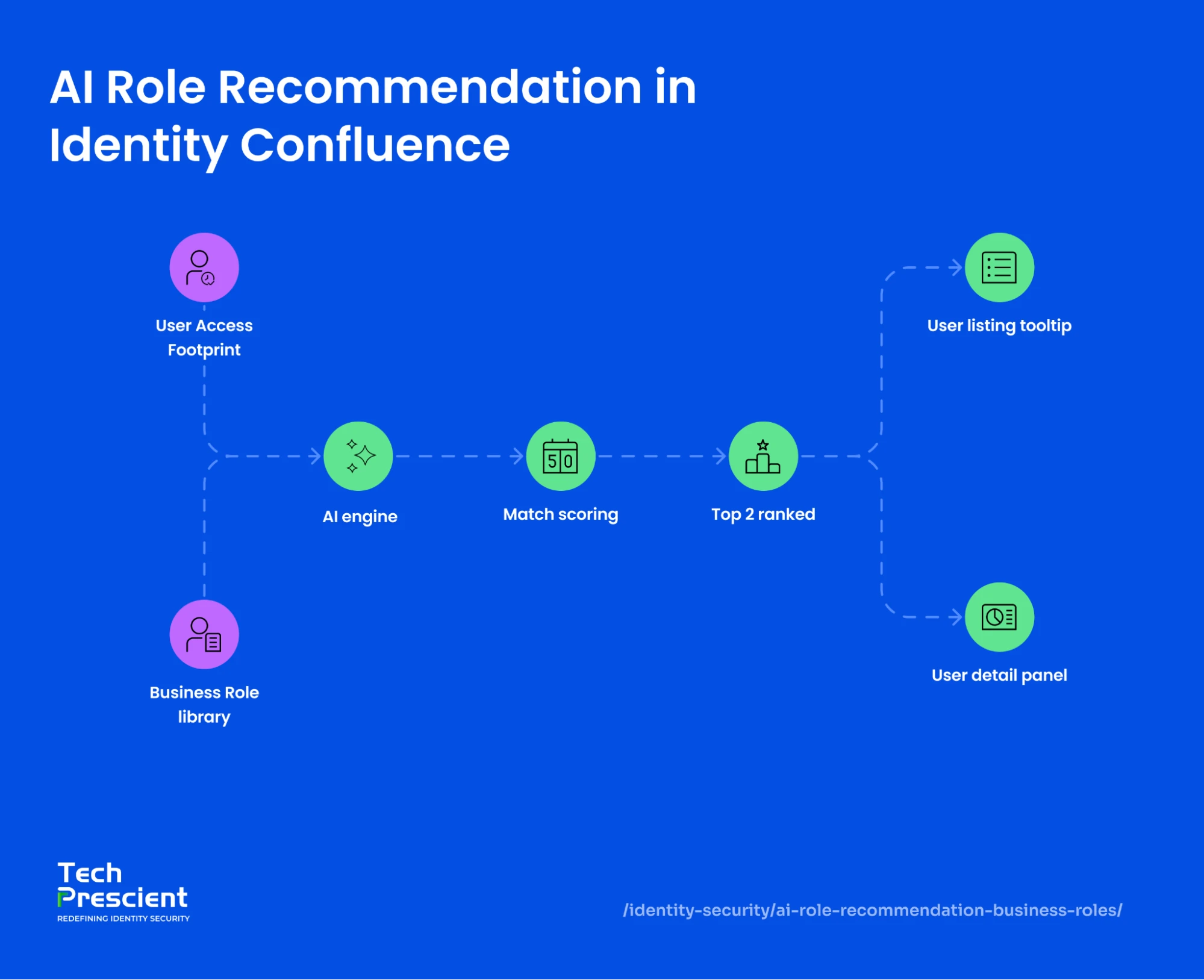
The engine grounds each suggestion in the user's actual access. Every recommendation links back to a specific IT role the user already holds, so admins always know why a business role was surfaced.
How Are the Recommendations Generated?
The AI engine reviews each user's current access footprint, including their IT role assignments and entitlements, and compares it against every active business role configured in the tenant. Recommended business roles are produced based on role overlap and access patterns. The closer the alignment between what the user already has and what a business role bundles, the higher the recommendation score.
Only the top two recommendations per user have surfaced. This keeps admins focused on high-signal matches rather than scrolling through long lists.
What Does Each Recommendation Show?
Every recommendation surfaces four pieces of information:
- Match label, either "Perfect Match" or "Partial Match"
- Score, between 0 and 1, displayed as a percentage in the user listing and as a decimal in the detail panel
- Confidence band, High or Low, derived from the score
- Rationale, naming the IT role the recommendation is anchored to (for example, "Will Consolidate IT Roles - Test Atlassian - 1")
A score of 1.00 with a "Perfect Match" label and high confidence indicates the strongest possible fit. A score of 0.40 with a "Partial Match" label and low confidence indicates a weaker but still relevant match.
Every recommendation names the exact IT role behind it. An admin can read that reasoning and check it before acting, rather than trusting a score on its own. Instead of presenting a recommendation in isolation, the system names the exact IT role overlap behind the suggestion, so admins know why it surfaced before deciding.
Where Do the Recommendations Appear?
Recommendations appear in two places, each designed for a different purpose of review.
On the user listing screen, an icon next to each user displays a count of the AI-suggested business roles. Hovering on the icon opens a tooltip showing the top two recommendations with their match labels, confidence bands, and percentage scores. This is built for fast, scan-level review across many users at once.
Application Insight:
The AI engine ranks recommendations by score and surfaces the strongest matches first. Admins can act directly through the Assign Role button or open Details for full context. The system supports the decision but never makes it.
On the user detail page, a dedicated panel called Recommended Business Roles - Based On IT Roles shows the same recommendations in expanded card format. Each card includes the "Match" label, decimal score, the recommended action ("Assign Immediately"), the rationale, and direct buttons to assign a role or open details.
How Does the Consolidation Logic Work?
The rationale frequently shows up as "Will Consolidate IT Roles - [name]." The AI engine identifies cases where a user holds an IT role through a direct assignment, and a configured business role exists that bundles the same IT role. Surfacing this gives admins the chance to govern the access through a structured business role instead of as a standalone direct assignment.
The feature does more than match. It also flags direct assignments a business role could absorb, giving admins a running list of role consolidation opportunities that would otherwise stay buried in the data. Access moves under named roles, where it is easier to review and certify. It's a continuous prompt for business role consolidation, pulling fragmented direct assignments into structured role-based governance, where access is easier to review, certify, and maintain over time.
Is AI role recommendation the same as role mining?
No. Role mining analyzes raw entitlement data to discover and build new candidate roles from scratch, using bottom-up role engineering. AI role recommendation works after roles exist: it matches each user to the business roles already configured in the tenant and scores the fit. The two work together. Mining builds the role library; recommendations keep users mapped to it.
Does the AI assign roles automatically?
No. The engine ranks and recommends; an admin makes the call. Each recommendation shows the score, the confidence band, and the IT role behind it, and the admin assigns the role or opens the full record before deciding. The system supports the decision without making it.
What is a Perfect Match vs. a Partial Match?
A perfect match means the user's access lines up completely with a business role, a score at or near 1.00, with high confidence. A partial match means a real but incomplete overlap, with a lower score and lower confidence. Both appear ranked, strongest first, so admins act on the clearest cases quickly.
How does role recommendation support least privilege and audits?
Fragmented direct assignments are hard to review because each one stands alone. Recommendations pull that access under named business roles, so access reviews and segregation of duties checks run against one role rather than many scattered grants. Fewer standing direct assignments also means less access to overgrant in the first place, which is the point of least privilege.
What Changes for Identity Teams With AI Role Recommendation?
Without AI recommendations, admins search manually through business role libraries to find the right fit for each user. The work is slow, inconsistent, and easy to deprioritize when other tasks pile up.
With AI-driven access governance built into the user listing screen, the closest matches appear automatically. Admins scan, review the rationale, and act, all without leaving the screen they were already on. Business role consolidation opportunities that would have stayed buried now surface at the top of the queue.
The work changes from search to review. Admins no longer hunt through the role library to find a fit; they open the user record, read the shortlist the engine has ranked, and act on it.
Are your business role assignments audit-ready?
Validate whether IAM best practices are enforced across users, applications, and privileged access.
What Comes Next?
AI role recommendation brings structure to one of the most repetitive decisions in identity governance. As the Business Role library grows and user access patterns evolve, the engine continues to surface fresh suggestions, so role assignment keeps pace as access changes, rather than happening only during periodic reviews.
Start a Tech Prescient trial and see role recommendations on your own users - match scores, rationales, and one-click assignment, right where admins already work.


GET A PERSONALIZED DEMO
See Identity Confluence in Action
“One platform to govern identities, automate access decisions, and prove compliance; across every app, user, and system in your environment.”



Murli Ramsunder
Senior Architect, Vonage