
What Is Automated Lifecycle Management?
Last Updated date: May 4, 2026
On this page
See Tech Prescient in Action
Automate access, reduce risk, and stay audit-ready
Automated lifecycle management (ALM) uses policy-driven automation to manage lifecycle events across users, applications, and data, including provisioning, updates, access changes, and deprovisioning, without manual intervention. It ensures that lifecycle events happen consistently, securely, and in compliance with defined policies.
Automated lifecycle management (ALM) addresses a growing enterprise challenge: managing high-volume lifecycle events accurately, securely, and at scale. As organizations expand across cloud platforms, SaaS applications, and hybrid environments, manual lifecycle processes become slow, error-prone, and difficult to govern.
Lifecycle automation replaces these manual handoffs with policy-driven workflows. Whether provisioning user access, updating application permissions, enforcing data retention policies, or revoking access at offboarding, automation ensures the right action happens at the right time, every time.
In identity-centric environments, automated lifecycle management extends Identity Governance and Administration (IGA) by operationalizing governance decisions through automation. It enables organizations to enforce least-privilege access, reduce compliance risk, and maintain audit readiness without increasing operational overhead.
As identities increasingly define the security perimeter, lifecycle automation is a foundational requirement for secure and scalable governance.
Key Takeaways:
- Automated lifecycle management utilises policy-driven automation to manage user, application, and data lifecycle events with minimal manual effort.
- It reduces security and compliance risk by ensuring consistent provisioning, updates, and deprovisioning across systems.
- Lifecycle automation improves audit readiness through built-in logs, approvals, and repeatable workflows.
- In identity-centric environments, ALM strengthens IGA by enforcing least-privilege access and zero-trust principles at scale.
What Is Automated Lifecycle Management?
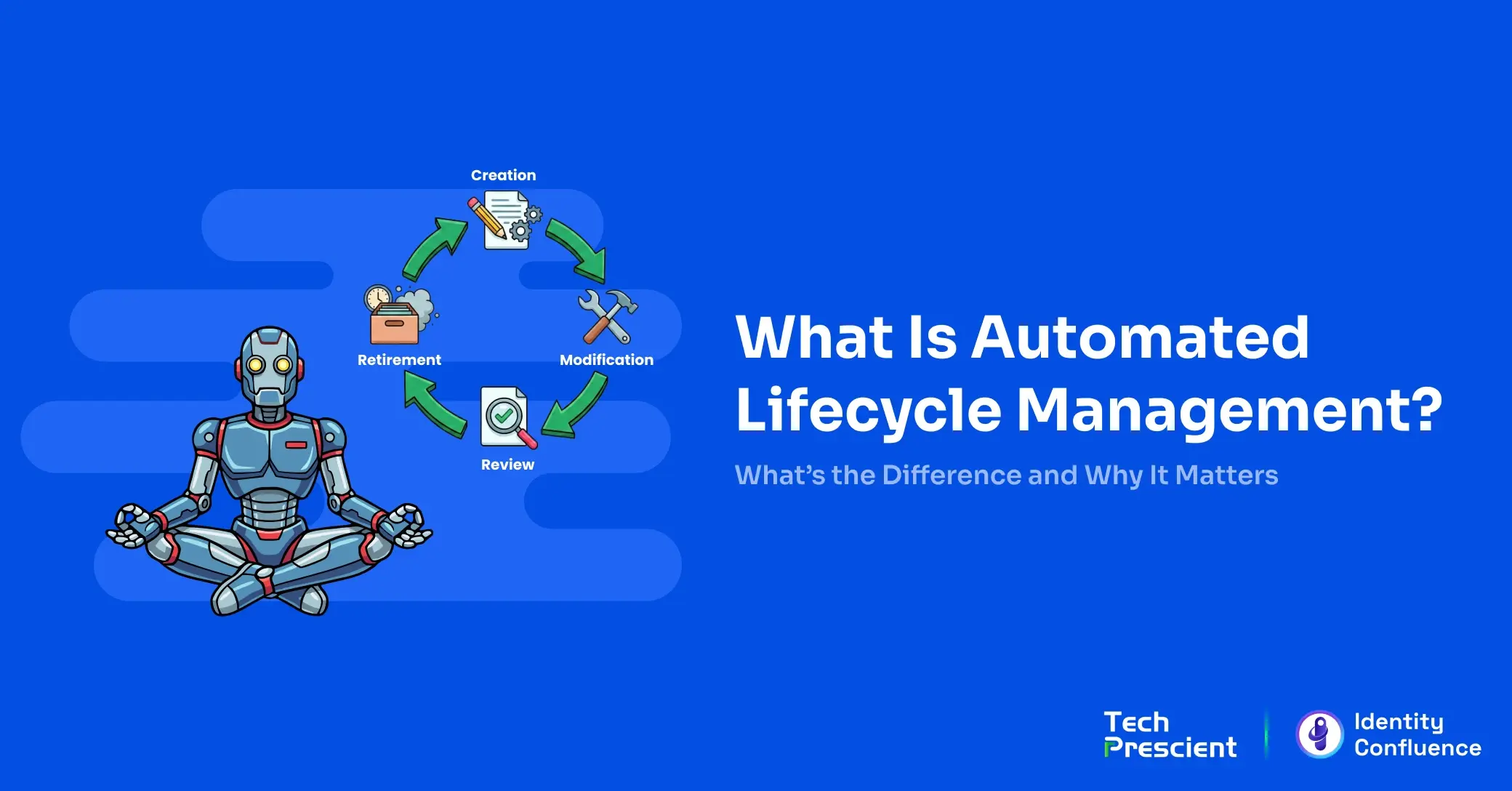
Automated lifecycle management (ALM) refers to the automation of lifecycle events, such as creation, modification, review, and retirement, across users, applications, or data. These actions are executed automatically based on predefined rules, triggers, and policies, rather than manual intervention.
In the context of identity governance, ALM covers everything from provisioning a new employee’s access on day one to automatically updating permissions when their role changes to securely revoking access the moment they leave the organization. ALM is not limited to identities; it also manages software updates, license renewals, and data retention policies across the IT ecosystem.
The goal is simple: improve efficiency, strengthen security, and maintain compliance without adding to your IT team’s workload. By automating these lifecycle events, organizations can:
- Eliminate human error in high-volume processes
- Reduce operational costs
- Ensure consistent policy enforcement across users, applications, and data
- Free up teams to focus on strategic priorities instead of repetitive tasks
Whether it’s ensuring identity automation in your IGA framework, managing application lifecycles, or enforcing data governance rules, ALM turns what was once a manual, error-prone process into a streamlined, policy-driven workflow that works 24/7.
Why Lifecycle Automation Matters in Modern Enterprises
Today’s enterprises juggle a growing mix of on-premises systems, cloud applications, and remote users. With hybrid workforces becoming the norm and compliance demands evolving at record speed, manual lifecycle management simply can’t keep up.
Automation makes governance scalable and sustainable by replacing manual processes with consistent, policy-driven execution. It ensures that every identity, application, and dataset is managed consistently, whether you’re onboarding a new hire, rolling out software updates, or enforcing data retention rules.
The impact is immediate:
- Fewer Errors: Automated processes remove the risk of missed steps or incorrect permissions.
- Consistent Policy Enforcement: Role-based access controls (RBAC), least privilege, and zero-trust policies are applied the same way every time.
- Less IT Friction: No more bottlenecks for access requests or deprovisioning; IT teams can focus on strategy instead of repetitive admin work.
With automated lifecycle management, security risks like lingering access for former employees are eliminated, onboarding becomes seamless, and audit outcomes improve thanks to stronger IT general and application controls. For modern enterprises, automation is a core requirement for secure, compliant, and efficient operations.

Prashant Sail
Technical Architect
Lifecycle Automation Readiness Model
Identify gaps where automation breaks across identity and access
How Does Identity Lifecycle Management Work?
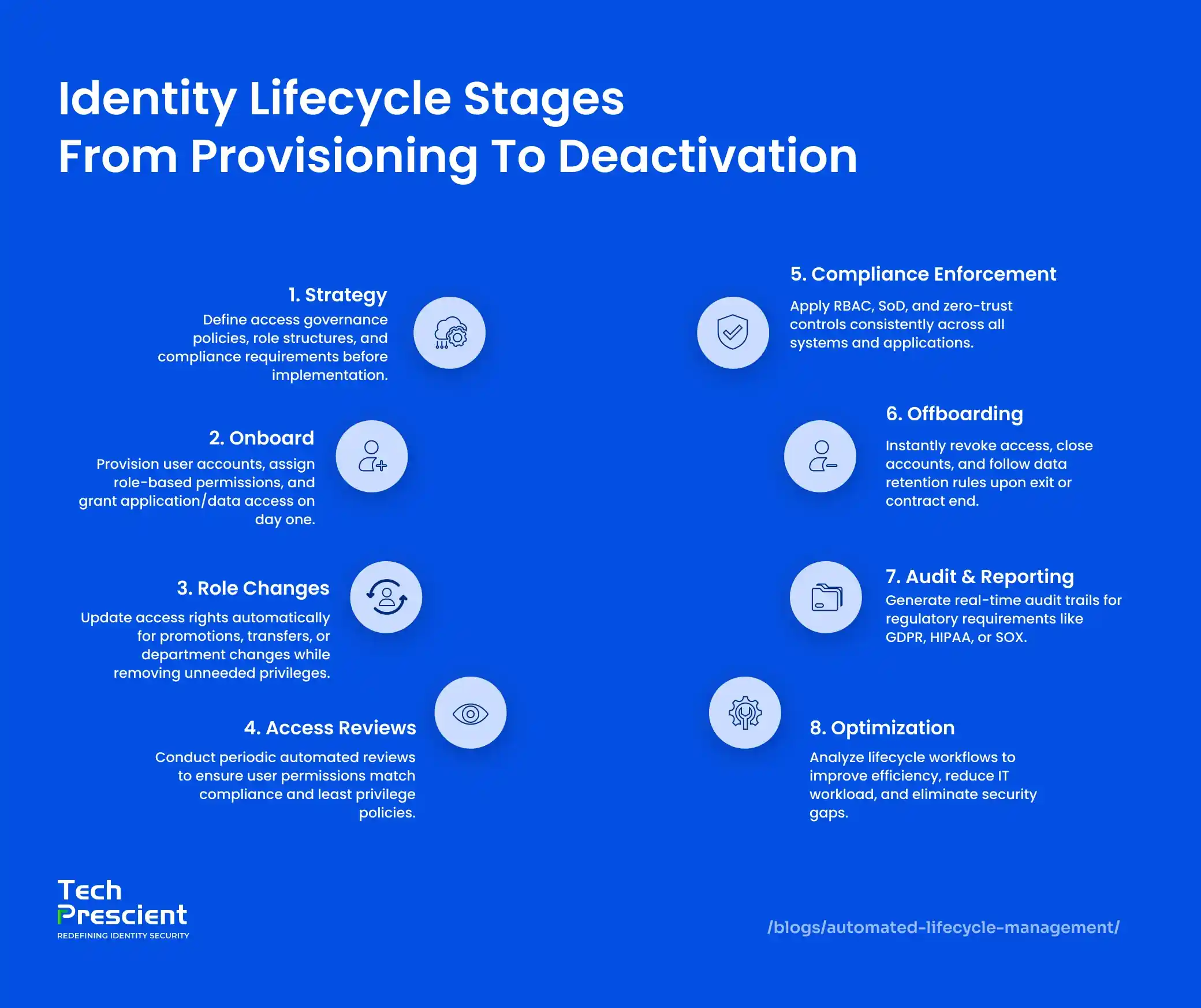
Identity lifecycle automation orchestrates every stage of a user’s journey within an organization, from onboarding to offboarding, ensuring access is provisioned, modified, reviewed, and revoked accurately and on time
At its core, it integrates HR systems (where employee records originate) with IT systems (where access is granted) so that identity changes are triggered automatically based on role, department, or employment status. Here’s how it works across the key stages:
-
Onboarding
When HR adds a new hire to the system, the automation engine provisions accounts, assigns role-based permissions, and delivers access to all necessary applications, databases, and tools often before the employee’s first day. -
Role Changes & Transfers
If an employee is promoted, moved to a new team, or changes responsibilities, their access is automatically updated to match their new role, while removing permissions no longer needed. This prevents role creep and enforces least privilege policies. -
Access Reviews
Regular, automated access reviews ensure that each user’s permissions remain aligned with compliance standards like HIPAA, PCI-DSS, SOX, and GDPR. This step reduces audit gaps and strengthens governance controls. -
Offboarding
Once HR processes a termination or contract end, the automation instantly revokes all system and data access, closes accounts, and archives records according to data retention policies. This mitigates the security risks posed by lingering credentials.
By connecting people processes in HR with technology governance in IT, identity lifecycle automation eliminates manual handoffs, reduces security gaps, and ensures that policy enforcement happens the same way, every single time.
Other Lifecycle Automation Use Cases
While identity lifecycle automation is the most security-critical use case, the same automation principles can be extended to other lifecycle domains where consistency, compliance, and scale are required.
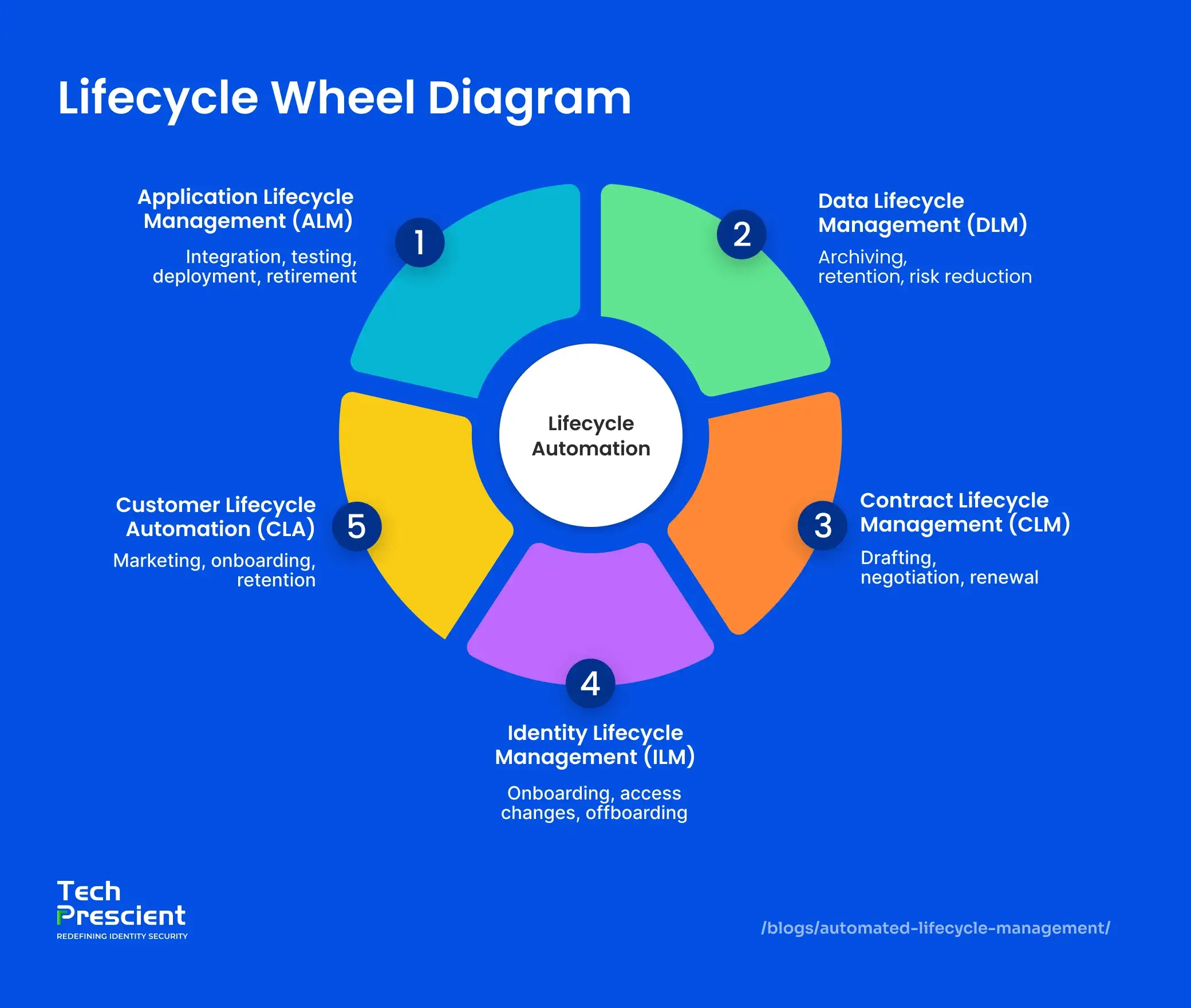
Lifecycle automation extends beyond identity management to other domains where consistency, compliance, and scale are required. The same principles, consistency, efficiency, and policy-driven workflows, can transform other critical business functions. From software delivery to contract management, automation ensures speed, accuracy, and compliance across the board.
Application Lifecycle Management (AppLM)
Application Lifecycle Management covers the entire journey of an application from its initial development to eventual retirement. Automation streamlines repetitive yet essential steps, such as:
- Integration & Testing: Automatically integrate new code, run test cases, and validate quality before deployment.
- Deployment: Push updates or new applications to production environments with minimal downtime.
- Retirement: Remove obsolete applications securely while preserving necessary records.
For DevOps teams, ALM automation is the backbone of high-velocity CI/CD pipelines, ensuring faster releases, fewer errors, and better alignment between development and operations.
Data Lifecycle Management (DLM)
Data is both an asset and a liability if not managed properly. Data Lifecycle Management automation handles information from creation to secure disposal:
- Archiving: Move inactive or stale data to low-cost, secure storage.
- Retention Policies: Enforce data retention schedules to meet regulatory requirements like GDPR or HIPAA.
- Risk & Cost Control: Reduce exposure to breaches and avoid unnecessary storage expenses.
By automating these steps, organisations not only meet compliance standards but also ensure that only relevant, high-value data remains in active systems.
Contract Lifecycle Management (CLM)
Contracts govern partnerships, procurement, and revenue streams, but manual handling can lead to missed deadlines, compliance risks, and operational delays. CLM automation addresses this by:
- Tracking every stage from drafting and negotiation to approval and renewal.
- Setting automated alerts for key dates, ensuring no opportunities or obligations are overlooked.
- Standardising workflows to maintain consistency across all agreements.
This level of oversight minimises delays, reduces legal risks, and keeps the business relationship lifecycle running smoothly.
Customer Lifecycle Automation (LCA)
In customer-facing industries, personalisation and timing are everything. Customer Lifecycle Automation helps businesses:
- Tailor marketing messages based on customer behaviour and lifecycle stage.
- Automate onboarding journeys that engage and educate new users.
- Implement retention campaigns to strengthen loyalty and reduce churn.
Benefits of Automated Lifecycle Management
Lifecycle automation delivers operational efficiency while maintaining consistent governance, compliance, and control at scale. By replacing manual handoffs with policy-driven workflows, teams cut busywork, shrink risk, and keep audits clean.
-
Eliminates human errors
Automated provisioning, updates, and deprovisioning remove copy-paste mistakes and missed steps, ensuring the right access at the right time every time. -
Enforces governance policies
RBAC, least-privilege, SoD, and zero-trust rules are applied consistently across apps and data, turning best practices into always-on guardrails. -
Accelerates task execution
Routine actions like new-hire setup, role changes, license allocation, and data retention run in seconds, not days, improving time-to-productivity and reducing IT tickets. -
Improves audit-readiness
Built-in logs, attestations, and automated access reviews create clear evidence trails, simplifying audits and helping avoid compliance gaps or penalties.
Net outcome: reduced risk, fewer delays, and governance embedded directly into everyday operations.
Choosing the Right Automation Tools
The success of lifecycle automation depends on selecting tools that fit seamlessly into your existing identity and IT ecosystem. Look for solutions that:
- Integrate with your identity stack — Compatibility with IAM, IGA, HR, and ITSM systems ensures smooth data flow and avoids information silos.
- Align with security goals — Support for RBAC, least privilege, and zero-trust principles is essential for reducing risk exposure.
- Provide audit-ready reporting — Detailed activity logs and automated access reviews help maintain compliance and pass audits with confidence.
- Scale with your business — Choose platforms that can handle growth in users, applications, and compliance requirements without adding complexity.
Tech Prescient’s lifecycle automation platform is designed to integrate with existing identity and IT systems while supporting governance, compliance, and operational efficiency at scale.
Real-World Examples of Lifecycle Automation
Lifecycle automation isn’t theoretical—it’s already transforming operations across industries:
- Financial Services — Automating identity lifecycle processes ensures immediate deprovisioning of terminated staff, preventing unauthorized access to sensitive financial data and reducing insider threats.
- Healthcare — Data lifecycle automation archives inactive patient records and enforces HIPAA-compliant retention schedules, protecting privacy while optimizing storage.
- SaaS Providers — Customer lifecycle automation personalizes onboarding workflows, boosting adoption rates and reducing churn in competitive subscription markets.
- Large Enterprises — Application lifecycle automation speeds up DevOps pipelines by automating testing, integration, and deployment—accelerating time to market without sacrificing quality.
- Legal and Procurement — Contract lifecycle automation tracks agreements from drafting to renewal, eliminating missed deadlines and minimizing manual oversight.
These examples show how automation removes friction, strengthens compliance, and delivers measurable business value no matter the industry.
Next Steps
Automated lifecycle management provides consistency, security, and governance in environments where manual processes no longer scale. By embedding policy-driven automation across identity, applications, and data, organizations reduce risk while accelerating operations.
Tech Prescient’s unified lifecycle automation platform helps enterprises enforce governance without friction, across identities, systems, and compliance workflows.
Is Your Lifecycle Automation Audit-Ready?
Benchmark maturity and fix lifecycle gaps before they scale
FAQs
Application Lifecycle Management (ALM) focuses on managing the lifecycle of software applications from development and testing to deployment and retirement. Identity Lifecycle Management (ILM) manages the lifecycle of user identities, including onboarding, role changes, access reviews, and offboarding. Both rely on automation but serve different domains: ALM streamlines software delivery, while ILM secures and governs access to systems and data.
Automating lifecycle processes ensures that access provisioning and deprovisioning happen securely and on time, eliminating delays that leave systems exposed. It also enforces governance policies, prevents privilege creep, and reduces attack surfaces created by orphaned accounts or outdated permissions.
There are multiple tools depending on the domain. For ILM, platforms like SailPoint or Okta are common. For ALM, tools such as Azure DevOps or Jenkins are widely used. Informatica supports Data Lifecycle Management (DLM), and Contract Lifecycle Management (CLM) platforms like Icertis automate contract workflows.
No. Mid-sized businesses also benefit significantly from lifecycle automation. It reduces IT workload, improves security, speeds up processes, and ensures compliance, without requiring the large budgets or teams often associated with enterprise IT.
Yes. Modern lifecycle automation platforms provide APIs, SCIM support, and ready-made connectors to integrate with HR systems like Workday or SAP SuccessFactors and IT systems like ServiceNow or Active Directory, enabling seamless, end-to-end automation.


GET A PERSONALIZED DEMO
See Identity Confluence in Action
“One platform to govern identities, automate access decisions, and prove compliance; across every app, user, and system in your environment.”


