
Eliminate Hidden Risk in File Server Access Management
Last Updated date: April 15, 2026
On this page
See Tech Prescient in Action
Automate access, reduce risk, and stay audit-ready
File server access management is a modern identity security capability that controls, tracks, and revokes who can read, write, or modify files and folders on shared network drives through Active Directory (AD) security groups and NTFS permission inheritance.
Tech Prescient’s Identity Confluence provides an IGA layer over Active Directory, NTFS file servers, and HR systems such as Workday and SAP, enabling governance beyond native directory capabilities. It builds a continuous, authoritative map of every folder-to-group-to-user permission relationship. This is enforced through real-time visibility into existing permissions, owner-accountable approval workflows, and automated revocation tied directly to HR lifecycle events.
TL;DR
File server permissions flow through shared AD groups, not individual assignments, making clean revocation difficult.
Identity Confluence maps explicit and inherited AD group memberships across folder tiers, surfacing access that often goes unnoticed.
Every access grant is tied to an owner, an approval, and a documented justification, forming a tamper-resistant audit trail.
When a leaver or mover event triggers in Workday or SAP, the user is removed from relevant AD groups without disrupting other members.
After initial configuration, discovery, approval tracking, and revocation run continuously with periodic policy tuning.
The Problem Is Not Access. It Is Inheritance.
Think of your file server as an office building. HR is on one floor, Finance on another, and Legal on a third. Each floor has rooms, and rooms have filing cabinets. Every employee gets a keycard deciding which floors they enter, which rooms they open, and what they can read or edit inside.
That keycard is an Active Directory security group. Critically, it is shared, not personal. Everyone in the finance team holds the same group membership. When a user is added to the Finance AD group, NTFS inheritance automatically extends their access to all subfolders and files below it.
Over time, that same user gets added to additional AD groups at deeper folder tiers: one for a specific sub-folder and another for a sensitive folder inside that, each for a legitimate reason at the time. When they eventually move to a different department, IT removes the top-level group. The sub-folder group memberships were still active. Nobody had a complete list.
The Impact:
File servers grant access through shared AD groups, not individual assignments, and permissions are inherited across folders. Users accumulate group memberships over time. When they move roles or leave, some access is removed, but hidden memberships remain, creating security and audit gaps.
What Is File Server Access Management in Identity Confluence?
File server access management in Identity Confluence integrates HR Systems (Workday/SAP), File Servers, and Active Directory into the platform; builds an authoritative map of every folder-to-group-to-user permission relationship; and enforces that map continuously through structured approvals and event-triggered revocation.
In SaaS applications like Salesforce, access is tied to individual users, and deprovisioning is a single call. File servers are different. Access flows through shared AD groups mapped to hierarchical folder paths, making governance inherently more complex.
Identity Confluence works within that model. It connects to shared Windows file servers with NTFS permissions and AD security groups. Configuration requires the UNC root path, relevant AD groups, and a mapping of groups to folders. The connector requires only read access to Active Directory and the file system. No schema changes, no software installation on the target server, and no modifications to existing group structures.
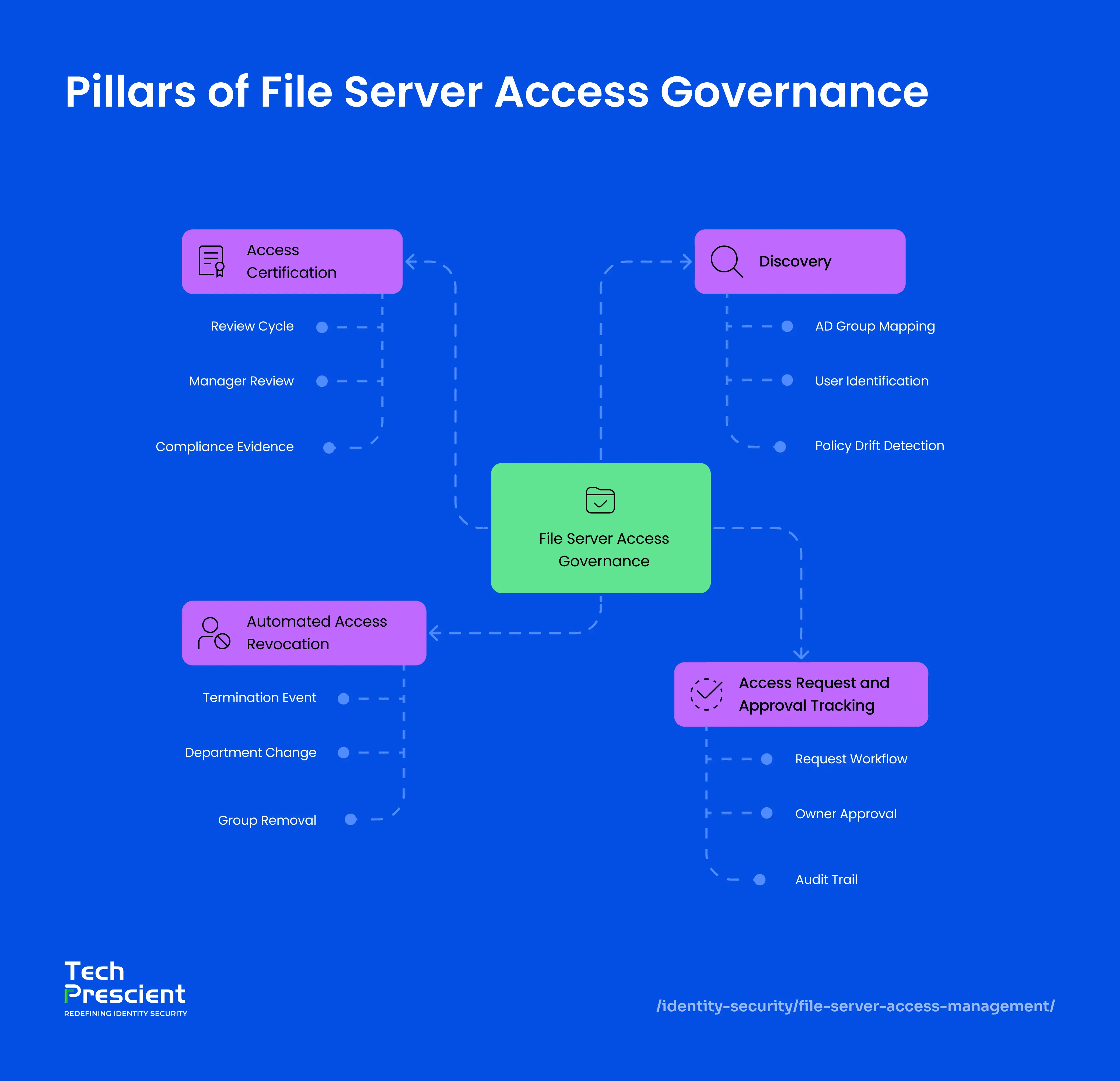
Pillars of File Server Access Governance
Every file server access governance implementation in Identity Confluence is built on the following capabilities:
1. Discovery
Discovery answers the question every compliance team eventually faces: who currently has access to what, and how did they get it?
Identity Confluence scans configured folder hierarchies at defined intervals, mapping permissions across every tier. At every tier, it reads every AD group with access permissions and maps every user inside each group, including users explicitly added to sub-folder groups at different points and users who gained access through nested group membership. Any drift between actual AD group membership and your defined policy is flagged as an anomaly in the Identity Confluence dashboard.
This gives IT and compliance teams a clear picture of who has access, at what level, and why.
2. Access Request and Approval Tracking
Informal access grants are the root cause of most file server audit findings. Someone with IT access adds a colleague to a group. No justification logged. No review date set. The access persists indefinitely.
Identity Confluence replaces that with a structured request workflow. A user needing folder access raises a request through the platform: folder path, permission level (read or read-write), and a business justification. The request routes to the folder owner or department head for sign-off. Every step is timestamped and recorded against the specific folder path and AD group.
Each step - request, approval, and revocation - is logged with timestamps, forming a complete, tamper-resistant audit trail.
Owner accountability combined with documented approvals turns every access decision into durable, audit-ready evidence.
3. Automated Access Revocation
Automated access revocation is where file server governance fails most consistently and where Identity Confluence has the most direct operational impact.
A user who has worked across two departments may hold six to eight AD group memberships across multiple folder tiers: some provisioned for their permanent role and others added for temporary project work at a specific sub-folder level. Removing them from one group leaves every other membership untouched.
When a joiner, mover, or leaver event triggers in Workday or SAP, Identity Confluence automatically removes the user's access across all mapped AD groups. No groups are deleted, no folder structures are modified, and no other users are affected. Every removal is logged at the individual group level for audit export.
Clean, complete revocation is only possible when provisioning was tracked. Discovery and approval tracking are prerequisites, not optional add-ons.
4. Access Certification (Periodic Review)
Granting and revoking access correctly isn't enough; existing access also needs periodic validation. Identity Confluence supports certification campaigns where managers and data owners review current file server access and confirm whether it's still needed.
Each review cycle presents users with access, the AD groups granting it, and the associated folder paths and permission levels. Reviewers can approve or revoke access directly within the campaign, and all decisions are logged with timestamps and reviewer identity, forming audit-ready evidence for compliance requirements such as SOX and ISO 27001.
This ensures that access, which was correctly granted in the past, remains appropriate over time.
Scenarios That Show the Range
Scenario 1. Department Transfer (Mover)
A finance team member accumulates three separate AD group memberships over two years: one for the finance department root folder, one for a budget reports sub-folder, and one for a salary data folder at the file level. Each was provisioned for a legitimate business reason at the time.
When the employee transfers to Marketing, the role-change event fires in Workday. Identity Confluence receives it via webhook, resolves the user's complete access map, and identifies all three group memberships. The revocation workflow removes the user from all three in a single automated execution. A provisioning workflow, triggered by the same event, adds them to the Marketing AD group. Both run in one lifecycle record with no overlap window and no manual intervention.
Note:
Most IT teams remove only the top-level department group. Sub-folder and file-level AD groups are separate, explicit memberships that NTFS inheritance does not clean up automatically. Identity Confluence resolves the full picture from the access map and removes each membership individually.
Scenario 2. Employee Leaves (Leaver)
AD groups on a file server are shared memberships, not personal access assignments. Removing a departing user by deleting or modifying the group would revoke access for every other member who still requires it. The correct operation is surgical: remove the individual from each group they belong to while leaving the group and all other memberships intact.
When a termination event fires, Identity Confluence resolves the user's complete AD group membership. In a typical case, this spans six groups across the Finance and Engineering folder hierarchies, including project-specific groups provisioned years earlier and never revoked. The automated access revocation workflow removes the user from all six groups within the one-hour SLA. Each group, the folder it governs, and the removal timestamp are recorded individually. Supports audit-ready evidence aligned to SOX, HIPAA, ISO 27001, GDPR, and other compliance frameworks.
Scenario 3. Sensitive Folder Access (Request)
A marketing team member requires read-only access to Finance/Q3 reports for a time-limited campaign analysis. Without a formal request process, this access is typically granted through an informal IT request, with no documented justification, no designated approver, and no defined end date. The access persists long after the business need ends.
With Identity Confluence, the user submits a formal access request: folder path, permission level, and business justification. The request routes to the finance department head for explicit sign-off. On approval, Identity Confluence provisions the user into the relevant read-only AD group. When the campaign concludes, access is revoked through the same interface and logged against the original request record, closing the full access lifecycle in one auditable thread.
When an auditor asks why a marketing team member holds access to finance files, the answer is a single lookup: who requested it, who approved it, when, and why.
Note:
Discovery accuracy depends on scheduled scans. Any access granted outside Identity Confluence, through manual AD changes or legacy scripts, may not be detected until the next scan completes.
One Structural Constraint Worth Understanding
Automated revocation operates correctly when provisioning was tracked. Access granted outside Identity Confluence through manual AD changes or legacy scripts may not appear until the next discovery scan. Real-time accuracy depends on scan frequency and integration coverage.
Run discovery before activating lifecycle revocation policies. The initial scan surfaces AD group memberships that surprise most IT teams. That baseline is what makes every subsequent revocation complete. Revocation without a trusted access map is best-effort removal.
Application Insight:
File server access management failures are rarely security failures. They are process failures. The right people are doing the right things, just not consistently. Real AD group access control is owner accountability, documented approvals, HR-triggered revocation, and a record of creation-to-deprovisioning for every grant. That is what separates a file server IGA done right from governance that only looks right on paper.
What Comes Next
File server governance is one layer. Identity Confluence applies the same model across cloud applications, HRMS platforms, and custom systems through 200-plus pre-built connectors.
See how teams replace manual, untracked file server permissions with governed, auditable access lifecycles that run exactly as defined every time.


GET A PERSONALIZED DEMO
See Identity Confluence in Action
“One platform to govern identities, automate access decisions, and prove compliance; across every app, user, and system in your environment.”



Murli Ramsunder
Senior Architect, Vonage