
Workflow Automation for Any Repeating Identity Process
Last Updated date: April 14, 2026
On this page
See Tech Prescient in Action
Automate access, reduce risk, and stay audit-ready
Identity workflow automation is the practice of modeling repeating identity processes: provisioning, approvals, role changes, access revocations, compliance notifications, and more as visual, trigger-based flowcharts that execute automatically without manual intervention.
Identity Confluence Workflows is Tech Prescient's no-code workflow automation engine built specifically for IGA teams.
Every identity team has processes that repeat on a schedule. Every identity team also has processes that repeat on a trigger: an HR event, a system signal, or a manager's decision.
Most of those processes are still executed manually. Someone opens a ticket. Someone reads a notification. Someone provisions an account, revokes a permission, assigns a role, sends a compliance notification, or kicks off an approval chain. The process is known, and the steps are documented. The outcome is predictable. And yet, every instance requires human intervention. Workflow automation fixes this.
TL;DR
Workflows is Identity Confluence's no-code workflow automation engine, not an access-only feature
Any recurrent identity process can be modeled as a visual, trigger-based flowchart and executed automatically
Building blocks compose every workflow: Trigger, Action, Logic, and Integration
The drag-and-drop workflow builder handles scheduled, event-driven, and conditional processes without code
Failures never drop silently; every unfinished execution is parked, logged, and flagged for review
The Problem Is Not Execution. It Is Repeatability
Identity operations teams do not fail because they do not know what to do. They fail because the same process, executed hundreds of times manually, eventually produces an inconsistent result.
A new joiner arrives. Their HR record should automatically trigger a known sequence: provisioning standard tools, restricting sensitive environments, and routing approvals for elevated access. The sequence is identical for every hire in the same role. Without no-code workflow automation, each execution still depends on a manual queue, human attention, and the risk of an overlooked step.
Defined, repeating processes are being treated as one-off tasks. The identity workflow builder in Identity Confluence, a modern IGA platform, fixes this by letting teams design any identity process, however simple or conditional, once and having the system execute it every time conditions are met, with full automation where possible and intelligent approval routing when required.
What Is Identity Workflow Automation?
Workflows is Identity Confluence's built-in automation engine for access requests, approvals, and lifecycle events. It gives teams a visual, drag-and-drop workflow builder to model any repeating identity process. Once designed, the workflow executes automatically - on a schedule, on an event trigger, or both - exactly as defined.
The scope is intentionally broad. Automated identity workflows go far beyond basic provisioning and deprovisioning. Any process involving a trigger, a set of actions, conditional logic, and communication with an external system can be modeled as a workflow. Examples include onboarding sequences, scheduled access windows, approval-gated role assignments, offboarding checklists, compliance notifications, escalation chains, and many other repeatable identity processes.
Configure automation visually. No scripting, no custom API calls, no deployment pipelines. Compliance managers, HR operations leads, and identity analysts can build and modify workflows themselves, no developer involvement required. Changes happen directly in the interface, not in code.
The Building Blocks
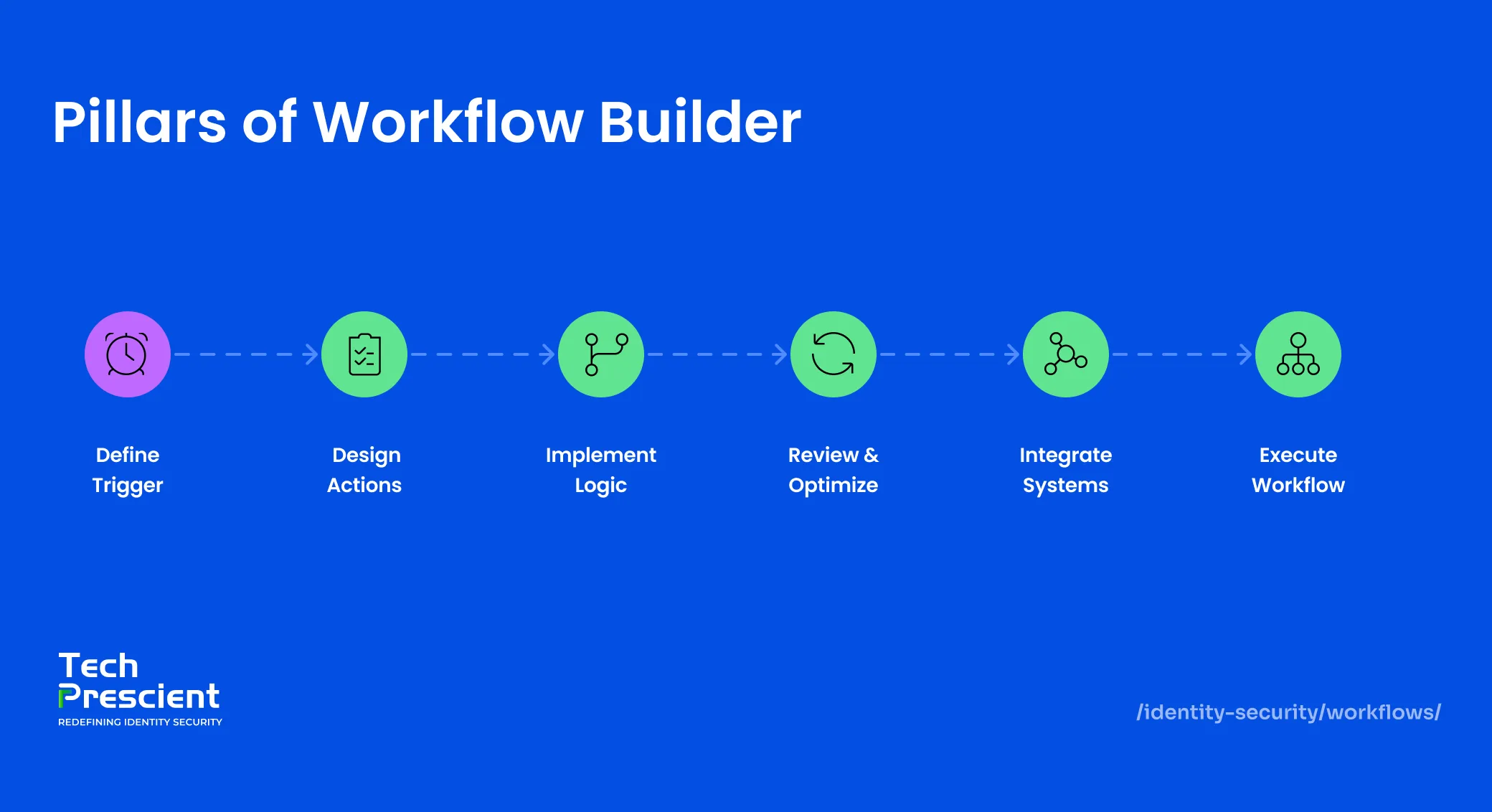
Every workflow in Identity Confluence is built from core block types. Their smart combination is what makes IGA workflow automation flexible enough to model any process across the full range of identity operations.

Trigger
The trigger is what starts the workflow. A scheduled trigger fires at a defined time and cadence: every weekday at 9:30 AM, the first Monday of every month, or every day at midnight. Ideal for any process driven purely by time, rather than any external event.
A webhook trigger fires the instant another system sends a signal to Identity Confluence – a new employee record is created in Workday, or a role change event occurs in SAP. The workflow starts immediately, regardless of time zone, business hours, or queue depth.

Action
The action block is where the workflow does something. In Identity Confluence, actions include provisioning access, revoking access, assigning or removing a role, updating group membership in Active Directory or Azure AD, and sending notifications to owners, managers, or security teams.
Each action connects to a specific system via a connector that is configured once at the platform level and then reused across any workflow, no per-workflow setup required.

Logic
Logic blocks add intelligent conditional branching so that the workflow adapts to real-world variability. A joiner workflow for the finance department follows a different provisioning sequence than one for engineering. An approval received within 24 hours is routed differently from one pending for five days.
Logic blocks handle these branches explicitly. If the employee's department is Finance, include the financial reporting suite. If manager approval is not received within 48 hours, escalate to the department head. If the user's risk score exceeds a threshold, pause provisioning and alert the security team. Logic is what separates no-code workflow automation from scripts: it handles real-world variability without a custom code path for every scenario.

Integration
Integration blocks connect the workflow to external systems. HRMS platforms (Workday, SAP, SuccessFactors, and other HRMS platforms) that generate joiner-mover-leaver events; identity providers like Azure AD and Okta that receive provisioning instructions; and downstream SaaS applications (Salesforce, Google Workspace, ServiceNow, and 250+ more) are included in the workflow. These integrations enable controlled data flow between systems, ensuring that identity events, access changes, and approvals propagate reliably across connected applications.
If a connector is active in Identity Confluence, it is available as an integration block in any workflow. With 250+ pre-built connectors, the application your workflow needs is almost certainly already supported. No new connection setup per workflow.

Human Input
Not every identity decision can be predefined. Certain approvals, validations, and exceptions require explicit human judgment that logic blocks alone cannot replace.
Human input blocks pause workflow execution and route a task to a designated person: a manager approving elevated access, a data owner validating a request, or a compliance reviewer confirming an exception. Once the response is received, the workflow resumes exactly where it left off, based on the decision made.
Note:
Human input does not slow automation down. It embeds accountability at precisely the point where accountability is required, while keeping every step fully traceable.
Three Scenarios That Show the Range
Access provisioning happens to be the most visible identity process, but the same building blocks that power no-code workflow automation compose approval chains, compliance notifications, role change sequences, offboarding steps, escalation triggers, and any other repeating identity process just as cleanly. These three scenarios span the full trigger spectrum to show the range.
Scenario 1: Market Hours Access and Scheduled Workflow
A brokerage firm's trading floor team needs system access to be active during market hours only. Provision at 9:30 AM and revocation at 3:30 PM every weekday.
Two automated identity workflows handle this. The provisioning workflow fires on a scheduled trigger at 9:30 AM, Monday through Friday. An action block provisions access to the trading platform for the designated user group. The revocation workflow mirrors it: a scheduled trigger at 3:30 PM, an action block revoking the same access. Once published, both run every market day without human involvement, logged and timestamped. The compliance team pulls the full execution history for any audit window without assembling records manually.
Scenario 2: New Joiner Onboarding, Webhook Workflow
When a new employee record is created in Workday, the onboarding workflow fires automatically. The first action block provisions standard productivity tools: email, collaboration platforms, and internal wikis. A logic block checks the employee's department. If not Finance or Legal, the financial reporting suite is excluded. A second logic block routes a request to the hiring manager for sensitive environment access. If approved, a subsequent action block provisions that access. If no response arrives within five business days, the request is flagged for review.
The sensitive exclusion step does not get overlooked. The approval chain is logged. The complete provisioning trail is available for audit from the moment the Workday event fired.
Scenario 3: Role Change, Mover Workflow
When an employee moves from Engineering to Finance, their access profile changes entirely. A role change event from SAP fires a webhook trigger in the identity workflow builder. A logic block checks the new department assignment. An action block revokes access to engineering repositories and development environments. A second action block provisions access to the financial reporting suite. The transition happens in a single workflow execution: no ticket raised, no manual handoff, no window where the employee holds access from both roles simultaneously.
The 15-Second Execution Window
Every workflow automation execution in Identity Confluence is designed to complete within 15 seconds. If it exceeds this window, it is automatically parked as failed and flagged for manual review.
This limit applies to execution time, not process complexity. Workflows that involve high-latency external systems or long sequential chains may exceed this limit.
Best Practice: Keep the execution path lean and focused. For processes involving human decisions, such as approvals that take hours after the workflow fires, use asynchronous logic. Send the approval request in one execution, then resume the workflow via a webhook callback as a separate execution. Avoid polling in a single run.
Failed executions are not silently dropped. They are placed in a dedicated review queue with complete log details showing which step failed and why. Operations teams diagnose, correct, and re-trigger. Transparency over silent failure: that is the deliberate design choice.
Application Insight:
Embedding human approvals inside a workflow does not slow governance down. It ensures that every decision requiring accountability is captured, timestamped, and traceable without relying on a separate ticketing system or manual follow-up.
What Comes Next
IGA workflow automation governs execution across provisioning, approvals, role transitions, and beyond. Once any repeating identity process runs consistently, the next question is whether the outcomes it produces remain appropriate over time. That is a different problem, and Identity Confluence addresses it at the next layer.
See how teams replace manual, untracked identity processes with automated identity workflows that run exactly as designed every time.


GET A PERSONALIZED DEMO
See Identity Confluence in Action
“One platform to govern identities, automate access decisions, and prove compliance; across every app, user, and system in your environment.”



Murli Ramsunder
Senior Architect, Vonage