
What Is Mandatory Access Control (MAC) in Cybersecurity?
Last Updated date: January 12, 2026
On this page
See Tech Prescient in Action
Automate access, reduce risk, and stay audit-ready
Mandatory Access Control (MAC) is a security model where access to systems, applications, and data is enforced by a central authority using predefined security labels and clearance levels. Users cannot modify permissions, making MAC ideal for high-security and compliance-driven environments such as government, healthcare, and finance.
Mandatory access control (MAC) is a type of access control in which the operating system grants users access depending on data confidentiality and user clearance levels. This paradigm grants access based on need-to-know: users must demonstrate their need for knowledge before getting access. MAC is also known as a non-discretionary access control paradigm, which indicates that control is not provided at the option of the user or file owner. The MAC model's control mechanisms enable businesses to apply zero-trust principles. MAC is regarded as one of the most secure access control methods. System administrators manually establish access rules under this paradigm, which are rigidly enforced by the operating system or security kernel.
However, choosing an access control model relevant to your organization can be tricky. This article discusses use cases for mandatory access control (MAC) and discretionary access control (DAC), explains the differences between MAC and DAC to help you decide which is the better fit, and provides tips on implementation.
According to SpyCloud in 2024, valid but compromised credentials were the initial access vector in 22% of data breaches, underscoring the risks of weak or inconsistently enforced access controls. Organizations that implement centrally enforced access policies have reported significant reductions in unauthorized access incidents. In this context, MAC provides a structured, clearance-based approach to limiting access and reducing exposure across critical systems.
Key Takeaways:
- Learn what Mandatory Access Control (MAC) is and why it is used in high-security environments
- Understand how MAC enforces access through security labels and clearance levels
- Review common use cases across government, healthcare, and financial sectors
- Compare MAC and DAC in terms of control, flexibility, and ownership
- Explore core MAC models and implementation considerations
How Mandatory Access Control Works
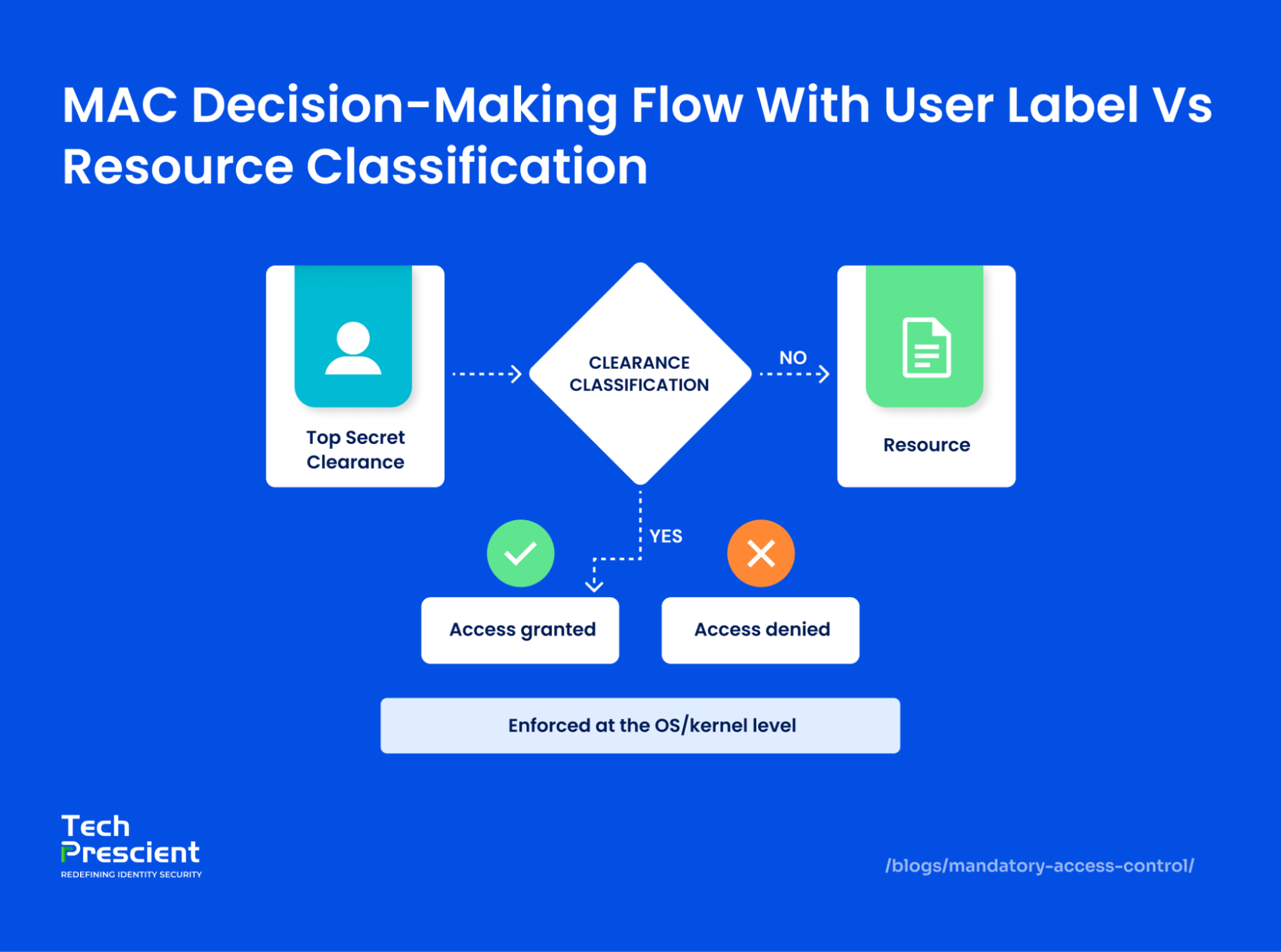
Mandatory Access Control works by assigning security labels to users and resources. The system grants access only when a user's clearance level meets or exceeds the resource's classification, with no ability for users to override permissions.
MAC is considered mandatory because access rights are defined and regulated by system policy rather than by individual users. Network users have limited ability to share access or modify permissions, ensuring that enforcement remains consistent across the environment.
Policy Definition
Implementation begins with the definition of formal security policies. These policies specify which users or roles may access particular resources, under what conditions, and based on data sensitivity and clearance levels. Policies serve as authoritative rulesets and are enforced uniformly, eliminating discretionary overrides.
Labeling System
Mandatory access control, which is commonly used in government and military installations, assigns a classification label to each file system object (for example, "Restricted," "Confidential," or "Top Secret"). Similarly, every user is given a security or clearance level. They may only access the object or resource if their security level matches or exceeds the resource's categorization label.
Access decision logic
In MAC systems, security labels and policies maintain comprehensive records of permissions and access levels for every user and resource, guiding the enforcement mechanism in determining access rights. When a user attempts to access a resource, the system compares the security label of the user with that of the resource to verify whether the user's label meets or exceeds the required classification level.
System enforcement
MAC is the most secure access control option available, but it needs careful planning and ongoing monitoring to maintain all resource item and user categories up to date. The administrator is responsible for creating and enforcing MAC's hierarchical architecture, regulating all user rights, and determining who has access to what. Because of this centralized management, non-admin users are unable to create their own permissions or access resources with higher security levels than their own.
Mandatory Access Control Examples (MAC in Real Life)
Mandatory access controls work well in multilevel, hierarchical environments with tiers of users holding different clearances. This contrasts with multilateral systems like discretionary access control, which favor speed over data security. MAC is rare in small businesses or consumer applications, but it has important use cases.

Government/military
Government, military, and intelligence institutions utilize required controls to impose stringent clearance levels. Government agencies handle massive amounts of sensitive information that must be kept secure. However, it must be available to employees. MAC allows for this by empowering administrators to define categories and securely link users to the secret information they require.
Financial institutions
Large firms and banking sectors utilize MAC to protect client data. For example, MAC enables insurance and banking businesses to restrict the number of people who have access to financial data. This decreases the chances of potential data breaches and reputational harm. By implementing strict clearance-based access, these institutions can ensure only authorized users handle sensitive information. This not only safeguards customer trust but also helps meet strict regulatory and compliance requirements.
Healthcare
In the healthcare sector, MAC is widely used to enforce HIPAA (Health Insurance Portability and Accountability Act) compliance by segmenting access to sensitive patient records. Each medical record is assigned a classification level, and only healthcare professionals with the appropriate clearance, such as a treating physician or authorized nurse, can access it. This prevents unauthorized staff from viewing or modifying patient data, reducing the risk of privacy breaches.
Should You Implement Mandatory Access Control?
Score your environment before enforcing strict access models
MAC vs DAC: What's the Difference?
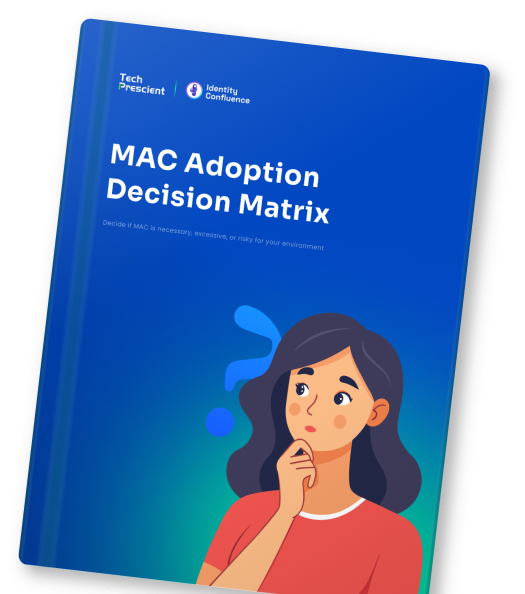
Mandatory Access Control enforces access using centrally managed security rules, while Discretionary Access Control allows users to decide who can access their data.
Mandatory Access Control (MAC) and Discretionary Access Control (DAC) differ in who controls permissions, how flexible they are, and where they're most effective. MAC emphasizes strict, administrator-enforced security, while DAC offers user-level control with greater flexibility.
| Characteristic | MAC | DAC |
|---|---|---|
| User Control | Users cannot configure or change access parameters themselves. | Users can configure access parameters without involving administrators. |
| Access Management | Centralized access management defines and enforces all permissions. | No centralized access management; each access control list must be checked individually to find access parameters. |
| Security Level | Provides a high level of data protection because policies cannot be bypassed. | Offers a lower level of data protection because users can share data however they like. |
| Typical Use Case | MAC is typically used in government, military, law enforcement, and other high-security sectors. | DAC is typically used in small and medium-sized companies or trusted user environments. |
| Who Sets Access | In MAC, only administrators have the authority to set access permissions. | In DAC, both administrators and users can set access permissions. |
Benefits of Mandatory Access Control
Mandatory Access Control strengthens security by enforcing least privilege, preventing insider threats, and supporting compliance with regulations like GDPR, HIPAA, and PCI DSS.
MAC emphasizes strict, administrator-enforced control and is designed for environments where security and compliance requirements outweigh flexibility. DAC prioritizes ease of use and adaptability by allowing users to grant or revoke access at their discretion. As a result, MAC is typically deployed in high-assurance environments, while DAC is more common in general-purpose and collaborative systems.
Strong centralized control
The system administrator can set access permissions for objects anywhere on the network. Users without the necessary clearance level cannot access these objects. There is also no scope to gain access by sharing credentials with others. Centrally managed policies grant access only to explicitly authorized users, preventing accidental permission sharing and enabling thorough vulnerability assessments. Multi-level security (MLS) rigorously classifies and labels data, protecting even the most sensitive information.
Ideal for compliance-heavy sectors
MAC is recommended by industry regulations like PCI-DSS. Companies handling financial data prefer mandatory controls to guard cardholder data environments or databases like insurance policyholders. Helps organizations meet regulations like GDPR, HIPAA, and PCI DSS through structured and auditable access control. Strict policy enforcement and detailed logging simplify compliance and reduce the risk of penalties.
Prevents insider threats via least privilege
Enforces a need-to-know basis for access, limiting insider threat risks. This aligns with the principle of least privilege (PoLP), which ensures users receive only the minimum access required to perform their tasks. Even system administrators cannot access sensitive information unless their security labels allow it, making it particularly valuable in finance and healthcare.
Enhances audit readiness with clear logs
MAC logs every access attempt and user action, creating comprehensive audit trails. These logs are crucial for forensic analysis and incident response, enabling organizations to trace breaches, understand their origins, and enhance accountability and transparency.
Challenges & Limitations of MAC
While highly secure, Mandatory Access Control can be complex to manage, less flexible for users, and difficult to scale in fast-changing or agile environments.
When choosing an access control system, security teams need to weigh up the pros and cons. Potential limitations of mandatory access control include:
Complex policy management
As user communities increase, administrators may have difficulty maintaining MAC systems. The administrator has the responsibility for configuring and managing all access, especially as the number of systems and users rises. Security teams must verify that user permissions are up to date and represent their roles. They must also quickly enroll new personnel and terminate those who have left. For the same reasons, MAC is unsuitable for applications with a large number of users, such as internet-based apps.
Reduced flexibility for end-users
MAC restricts users from modifying access permissions or adjusting their own privileges. All changes must be handled by administrators through the operating system or security kernel. While this model strengthens control, it can slow access to information and reduce operational agility. Granting or modifying clearance levels across multiple resource categories can be time-consuming and costly. These challenges are amplified in environments with multiple security domains or classification levels, where coordination and policy updates require careful planning and validation.
Harder to implement in dynamic or agile environments
MAC is designed for stable environments with well-defined roles and data classifications. In fast-changing or agile environments, where access needs shift frequently, MAC can be difficult to implement and maintain effectively. Although MAC reduces many forms of unauthorized access, it does not eliminate all risk. Administrators with elevated privileges still require oversight, as misuse of privileged access can undermine policy intent. As a result, organizations with limited resources or rapidly evolving infrastructure may favor more flexible access control models that are easier to adapt and operate.
Mandatory Access Control in Operating Systems and Databases
1. MAC in Linux
Linux environments commonly implement Mandatory Access Control through security frameworks such as Security-Enhanced Linux (SELinux). SELinux enforces access decisions based on predefined security policies and labels applied to processes, users, and system objects. These policies are evaluated by the kernel and cannot be overridden by non-privileged users, enabling consistent enforcement across the operating system.
2. MAC in Windows
Windows supports forms of mandatory integrity control and policy-based enforcement through security descriptors and system-defined integrity levels. While these mechanisms provide elements of mandatory enforcement, they are generally more limited in scope and rigidity compared to Linux-based MAC implementations. Access decisions remain centrally managed and are applied according to defined policy constraints.
3. MAC in Database Management Systems
Database management systems (DBMS) can apply MAC principles to control access at the table, row, or column level. Data objects are assigned classification labels, and access is granted only to users or roles whose clearance levels meet policy requirements. This approach helps ensure that sensitive data is accessed only by authorized entities and supports consistent enforcement across structured data environments.
Common MAC Models: Bell-LaPadula & Biba
Mandatory Access Control is commonly implemented using formal security models that define how confidentiality and integrity are enforced. Two of the most widely referenced MAC models are Bell-LaPadula and Biba, each designed to address distinct security objectives.
Bell-LaPadula
The Bell-LaPadula (BLP) model is primarily focused on confidentiality, ensuring that sensitive data does not leak to unauthorized users. It operates on the principle of "no read up, no write down":
- No read up means a user cannot access information at a higher classification level than their own (e.g., a "Confidential" user cannot read "Secret" files).
- No write down means a user cannot write information to a lower classification level, preventing the accidental or intentional leakage of sensitive data to less secure areas.
This model is widely used in military, government, and classified systems where protecting data secrecy is critical. For example, in a defense network, this prevents a low-clearance soldier from reading top-secret orders or a high-clearance officer from accidentally saving classified reports into a publicly accessible folder.
Biba
The Biba model focuses on data integrity rather than confidentiality. Its objective is to prevent untrusted or lower-quality data from influencing higher-integrity systems. The model is governed by the principles "no write up" and "no read down."
- No write up ensures that users cannot write to data at a higher integrity level, protecting critical information from being altered by less trustworthy sources.
- No read down prevents users from reading data from lower integrity levels, avoiding contamination by inaccurate or unverified sources.
This model is ideal for systems where accuracy and trustworthiness of data are more important than secrecy, such as financial systems, healthcare records, or safety-critical industrial controls, ensuring that decisions are based only on reliable and verified information.
Choose Bell-LaPadula when protecting confidentiality is the top priority, such as in defense or classified environments. Opt for Biba when safeguarding data integrity is critical, like in financial systems or safety-critical applications where accurate information drives decisions.
Best Practices for Implementing MAC
Implementing MAC effectively takes more than just turning it on; you need a well-structured approach that covers policies, automation, and ongoing oversight. Below are some proven best practices to help you set up a secure, efficient, and compliant MAC framework.
Define clear policies and labels
Create precise and clear security policies to ensure consistent enforcement at all levels of access control. Policies should define data classification, access requirements, and organizational roles and responsibilities. Effective rules should also contain operational processes for dealing with exceptions and circumstances that necessitate policy changes.
Automate labeling and provisioning
Automate user provisioning and deprovisioning to enforce access controls accurately and in real time. Identity platforms such as Okta or Microsoft Entra ID (Azure Active Directory) can assign appropriate access based on role and security labels, and promptly revoke access when roles change or users depart. Automation reduces the risk introduced by manual onboarding, offboarding, and role transitions.
Enforce separation of duties
Implement separation of duties (SoD) by assigning distinct roles and access permissions within the MAC framework. For example, one user may initiate a financial transaction while a separate, higher-cleared role is required for approval. Preventing any single individual from exercising end-to-end control over sensitive operations reduces the likelihood of fraud, misuse, and operational error.
Integrate with CI/CD pipelines, cloud environments, and IAM
MAC strengthens control over CI/CD pipelines by ensuring that only authorized identities and processes can initiate, modify, or deploy code. Security labels can be applied at each pipeline stage and enforced through integration with identity and access management (IAM) systems. This enables policy-driven controls over who can execute builds, deploy applications, and access protected resources across cloud environments.
Classify Data with Sensitivity Labels
Establish a thorough categorization system to precisely categorize data according to its level of sensitivity and protection. An example of how you could categorize your data is as follows: Confidential - Internal project documentation, personnel files, and memoranda; Secret - Research and development data, financial reports, and strategic plans; Top Secret - Critical trade secrets and highly sensitive infrastructure details. Automated technologies that update labels dynamically as data progresses through its lifespan can help preserve these categories.
Regular Audits and Monitoring
Security audits and real-time monitoring can help quickly identify unwanted access attempts and automate incident detection. Automated compliance reports can also provide a clear view of your current security posture and highlight areas that need improvement.
Final Thoughts
A well-implemented Mandatory Access Control (MAC) framework doesn't just lock down sensitive data; it enforces security at the very foundation of your systems. By applying strict, centralized policies and clearance-based labels, organizations can safeguard high-value assets, prevent unauthorized access, and ensure compliance across regulated environments. The above best practices show how MAC, when combined with automation and continuous monitoring, shifts access control from a manual, error-prone process to a resilient, policy-driven security model.
If you're considering MAC adoption or aiming to strengthen your existing access control strategy, Tech Prescient can help you design and implement a solution that's both secure and scalable.
Learn If MAC Fits Your Security Architecture
Avoid over-restricting users or under-protecting data
Mandatory Access Control (MAC) is a system-enforced security model where access permissions are centrally defined using security labels and clearance levels, ensuring users can only access data they are authorized for.
Unlike Discretionary Access Control (DAC), where users can set permissions on their own resources, MAC is strictly controlled by administrators and cannot be overridden by users. This makes MAC much more rigid and secure.
You'll find MAC in government clearance systems where sensitive info is tightly controlled, and in healthcare environments compliant with HIPAA, ensuring only authorized personnel can access patient data.
MAC boosts security by limiting insider threats and enforcing strict access policies. It also helps organizations meet compliance requirements for regulations like GDPR and PCI DSS.
Implementing MAC can be complex due to detailed policy management; it offers less flexibility for users and requires more effort and oversight compared to other access control models.


GET A PERSONALIZED DEMO
See Identity Confluence in Action
“One platform to govern identities, automate access decisions, and prove compliance; across every app, user, and system in your environment.”



Murli Ramsunder
Senior Architect, Vonage