




On this page
See Tech Prescient in Action
Automate access, reduce risk, and stay audit-ready
Discretionary Access Control (DAC) allows data owners to decide who can access resources, while Mandatory Access Control (MAC) enforces system-defined rules that users cannot override. DAC prioritizes flexibility and collaboration, whereas MAC focuses on strict security and compliance.
DAC and MAC are two main access control models in cybersecurity. Each model handles permissions, security, and compliance in a unique way. Discretionary Access Control (DAC) is a versatile and excellent tool for cooperation since it gives resource owners the ability to choose who may access their data. For high-security settings, Mandatory Access Control (MAC) is perfect because it employs centralized, system-enforced rules and security labels. In cybersecurity, understanding DAC and how it varies from MAC enables businesses to efficiently balance control, security, and access.
According to the latest data breach statistics by Secureframe, 46% of all data breaches contained consumer personally identifiable information (PII) in 2025, which demonstrates the need for precise, restricted access models for securing sensitive data in businesses. The modern digital world contains a great deal of sensitive data. Protecting this data from breaches and illegal access has become a top concern in cybersecurity. This can be supported by the use of an approach called access control, which makes sure that only those with the appropriate permission rights can access sensitive data. In this blog, you will know the major distinctions between DAC and MAC, how they operate in real-world circumstances, and how to select or combine them to better access governance, satisfy compliance needs, and boost your overall security posture.
Key Takeaways:
- DAC and MAC follow distinct approaches: DAC emphasizes flexibility, while MAC enforces strict, centralized control
- DAC supports collaboration by allowing resource owners to manage permissions directly
- MAC protects sensitive systems through non-overridable, policy-driven access rules
- Selecting the right model depends on risk tolerance, compliance requirements, and scale
- Both models contribute to stronger identity governance and Zero Trust security strategies
What Is Discretionary Access Control (DAC)?
Discretionary Access Control (DAC) is an access control model where the resource owner decides who can access data and what actions they are allowed to perform, such as read, write, or modify.
Discretionary access control (DAC) is an identity-based access control mechanism that grants users some control over their data. It's commonly found in smartphone apps, Google Docs, and operating systems worldwide. In a DAC system, data owners, such as resource owners or any other users allowed to govern data, can specify access rights for specific users or groups of users. In other words, the resource owner determines who has access and what rights are granted.
Unlike centralized models, DAC allows subjects to share information with other users, grant privileges, change object attributes, choose which attributes are associated with newly created objects, and set different forms of access control without needing central authorization. These permissions are typically stored in an access-control list (ACL), which specifies which users and groups have access to data, as well as their access levels. An ACL can be created automatically or by an administrator when access is granted. A system administrator can also implement an ACL as part of a security policy, one that normal users cannot modify or override.
How Does Discretionary Access Control Work?
Permissions in DAC are typically assigned by resource owners or administrators. For example, in personal computer operating systems, file access can be restricted by granting specific rights to selected users. Common permission types include Read (R), which lets users view a resource without altering it; Write (W), which allows modifying or creating content; and Execute (X), which enables running files, scripts, or applications.
While these permissions are essential for functionality and collaboration, they must be carefully managed to prevent accidental changes, malicious actions, or security breaches. DAC decides who can use a resource based on the identity of the user and their ownership of that resource. The process typically involves:
- Identify the subject
The process starts by figuring out who is trying to access the resource—whether it is an individual user or a user group. They need to log in or otherwise verify their identity. - Check the object
The system then examines the resource, such as a file, application, or data, to see what permissions have been set. - Match permissions
If the user's identity or group matches an entry on the allowed list, they get the corresponding access level. If not, the system denies access. - Owner control
At any time, the resource owner can modify permissions, granting or removing rights for specific users or groups.
DAC can be implemented in two main ways:
- Access Control Lists (ACLs)
ACLs define which users or groups can access a resource and specify the actions they are permitted to perform. - Capability Systems
Access is granted through possession of a specific capability, such as a cryptographic key, security token, or unique access reference.
A common example of DAC is file sharing in collaboration platforms, where the document owner controls who can view, comment on, or edit content. This owner-managed flexibility supports collaborative workflows but also requires disciplined permission management to limit unnecessary access and reduce exposure risk.
What Is Mandatory Access Control (MAC)?
Mandatory Access Control (MAC) is an access control model where access decisions are enforced by the system based on security labels and user clearance levels, not by data owners.
Mandatory access control (MAC) is a type of access control in which the operating system grants users access depending on data confidentiality and user clearance levels. This model grants access based on need-to-know: users must demonstrate their need for knowledge before getting access. MAC is also known as a non-discretionary access control paradigm, which indicates that control is not provided at the option of the user or file owner. The MAC model's control mechanisms enable businesses to apply zero-trust principles. MAC is regarded as one of the most secure access control methods. System administrators manually establish access rules under this paradigm, which are rigidly enforced by the operating system or security kernel. Regular users cannot change security characteristics for data they have produced.
Note
Mandatory Access Control is designed for environments where security decisions must never depend on user judgment. By removing discretion entirely, MAC enforces trust boundaries that are resilient to human error, misconfiguration, and insider misuse.
How Does Mandatory Access Control Work?
Mandatory Access Control operates on the principle that all access must be explicitly authorized. No user is granted implicit permission to view or modify resources owned by others. Access provisioning is centrally administered, and enforcement is handled entirely by the system rather than by individual users.
Both users and resources are assigned security labels that define their classification and category. These labels form the basis for all access decisions and ensure that permissions align with organizational security policies.
Label-Based Access Control in MAC
MAC manages and controls access to resources using label-based access control for data and clearance levels. It assigns a security label to each resource in the system, and these labels or classifications are important indicators of the resource's criticality and sensitivity. Resources are marked with security designations, such as confidential, secret, or public. Individuals inside the organization are also allocated clearance levels, and the clearance level issued to each individual determines which resources they have secure access to.
How Access Is Granted in MAC?
Whenever a user requests access to a resource, the system checks the user's security label and clearance level to ensure that they have the necessary clearance before granting access. Assume a government agency has material that is categorized as extremely private with a national security classification. This material is only accessible to people who have both a highly secret security clearance (classification) and authority to access national security documents (category). Such users have access to information that needs a lesser level of clearance, but workers with lower clearance levels or no rights to national security papers do not.
Real-World Example in Banking
In banking, the same idea applies: client financial records categorized as sensitive and tagged with a fraud investigation category would only be available to individuals with the necessary clearance level and investigation authority. All other employees, even those who work in the bank, would be denied access to these documents.
DAC vs MAC: Key Differences Explained
The primary distinction between Discretionary Access Control (DAC) and Mandatory Access Control (MAC) lies in how access decisions are governed. DAC grants resource owners the ability to manage permissions for the assets they control, while MAC removes user discretion and enforces centrally defined security policies.
At a conceptual level, DAC focuses on ownership-based access decisions, while MAC enforces authorization based on predefined clearance and classification rules, independent of ownership.
While both DAC and MAC regulate access to data, they serve very different security goals. DAC emphasizes usability and collaboration, whereas MAC prioritizes confidentiality, integrity, and strict policy enforcement.
| Characteristics | MAC | DAC |
|---|---|---|
| Data Confidentiality | MAC's rigorous regulations ensure that sensitive data is properly safeguarded, with no way for users to provide access. | DAC relies on resource owners to maintain data confidentiality, which can lead to leaks if not maintained appropriately. |
| Security Use Cases | MAC is ideal for high-security environments, such as government institutions, the military, and critical infrastructure, where strict control over data access is essential. | DAC works well in environments that require flexibility and easy access, such as corporate settings and small enterprises. |
| Flexibility and Convenience | It is more complex to establish than other models, but once implemented, it delivers unparalleled security through its strict, centrally enforced rules. | It is flexible and simple to set up, but it lacks the stringent restrictions and centralized control found in MAC. |
| Front-End versus Back-End Control | MAC places all access control decisions in the hands of system administrators, ensuring consistent enforcement while leaving end users with no ability to alter permissions. | DAC gives end users responsibility for managing access to their own resources, providing additional front-end control over who can view or modify data. |
| Access Control Decisions | MAC makes decisions based on policies, classifications, and clearances, without user interaction. | DAC allows owners or resource managers to make decisions; however, this comes at the expense of security. |
| Practical Examples | A practical example of MAC is a military communication system, where messages are classified as Confidential, Secret, or Top Secret, and only personnel with the corresponding security clearance can access or send them, ensuring strict control over sensitive information. | DAC appears in everyday tools. Facebook group admins setting view or post rights, smartphone owners granting apps access to contacts or GPS, file owners in Windows or UNIX setting read/write permissions, and Google Docs or Dropbox owners deciding who can edit, view, or share. |
Choosing DAC or MAC? Use This Framework
Quickly determine the right model based on risk and usage
If MAC Is More Secure, Why Does Windows Use DAC?
General-purpose operating systems such as Windows primarily rely on DAC to support flexibility, usability, and large-scale collaboration. DAC allows users and applications to share files, adjust permissions, and operate efficiently across diverse workloads.
While MAC provides stronger policy enforcement, it is significantly more restrictive and can limit productivity in general-purpose environments. Instead of implementing full MAC enforcement, operating systems typically combine DAC with additional security mechanisms, including privilege management, auditing, and application isolation, to balance security and usability.
Which Access Control Model Uses “Need-to-Know”?
Mandatory Access Control is the model that enforces the need-to-know principle. By using security labels and clearance levels, MAC ensures that users can access only the data required for their authorized role and responsibilities.
Real-World Examples of MAC and DAC
Practical use cases help illustrate how Mandatory Access Control and Discretionary Access Control operate across different environments. Each model is applied based on security requirements, regulatory constraints, and the level of flexibility needed by users.
- MAC in Military or Government Agencies
MAC is commonly utilized in military and government environments where data security is paramount. For example, tight security labeling and clearances are used to limit access to sensitive information. Only those with the necessary authorization may see or manage this data, reducing the danger of unwanted access. - DAC in a Corporate Setting
DAC is often used in business situations where flexibility is essential. Employees are responsible for managing their own files and deciding who has access to or can alter them. For example, a project manager may provide team members access to a shared folder, allowing for seamless communication without the need for system administrators.
Choosing the Right Model for Your Organization
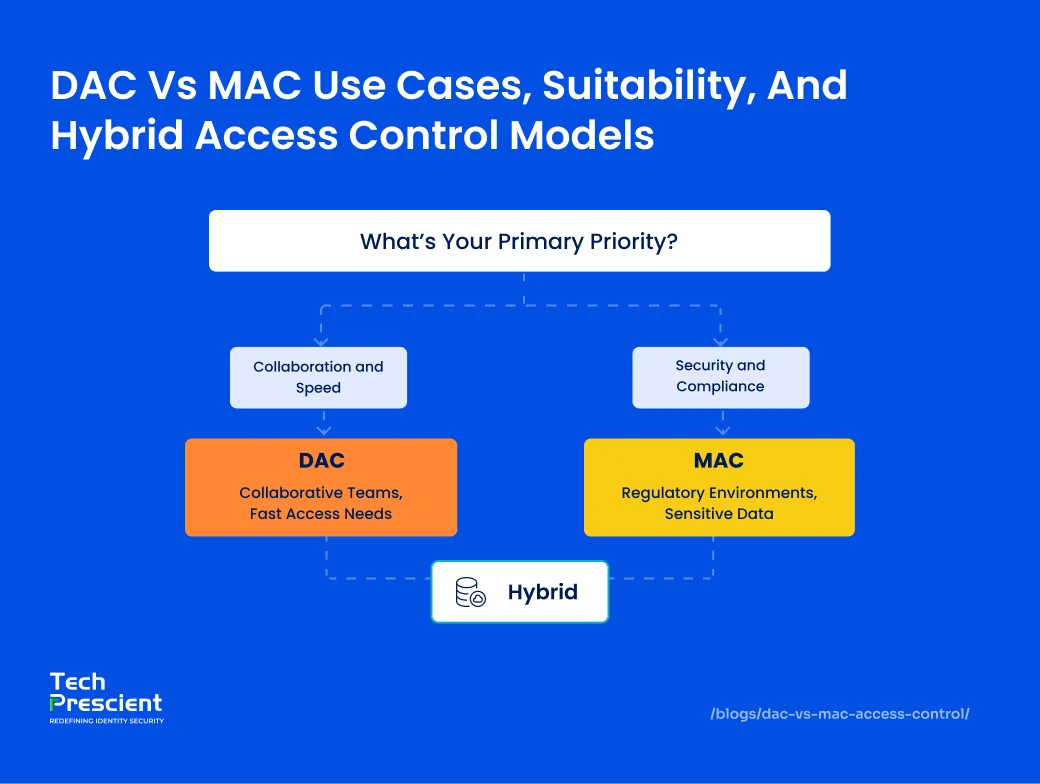
An organization's security requirements and operational priorities determine whether Discretionary Access Control or Mandatory Access Control is the appropriate model. Understanding where each approach is most effective helps organizations balance protection, usability, and administrative overhead.
Best Practice
Most enterprises don't choose between DAC and MAC—they layer them. Use MAC to protect high-sensitivity assets and DAC for everyday collaboration, with IGA enforcing visibility, review, and policy alignment across both.
When to use MAC
- Primary Use and Applications
Government entities, armies, and law enforcement agencies primarily employ this access control paradigm. The United States government employs MAC to protect secret material as well as to facilitate tiered security policies and applications. Organizations use MAC to manage access to client account data to improve data protection and compliance in the insurance and banking industries. This non-discretionary access control approach may also safeguard database access, where the objects include procedures, tables, views, and other aspects. - Suitability and Limitations
MAC is appropriate for enterprises that prioritize data security above operational flexibility and expense. Because of its complexity and inflexibility, MAC is hardly used in private organizations. A MAC-only architecture offers a high and granular level of protection. However, it is tough to install and maintain. - Hybrid Implementation with Role-Based Access Control (RBAC)
To reduce administrative complexity, MAC is often implemented alongside Role-Based Access Control. RBAC allows administrators to assign permissions based on job function rather than individual users. Roles can be defined for groups such as employees in the same position, external partners, or service accounts. By combining MAC with RBAC, organizations can centralize policy enforcement while simplifying user provisioning and access management through standardized roles. - Hybrid Implementation with Discretionary Access Control (DAC)
MAC is also frequently combined with Discretionary Access Control to balance security with collaboration. In this model, MAC enforces protection over highly sensitive or regulated data, while DAC enables users to share and manage access to less sensitive resources within corporate systems. This hybrid approach allows organizations to maintain strict controls where required while supporting day-to-day collaboration and productivity.
When to use DAC
-
Unsuitability for Highly Sensitive Environments
Discretionary Access Control is generally not suitable for environments that handle highly sensitive or regulated data, such as medical records, financial systems, or classified information. Because access decisions are made by resource owners rather than enforced centrally, DAC introduces governance and oversight limitations.When users are allowed to share access independently, there is limited assurance that recipients require the access for legitimate business purposes or will adhere to organizational security policies. Access propagation can occur without visibility or approval, making it difficult to control how data is shared across systems. As a result, enforcing the principle of least privilege, need to know, and separation of duties becomes significantly more challenging in pure DAC environments.
-
Suitability for Small Businesses
DAC is well suited for smaller organizations with limited IT resources and lower administrative overhead requirements. Its simplicity allows users to manage access directly without extensive policy design or centralized enforcement. In these environments, DAC supports collaboration and operational efficiency while remaining manageable from a security perspective. -
Scalability Considerations
DAC scales effectively in organizations with a small number of users, where access relationships are relatively straightforward. As organizations grow, however, the number of permissions and sharing relationships increases, making oversight and governance more complex. In larger environments, DAC often requires supplemental controls or integration with centralized access management models to maintain visibility and consistency.
Can You Combine DAC with MAC?
The combination of Mandatory Access Control (MAC) and Discretionary Access Control (DAC) results in a more balanced access management strategy. MAC implements administrator-managed security standards that protect sensitive data through tight classifications and clearances. DAC increases flexibility by allowing resource owners to control access to less sensitive data depending on current needs.
A government agency, for example, may utilize MAC to safeguard confidential documents, whereas DAC controls generic files to facilitate collaborative work. This hybrid solution is ideal for enterprises that want stringent control over secret data as well as flexibility in everyday operations. Though it necessitates careful preparation, it improves vital asset protection while providing users with the freedom to remain productive.
DAC and MAC in the Context of IGA and Zero Trust
Discretionary Access Control (DAC) and Mandatory Access Control (MAC) are core access control models that play a pivotal role in Identity Governance and Administration (IGA) and support the Zero Trust security framework. Together, they help organizations define, enforce, and continuously verify user access in a way that aligns with compliance and security objectives.

DAC/MAC as Foundational Access Control Mechanisms
In the IGA context, DAC and MAC act as the baseline for how access is provisioned and managed. DAC empowers resource owners to grant permissions, offering flexibility for collaboration and operational agility. In contrast, MAC enforces centrally managed, policy-driven controls that users cannot override, ensuring strict adherence to security classifications. By combining these approaches, organizations can establish strong governance over who can access what and under which conditions.
Role in Enforcing Least Privilege and Access Review
The principle of least privilege, a cornerstone of Zero Trust, ensures that users only have access to the resources necessary for their role, and nothing more. DAC and MAC both contribute to enforcing this principle by restricting excess permissions and ensuring that high-sensitivity resources remain tightly controlled. When integrated into IGA workflows, they enable periodic access reviews and certification campaigns, helping detect privilege creep and ensuring that outdated or unnecessary access is revoked promptly.
Link to Role-Based Access Control (RBAC) and Policy Enforcement
DAC and MAC complement RBAC by determining how roles and permissions are assigned and enforced. RBAC provides a scalable way to group access rights based on job functions, while DAC and MAC define the boundaries for how these rights are granted and maintained. This integration simplifies compliance with frameworks such as SOX, HIPAA, and GDPR, while ensuring consistent policy enforcement across all systems and applications.
Final Thoughts
Choosing the right access control model isn't just a technical decision; it's a strategic one. Whether your organization values the flexibility of DAC, the strict governance of MAC, or a hybrid that blends both, aligning your approach with IGA and Zero Trust principles is essential for safeguarding data, meeting compliance, and enabling secure collaboration at scale.
At Tech Prescient, we help organizations design, implement, and optimize access control strategies that fit their unique risk profile, compliance requirements, and operational needs.
Pick the Right Access Model with Confidence
Use a structured method instead of guessing security tradeoffs
FAQs
Discretionary Access Control, or DAC, is an access control model where the resource owner decides who can access the resource and what actions they're allowed to take, such as read, write, or modify. It's a flexible approach that gives data owners control over permissions, making it great for environments where collaboration is key.
A common example of DAC is when a user sets file permissions on a Unix or Linux system, deciding who can read or edit that file. Another example is sharing a Google Doc and giving someone view-only or edit access. In both cases, the resource owner directly decides who gets what level of access.
The main difference between DAC and MAC is control: DAC is owner-controlled and flexible, while MAC is system-controlled and enforces non-overridable security rules. DAC is owner-controlled, allowing flexibility in granting or revoking access, while Mandatory Access Control (MAC) is system-enforced with security policies and labels that users cannot override. MAC is generally more secure but less flexible, making it ideal for highly sensitive data.
MAC should be used instead of DAC when data sensitivity, regulatory compliance, and strict access enforcement are top priorities. It ensures data classification and access rules are centrally controlled and tamper-proof, reducing the risk of human error or misuse.
Yes, many systems adopt a hybrid approach, combining DAC's flexibility with MAC's strict enforcement. This way, resource owners can grant basic permissions, while sensitive data remains protected under system-enforced rules. It's a practical way to balance collaboration with strong security.
Share



Rashmi Ogennavar
Content Strategist
A content strategist translating complex Tech and SaaS concepts into compelling narratives for business and technical audiences. With a strategic, data-informed approach, the work bridges content and product storytelling, crafting messaging that resonates and drives decisions across the buyer journey.
Most Popular Blogs

Identity Security· 21 min read
Data Access Governance Solutions: How to Secure Sensitive Data at Scale
Compare data access governance solutions for 2026: how DAG platforms discover sensitive data, run access reviews, automate remediation, and prove compliance.
Brinda Bhatt· September 7, 2026
Identity Security· 24 min read
What Is Zero Trust Network Access (ZTNA)?
Learn what Zero Trust Network Access (ZTNA) is, how it works, and why it’s replacing VPNs for secure, identity-based access control.
Yatin Laygude· August 14, 2026
Identity Security· 24 min read
Cyber Essentials Certification: Complete Guide
Learn Cyber Essentials certification, cost, requirements, and steps. Compare Cyber Essentials vs Plus and get certified faster.
Yatin Laygude· August 10, 2026