
Discretionary Access Control (DAC): Definition, Examples & Use Cases
Last Updated date: January 12, 2026
On this page
See Tech Prescient in Action
Automate access, reduce risk, and stay audit-ready
Discretionary Access Control (DAC) is a decentralized access control model in which the resource owner determines who can access a resource and what level of access they receive. In this approach, the subject that controls a file, document, or system object can grant or revoke permissions, share the resource with others, and define attributes for newly created objects without requiring approval from a central administrator. Practical examples of DAC appear in tools such as Google Docs, where users decide who can view or edit a document, as well as in smartphone applications and common operating systems.
Unlike Mandatory Access Control (MAC), which enforces strict policies through a central authority, Discretionary Access Control (DAC) gives resource owners flexibility and autonomy. In DAC systems, subjects can share information, grant privileges, modify object attributes, or define attributes for new objects, all without central authorization. This allows quick adjustments and different forms of access control that are generally not possible in MAC. While MAC sets policies centrally via clearance levels, DAC lets object owners decide who can access and modify their resources. The trade-off, however, is that such freedom can create security risks if permissions are not carefully managed.
A 2025 market analysis shows that while Role-Based Access Control (RBAC) leads the access control market, Discretionary Access Control (DAC) is a favorite among environments where teamwork and flexibility matter.
Did You Know?
Most access-related security incidents are caused by excessive permissions, not missing ones. In DAC environments, this risk increases when access decisions aren't regularly reviewed or governed.
It's especially common among small and mid-size organizations and makes up a big part of the USD 12.01 billion global access control market, which is expected to reach USD 25.15 billion by 2034. This mix of autonomy and flexibility is why DAC works so well for user-driven collaboration. Up next, we'll look at how it works, where it shines, where it can pose risks, and how it stacks up against more rigid models like MAC.
Key Takeaways:
- DAC places access control decisions with resource owners through identity-based permissions
- It supports flexibility and collaboration but can introduce security vulnerabilities if poorly governed
- Common in everyday tools, including operating system file systems, enterprise cloud platforms, and mobile applications
- Well suited for agile, low-regulation environments and less appropriate for highly sensitive or tightly controlled systems
- Frequently supplemented by structured models such as RBAC within IAM frameworks to improve governance
What Is Discretionary Access Control (DAC)?
Discretionary Access Control (DAC) is an access control model where the owner of a resource decides who can access it and what actions they can perform, such as read, write, or execute.
In Discretionary Access Control (DAC), the security model allows the resource owner to define who can access the resource and specify the actions they are permitted to take, such as read, write, or execute. Control over these permissions is generally maintained through access control lists (ACLs) or configured within application settings. To see how DAC compares with another model, check out our MAC vs DAC comparison guide.
DAC operates on the principle that the resource owner has full discretion over who is granted access. First introduced in the Orange Book by the Trusted Computer System Evaluation Criteria (TCSEC), DAC is widely implemented in operating systems and network resources. Most discretionary access control examples incorporate accountability features, such as logging user access and tracking resource modifications. Overall, DAC provides granular control over access to sensitive information, helping safeguard critical data from unauthorized individuals.
Common discretionary access control functions include:
- Defining user roles to control which users can perform operations on specific database objects
- Restricting which users are authorized to create databases
- Preventing unauthorized users from registering user-defined routines
- Controlling whether users other than database security administrators can view executing SQL statements
How Does Discretionary Access Control Work?
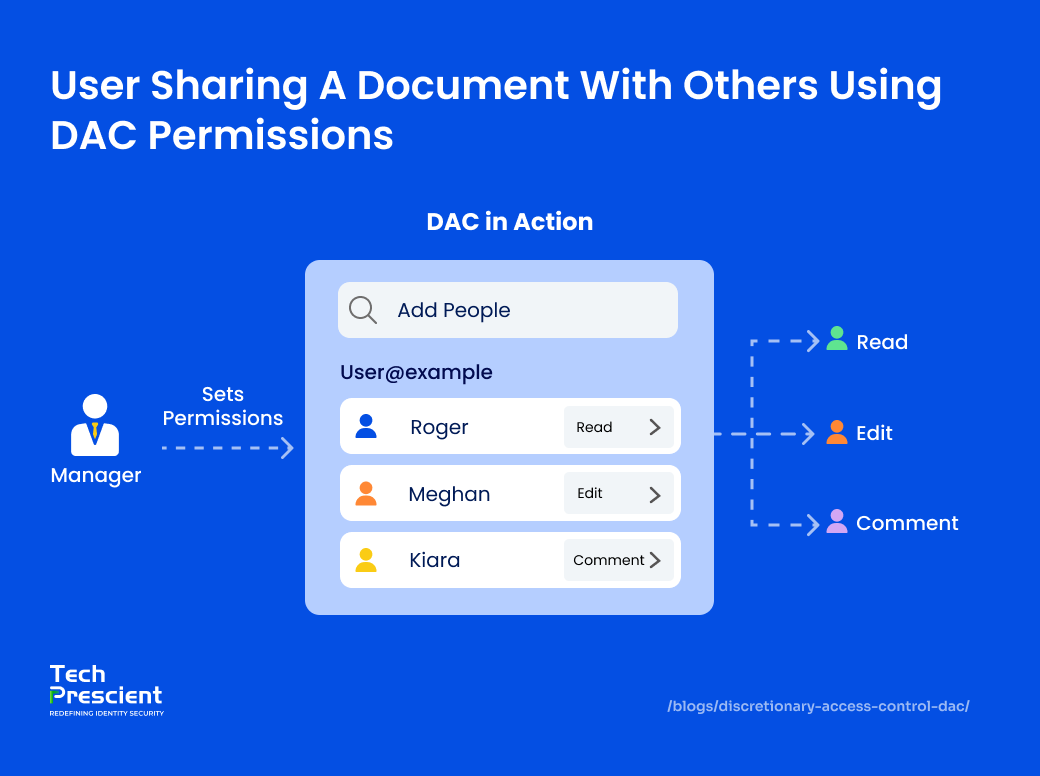
In Discretionary Access Control (DAC), access decisions are made by the resource owner, not a central administrator. Identity verification, permission assignment, and access enforcement work together to control who can use a resource.
In Discretionary Access Control (DAC), the resource owner, whether it's a file, folder, or database, decides who can access the resource and what actions they are allowed to perform. When a user requests access, the system validates their credentials (such as a username, password, or cryptographic keys) to confirm identity and then grants the appropriate permissions defined by the owner. Because control is "discretionary," the owner can grant, adjust, or revoke permissions at any time, determining not only who can access the resource but also the extent of their privileges, such as read, write, modify, or share. This makes DAC highly flexible and user-driven, though it also introduces potential security risks since protection largely depends on how carefully owners manage and distribute credentials.
For example, in personal computer operating systems, file access can be limited by granting certain privileges to specific users. These rights often include Read (R), which allows you to examine a resource without making any changes; Write (W), which allows you to create or edit material; and Execute (X), which allows you to run files, programs, or applications. To observe DAC in action, it's necessary to understand how such rights are granted and maintained.
Permissions set by owner, not system admin
In a DAC environment, access rules are established by the resource owner, not by system-wide policy. Access decisions are tied to user identity, which is validated during authentication. The owner determines which users receive credentials and what level of access those credentials provide, placing control entirely in the hands of the individual managing the resource.
Control via ACLs, file permissions, or sharing panels
Discretionary access control is an identity-based access control mechanism that allows users to govern their data. Data owners can set access rights for single users or groups of users. An Access Control List (ACL) stores the access rights for each piece of data. When a user provides access, the administrator generates this list, which can also be created automatically. An ACL lists the people and organizations who have permission to access data, as well as their access levels. A system administrator can also use an ACL as a security policy to prohibit normal users from changing it.
Easy grant/revoke with immediate effect
DAC is considered discretionary since the resource owner can give or revoke access to the information in issue. It is more than just allowing access; the owner may specify the type of access the user has and what they can do with it. Because not all employees require the same degree of access, separate user profiles with particular credentials can be developed to provide for changing access types as needed.
A practical example of DAC is Google Docs sharing, in which the document author determines who may access, comment on, or change the file, or Unix chmod commands, in which the file owner grants read, write, and execute rights to certain users or groups. In both circumstances, the resource owner has complete discretion over granting or denying access at any time.

Pro Tip
If a user can share a file, they can also accidentally overshare it. Always review "share" permissions separately from read/write access in DAC-heavy tools like Google Workspace or SharePoint.
Advantages and Disadvantages of DAC
Discretionary Access Control offers several operational benefits, particularly in environments where usability and flexibility are priorities. At the same time, its decentralized nature introduces security and governance trade-offs that must be carefully managed.
The main benefits of DAC systems include:
DAC is often selected for its balance between access flexibility and ease of administration. By allowing resource owners to manage permissions directly, DAC reduces friction in day-to-day access decisions and supports collaborative workflows.

Flexibility
DAC allows resource owners to define permissions at the object level. Users can be assigned access rights to specific files, folders, or resources, and permissions can be applied to individual users or groups. This level of granularity is not available in mandatory access control models, which rely on centrally enforced policies.
Speed and efficiency
Discretionary controls allow data to flow freely over networks. Users can provide access to objects by clicking a button. There is no need to build complicated user profiles or clearance levels for new personnel.
Low burden on administration
Decentralization means that object owners govern access, which reduces administrative burden. Administrators are not required to manage access control profiles for each user and each resource. Instead, consumers decide how they want to obtain information when they need it.
Simple policy management
DAC systems rely on straightforward mechanisms such as access control lists and application-level sharing settings. When properly configured, these controls are easy to manage and require limited policy complexity compared to more rigid access control models.
These advantages make DAC well suited for smaller organizations, collaborative teams, or environments where data sensitivity is lower and operational speed is a priority.
Disadvantages of DAC
Discretionary access control has drawbacks despite its advantages. These are the key points to remember.
Security
DAC is generally less secure than centrally enforced models such as mandatory access control. Because users control permissions, there is a higher risk of excessive access, accidental oversharing, or privilege creep. Attackers may exploit these weaknesses by targeting users who have granted broader access than intended.
Absence of visibility
Decentralization may result in a lack of administrative visibility and confusion. Security personnel must be aware of who is using private resources. Discretionary controls can result in security flaws and problems with compliance since they are difficult to monitor and manage.
Maintenance
Object owners are responsible for keeping ACLs up to current and relevant. As ACLs and networks develop, they may lose effectiveness. For example, access control lists may include access privileges for former workers. Alternatively, it may fail to update with user roles.
If you can't answer "Who has access to this file right now?" in under 30 seconds, DAC is already becoming a risk.
Measure Your DAC Risk Exposure
Calculate access risk from sharing, ownership and stale permissions
DAC vs MAC: What's the Difference?
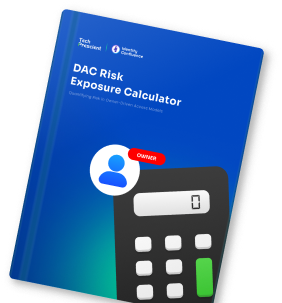
MAC and DAC handle security, flexibility, and user control in different ways. Knowing these differences helps you choose the model that best fits your company's needs.
| Feature | DAC | MAC |
|---|---|---|
| Control | Access is managed by the resource owner, who decides who can view, edit, or execute the resource. | Access control is managed and enforced by system administrators and the operating system. |
| Flexibility | Highly flexible, allowing owners to grant, modify, or revoke permissions at any time. | Very limited flexibility, as permissions are fixed according to strict security classifications. |
| Security | Provides low security, with risk depending on how carefully the owner manages access. | Provides very high security, as policies are centrally controlled and difficult to bypass. |
| Use Case | Works best for environments that prioritize collaboration and general office work. | Works best for sectors like government, military, or regulated industries where strict control is essential. |
| Example | In Google Docs, the file owner can choose who to share the document with and decide whether they can view, comment, or edit it, giving the owner direct control over access. | In a military clearance system, access to classified documents is based on security clearance levels. For example, only personnel with "Top Secret" clearance can open certain files, regardless of who created them. |
Common Discretionary Access Control (DAC) Exam & Interview Questions
Q: In which types of operating systems is discretionary access control implemented? A: Discretionary Access Control is commonly implemented in general-purpose operating systems, including Unix, Linux, and Microsoft Windows. These platforms allow resource owners to manage access permissions for files, directories, and system objects.
Q: What does DAC stand for in cybersecurity? A: DAC stands for Discretionary Access Control. It is an access control model in which the owner of a resource determines who can access it and what actions they are permitted to perform.
Q: Is DAC an identity-based access control model? A: Yes. DAC is considered an identity-based access control model because access permissions are granted and enforced based on the authenticated identity of the user or process requesting access.
Real-World Examples of DAC in Use
DAC is a common feature in both consumer and enterprise applications. In many cases, users interact with discretionary access systems without even realizing it. Here are some practical examples:
Smartphone app permission prompts (contacts, camera)
Mobile operating systems commonly use DAC when prompting users to allow or deny application access to resources such as contacts, cameras, microphones, or location data. The device owner determines which applications can access these functions and can modify permissions at any time.
Unix/Linux file commands (chmod, chown)
Most operating systems rely on DAC for file management. In UNIX or Linux, commands like chmod and chown let object owners set read, write, or execute privileges. Owners can also hide file attributes or deny access without proper authentication.
Google Workspace document sharing
Platforms like Google Docs apply DAC by letting document owners create access control lists (ACLs). Some users may be given write permissions, while others have view-only access. The owner can also delete the document or close the project at any time.
Dropbox, Slack, and similar collaboration platforms
Collaboration tools often use DAC to manage shared resources. Owners determine who can view, edit, or share files, ensuring the right people have the right level of access while keeping control over the content.
When Should You Use DAC?
Discretionary Access Control is best suited for environments where collaboration, speed, and operational flexibility are higher priorities than strict central governance. While it is not ideal for highly regulated or sensitive data environments, DAC can be effective when access requirements change frequently and centralized approval would introduce unnecessary friction.
Small businesses with ad-hoc projects
Organizations with small teams and minimal administrative staff often benefit from DAC. Resource owners can share files, tools, and systems without relying on constant administrative involvement, reducing complexity and operational overhead.
Academic and research teams
Universities, research labs, and project-based study groups benefit from DAC's flexibility. Team leads can quickly grant or adjust access to datasets, papers, or experimental results as needs change.
Low-regulation environments
In industries without heavy compliance requirements, DAC offers the freedom to share information without getting bogged down in strict approval processes. This is ideal for creative agencies, startups, and small service providers.
Collaborative projects
In team environments where documents, code, or other resources must be shared, Discretionary Access Control (DAC) makes it simple to grant, adjust, or revoke permissions, enabling smooth and efficient collaboration.
Personal computing
In operating systems such as Windows and Linux, Discretionary Access Control (DAC) governs file and folder permissions, giving users the ability to decide who can access their personal data and how it can be used.
Specific applications
Discretionary Access Control (DAC) is widely used in applications that require content sharing, such as Google Docs or Facebook groups, where the creator manages who can view, edit, or comment. It also supports cross-functional teams working on shared content, from collaboration platforms like Google Docs to shared drives in Dropbox, by enabling users to co-edit documents, upload files, and modify permissions in real time, while ensuring the content owner maintains final control.
How DAC Fits Into the Cybersecurity Landscape
In modern cybersecurity environments, Discretionary Access Control (DAC) rarely operates alone and is most effective when combined with IAM, IGA, and RBAC models.
Discretionary Access Control (DAC) offers flexibility, granting resource owners the ability to manage permissions directly, but it should not stand alone. In the modern DAC cybersecurity landscape, DAC must be integrated into Identity Governance and Administration (IGA) and IAM systems to deliver both usability and governance.
Fits alongside RBAC for structured access
DAC complements Role-Based Access Control (RBAC) by allowing resource owners to fine-tune permissions within the structure of roles. While RBAC defines who needs what access broadly, DAC access control lets owners adjust permissions at the object level, creating a balance between structure and flexibility.
Works within IAM/IGA frameworks
When embedded in IAM or IGA platforms, DAC becomes part of a governed workflow. Access decisions made by owners are tracked, reviewed, and audited, ensuring that discretionary decisions remain transparent and controlled. When DAC decisions are governed through IGA, organizations gain visibility, auditability, and control over owner-driven permissions.
Not suited for regulated or sensitive data without additional controls
DAC lacks centralized enforcement by design. As a result, it is not suitable as a standalone control for regulated or high-sensitivity environments. Without additional safeguards, DAC can contribute to overprovisioning and privilege escalation, particularly in large or distributed organizations.
Combine with access reviews to prevent privilege creep
Embedding DAC within governance processes like periodic access reviews, certification campaigns, and automated entitlement reporting helps catch and correct privilege creep, strengthening overall security posture.
Final Thoughts
Discretionary Access Control is widely used for its flexibility, speed, and user-driven nature, making it ideal for agile environments like small teams and research groups. However, to avoid security risks, it should be balanced with governance by integrating it into IAM/IGA frameworks, supplementing with RBAC, and conducting regular access reviews.
At Tech Prescient, our identity security experts help businesses design access control strategies that balance collaboration, governance, and compliance.
Turn DAC Visibility Into Governance
Identify risky permissions and prioritize remediation instantly
Discretionary Access Control (DAC) is a cybersecurity model where the owner of a resource decides who can access it and what actions they can perform, such as read, edit, or share.
The difference lies in who makes the decisions. In DAC, the data owner controls permissions. In Mandatory Access Control (MAC), the system or a central authority sets the rules, and no one can override them. Role-Based Access Control (RBAC) assigns access based on predefined job roles, so permissions change automatically when a person's role changes.
DAC is not ideal for highly sensitive data because it relies on user discretion, which can lead to over-permissioning. It works best when combined with stricter access control models.
You've probably used DAC without realizing it. When you share a Google Doc and choose who can view or edit it, that's DAC in action. The same goes for smartphone app permission prompts or Unix/Linux file commands like chmod and chown.
Yes, and that's often the best approach. Many organizations pair DAC with IAM systems or RBAC to balance flexibility with governance, ensuring that permissions are both user-friendly and compliant with security policies.


GET A PERSONALIZED DEMO
See Identity Confluence in Action
“One platform to govern identities, automate access decisions, and prove compliance; across every app, user, and system in your environment.”



Murli Ramsunder
Senior Architect, Vonage