




On this page
See Tech Prescient in Action
Automate access, reduce risk, and stay audit-ready
A security assessment checklist is a structured framework used to identify vulnerabilities, assess risks, and evaluate security controls across IT systems, applications, and infrastructure. Instead of reacting to incidents, it provides a structured way to uncover risks early, prioritize remediation, and maintain a strong security posture.
Modern environments span cloud applications, APIs, endpoints, and third-party integrations. Without structured assessment, gaps such as misconfigurations, excessive access, and unpatched systems remain undetected. A well-defined IT security assessment checklist ensures nothing important is missed.
In this blog, we'll walk through a complete security assessment checklist, covering key components, step-by-step processes, best practices, and common pitfalls, so you can protect your applications, data, and systems effectively.
Key Takeaways
- A security assessment checklist helps identify vulnerabilities before they are exploited
- Supports compliance with regulations like HIPAA, GDPR, PCI-DSS, and ISO 27001
- Enables structured application security risk assessment and IT security evaluation
- Prioritizes remediation based on risk
- Improves overall visibility into security posture across systems and users
Why Security Assessments Are Critical
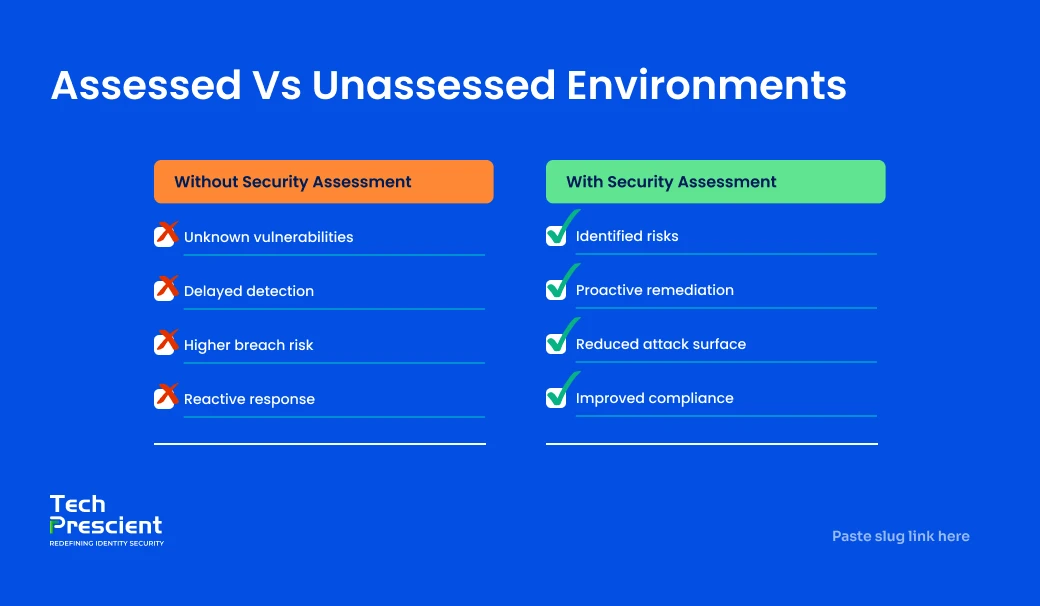
Regular security assessments are critical for identifying vulnerabilities, reducing risk, and maintaining compliance in modern IT environments. Security is not static; new threats, system changes, and user behaviors continuously introduce risk. Assessments provide a clear, repeatable way to evaluate these risks and take action before they turn into incidents.
1. Detect Vulnerabilities Across IT and Applications
Security assessments help uncover weaknesses across infrastructure, applications, and configurations. This includes outdated software, misconfigured cloud resources, insecure APIs, and exposed endpoints. In modern environments, risk extends beyond infrastructure to SaaS applications, identities, and integrations. A structured application security assessment ensures these areas are evaluated consistently.
2. Prevent Breaches and Reduce Impact
Most breaches exploit known issues such as weak access controls, unpatched systems, or misconfigurations. Regular assessments help identify these gaps early and reduce the likelihood of successful attacks. Even when incidents occur, established controls and monitoring reduce impact and response time.
3. Support Regulatory Compliance
Many regulations and standards require organizations to perform regular security assessments. Frameworks like ISO 27001, PCI-DSS, HIPAA, and GDPR expect organizations to demonstrate that risks are identified, managed, and continuously monitored. A consistent information security risk assessment checklist helps meet these requirements and maintain audit readiness.
4. Enable Better Security Prioritization
Not all vulnerabilities carry the same level of risk. Security assessments provide visibility into which issues are most critical, helping teams prioritize remediation efforts effectively. Instead of reacting to every alert, organizations can focus on high-impact risks, such as privileged access, sensitive data exposure, or critical system vulnerabilities.
Core Components of a Security Assessment Checklist
A comprehensive assessment must cover assets, vulnerabilities, access, network, data, policies, and third-party risk. An effective assessment spans infrastructure, applications, identities, and external dependencies. Missing even one of these components can create blind spots that attackers exploit. The following areas form the foundation of an effective application security assessment checklist.
1. Asset Inventory and Classification
Every security assessment starts with knowing what needs to be protected. This includes identifying all hardware, software, cloud applications, APIs, and IoT devices across the environment. Once identified, assets should be classified based on sensitivity and business criticality; for example, systems handling customer data or financial transactions should be prioritized. Maintaining accurate inventory prevents unmanaged or shadow assets from becoming risk exposure.
2. Vulnerability and Penetration Testing
Vulnerability testing focuses on identifying weaknesses in systems, applications, and configurations before attackers do. This includes automated scans to detect known vulnerabilities and penetration testing, where security teams simulate real-world attacks to uncover deeper issues. Techniques such as SAST (Static Application Security Testing), DAST (Dynamic Application Security Testing), and fuzz testing help evaluate application behavior under different conditions. Detection alone is insufficient; prioritization and remediation tracking determine effectiveness.
3. Access Control and Identity Management
Access control is a primary control point in any security assessment. This involves reviewing role-based access control (RBAC), identifying privileged accounts, and ensuring users only have access to what they need. Enforcing the principle of least privilege reduces the risk of misuse or compromise. Equally important is user lifecycle management, ensuring timely provisioning and deprovisioning of access when roles change or employees leave. Poor identity management leads to orphaned accounts and excessive permissions.
4. Network and Endpoint Security
Network and endpoint security ensure that systems are protected from unauthorized access and malicious activity. This includes reviewing firewall configurations, intrusion detection and prevention systems (IDS/IPS), VPN access, and remote connectivity. Monitoring the network for unknown or unauthorized devices helps identify potential entry points. On endpoints, ensuring endpoint detection (EDR) tools are active, systems are patched, and configurations are secure is essential to prevent compromise.
5. Data Protection and Encryption
Protecting sensitive data is a core objective of any information security risk assessment checklist. Organizations must ensure that data is encrypted both at rest and in transit, reducing the risk of exposure if systems are compromised. Regularly verifying backup integrity and testing disaster recovery processes ensures business continuity in case of incidents. Compliance with regulations such as GDPR, HIPAA, and PCI-DSS also depends heavily on how data is handled, stored, and protected.
6. Security Policies and Awareness
Technology alone is insufficient, people and processes remain critical.. Security assessments should evaluate whether employees are trained on phishing, password hygiene, and secure data handling. Awareness programs help reduce human error, which is a leading cause of breaches. In addition, organizations must review incident response and disaster recovery plans to ensure they are practical, tested, and effective. Social engineering tests can further validate how well employees respond to real-world attack scenarios.
7. Third-Party Risk and Compliance
Modern organizations rely heavily on third-party vendors, SaaS platforms, and external integrations. These dependencies expand the attack surface. A strong application security risk assessment includes evaluating vendor security practices, monitoring third-party access, and ensuring compliance with contractual and regulatory requirements. Without proper oversight, third-party systems can become entry points for attackers, making this a critical part of the checklist.
8 Steps to Conduct a Security Assessment (Step-by-Step Checklist)
A structured assessment follows a defined process, from identifying threats to continuously monitoring controls, to ensure complete IT and application risk evaluation. A well-executed IT security assessment is not a one-time activity. It is a continuous cycle of identifying risk, validating controls, and improving over time. The following steps provide a practical framework for conducting a comprehensive application security assessment.
Determine & Assess Potential Threat Actors
Identify threat actors, including external attackers, insiders, and automated threats, and assess their motivations, such as financial gain, data theft, or disruption. This step sets the context for the entire application security risk assessment.
Analyze Application Security Risk Factors
Next, evaluate the specific risks within your applications and systems. This includes vulnerabilities in code, insecure APIs, misconfigurations, and weak authentication mechanisms. Consider how users interact with the application, what data is processed, and where potential entry points exist. This step helps identify areas that require deeper testing and protection.
Create a Risk Assessment Inventory
Document all identified assets, risks, and vulnerabilities in a centralized inventory. This includes systems, applications, data flows, user access, and known weaknesses. A structured inventory ensures nothing is overlooked and provides a foundation for prioritizing remediation efforts.
Analyze Data Flow & Architecture
Map how data moves across systems, applications, and users. This includes identifying where sensitive data is stored, processed, and transmitted. Understanding data flow helps uncover hidden risks such as exposed APIs, insecure integrations, or unnecessary data access. It also ensures that controls are applied at the right points in the architecture.
Analyze & Mitigate Risk Scenarios
Evaluate how identified risks could be exploited. For example, consider what happens if credentials are compromised or if an API is exposed. This helps assess the potential impact and likelihood of each risk. Based on this analysis, define mitigation strategies such as strengthening access controls, patching vulnerabilities, or limiting exposure.
Inspect and Track Vulnerabilities
Conduct vulnerability scans and testing to validate identified risks. This includes scanning systems for known vulnerabilities, testing configurations, and verifying security controls. Once identified, vulnerabilities should be tracked in a structured way, with clear ownership and timelines for remediation. Tracking ensures issues are not forgotten or left unresolved.
Implement Security Controls and Test Effectiveness
Apply security controls based on identified risks. This may include implementing encryption, strengthening authentication, enforcing least privilege, or deploying monitoring tools. Controls must be tested to validate effectiveness. Testing validates that security measures are effective and do not introduce new gaps.
Monitor & Update Security Controls
Security is not static. Systems, threats, and user behavior change over time. Continuous monitoring helps detect new risks, track system activity, and ensure controls remain effective. Regular updates and reassessments keep the security assessment checklist relevant and aligned with evolving threats.

Pro Tip
Don't treat all risks equally, focus first on high-impact areas like privileged access, sensitive data, and external exposure. Prioritization is what turns assessments into real risk reduction.
Best Practices for Security Assessments
Effective assessments require automation, collaboration, documentation, and alignment with recognized frameworks. A checklist is only as effective as how it is executed. Following best practices ensures assessments are consistent, actionable, and aligned with real-world risks rather than being treated as one-time activities.
1. Use Automated Scanning Tools for Efficiency
Manual assessments do not scale with modern environments. Automated tools help continuously scan systems, applications, and configurations for vulnerabilities and misconfigurations. These tools improve coverage, reduce human error, and ensure that new risks are identified quickly. However, automation should complement, not replace, manual validation and expert analysis.
2. Include Cross-Functional Stakeholders
Security is not just an IT responsibility. Effective IT security assessments require collaboration between IT, security teams, compliance teams, and business units. Each group provides distinct operational context, IT understands infrastructure, security teams focus on threats, compliance ensures regulatory alignment, and business teams highlight critical processes and assets. This ensures assessments are both technically accurate and business-relevant.
3. Document Findings for Audit Readiness
Every assessment should result in clear, structured documentation. This includes identified vulnerabilities, risk levels, remediation steps, and timelines. Proper documentation not only helps track progress but also supports audit readiness by providing evidence of security controls and risk management efforts. Without documentation, assessments lose audit and operational value.
4. Follow Established Security Frameworks
Using recognized frameworks ensures that assessments are comprehensive and aligned with industry standards. Frameworks such as NIST, ISO 27001, and CIS Controls provide structured guidelines for identifying, managing, and mitigating risks. Aligning your information security risk assessment checklist with these frameworks improves consistency and credibility.
5. Update the Checklist Regularly
Threat landscapes evolve constantly, and so should your security assessment checklist. New technologies, cloud adoption, AI-driven threats, and changing regulations introduce new risks. Regularly updating the checklist ensures that assessments remain relevant and continue to cover emerging vulnerabilities. A static checklist quickly becomes outdated and ineffective.
Common Pitfalls to Avoid
Most assessments fail due to poor execution, incomplete coverage, and lack of follow-through. Even with a well-defined security assessment checklist, organizations often make mistakes that reduce its effectiveness. Avoiding these common pitfalls ensures your IT security assessment delivers real value instead of becoming a checkbox exercise.
1. Skipping Assessments Due to Perceived Low Risk
Many organizations delay or skip assessments because they believe their environment is low risk. This assumption introduces risk; threats evolve constantly, and even small gaps can be exploited. Risk is not static. What seems low risk today can become a critical vulnerability tomorrow, especially as systems, users, and integrations change.
2. Ignoring Cloud and SaaS Assets
Modern environments extend far beyond on-prem systems. Cloud applications, SaaS platforms, APIs, and third-party integrations introduce new risks that are often overlooked. Failing to include these assets in your application security assessment checklist creates blind spots, leaving critical data and access unprotected.
3. Poor Remediation Prioritization
Not all vulnerabilities are equally critical. Treating every issue the same leads to wasted effort and delayed response to high-risk threats. Effective assessments should prioritize remediation based on risk impact, focusing first on vulnerabilities that affect sensitive data, privileged access, or critical systems.
4. Neglecting Employee Training
Security is not just about systems; it also depends on user behavior. Without proper training, employees may fall for phishing attacks, mishandle data, or ignore security protocols. Even the strongest technical controls can be bypassed through human error. Including awareness training as part of the security assessment checklist helps reduce this risk.
5. Not Tracking Findings or Progress
Identifying vulnerabilities is only the first step. Without proper tracking, issues may remain unresolved or be forgotten over time. Organizations must maintain a structured process to track findings, assign ownership, and monitor remediation progress. This ensures accountability and continuous improvement.
6. Treating Assessments as One-Time Activities
Many organizations perform assessments only for compliance or audits. Without continuous monitoring and reassessment, new risks go undetected.
Final Thoughts
A structured security assessment checklist is essential for identifying vulnerabilities, reducing risk, and maintaining compliance in modern IT environments. Organizations that treat security assessments as a continuous process, not a one-time activity, are better positioned to prevent breaches, protect sensitive data, and stay audit-ready.
FAQs
A security assessment checklist is a structured framework used to identify vulnerabilities, assess risks, and evaluate security controls across IT systems, applications, and infrastructure.
Security assessments are important because they help organizations proactively identify and fix vulnerabilities before they are exploited. They also support regulatory compliance, improve visibility into risks, and strengthen overall cybersecurity posture by enabling structured application risk management.
Security assessments should ideally be conducted on a quarterly basis, or more frequently depending on the organization's risk level. They should also be performed after major infrastructure changes, application updates, or security incidents to ensure new risks are identified and addressed.
Common frameworks that guide security assessments include the NIST Cybersecurity Framework, ISO 27001, and CIS Controls. These frameworks provide structured guidelines for identifying, assessing, and mitigating risks, helping organizations align their information security risk assessment checklist with industry best practices.
Yes, third-party vendors should be included as part of a security assessment checklist. Vendor and SaaS assessments help identify supply chain risks, ensure compliance with security policies, and prevent unauthorized access to critical systems and data.
Common risks identified during an IT security assessment include network vulnerabilities, application misconfigurations, weak access controls, excessive privileges, outdated software, and unpatched systems. These risks are often exploited by attackers and should be prioritized during remediation.
Share



Rashmi Ogennavar
Content Strategist
A content strategist translating complex Tech and SaaS concepts into compelling narratives for business and technical audiences. With a strategic, data-informed approach, the work bridges content and product storytelling, crafting messaging that resonates and drives decisions across the buyer journey.
Most Popular Blogs
Identity Security· 21 min read
Data Access Governance Solutions: How to Secure Sensitive Data at Scale
Compare data access governance solutions for 2026: how DAG platforms discover sensitive data, run access reviews, automate remediation, and prove compliance.
Brinda Bhatt· September 7, 2026
Identity Security· 24 min read
What Is Zero Trust Network Access (ZTNA)?
Learn what Zero Trust Network Access (ZTNA) is, how it works, and why it’s replacing VPNs for secure, identity-based access control.
Yatin Laygude· August 14, 2026
Identity Security· 24 min read
Cyber Essentials Certification: Complete Guide
Learn Cyber Essentials certification, cost, requirements, and steps. Compare Cyber Essentials vs Plus and get certified faster.
Yatin Laygude· August 10, 2026