
How Bulk and Offline Certifications Improve Review Efficiency
Last Updated date: October 11, 2026
On this page
See Tech Prescient in Action
Automate access, reduce risk, and stay audit-ready
Access reviews are one of the most repetitive jobs in identity governance. A reviewer is handed a campaign, opens it, and works through a list of users one entry at a time, deciding whether each person should keep their access or have it removed.
The decisions are not the slow part. The mechanics around them are. Clicking through users individually, inside the platform, with a live connection required for every action, turns a straightforward review into a slow one. Offline certification in Identity Confluence removes that friction without removing the rigor.
TL;DR
- Reviewers can download a full campaign as an Excel file and review it offline, with no live connection needed
- Decisions and comments for many users are made at once, then uploaded back in a single action
- The My Reviews toggle filters campaigns down to only the ones assigned to the logged-in reviewer
- Bulk and offline review applies to standard user, self, and non-human identity reviews
- Every uploaded decision flows back into the same campaign, keeping the audit record intact
Why One-by-One Reviews Slow Governance Down
A review campaign can cover dozens or hundreds of user-application pairs. When a reviewer has to certify or revoke each one individually inside the platform, three things happen.
The review takes longer than it should because every decision is a separate interaction. It depends on connectivity, since the reviewer has to stay inside the platform for the entire session. And it quietly discourages reviewers from giving each entry real attention, because the format rewards speed-clicking over judgment. This is a documented failure mode, not a hypothetical. In SailPoint's identity research, 82% of identity leaders said satisfying auditors takes high levels of effort, and the volume problem drives reviewers toward rubber-stamping, clearing the queue rather than making real decisions. A format that lets a reviewer work through a full campaign in one pass, with risk scores and access flags visible in the same file, is a direct answer to that.
None of this means the user access review itself is flawed. It means the way reviewers interact with it can be improved. That is exactly what bulk and offline certification does.
How Bulk and Offline Certification Works in Identity Confluence
The feature lives inside the User Access Review screen, where reviews are organized into three tabs: standard user reviews, self-reviews, and non-human identity reviews. A reviewer switches the toggle from All Reviews to My Reviews and immediately sees only the campaigns assigned to them, rather than every campaign running across the tenant.
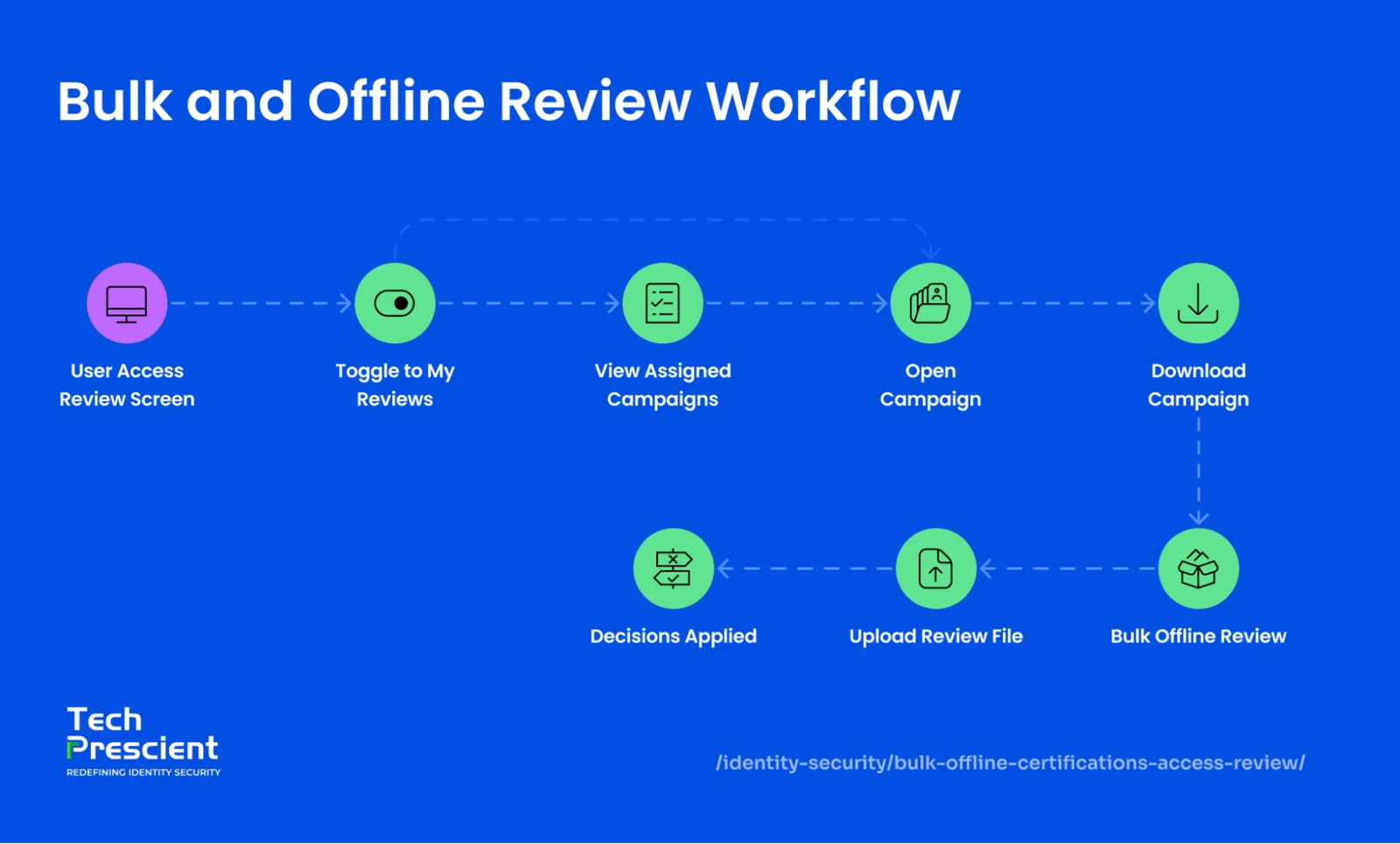
Opening any campaign brings up the full list of users under review, each with its application, IT role, and entitlements, risk score, login count, and access flags such as PII and privileged status. This is where the offline workflow begins.
Download the Campaign
Next to the search bar sits a download button. It exports the entire campaign as an Excel file containing the current access data for every user in that review. Once the file is on the reviewer's machine, the platform connection is no longer needed.
Application Insight:
Because the download is scoped to a single campaign, the upload only writes back to that same campaign. A reviewer handling several campaigns downloads and uploads each one separately, which keeps every campaign's audit trail clean and self-contained.
Review Offline and in Bulk
The reviewer works through the spreadsheet at their own pace. Because all users sit in one file, decisions and comments are recorded across the whole list in a single sitting, which is what makes this a bulk access review rather than a sequence of individual actions. The reviewer needs no internet, no live platform session, and no screen-by-screen clicking.
Upload the Completed File
When the review is done, the reviewer returns to the same screen and uploads the completed Excel file. The certified and revoked decisions, along with the comments, flow back into that specific campaign. The campaign updates, the progress counters move, and the record reflects exactly what the reviewer decided.
Your reviews are efficient. Are they audit-resilient?
Pressure-test your UAR process against SOX, HIPAA, and ISO scrutiny.
Where Completed Reviews Become Audit Evidence
Every certify and revoke decision a reviewer records is more than a closed task. It is evidence, and Identity Confluence keeps that evidence in two distinct places.
Screen 1: Reports
The Reports screen is the operational record of what the platform has done. It holds platform-level reports covering access logs, reconciliation activity, provisioning history, and policy changes, each one viewable on screen and exportable as a structured file. When a team needs to see the activity behind a review campaign, who had access to what, and when it changed, the Reports screen is where that history lives. It answers the practical question of what happened in a format ready to share or analyze.
Screen 2: Evidence Center
The Evidence Center is the compliance-facing layer. Instead of raw operational logs, it organizes governance data by framework and maps it to individual control clauses across SOC 2, ISO/IEC, DPDPA, NIST, and more. Completed access reviews feed into the clauses that depend on them, so an auditor assessing a specific control gets a pre-mapped report rather than a manually assembled one.
Because bulk and offline reviews help campaigns finish on schedule, the evidence behind them stays current.
See how the Evidence Center maps every completed review to clause-level audit reports.
What Comes Next
Bulk and offline certification is a small change to how reviewers work and a meaningful change to how reviews get done. The campaign, the reviewers, and the audit record stay exactly as they were. What changes is that the review is no longer trapped inside a one-click-at-a-time interface.
See how Tech Prescient's Identity Confluence runs access reviews that reviewers can complete quickly, offline, and in bulk, with every decision captured as audit-ready evidence.
FAQs
Yes. In Identity Confluence, a reviewer downloads the full campaign as an Excel file, works through every user at their own pace with no live connection, and uploads the completed file back into the same campaign. The download is scoped to one campaign, so the upload writes back only to that campaign, and its audit trail stays self-contained.
Instead of certifying or revoking each user one at a time inside the platform, a bulk review records decisions and comments across the whole list in a single file and a single upload. It cuts the number of individual interactions without changing the campaign, the reviewers, or the audit record.
No. Every uploaded decision flows back into the same campaign, updating its progress counters and its record. The completed reviews then feed the Evidence Center, which maps them to the specific control clauses that depend on them across frameworks like SOC 2 and ISO 27001.
Standard user reviews, self-reviews, and non-human identity reviews. The My Reviews toggle filters the screen to only the campaigns assigned to the logged-in reviewer.


GET A PERSONALIZED DEMO
See Identity Confluence in Action
“One platform to govern identities, automate access decisions, and prove compliance; across every app, user, and system in your environment.”



Murli Ramsunder
Senior Architect, Vonage