




On this page
See Tech Prescient in Action
Automate access, reduce risk, and stay audit-ready
Role-Based Access Control (RBAC) implementation is a foundational security practice for enterprises managing complex user access across applications, cloud platforms, and sensitive data environments. When implemented correctly, RBAC reduces unauthorized access, enforces least privilege, and enables organizations to remain audit-ready as they scale.
In 2026, RBAC implementation is no longer just about assigning roles, it requires aligning identity data, automating access decisions, integrating IAM and IGA platforms, and continuously reviewing access to prevent privilege creep. Enterprises that implement RBAC with governance in mind can significantly reduce identity-related risk while improving operational efficiency.
RBAC provides a structured, repeatable approach to enterprise access control by assigning permissions based on defined job roles, ensuring users interact only with the systems and data required for their responsibilities. When implemented correctly across application and cloud environments, RBAC enforces least-privilege access, supports regulatory compliance, and strengthens security posture. According to Sprinto, organizations with a structured RBAC implementation can reduce unauthorized or prohibited access by up to 60%. Achieving this level of control requires clearly defined roles, accurate user-to-role mapping, centralized policy enforcement through identity platforms, and ongoing access reviews to maintain governance and operational efficiency.
This RBAC implementation guide 2026 walks through a practical, step-by-step framework designed for enterprise environments, including real-world examples and actionable guidance to help organizations build, enforce, and maintain effective role-based access controls.
Key takeaways:
- Define roles and permissions aligned with job functions
- Understand how to assign permissions using the principle of least privilege
- Discover methods to automate user-role mapping and reduce manual errors
- Explore tools and techniques to enforce and maintain RBAC policies effectively
- See real-world RBAC implementation examples that ensure compliance and audit readiness
What Is Role-Based Access Control?
RBAC assigns access permissions based on job roles rather than individual users, simplifying access management, reducing risk, and supporting compliance through least privilege and segregation of duties.
Role-Based Access Control (RBAC) is an access management approach that assigns only the minimum necessary permissions to individuals based on their job roles, limiting access to predefined role privileges. By doing so, RBAC helps streamline access management and reduces the risk of security breaches and insider threats.
RBAC is essential for large enterprises as it simplifies access provisioning and monitoring, which allows IT teams to manage access permissions, thus reducing human error and administrative workload. It makes access management simpler by letting IT teams enable faster onboarding through reusable roles. RBAC also strengthens compliance by supporting the principle of least privilege, segregation of duties (SOD), and audit trails, which makes it easier to meet regulatory standards like GDPR, SOX, and HIPAA.
For example, in a content management system (CMS), an Author may only create or edit their content, while an Editor can review and approve content from multiple authors. An Admin, on the other hand, would have full access to manage content, users, and settings. This hierarchy ensures clear separation of responsibilities and reduces the potential for unauthorized actions.
Reality Check:
RBAC doesn't automatically make systems secure. Poorly defined roles can still grant excessive access. Security comes from how roles are designed, reviewed, and enforced.
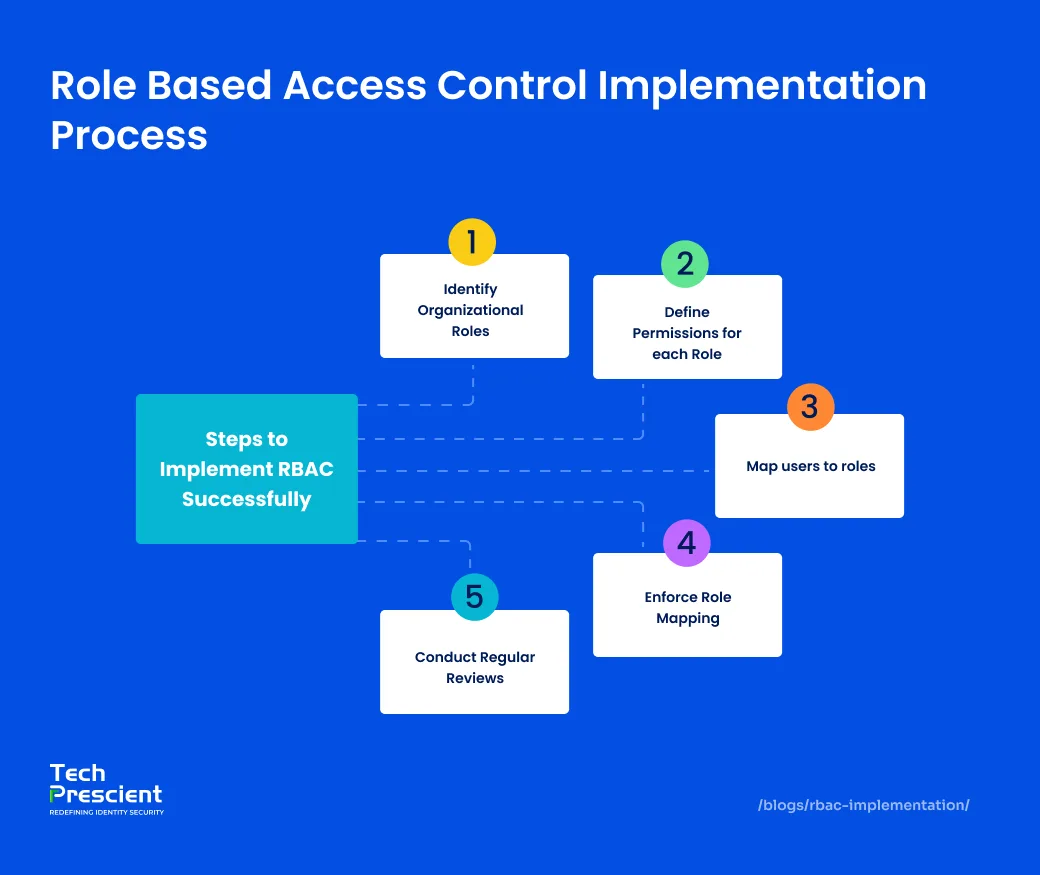
RBAC Implementation Steps for Enterprises
Implementing RBAC requires identifying roles, defining permissions, mapping users, integrating enforcement layers, and continuously reviewing access to prevent over-provisioning.
Here's how to do it in six practical steps:
Identify Organizational Roles
RBAC implementation begins with viewing the present technique of managing access control and is done in two separate processes. The first step is to classify significant organizational resources according to their criticality, which includes sensitive files, databases, specific datasets, and views, as well as unique functionality or operations that require privilege to access. This stage allows you to inventory data and data classes in order to determine which permissions to allocate to users. It also identifies the domains covered by RBAC implementation.
The process is to undertake a review of procedures and workflows, as well as how your users access and interact with the resources within them. You should consider assessing existing security procedures and policies to evaluate if they are in line with compliance standards. Finally, review how users are currently organized or managed, as well as how user accounts are provisioned and de-provisioned.
Define Permissions for Each Role
This step begins with an analysis of the organizational structure and the division of roles according to the level of access, just like data classification. Once done, identify the roles that have not been created yet and map permissions to each role. While doing so, be sure to apply the principle of least privilege, ensuring that each role only gets the minimum access necessary to perform its tasks. At this point, it's also critical to consider constraints and nuances like temporary access, additional access, and conflicting roles. This is a critical phase that will require meticulous attention to detail. It also makes it easier to assign group responsibilities that require similar access.
For instance, a Finance Analyst may need access to budgeting and reporting tools, an IT Admin would require control over infrastructure and configurations, while a Support Rep would handle customer queries and access support-related platforms. Identifying such roles lays the groundwork for more precise access control and smoother RBAC implementation.
Map Users to Roles
With roles and permissions in place, it's time to link users to the roles that match their job function. Use existing organizational data like titles, departments, or job levels to guide these assignments. Where possible, integrate your RBAC model with your Human Resource Information System (HRIS) or identity provider to automate this mapping. Manual user-role assignment doesn't scale well and is prone to inconsistencies, especially in large organizations.
Integrate RBAC
RBAC must then be integrated into the organization's technical environment. Enforcement can occur at multiple layers depending on application architecture and security requirements.
- Query-level RBAC controls access within databases or applications by granting roles permission to execute specific functions or query types.
- Interface-level RBAC limits which views, screens, or interfaces a role can access, ensuring users interact only with components relevant to their responsibilities.
- Component-level RBAC applies finer-grained control by selectively displaying or hiding specific attributes or options based on role, which is useful when role differences are minimal.
The appropriate enforcement model depends on the required granularity of control and the organization's overall security objectives.
Implement & Enforce Role Mapping
Role assignments should be enforced using centralized Identity and Access Management (IAM) or Identity Governance and Administration (IGA) platforms such as Tech Prescient. These tools enable policy-based enforcement, prevent unauthorized access escalation, and ensure users cannot bypass assigned permissions.
Strong enforcement mechanisms are essential to prevent privilege creep as users change roles, departments, or responsibilities over time.
Common Failure Pattern:
Roles are enforced at onboarding, but never updated during job changes. This is how "temporary access" becomes permanent risk.
Conduct Regular Reviews
RBAC is not a one-time exercise; it requires regular evaluations. Access within the organization is constantly changing for a variety of reasons, including compliance updates, workflow changes, shifts in roles and responsibilities, and so on. As a result, it must be continuously monitored and improved through a reporting mechanism. Access control is also an important function in the onboarding and offboarding process workflows, and must be reviewed when employees join or leave the organization. As a result, these periodic reviews will need to assess RBAC policies and how the system aligns with them.
Is Your RBAC Audit-Ready?
Use this checklist to validate roles, permissions, and access governance.
Real-World RBAC Implementation Examples
The following RBAC implementation examples show how enterprises apply role-based access control across departments and systems.
To illustrate how Role-Based Access Control functions in practice, consider the following enterprise roles and how clearly defined permissions improve security, reduce risk, and support compliance. These examples demonstrate how RBAC enforces access boundaries while aligning permissions with job responsibilities.
Scenario
A mid-sized financial services firm implements an Identity Governance and Administration (IGA) platform to streamline and automate access control across departments like HR, Finance, and IT. Facing increasing data sensitivity and evolving compliance requirements, the organization adopts RBAC to establish granular control over user permissions, reduce manual provisioning, and create a scalable access management strategy.
| Sr No | Role | HRMS | ERP | IAM Console |
|---|---|---|---|---|
| 1 | HR Specialist | View/Edit Employee Records | ❌ No Access | ❌ No Access |
| 2 | Finance Manager | ❌ No Access | Budget & Expense Approval | ❌ No Access |
| 3 | IT Administrator | ❌ No Access | ❌ No Access | Full Administrative Control |

HR Specialist
The HR Specialist is granted access to view and manage employee records within the HRMS (Human Resource Management System). Their role includes onboarding new hires, updating personal information, and managing internal HR documentation. However, access to payroll, compensation data, or financial records is explicitly denied. This separation reinforces data confidentiality and minimizes the risk of sensitive salary information being mishandled.
Finance Manager
The Finance Manager has access to the organization's ERP system, where they are responsible for approving expenses, managing budgets, and overseeing financial workflows. They are completely restricted from accessing HR or employee-related data. This clear division ensures that financial operations remain isolated from personnel management, preventing any unintentional crossover or data exposure between departments.
IT Administrator
The IT Administrator has full control over system infrastructure, including managing user identities, setting access controls, and maintaining security configurations. Their role is technical, with no involvement in business functions like financial approvals or HR operations. By restricting access to sensitive business data, this role respects the principle of segregation of duties (SoD), ensuring IT has the tools to support without overstepping into operational or confidential areas.
Why It Matters?
RBAC delivers more than just structured access control; it enforces security best practices, supports regulatory compliance, and adapts to evolving business needs. Here's why a well-implemented RBAC model can be a game-changer for your organization.
Supports Least Privilege and SoD Principles
RBAC ensures that each user receives only the access required to perform their job, no more and no less. This implementation of the principle of least privilege reduces the risk of unauthorized access, human error, and insider threats. At the same time, Segregation of Duties (SoD) is inherently built into the system. For example, an IT admin cannot both provision and approve financial access, and a finance manager cannot access HR records, eliminating toxic permission combinations that could lead to compliance failures or fraud.
Enables Compliance & Audit Readiness
By clearly defining roles and permissions, RBAC makes it easier to meet regulatory standards like SOX, GDPR, and HIPAA. Each user's access can be traced back to their role, and those roles can be audited for scope and relevance. Access logs, user-role mappings, and policy enforcement become straightforward to generate and review. This not only shortens the time required for audits but also ensures that the organization maintains continuous compliance without scrambling to gather evidence when required.
Automates Access Reviews with IGA Tools
By integrating RBAC with Identity Governance and Administration (IGA) platforms, organizations can automate periodic access reviews and certifications. Managers are prompted to confirm ongoing access needs, and unnecessary permissions can be revoked promptly. This automation reduces over-provisioning, keeps access aligned with current responsibilities, and eliminates the operational overhead of manual reviews.
Quick Self-Check:
If you had an audit tomorrow, could you explain why every role exists, and who approved it?
Common RBAC Implementation Mistakes (and How to Avoid Them)
Even well-intentioned RBAC initiatives can fail when governance, scalability, and lifecycle management are overlooked. The following are the most common RBAC implementation pitfalls encountered in enterprise environments:
- Role Explosion – Defining too many narrowly scoped roles increases administrative overhead and makes RBAC difficult to manage and maintain.
- Over-Permissioning – Granting "just-in-case" access undermines the principle of least privilege and expands the attack surface.
- Lack of Segregation of Duties (SoD) – Allowing conflicting roles increases the risk of fraud, policy violations, and compliance failures.
- Missing Review Cycles – Treating roles as static leads to privilege creep as responsibilities change over time.
- No HR or Identity Integration – Manual role assignment does not scale and introduces inconsistency and human error.
These issues can be avoided by aligning roles to actual job functions, integrating RBAC with identity governance platforms, enforcing automated provisioning and deprovisioning, and conducting regular access reviews to maintain continuous governance.
Final Thoughts
A well-executed RBAC model doesn't just enhance access security; it operationalizes governance. By assigning entitlements based on roles and enforcing strict boundaries between job functions, organizations can proactively meet compliance mandates, reduce identity-related risks, and scale secure access as business needs evolve. The above real-world example illustrates how RBAC, when paired with an IGA platform, transforms access control from a reactive IT task to a strategic enabler of enterprise security and agility.
If you're exploring RBAC implementation or looking to optimize your access governance strategy, Tech Prescient can help you get there faster and smarter. Our team has deep expertise in building secure, scalable identity solutions tailored to your business needs.
FAQs
To implement RBAC, start by clearly defining organizational roles based on job functions. Then, set specific permissions for each role, assign users accordingly, and enforce access through IAM or IGA tools. Don't forget to regularly audit and review role mappings to keep your system secure and up to date.
A common example is in a content management system (CMS). Here, authors can only create or edit their own posts, editors can modify content from all authors, and admins have full access to manage content, users, and settings. Each role gets access aligned with their responsibilities.
RBAC (Role-Based Access Control) assigns access based on a user's role within the organization. ABAC (Attribute-Based Access Control), on the other hand, grants access using dynamic attributes like time, device type, location, or user status—offering more contextual and fine-grained control.
Absolutely. RBAC is widely supported in cloud environments. Major platforms like Microsoft Azure Active Directory, AWS IAM, and Google Cloud IAM all offer robust RBAC features to help manage user access securely and efficiently.
RBAC is supported by many IAM and IGA tools, including Azure AD, AWS IAM, SailPoint, Okta, and Saviynt. These platforms help automate role assignments, enforce access policies, and maintain compliance with audit-ready access controls.
Share



Yatin Laygude
Content Writer
A content writer with 6 years of experience turning complex topics into clear, engaging, and meaningful content. From blogs and web pages to whitepapers and thought pieces, he creates content that not only explains but also connects with both the audience and business goals.
Most Popular Blogs

Identity Security· 21 min read
Data Access Governance Solutions: How to Secure Sensitive Data at Scale
Compare data access governance solutions for 2026: how DAG platforms discover sensitive data, run access reviews, automate remediation, and prove compliance.
Brinda Bhatt· September 7, 2026
Identity Security· 24 min read
What Is Zero Trust Network Access (ZTNA)?
Learn what Zero Trust Network Access (ZTNA) is, how it works, and why it’s replacing VPNs for secure, identity-based access control.
Yatin Laygude· August 14, 2026
Identity Security· 24 min read
Cyber Essentials Certification: Complete Guide
Learn Cyber Essentials certification, cost, requirements, and steps. Compare Cyber Essentials vs Plus and get certified faster.
Yatin Laygude· August 10, 2026