




On this page
See Tech Prescient in Action
Automate access, reduce risk, and stay audit-ready
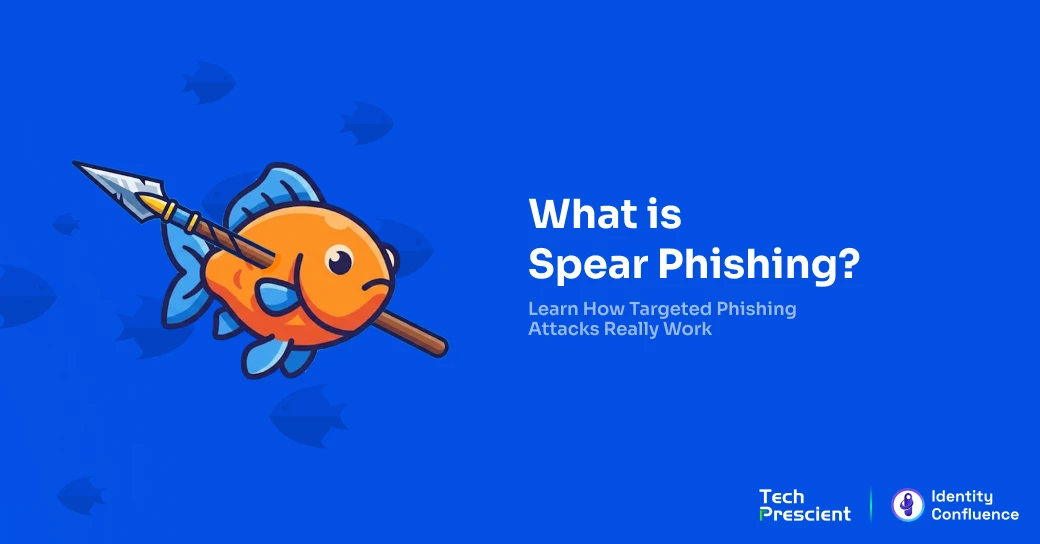
Spear phishing is a targeted form of phishing where attackers impersonate trusted individuals to trick specific victims into revealing sensitive information or performing harmful actions.
Unlike generic phishing, spear phishing uses personalized details to increase credibility and success rates.
Spear phishing has become one of cybercriminals' most successful strategies for tricking certain people or companies. Attackers thoroughly research their targets, utilizing information from social media, business websites, and publicly accessible documents rather than sending generic bulk emails. Then, they construct messages that appear authentic and pertinent, frequently as though they are from reliable partners or coworkers. This degree of personalization raises the likelihood of a successful compromise and makes the attack much more plausible.
Almost anybody may be duped by these convincing emails, even CEOs and financial teams who deal with critical data on a daily basis. Attackers may attempt to obtain your login credentials, gain access to private or financial information, or insert malware via an attachment or link. The typical warning indicators are simple to overlook because the email appears reliable. Sometimes an attacker only needs to click once to get access to an organization's network.
According to a new Proofpoint threat study, more than 80% of organizations experienced efforts at email-based identity fraud last year, demonstrating how widespread and targeted these scams have grown. In the following sections, we'll go over how these attacks work, what red signals to look for, and what steps you should take to safeguard your company.
According to industry security reports, targeted phishing attacks account for a significant percentage of business email compromise (BEC) incidents worldwide.
These attacks often result in financial fraud, data breaches, and ransomware deployment.
Key Takeaways:
- Spear phishing is a targeted attack that uses personalized details to impersonate trusted individuals.
- Attackers follow a clear process of researching, crafting convincing messages, and executing malicious actions.
- Common attack types include CEO fraud, vendor impersonation, credential theft, clone phishing, and malware delivery.
- Spear phishing emails can be spotted through mismatched domains, urgent requests, odd attachments, and tone inconsistencies.
- Strong verification, multi-factor authentication (MFA), email security tools, least privilege access, and awareness training are key to prevention.
What Is Spear Phishing?
Spear phishing is a targeted social engineering attack where scammers impersonate trusted individuals to deceive specific people into taking harmful actions. Instead of sending generic, one-size-fits-all messages, attackers create highly personalized emails, texts, or direct messages using information gathered about the victim. This personalization makes the communication look authentic and significantly increases the chances of the target clicking a malicious link, sharing sensitive information, or downloading malware.
To understand why spear phishing is so effective, it helps to look at what separates it from traditional phishing and how attackers gather the details that make these scams believable.
Quick Answer: What Is Spear Phishing?
Spear phishing is a highly targeted social engineering attack that uses personalized emails or messages to deceive a specific individual or organization.
Attackers often impersonate executives, vendors, or colleagues to steal credentials, money, or sensitive data.
How Spear Phishing Differs from Mass Phishing
Mass phishing sends the same generic message to large numbers of people and relies on volume rather than accuracy. These messages are often easy for trained users or email filters to detect.
Spear phishing is much more focused and tailored. Attackers choose a single person or a small group, such as finance, HR, or IT, and research them carefully. They study job roles, responsibilities, recent activities, and relationships to craft messages that feel relevant, timely, and trustworthy. Because the message appears to fit naturally into the victim's normal workflow, it is far more convincing and difficult to spot. This precision makes spear phishing significantly more dangerous than broad phishing attempts.
Users can be tricked into installing malware or disclosing their credentials, including usernames and passwords. Once obtained, these details allow an attacker to slip into the user's network unnoticed, enabling data theft or disruption of the environment from inside. Attackers may also target sensitive information like credit card numbers, Social Security numbers, and bank account details, which can then be used to carry out financial fraud.
Spear Phishing in Cyber Security
In cyber security, spear phishing is classified as a targeted social engineering attack that often serves as the initial access vector in major breaches.
Security teams consider spear phishing dangerous because:
- It bypasses traditional spam filters
- It targets high-value employees
- It enables credential theft and lateral movement
- It often leads to ransomware or business email compromise (BEC)
Many large-scale breaches begin with a single personalized phishing email.
How Attackers Collect Personal Details
Attackers begin with detailed reconnaissance to make their communication as believable as possible. This typically includes studying:
- LinkedIn profiles to understand job titles, teams, and responsibilities
- Company websites to learn about organizational structure, vendors, and leadership
- Social media posts that reveal personal interests, milestones, or routines, for example, updates on X/Twitter or Instagram about travel schedules or family events
- Public records, data breaches (e.g., from dark web markets), and leaked credential dumps that expose emails, phone numbers, or details of past interactions
These insights allow the attacker to mimic the tone, writing style, and context of real internal messages, often using AI tools to clone writing styles or generate deepfake voices for vishing follow-ups. For example, knowing who the victim reports to helps the attacker impersonate that manager. Understanding that the organization recently partnered with a new vendor gives them a plausible reason to send a fake invoice or updated payment request. The more personal details they gather, the more convincing the attack becomes.
A Simple Spear Phishing Scenario
Imagine receiving an email that looks exactly like it came from your manager. The formatting, signature, and tone all feel familiar. The message asks you to quickly review an updated client document and includes a link.
A typical spear-phishing attempt might look like this:
- You receive a highly convincing email that mimics your manager's writing style and urgency.
- The email contains a link that leads to a spoofed login page designed to capture your credentials.
- Entering your username and password unknowingly hands your credentials to the attacker. More advanced attacks may install malware, such as a command-and-control agent, giving attackers hidden access to your device and enabling deeper network intrusion.
From there, the attacker may exfiltrate data, move laterally across systems, or compromise additional accounts, turning a simple email into a gateway for a larger breach.
How Spear Phishing Works (Step-by-Step)
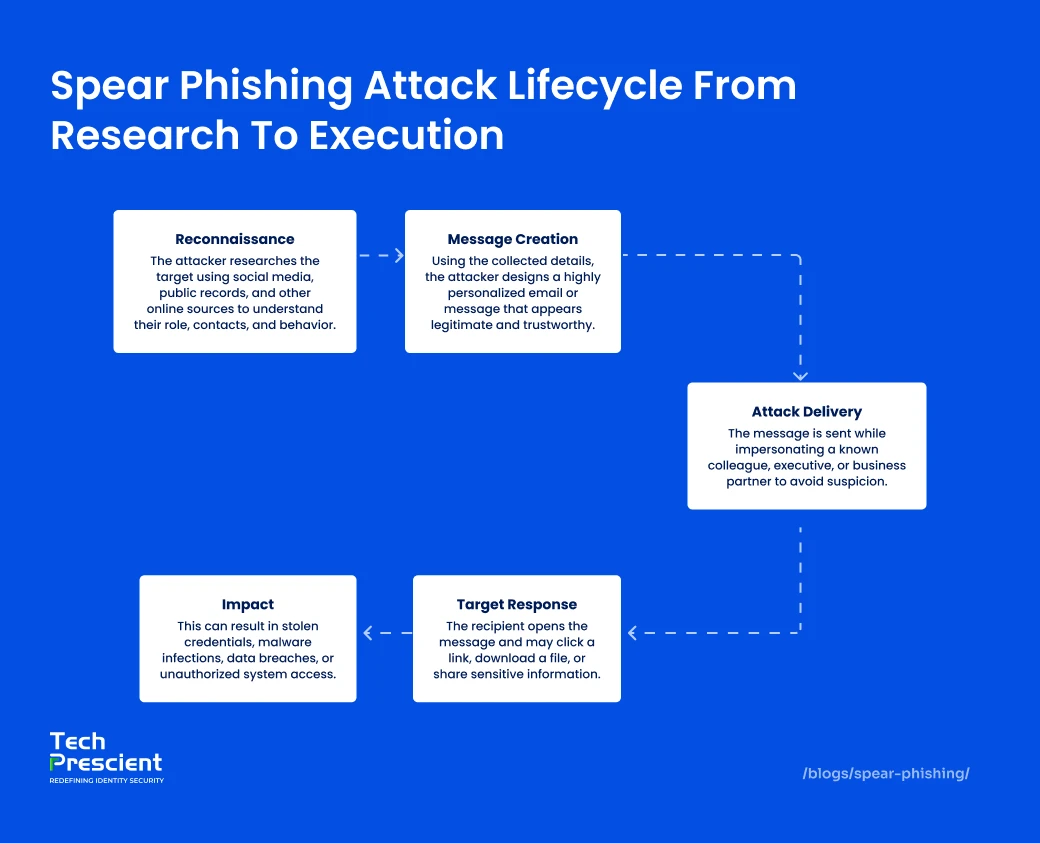
Spear phishing attacks typically follow five stages: reconnaissance, message crafting, delivery, exploitation, and persistence.
Spear phishing attacks follow a deliberate and methodical process. Instead of relying on generic messages, attackers invest time researching the victim, building a believable story, and delivering a tailored request that appears urgent and trustworthy. This step-by-step approach helps them bypass suspicion and dramatically increases the success rate of the attack.
Below is a breakdown of how these targeted attacks typically unfold.
Information Gathering
Every spear phishing campaign begins with gathering detailed information about the potential victim. Attackers search through LinkedIn, company websites, social media platforms, and even old breach data to understand job roles, reporting structures, and daily responsibilities.
They focus on individuals who have access to valuable assets such as financial systems, vendor records, payroll information, or sensitive personal data. Departments like finance, HR, and IT administration are frequent targets because of the level of access they hold. The goal at this stage is to build a complete profile of the victim so the attacker can impersonate someone the target knows and trusts.
Crafting the Message
With enough information collected, the attacker creates a highly personalized message. This message often uses:
- Wording that matches the victim's normal workflows
- Spoofed email domains that closely resemble legitimate ones
- Formatting and tone similar to that of a manager, coworker, or trusted vendor
The attacker carefully designs the message to create a sense of urgency or familiarity. For example, a finance employee might receive a request to review an invoice. A sysadmin might receive a fake security update. The message appears reasonable in context, which reduces the chance that the victim will question its authenticity.
Execution
Once the message is delivered, the attacker prompts the victim to take a specific action. This could involve:
- Clicking a malicious link that leads to a spoofed login page designed for credential harvesting
- Downloading an attachment that installs malware, ransomware, or a command and control agent
- Responding quickly to a request for sensitive information or a wire transfer under the guise of urgency
These techniques are effective because they blend into normal business routines. A simple login prompt or invoice review request can easily be mistaken for legitimate work.
Exploitation of Access
If the victim complies, the attacker uses the captured information or system access for malicious purposes. This may include financial fraud, unauthorized access to corporate accounts, lateral movement within the network, or initiating the first stage of an advanced persistent threat (APT). The compromise can escalate quickly, especially if privileged accounts are involved.
Covering Tracks
To avoid detection, attackers often erase signs of their activities, such as deleting the original email, modifying logs, or hiding malware processes. This allows them to maintain unauthorized access and continue gathering data or preparing follow-up attacks without raising immediate suspicion.
Common Types of Spear Phishing Attacks
Spear phishing campaigns can take many forms, but they all rely on impersonation, urgency, and familiarity to deceive victims. Attackers adapt their techniques to exploit authority, financial workflows, trusted vendor relationships, and routine communication patterns. Below are some of the most common and impactful types of spear phishing attacks organizations face today.
CEO Fraud (Whaling)
Whaling targets high-level executives such as CEOs or CFOs, where attackers impersonate leadership to request urgent financial actions. These messages often use authority, urgency, and internal language to pressure employees into approving wire transfers or sharing sensitive information.
Real-world incidents such as the Mattel and Ubiquiti cases show how convincing these emails can be, sometimes costing organizations millions. Because executives are busy and often have elevated privileges, whaling attacks have a significantly higher success rate compared to regular spear phishing.
Vendor Impersonation
Vendor impersonation relies on attackers posing as trusted third-party suppliers or service providers. They send fake invoices, altered bank account details, or payment update requests that appear legitimate because they mirror real vendor communication.
Using spoofed domains or compromised vendor accounts, attackers can bypass suspicion and convince finance teams to authorize fraudulent payments. This method is especially effective in environments with frequent vendor transactions.
Credential Harvesting
Credential harvesting attacks trick users into entering their login details on spoofed websites designed to mimic legitimate services such as Microsoft 365 or Google Workspace. Attackers may send emails prompting employees to reset their passwords, verify account activity, or review a shared document. Once the user submits their credentials, the attacker gains access to corporate systems, email accounts, or cloud applications. Stolen credentials are often used for lateral movement, data theft, or launching further phishing campaigns.
Clone Phishing
In clone phishing, the attacker copies a legitimate email the victim has previously received and replaces the original link or attachment with a malicious version. Because the email appears identical to a known message and comes from a familiar thread, victims are more likely to trust it and take action. This technique is highly effective in environments where employees frequently exchange documents or links.
Malware Delivery
Attackers often deliver malware through spear phishing emails that include malicious attachments disguised as invoices, HR files, job applications, or financial documents. When opened, these attachments may install keyloggers, ransomware, remote access tools, or backdoors, giving attackers long-term access to the network. Malware-based spear phishing is commonly used in advanced persistent threat campaigns because it provides persistent, stealthy control over compromised systems.
What Is a Spear Phishing Email?
A spear phishing email is a highly personalized fraudulent message designed to appear as if it came from a trusted contact.
Unlike generic phishing emails, it may include:
- The victim's name
- Their job role or department
- References to real projects or vendors
- Accurate company formatting and signatures
Because these emails feel authentic, they are significantly harder to detect than standard phishing messages.
How to Identify a Spear Phishing Email
Spear phishing emails are designed to look legitimate, but they almost always contain subtle red flags. These warning signs often appear in the sender's address, the tone of the message, the urgency applied, or the presence of suspicious links or attachments. By knowing what to look for, employees and individuals can detect these attacks before they cause damage.
Below are the most common indicators that an email may be part of a targeted spear phishing attempt.
Red Flags Checklist
Suspicious Sender Address
A spear phishing email often appears to come from someone you know, but a closer look at the sender address usually reveals inconsistencies. Attackers frequently use domains that are slightly altered or misspelled to mimic legitimate organizations. These changes may be as subtle as an extra character or a different top-level domain. Always inspect the full email address, not just the display name, before trusting the message. If anything looks unusual or unexpected, treat the email as suspicious.
Unexpected or Urgent Requests
Urgency is one of the most common social engineering techniques used in spear phishing. Attackers try to create pressure by requesting immediate action, often claiming that something critical or time-sensitive needs attention. These requests may involve approving payments, updating credentials, or sharing confidential information. When urgency feels forced or out of context, it is usually meant to bypass your normal caution. Take a moment to verify such requests through a trusted communication channel.
Links That Do Not Match the Expected URL
Malicious links are frequently disguised as legitimate login pages or trusted websites. Even if the text appears correct, hovering over the link often exposes a URL that does not match the supposed destination. This mismatch is a strong indicator of a spoofed website designed for credential harvesting or malware downloads. Before clicking any link, confirm that it leads to a domain you recognize and trust. If the link seems even slightly off, avoid interacting with it entirely.
Slight Grammar or Tone Inconsistencies
Attackers try to mimic the writing style of real colleagues, but subtle errors often give them away. Messages may include unusual phrasing, incorrect grammar, or a tone that feels inconsistent with the sender's usual communication style. These issues can occur even in sophisticated attacks because cybercriminals may not fully understand internal terminology or tone. If a message feels "off" in any way, question its authenticity. Trust your intuition when something does not sound like the person who supposedly sent it.
Requests for Sensitive Data or Money
Legitimate businesses rarely ask for passwords, financial details, MFA codes, or personal information through email. Spear phishing emails often include such requests, sometimes paired with urgency or authority to push the recipient into compliance. These messages may claim that an account is compromised, a payment is overdue, or an internal process requires immediate verification. Any email requesting sensitive information should be considered highly suspicious until proven otherwise. Always verify through official channels before taking action.
Protect Your Organization from Targeted Attacks
Tech Prescient helps organizations strengthen their defenses against spear phishing with automated identity governance and advanced security controls. If you want to reduce risk and stay ahead of evolving threats, explore how our solutions can help. Click the button below to get started.
How to Prevent Spear Phishing Attacks
Preventing spear phishing requires a layered defense strategy that combines human awareness, technical controls, and identity security governance.
Strong verification processes, multi-factor authentication (MFA), and ongoing awareness training significantly reduce the risk of spear phishing. Because these attacks are highly personalized, prevention requires both technical controls and consistent user vigilance.
Verify Unusual Requests Through a Second Channel
Spear phishing often relies on urgency, authority, or pretexting to push employees into quick decisions. Any email requesting sensitive information, password resets, wire transfers, or changes to vendor payment details should always be verified through a separate channel such as a phone call, chat message, or in-person confirmation. Independent verification is one of the most effective ways to stop business email compromise and whaling attacks.
Enable Multi-Factor Authentication (MFA) on All Accounts
Multi-factor authentication adds a critical layer of protection by requiring something the user knows (a password) and something they have (a token, smartphone, or biometric factor). Even if an attacker successfully harvests credentials through a spoofed login page, MFA can prevent unauthorized access to email accounts, cloud applications, and administrative systems. This significantly reduces the impact of credential harvesting attacks.
Use Email Authentication Standards: DMARC, DKIM, and SPF
Email authentication protocols help organizations validate incoming messages and detect spoofing attempts.
- SPF confirms that the sending server is authorized
- DKIM ensures message integrity through cryptographic signatures
- DMARC enforces policies that block or quarantine unauthenticated messages
Together, these controls prevent attackers from impersonating domains and reduce the risk of vendor impersonation, BEC, and cloned email attacks.
Install Advanced Email Threat Protection
Modern email filters use machine learning, behavioral analysis, and sandboxing to identify malicious attachments, suspicious URLs, and abnormal communication patterns. These tools can detect spear phishing attempts that bypass traditional filters by scanning external links, analyzing payloads in real-time, and flagging unusual sender behavior. Advanced threat protection ensures that harmful emails are blocked or isolated before they reach the recipient's inbox.
Implement Least Privilege Access
Limiting access rights reduces the damage an attacker can cause if they compromise an account. Employees should only have access to the systems and data they need for their role. With a least privilege model, even if a spear phishing attack succeeds, attackers cannot move freely across the network or access sensitive applications without additional authorization.
Real Examples of Spear Phishing Attacks
High-profile breaches show just how effective and damaging targeted phishing can be. These attacks often begin with a single deceptive email but can escalate into major financial losses, data theft, or long-term unauthorized access inside corporate networks.
Real-World Cases
John Podesta Email Hack
One of the most well-known spear phishing incidents occurred during the 2016 U.S. presidential campaign. John Podesta, the campaign chairman, received an email disguised as a legitimate Google security alert. The link redirected him to a spoofed login page designed to steal his credentials. Once compromised, attackers accessed thousands of emails, which were later leaked publicly. This case remains a landmark example of how a single spear phishing email can influence political processes and expose sensitive communications.
Mattel's $3 Million Fraudulent Transfer
Mattel experienced a major financial loss when attackers impersonated a high-ranking executive and instructed an employee to process an urgent wire transfer. The email was crafted with accurate internal details, making it appear authentic. Believing the request was legitimate, the employee authorized a $3 million transfer to a fraudulent overseas account. By the time the attack was discovered, the funds had already been withdrawn. This incident highlights how Business Email Compromise and executive impersonation can exploit trust in internal communication.
Target Breach via HVAC Vendor Phishing
The infamous Target data breach began with a spear phishing attack on one of the company's third-party HVAC vendors. Attackers compromised the vendor's credentials and used them to access Target's internal systems. From there, they installed malware on point-of-sale devices across multiple stores, ultimately stealing payment information from millions of customers. The attack demonstrated how spear phishing at a supplier level can create a ripple effect, impacting much larger organizations through compromised vendor relationships.
Spear Phishing vs. Phishing: What's the Difference?
Spear phishing and phishing both involve deceptive emails designed to steal information, but they differ significantly in scope, personalization, and impact. Phishing casts a wide net, while spear phishing aims directly at specific individuals or groups using tailored details.
Phishing vs Spear Phishing: Key Differences
| Feature | Phishing | Spear Phishing |
|---|---|---|
| Target | Large audience | Specific individual or team |
| Personalization | Generic | Highly personalized |
| Research Required | Minimal | Extensive reconnaissance |
| Success Rate | Lower | Higher |
| Common Goal | Credential theft | Financial fraud, credential theft, network access |
Phishing casts a wide net, while spear phishing targets a specific victim using carefully crafted deception.
What to Do If You Clicked a Spear Phishing Link
If you accidentally click a spear phishing link, acting quickly and decisively can significantly reduce the damage. Disconnect from the network, report the incident, secure accounts, and check for malware to protect your data and organization. Clicking a malicious link can expose your device to credential theft, spyware, ransomware, or unauthorized access, so the faster you respond, the better your chances of minimizing harm.
Disconnect Your Device
Immediately disconnect the affected device from the internet to stop any active malicious connections. Turn off Wi-Fi, unplug Ethernet cables, or enable airplane mode on mobile devices to prevent further communication with the attacker's servers. This reduces the risk of malware spreading, data exfiltration, or additional malicious downloads behind the scenes.
Report the Incident to Your Security Team
Notify your IT or security department right away so they can assess the scope and contain the threat. Early reporting helps your organization isolate compromised systems and prevent lateral spread across the network. Security teams can also begin incident response procedures, such as removing malicious files or resetting affected services.
Reset Passwords and Review Account Activity
Change passwords for all potentially affected accounts immediately, starting with the account tied to the phishing link. Use a different, secure device to perform these resets, and ensure new passwords are strong and unique. If you used the same password elsewhere, update those accounts too, and enable multi-factor authentication (MFA) to add a stronger second layer of defense.
Perform a Full Malware Scan
Run a comprehensive malware scan using up-to-date antivirus or endpoint detection tools. Some phishing links trigger downloads or install hidden malware even if nothing obvious appeared, so scanning helps identify and remove threats. If your organization uses advanced tools like EDR (Endpoint Detection and Response), make sure they are active and reviewing the incident.
Begin Your Incident Response Process
If the phishing link was part of an enterprise attack, follow your organization's incident response workflow to contain, investigate, and remediate the breach. Incident response includes identifying affected systems, removing threats, restoring clean backups, and documenting the event for future learning. Afterward, update your security policies, conduct targeted training, and improve email filtering to help prevent repeat incidents.
Final Thoughts
Spear phishing cannot be prevented by awareness alone. Modern identity security ensures that even if credentials are stolen, attackers cannot easily escalate privileges or move laterally.
Discover how Tech Prescient helps organizations reduce spear phishing impact through automated identity governance and least-privilege enforcement.
FAQs
Spear phishing refers to a targeted phishing attack aimed at a specific person, team, or organization. Attackers use personal or business-related details to make the message look legitimate. This personalization is what makes spear phishing more convincing than generic phishing.
Attackers first research the target using sources like LinkedIn, company websites, or past data breaches. They then impersonate a trusted contact and send a message containing a malicious link, attachment, or urgent request. The goal is to trick the victim into taking an action that compromises security.
A common example is an email that appears to come from a company CEO requesting an urgent wire transfer. The message often uses authority and time pressure to prevent verification. Once the transfer is made, the funds go directly to the attacker.
Phishing targets a large audience with generic messages sent in bulk. Spear phishing focuses on a specific individual and uses personalized information to appear trustworthy. This targeted approach makes spear phishing more sophisticated and harder to detect.
Organizations can reduce risk by enforcing multi-factor authentication and email authentication standards like DMARC. Regular user training, advanced email security tools, and strict verification processes also play a critical role. Together, these controls help stop attacks even if a user engages with a malicious message.
Spear phishing is more dangerous because it uses personalized information to appear legitimate, making victims more likely to trust and act on the message.
Yes. Because spear phishing messages are customized and often sent in small volumes, they can evade traditional spam detection systems.
Yes. Spear phishing is considered fraud and unauthorized access under most cybercrime laws worldwide.
Share



Yatin Laygude
Content Writer
A content writer with 6 years of experience turning complex topics into clear, engaging, and meaningful content. From blogs and web pages to whitepapers and thought pieces, he creates content that not only explains but also connects with both the audience and business goals.
Most Popular Blogs
Identity Security· 21 min read
Data Access Governance Solutions: How to Secure Sensitive Data at Scale
Compare data access governance solutions for 2026: how DAG platforms discover sensitive data, run access reviews, automate remediation, and prove compliance.
Brinda Bhatt· September 7, 2026
Identity Security· 24 min read
What Is Zero Trust Network Access (ZTNA)?
Learn what Zero Trust Network Access (ZTNA) is, how it works, and why it’s replacing VPNs for secure, identity-based access control.
Yatin Laygude· August 14, 2026
Identity Security· 24 min read
Cyber Essentials Certification: Complete Guide
Learn Cyber Essentials certification, cost, requirements, and steps. Compare Cyber Essentials vs Plus and get certified faster.
Yatin Laygude· August 10, 2026