




On this page
See Tech Prescient in Action
Automate access, reduce risk, and stay audit-ready
Mandatory Access Control (MAC), Discretionary Access Control (DAC), and Role-Based Access Control (RBAC) represent three distinct approaches to enforcing access decisions. MAC applies the most restrictive, system-enforced controls; DAC prioritizes flexibility by delegating control to resource owners; and RBAC balances security and scalability by aligning access with organizational roles.
Access control models are the gatekeepers of your digital environment, as the rights to access a particular resource, what actions can be performed, and how much control one has over it are defined by them. Selecting the right model for your business isn't just about ease of use; it is crucial for protecting sensitive data, being audit-ready, and minimizing cyber threats. Even the most advanced technologies can fall short if access policies do not align perfectly with their security and compliance standards.
Let us have a look at the three most common access control models, MAC, DAC, and RBAC, and understand how they differ from each other.

Mandatory Access Control (MAC)
Mandatory Access Control (MAC) is the most restrictive access control model. Access decisions are enforced centrally by the system using security labels and clearance levels. Users and resource owners cannot modify permissions. It's commonly seen in highly sensitive environments like government or military systems where data classification is critical.
Discretionary Access Control (DAC)
Discretionary Access Control (DAC) places permission management in the hands of the resource owner. Owners determine who can access their files or applications, often through access control lists (ACLs). This approach is typical in operating systems like Windows, where a file owner can grant or deny access to others.
Role-Based Access Control (RBAC)
Role-Based Access Control (RBAC) assigns permissions based on defined roles within an organization, such as "Administrator," "Finance," or "Support." Users inherit permissions through their assigned roles rather than through direct access grants. Large enterprises often use RBAC in applications such as ERP systems, where employees are assigned roles with predefined permissions.
MAC is strict and centrally controlled, making it ideal for environments like government or defense where data classification cannot be compromised. DAC offers greater flexibility by enabling resource owners to control who can access their files or applications, making it well-suited for business settings and collaborative environments. RBAC offers a balance between the two, providing a structured, scalable system tied to organizational roles, though it depends on clearly defined roles to work effectively.
The access control model you choose plays a key role in managing risk and ensuring compliance. According to Frontegg, RBAC (Role-Based Access Control) is the most widely used model because it offers a good balance between security and usability. 94.7% of companies have implemented it, and 86.6% still rely on it. On the other hand, choosing MAC (Mandatory Access Control) instead of DAC (Discretionary Access Control) ensures stricter, system-enforced rules that help maintain compliance. In contrast, relying on DAC when stronger controls are needed can increase the risk of compliance gaps and costly penalties.
Key Takeaways
- Understand how MAC, DAC, and RBAC differ in enforcement, flexibility, and risk profile
- Evaluate the strengths, limitations, and appropriate use cases for each model
- Use comparative analysis to support informed access control decisions
- Align access control strategy with security, compliance, and operational requirements
- Assess how different industries apply these models in real-world environments
What Are Access Control Models? Access Control Models Explained
Access control models define how users are granted permission to access systems and data. MAC enforces strict system-level rules, DAC allows owners to control access, and RBAC assigns permissions based on job roles.
Access control refers to the policies and technologies that determine which authenticated users are allowed to access specific systems, data, or resources. It's a cornerstone of cybersecurity, ensuring that only authorized parties gain access, thereby protecting the confidentiality, integrity, and availability of critical assets.
In the broader landscape of identity security, Access Control is a vital component within Identity & Access Management (IAM) frameworks. IAM systems handle authentication, authorization, and account lifecycle processes to manage access securely across environments. Meanwhile, Identity Governance & Administration (IGA) overlays IAM with governance, policy enforcement, compliance visibility, and auditing capabilities, ensuring access rights are appropriate and aligned with regulations.
Together, access control, IAM, and IGA form a layered defense: access control enforces who gets in and what they can do; IAM provides the operational mechanisms to authenticate and authorize; and IGA ensures governance, policy compliance, and oversight over those access decisions.

Prashant Sail
Technical Architect
What Is Mandatory Access Control (MAC)?
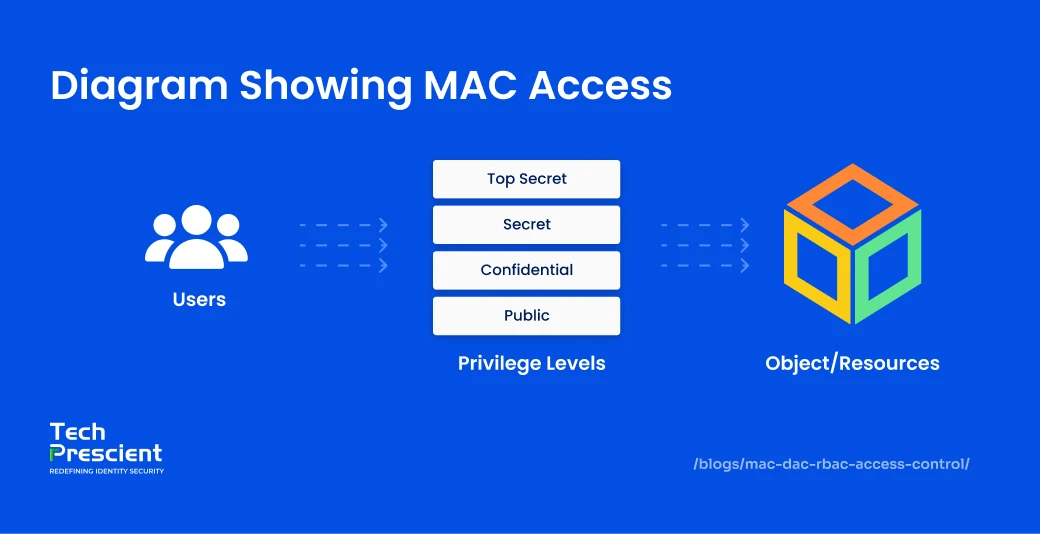
Mandatory Access Control (MAC) is a highly restrictive access control model in which access decisions are enforced by the system rather than by users or resource owners. Permissions are determined through security labels assigned to resources and clearance levels assigned to users, making MAC suitable for environments with stringent security and compliance requirements.
In a MAC model, the operating system governs access based on the sensitivity of the data and the authorization level of the user. Access is granted only when a user's clearance level meets or exceeds the classification of the requested resource, enforcing a strict need-to-know principle. Users cannot modify permissions or delegate access, regardless of ownership or role.
Mandatory Access Control is a centrally managed, non-discretionary security model designed to deliver the highest level of protection. In MAC, access policies are strictly governed by a centralized security administration rather than individual resource owners. This model applies security labels to both resources and users, which determine access eligibility.
- Classification and Clearance: Resources are assigned classifications (e.g., restricted, secret, top-secret) that reflect their sensitivity level. Users are granted clearances that define what classifications they are authorized to access.
- Compartment: Each resource is also assigned a compartment, such as a department or project group, while users are assigned to one or more compartments. Access is permitted only when both the user's clearance and compartment match those of the resource.
MAC is the highest level of access control, originally developed for military and government environments. It uses classification levels such as Classified, Secret, and Unclassified instead of a simple numbering system to enforce strict security policies. While it was first designed for defense and intelligence sectors, MAC is also used in industries like banking and insurance to protect highly sensitive data, such as customer account information.
Benefits of MAC
Mandatory Access Control is designed for environments where access policies must be enforced without exception. Its rigid, system-governed structure prioritizes consistency, predictability, and policy integrity over flexibility, making it suitable for highly sensitive and regulated systems.
- Centralized Policy Enforcement: In MAC, the system administrator defines access policies across the network. Users without the required clearance cannot bypass restrictions, even with shared credentials. Centrally managed rules enforce strict authorization, prevent accidental permission leaks, and support multi-level security (MLS) by classifying and labelling data for maximum protection.
- Classification and Clearance: In MAC, every resource is assigned a classification level (such as Restricted, Secret, Top-Secret) to indicate its sensitivity. Users are granted security clearances, which determine the classification levels they are authorized to access.
- Compartment: Each resource can also belong to a compartment, which specifies the group of people, such as a department or project team, who can access it. Similarly, a user's compartment membership defines which groups they belong to and, therefore, what additional resources they can access.

Pro Tip
MAC works best when it protects the smallest possible surface. Use it selectively for highly sensitive systems or datasets, and avoid forcing MAC across collaboration-heavy workflows where it will slow operations without adding meaningful security.
Limitations of MAC
While Mandatory Access Control provides strong enforcement guarantees, it also introduces operational and architectural constraints. These limitations must be weighed carefully, particularly outside of tightly controlled or regulated environments.
- Complex Policy Administration: As user communities scale, maintaining MAC becomes challenging since administrators must configure and manage all access centrally. Security teams need to continuously validate permissions, handle rapid onboarding and offboarding, and ensure roles remain accurate, making MAC impractical for large, internet-facing applications.
- Limited User Flexibility: MAC does not allow users or resource owners to modify permissions. All access changes must be performed by a system administrator through the security kernel. This strict control slows data flow, reduces productivity, and makes managing multiple confidentiality levels or security domains both time-consuming and costly.
- Clearing users is an expensive process: Granting and managing security clearances for users can be costly and time-consuming. It also requires ongoing maintenance to keep access rights updated, which can place a significant burden on administrative teams.
- Complex implementation: Implementing MAC requires assigning and maintaining classification labels across all users and resources. This labeling process can be time-consuming and difficult to adapt as systems evolve. Additionally, MAC's rigid structure is not always compatible with certain applications or operating systems, making integration challenging in diverse IT environments.
Examples of MAC
MAC is best suited for multilevel, hierarchical environments where users hold different clearance levels. MAC emphasizes strict data security. While uncommon in small businesses or consumer apps, it remains highly valuable in specialized high-security use cases.
- Government Institutions: Government, military, and intelligence agencies rely on MAC to enforce strict clearance levels for sensitive data. These institutions manage vast volumes of classified information that must remain secure yet accessible to authorized staff. With MAC, administrators can assign categories and map users to the specific classified resources they need, ensuring both security and controlled availability.
- Banking Sectors: In banking and large enterprises, MAC is used to safeguard sensitive client and financial data. By enforcing clearance-based access, institutions like insurance companies and banks can tightly restrict who handles critical records. This reduces the risk of breaches, protects customer trust, and ensures compliance with strict regulatory frameworks such as PCI-DSS and GDPR.
- Healthcare: Healthcare organizations apply MAC to meet HIPAA compliance by restricting access to sensitive patient records. Medical data is classified by sensitivity, and only cleared professionals, such as treating physicians or authorized nurses, can access or update it. This ensures patient confidentiality, prevents unauthorized access, and minimizes the risk of privacy breaches.
What Is Discretionary Access Control (DAC)?
Discretionary Access Control (DAC) is an access control model in which the owner of a resource determines who is permitted to access it and what actions they are allowed to perform. Permissions are commonly managed using access control lists (ACLs) or application-level permission settings.
In a DAC model, control over access decisions is delegated to individual users or application owners rather than enforced centrally by the system. Resource owners can grant, modify, or revoke permissions at their discretion, typically allowing actions such as read, write, modify, or execute. When access is requested, the system authenticates the user and enforces the permissions defined by the resource owner.
DAC is frequently used in commercial operating systems and business environments where collaboration and ease of access are priorities. Its relatively simple permission structure enables faster deployment and lower administrative overhead compared to centrally managed models. However, because enforcement depends on how consistently owners manage permissions, DAC introduces greater risk of over-privileged access, permission sprawl, and inconsistent policy application if governance controls are not in place.
Benefits of DAC
Discretionary Access Control is commonly adopted in environments where flexibility and decentralized decision-making are required. Its advantages are primarily operational, particularly in collaborative or low-to-moderate risk contexts.
- Granular Permission Control: DAC allows owners to assign permissions at a granular level, whether to individuals or groups, enabling precise control over who can read, write, modify, or share resources. Unlike mandatory access control (MAC), this adaptability provides users with more autonomy.
- Faster Collaboration: Permissions can be granted or modified quickly, often with just a few clicks. This eliminates the need to create complex clearance levels or extensive user profiles, making onboarding and collaboration faster.
- Lower Administrative Overhead: Because access decisions are decentralized, object owners, not central administrators, control permissions. This lightens the burden on IT teams and allows users to manage access to information as needed.
- Simplified Policy Management: DAC is straightforward to deploy using access control lists (ACLs) or native application permissions. Central administrators can define baseline controls, while ongoing permission management is handled at the resource level, reducing policy complexity in less regulated systems.
Limitations of DAC
While Discretionary Access Control (DAC) offers flexibility, it also introduces certain limitations that organizations must be mindful of.
- Weaker Security Posture: Compared to Mandatory Access Control (MAC), DAC is inherently less secure. Since access decisions rest with users, attackers may exploit these permissions to spread malware or escalate privileges. Risks like privilege creep, over-sharing of resources, or users unknowingly granting access can expose systems to vulnerabilities.
- Limited Administrative Visibility: DAC's decentralized model reduces centralized insight into access entitlements. Security and compliance teams may find it difficult to maintain an accurate view of who has access to sensitive resources, complicating auditing, policy enforcement, and regulatory reporting.
- Ongoing Maintenance Burden: DAC relies on object owners to keep Access Control Lists (ACLs) updated and relevant. As networks and roles evolve, ACLs may become outdated, granting permissions to former employees or failing to reflect role changes, ultimately reducing the effectiveness of access management.
Examples of DAC
Discretionary Access Control (DAC) is widely embedded in both consumer and enterprise systems. Most users engage with it daily, often without realizing it.
- Smartphone App Permissions: Operating systems and mobile platforms allow users to grant or deny applications access to specific resources, such as cameras, microphones, contacts, or location data. These decisions are made at the discretion of the resource owner and can be modified or revoked as needed.
- Collaborative Document Sharing: Platforms like Google Workspace (Docs, Sheets, etc.) rely on DAC to manage sharing. Document owners control access control lists (ACLs), assigning privileges such as view-only, comment, or edit. They also retain the right to revoke access, delete the file, or restrict sharing entirely.
What Is Role-Based Access Control (RBAC)?
Role-Based Access Control (RBAC) assigns permissions based on job roles rather than individuals, making it scalable, audit-friendly, and ideal for enterprises with structured teams.
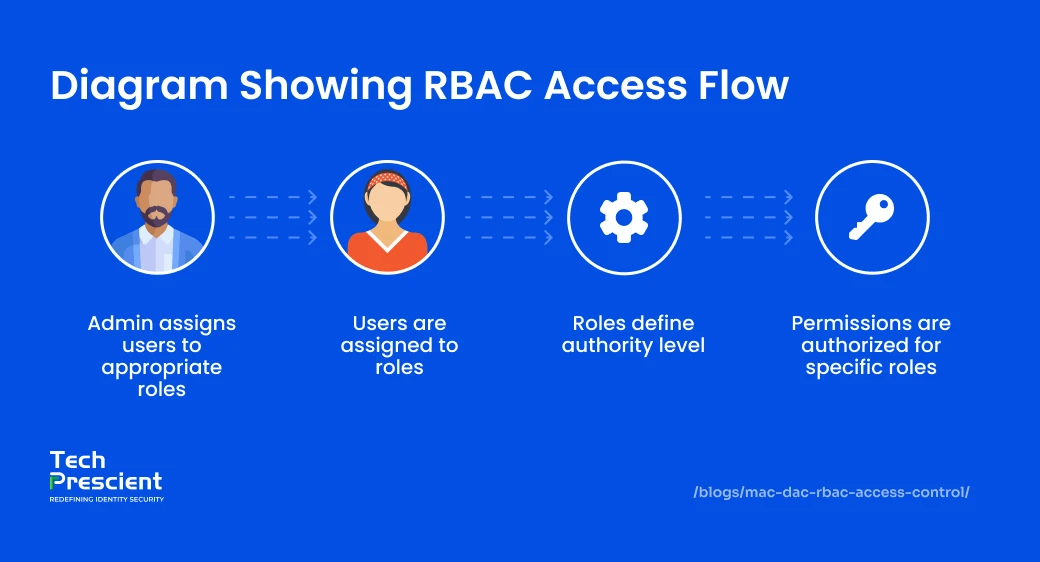
Role-Based Access Control (RBAC) is an approach to managing access to systems and data by linking permissions to specific job roles within an organization. Instead of assigning permissions to each user individually, Role-Based Access Control (RBAC) uses roles to manage access. In this model, access permissions are tied to specific roles, such as Manager, HR, or IT Administrator, rather than to individual users. Once roles are defined with their associated permissions, users are assigned to the appropriate roles, ensuring they only access the resources necessary for their responsibilities.
RBAC enforces the principle of least privilege by limiting users to the access required for their role. For example, an HR recruiter may be permitted to update employee records, while other users are restricted to read-only access. Because access is tied to role definition rather than individual discretion, RBAC scales effectively in environments with structured teams, frequent personnel changes, and formal compliance requirements.
RBAC is widely used in enterprise systems because it supports centralized governance, predictable access behavior, and repeatable policy enforcement. Its effectiveness depends on clearly defined roles and ongoing role lifecycle management to prevent over-privileged access as organizational needs evolve.
Benefits of RBAC
Role-Based Access Control improves access consistency and manageability by aligning permissions with organizational roles rather than individual users. Its value lies in standardization, scalability, and auditability when roles are well defined and governed.
- Implements the Principle of Least Privilege: RBAC limits user access to the permissions required for their assigned role. By constraining access to defined responsibilities, it reduces potential impact from compromised accounts and supports least-privilege enforcement across systems.
- Automates Role-Based Onboarding: Access is provisioned by assigning users to predefined roles rather than configuring permissions individually. This approach reduces setup time, improves consistency, and lowers the likelihood of misconfigured access during onboarding or role changes.
- Minimizes Human Error in Provisioning: Manual access assignment often results in either over-provisioning or under-provisioning. RBAC removes this uncertainty by standardizing roles across the organization, reducing errors, and keeping security consistent without constant admin intervention.
- Simplifies Compliance & Audit Readiness: RBAC simplifies access reviews and audits by providing a clear mapping between roles, permissions, and users. Defined roles and centralized access reporting make it easier to demonstrate policy enforcement and access appropriateness during compliance assessments.
- Ensures Flexibility Across Environments: RBAC can be applied consistently across on-premises systems, cloud platforms, and SaaS applications. When integrated properly, roles can be reused across environments, reducing duplication and simplifying access governance as infrastructure evolves.
Limitations of RBAC
While Role-Based Access Control (RBAC) offers strong security and scalability, it isn't without its challenges. Implementing and managing RBAC in real-world environments, especially within large enterprises, can become complex. Here are some of the key drawbacks organizations often face:
- Complex deployment and role engineering: Defining effective roles is often challenging in large organizations with overlapping responsibilities and evolving job functions. Poorly designed roles can lead to excessive complexity, prolonged implementation timelines, and increased administrative effort.
- Overlapping roles and risk of over-privileging: As organizations grow, it's common for employees to accumulate multiple roles over time. When roles and permissions overlap, users may end up with over-privileged access, meaning they can perform actions beyond their responsibilities. This not only increases the security risk but also creates compliance issues if access rights aren't regularly reviewed and pruned.
Examples of RBAC
RBAC streamlines permission management by assigning access based on organizational roles. This ensures employees only get the access required to perform their responsibilities, helping reduce unauthorized access and safeguard sensitive data. Here are some practical scenarios where RBAC plays a key role:
- Access to HR Platforms: In HRMS tools, HR managers can handle confidential functions such as salary updates, performance evaluations, and onboarding records. Regular staff, on the other hand, are limited to viewing personal details like payslips, leave balances, or tax forms. This separation preserves data privacy while keeping workflows efficient.
- Controlled Access in IT & DevOps: In DevOps ecosystems, permissions are tightly aligned to technical roles. Developers and engineers are granted access to testing environments, CI/CD pipelines, and server logs, while non-technical teams such as HR or Finance are restricted entirely. By limiting visibility and actions, RBAC prevents misconfigurations and strengthens system security.
- Role Segmentation in Finance Systems: Financial applications like ERP platforms use RBAC to differentiate access. Finance managers can approve transactions, update payment records, and generate reports. Meanwhile, auditors are restricted to read-only access, allowing oversight without the ability to alter data. This balance ensures compliance, security, and a transparent audit trail.
MAC vs DAC vs RBAC: Side-by-Side Comparison
When choosing the right access control model, it helps to see how they differ side by side. The table below highlights the key distinctions among MAC, DAC, and RBAC across control, flexibility, security, and usage, making it easier to determine which model best fits different environments.
| Sr. No | Feature | MAC (Mandatory Access Control) | DAC (Discretionary Access Control) | RBAC (Role-Based Access Control) |
|---|---|---|---|---|
| 1 | Who controls access | Access is strictly controlled by system policies. | Access is controlled by the resource owner. | Access is managed through roles defined by administrators. |
| 2 | Who sets permissions | Permissions are enforced only by the system administrator. | Permissions are granted or revoked by the resource owner. | Permissions are assigned through role configurations by admins. |
| 3 | Can users change access | Users cannot alter their own permissions. | Users can freely change permissions on their resources. | Permissions change when a user's role is updated. |
| 4 | How flexible it is | Very rigid with almost no flexibility. | Highly flexible as owners can adjust access anytime. | Moderately flexible through role-based adjustments. |
| 5 | Security level | Highest level of security, ensuring strict data confidentiality. Less secure when a compromised user has high-level permissions. | Lowest level of security. Permissions can be carelessly managed by end-users, leading to risks like privilege escalation or accidental data exposure. | Offers a strong balance of security and usability by following the principle of least privilege, which reduces the risk of excessive permissions. |
| 6 | What access is based on | Determined by security labels and classifications. | Determined by ownership and sharing preferences. | Determined by organizational roles and responsibilities. |
| 7 | Use case | Military, intelligence, and government systems where data confidentiality is paramount. | Typical user-centric operating systems like Windows and Linux, and collaborative platforms like Google Docs. | Enterprise-level applications and systems, such as banks and hospitals, where managing access for a large number of employees. |
How to Choose the Right Access Control to Implement in Your Organization
Selecting the right access control model isn't a one-size-fits-all decision. It depends heavily on your organization's size, industry, compliance needs, and available resources.
At a high level:
- Use MAC for environments that handle classified, regulated, or mission-critical data requiring centralized, non-discretionary enforcement.
- Use DAC where collaboration and owner-managed access are required and risk exposure is lower.
- Use RBAC where access must scale predictably across teams, roles, and systems with consistent governance.
Best Practice
Modern enterprises rarely rely on a single access control model. The most resilient architectures combine MAC for high-assurance systems, RBAC for workforce access, and DAC for low-risk collaboration, governed centrally through IAM and IGA platforms.
- Small and Medium Businesses (SMBs): SMBs often lack dedicated IT teams and resources, making them more vulnerable to cyber threats. In fact, 43% of cyberattacks target SMEs (Accenture). For such businesses, DAC or MAC, or RBAC is often more practical since these models are easier to configure and manage without large IT overhead. However, strict policy enforcement is key to preventing accidental over-permissioning.
- Enterprises: Larger organizations manage thousands of employees, departments, and external vendors. For them, RBAC works best as it provides structure and scalability. In highly sensitive environments (like defense or finance), MAC is often implemented to meet compliance and ensure the highest level of security.
- Industry-Specific Scenarios:
Defense contractors may require MAC for end-to-end operations due to the sensitivity of classified information. Retail and restaurant chains often benefit from RBAC, allowing secure access for employees, suppliers, and partners while protecting sensitive customer data.
In practice, many organizations implement multiple access control models concurrently. A hybrid approach allows organizations to apply MAC to high-assurance systems, RBAC to workforce and enterprise applications, and DAC to lower-risk or collaborative environments. This layered strategy enables flexibility without compromising governance where strict control is required.
Questions to ask before choosing
Selecting the right access control approach isn't just a technical decision; it's a strategic one that affects security, compliance, and user productivity. Before committing to MAC or DAC, or RBAC, organizations should ask themselves:
What level of security is required?
If your environment handles highly sensitive or classified data, strict system-enforced policies (MAC) may be necessary. For less sensitive contexts, DAC or RBAC could strike a better balance.
Who should control permissions?
Do you need system administrators to enforce every rule (MAC)? Or should resource owners have the flexibility to grant access (DAC)? If role-based consistency is key, RBAC offers centralized governance with less administrative overhead.
How dynamic are user roles and responsibilities?
In fast-moving organizations where roles evolve frequently, RBAC can simplify updates by assigning access through roles instead of individuals.
What compliance standards must be met?
Some industries, like defense, healthcare, and finance, demand strict adherence to regulatory frameworks. Matching your model to compliance obligations is crucial to avoid risk.
How important is scalability and ease of management?
As teams grow, individually managing permissions (DAC) becomes impractical. RBAC provides scalability, while MAC ensures uniform security across the system.
Is collaboration or strict control more important?
DAC supports collaboration and user-driven sharing, but at a higher risk. MAC enforces rigid boundaries, while RBAC balances governance with efficiency.
Consult with our experts to find the best fit for your organization. Whether you prioritize airtight security, flexible collaboration, or scalable governance, we help you design and implement an access control strategy that aligns with your unique needs.
Best Use Cases for MAC, DAC, and RBAC
Each access control model is designed with specific strengths, making it suitable for different organizational needs. While all three approaches aim to secure data and systems, their effectiveness depends on the level of security required, the size of the organization, and how permissions need to be managed. Here's when each model works best:
- Choose DAC when you want maximum flexibility and control at the user/resource-owner level
Discretionary Access Control puts the reins in the hands of the resource owner. This model relies on access control lists, making it easy for document creators or department leads to grant and manage privileges quickly. It is conceptually simple and highly responsive to evolving business needs, allowing owners to adjust permissions without involving administrators. However, this flexibility comes with trade-offs: the potential for over-privileged users and ambiguous sharing pathways can introduce security risks.
- Choose RBAC for small teams with stable, well-defined roles
Role-Based Access Control streamlines permission management by binding access rights to roles rather than individual users. It's ideal for organizations where responsibilities and structures are clear, access is granted by role, and everyone aligned with that role automatically inherits the correct permissions. This not only supports scalability but also ensures consistency across teams, reducing error and overhead. Although a robust internal hierarchy is needed, RBAC balances governance with efficiency effectively.
- Choose MAC when your organization operates in the military, government, or defense sectors
Mandatory Access Control enforces centralized, policy-driven access rules that users cannot override, perfect for environments where strict classification, compartmentalization, and auditability are non-negotiable. With security labels and kernel-level enforcement, MAC prevents unauthorized sharing and keeps boundaries airtight. Though less flexible and heavier to manage, its rigid structure is invaluable for safeguarding high-impact, sensitive data in regulated contexts.
MAC vs DAC vs RBAC in DBMS (With Examples)
In database management systems (DBMS), access control models govern how users interact with database objects such as tables, views, schemas, and records. The chosen model determines how permissions are assigned, enforced, and audited within the database layer.
1. MAC in DBMS
Mandatory Access Control is used in high-assurance database environments where data is classified by sensitivity. Records, tables, or schemas are labeled with security classifications, and users are assigned clearance levels. Access is permitted only when a user's clearance meets the classification of the data, preventing unauthorized disclosure regardless of ownership or role.
2. DAC in DBMS
Discretionary Access Control is commonly implemented in relational databases where object owners manage permissions. Table or schema owners grant privileges such as SELECT, INSERT, UPDATE, or DELETE to other users through access control lists or GRANT statements. While flexible, this approach relies on consistent permission management by owners to avoid excessive or unintended access.
3. RBAC in DBMS
Role-Based Access Control is widely used in enterprise database environments to simplify permission management at scale. Database roles such as DBA, Analyst, or Developer, are defined with specific privileges and assigned to users as needed. This structure supports centralized governance, repeatable access policies, and more efficient auditing across large user populations.
In modern DBMS deployments, RBAC is frequently favored for its ability to manage access consistently across complex environments, particularly when combined with identity governance and periodic access reviews.
Real-World Examples of Access Control Models
Access control models are applied differently across industries depending on security needs, collaboration requirements, and compliance demands. Understanding real-world use cases can help organizations choose the right model for their environment.
-
Finance
In financial institutions, access control is a cornerstone of data protection. RBAC helps segment roles, account managers, auditors, and compliance officers, and each gets access tailored to their responsibilities. For critical systems like trading platforms or payment gateways, MAC ensures only cleared personnel can execute or approve high-value transactions. This dual use strengthens compliance with regulations like PCI-DSS while minimizing fraud risks. -
Education
Academic environments often rely on DAC for collaborative flexibility. Faculty members and students can share lecture materials, research files, or project documents while controlling who can view, comment, or edit. At the same time, RBAC supports Learning Management Systems (LMS), where administrators, teachers, and students each get role-specific access. This ensures efficiency in managing coursework while protecting sensitive student data. -
Cloud/SaaS
Modern cloud and SaaS platforms leverage RBAC to manage large user bases across multi-tenant environments. Customers, admins, and support teams are assigned role-specific permissions, ensuring streamlined operations without overexposure of data. For highly sensitive functions, such as system configuration or master admin controls, MAC is layered in to restrict access to only a handful of authorized users. This hybrid model balances usability with robust security.
Final Thoughts: Which Is Right for You?
MAC vs DAC vs RBAC models each bring distinct advantages. MAC delivers maximum security for highly sensitive environments, DAC offers flexibility for collaborative teams, and RBAC ensures scalable, structured access for growing organizations. The key is matching the model, or a hybrid approach, to your organization's security needs, compliance obligations, and operational realities.
FAQs
MAC enforces access through strict, system-defined policies, leaving no room for user overrides. DAC gives resource owners control to decide who can access files or applications. RBAC organizes permissions around predefined roles, making access easier to manage across teams.
MAC is the most secure because it enforces centralized, non-discretionary policies. RBAC also offers strong security by standardizing permissions across roles. DAC is the least secure since it relies on individual owners to manage access, which can lead to mistakes.
RBAC is commonly used in enterprise environments because it scales effectively across large user populations, supports centralized governance, and simplifies auditing by tying access to roles rather than individuals.
Yes. MAC is more secure because access rules are enforced by the system and cannot be changed by users, reducing the risk of accidental or malicious access.
Yes. Many organizations implement hybrid access control strategies. MAC may be applied to high-assurance systems, RBAC to workforce and enterprise applications, and DAC to lower-risk or collaborative resources.
It depends on your priorities. Choose MAC for maximum security, DAC for flexibility and user-driven control, and RBAC for scalable, role-based access in enterprise environments.
Mandatory Access Control (MAC) applies the strictest access control. It is centrally enforced by the operating system, does not allow users to change permissions, and is commonly used in military, government, and mission-critical systems where data classification and confidentiality are critical.
Mandatory Access Control (MAC) relies on the operating system to determine access. Access decisions are based on security labels, classifications, and clearances enforced at the system level rather than by resource owners.
Share



Yatin Laygude
Content Writer
A content writer with 6 years of experience turning complex topics into clear, engaging, and meaningful content. From blogs and web pages to whitepapers and thought pieces, he creates content that not only explains but also connects with both the audience and business goals.
Most Popular Blogs
Identity Security· 21 min read
Data Access Governance Solutions: How to Secure Sensitive Data at Scale
Compare data access governance solutions for 2026: how DAG platforms discover sensitive data, run access reviews, automate remediation, and prove compliance.
Brinda Bhatt· September 7, 2026
Identity Security· 24 min read
What Is Zero Trust Network Access (ZTNA)?
Learn what Zero Trust Network Access (ZTNA) is, how it works, and why it’s replacing VPNs for secure, identity-based access control.
Yatin Laygude· August 14, 2026
Identity Security· 24 min read
Cyber Essentials Certification: Complete Guide
Learn Cyber Essentials certification, cost, requirements, and steps. Compare Cyber Essentials vs Plus and get certified faster.
Yatin Laygude· August 10, 2026