
How Identity Confluence Discovers and Classifies Non-Human Identities
Last Updated date: May 22, 2026
On this page
See Tech Prescient in Action
Automate access, reduce risk, and stay audit-ready
Your identity provider is primarily designed around managing human identities. It syncs with your Human Resource Information System (HRIS). It manages HR-driven lifecycle events, joiner, mover, and leaver workflows; ensuring access is provisioned, updated, and revoked at the right time. It tracks login activity, enforces multi-factor authentication (MFA), and manages role changes.
But your identity provider has limited visibility into what is running silently through your infrastructure right now. service accounts, API keys, bots, and machine identities authenticate daily without a login, never appear in an HR system, and operate largely outside traditional identity lifecycles.
Many organizations lack a complete inventory of how many exist. Often lack clear ownership. Credentials are often not consistently rotated. Auditors can't find them. And that's the security and compliance gap that creates significant security and compliance risk for organizations.
TL;DR
- Blind spot by design: Identity providers are architected for humans, not automation
- Two discovery methods: Email reconciliation finds hidden accounts in apps; cloud scanning catalogs infrastructure-native identities
- Four-category classification: Accounts in Sync, Permission Mismatch, Orphans, or Potential NHIs, each requires a different action
- Complete visibility in hours: Full discovery across applications and cloud infrastructure reveals what you don't know you have
- Foundation for governance: Discovery creates the baseline for ownership mapping, rotation policies, and compliance proof
Non-Human Identities Exist Outside Governance
Identity Governance frameworks assume human behavior: periodic re-authentication, HR-driven joiner-mover-leaver (JML) lifecycle events, organizational role changes, and termination workflows. Service accounts don’t fully align with these assumptions.
A developer creates an API key to connect two SaaS applications. It works perfectly. The developer moves teams. Six months later, the integration still runs.
Ownership is often not formally documented. Rarely reviewed for continued necessity. Often lack consistent rotation policies That account is now creating an unmanaged security risk.
This happens at scale. Across your SaaS applications, cloud environments, and legacy systems, service accounts often scale to dozens, hundreds, or more; each one is undocumented, lacks clear ownership, and is infrequently reviewed.
The cost of invisibility:
- Compliance failures: Auditors ask for a complete account inventory. You can't provide it. Audit findings cite uncontrolled service accounts.
- Security exposure: Compromised credentials go undetected because nobody monitors service accounts. A stolen API key can run for months before being discovered.
- Operational chaos: Credentials age without rotation. Systems fail when they finally expire. Deprovisioning never happens, leaving orphaned accounts cluttering your environment.
Why Traditional Identity Systems Fail for Non-Human Identities
Identity providers are optimized for managing human users because human users behave in predictable ways. They log in from browsers. They change roles when departments reorganize. They leave the company and are deprovisioned through established offboarding workflows.
Service accounts challenge many of these assumptions:
- No HR record: Service accounts aren't hired or terminated. They're created programmatically and often lack lifecycle tracking and formal ownership.
- No interactive login: They authenticate non-interactively, often without user-driven login events or periodic validation.
- No organizational structure: They are not mapped to organizational hierarchy or reporting structures or changes in roles.
- No expiration rules: They exist until explicitly managed, which is often inconsistent.
As a result, non-human identities remain outside Identity Governance by default. Your identity provider may not have full visibility into them. Your change management system doesn't control them. Your compliance team faces challenges in auditing them comprehensively. Your security team often has limited visibility into their activity, usage, or what permissions it holds.
How Identity Confluence Solves The Visibility Gap
Identity Confluence uses multiple discovery methods, including two core approaches, because non-human identities exist in two different places. One method finds undiscovered or unmanaged accounts already living in your applications. The other finds identities that are explicitly defined by cloud platforms as non-human identities.
Both methods converge into a unified, governed inventory, the foundation for everything that comes next: ownership mapping, rotation policies, access reviews, and compliance proof.
Key Capabilities
Email-Based Reconciliation:
Compares accounts in your SaaS applications against your identity provider using email identifiers where available. If an account has no matching email record in your IdP, it's flagged for further validation as a potential non-human identity. This surfaces hundreds of unmanaged accounts in hours.
Cloud-Native Platform Scanning:
Cloud platforms (AWS, Azure, GCP) explicitly define non-human identity types: IAM roles, service principals, managed identities, API credentials. Direct scanning catalogs all infrastructure-native identities without relying on identity reconciliation.
Four-Category Classification:
Every account is sorted into actionable categories: Accounts in Sync (human users, no action), Permission Mismatch (humans with wrong access), Orphan Accounts (outdated/test accounts), or Potential Non-Human Identities (automation requiring a decision).
Unified Inventory:
Both discovery methods feed into a centralized catalog showing exact count, type, location, and status of every non-human identity - giving you consolidated visibility through a single interface.
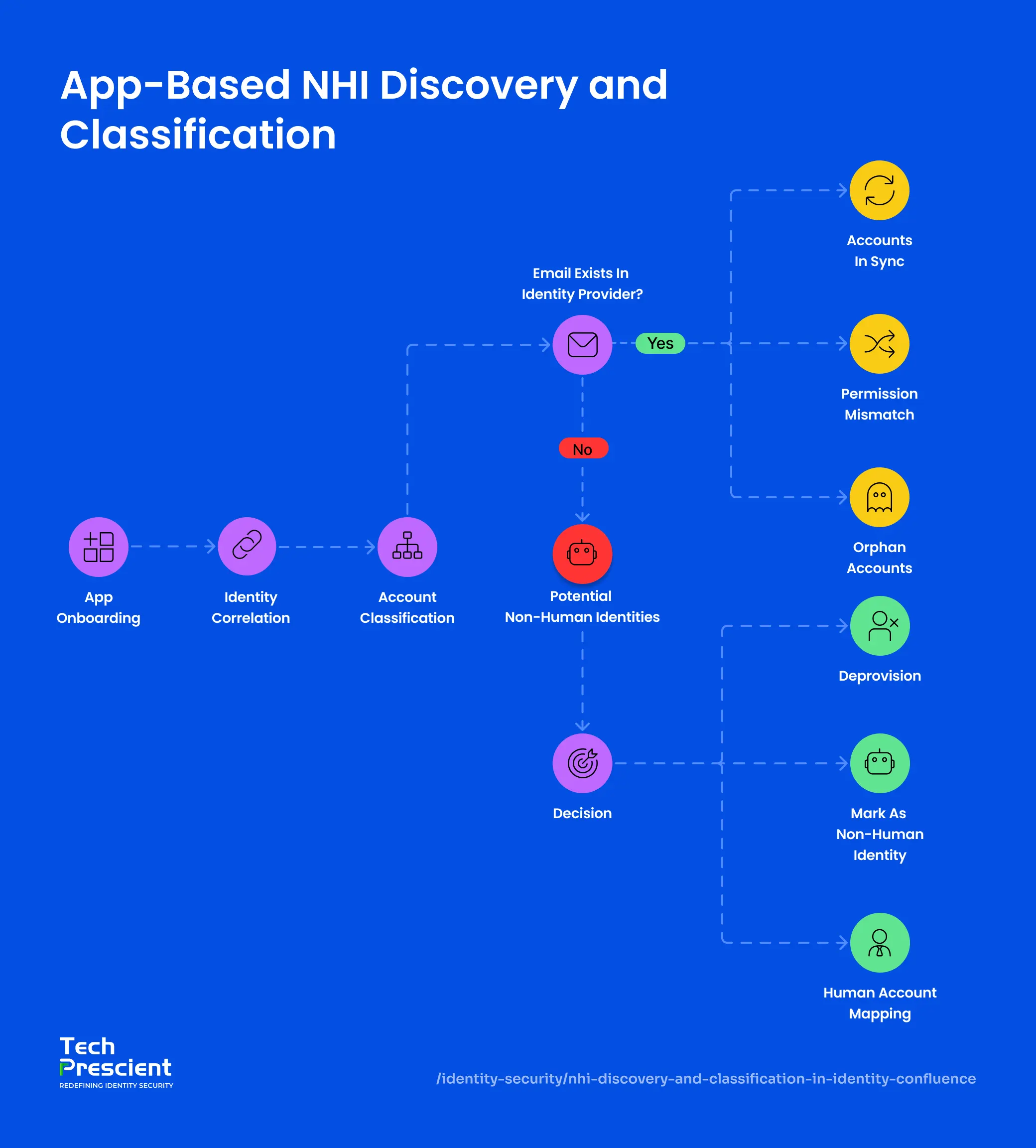
Method 1. App-Based NHI Discovery and Classification
Your SaaS applications may contain accounts not fully visible to your identity provider. These accounts exist in various systems - Salesforce, Slack, Jira, Google Workspace - created manually, inherited from legacy systems, or spun up by developers for integrations.
Email reconciliation finds them primarily by comparing identity attributes across two data sets
Step 1: App Onboarding
Configure an API-based connector between Identity Confluence and your SaaS application. Provide API credentials with appropriate read permissions. Define sync scope - which accounts to include or exclude (this prevents test accounts from polluting the results).
Step 2: Identity Correlation
Identity Confluence performs a two-list comparison:
List 1 (Your Identity Provider):
- alex@company.com
- martin@company.com
- carol@company.com
List 2 (Your SaaS Application):
- alex@company.com
- martin@company.com
- automation-bot
- Sync-service
- legacy-admin
Correlation method: Email-based matching primarily, with support for additional identifiers where available.
Result:
- alex@company.com → Found in both (Human account)
- martin@company.com → Found but inactive; classified as an Orphan account
- automation-bot → NOT found in IdP → Flagged as Potential Non-Human Identity for further validation
- sync-service → NOT found in IdP → Potential Non-Human Identity
- legacy-admin → NOT found in IdP → Potential Non-Human Identity
Step 3: Account Classification
Each account is categorized into one of four types:
| Account | Status in IdP | Classification | Action Needed |
|---|---|---|---|
| alex@company.com | Yes | Account in Sync | None |
| martin@company.com | Yes but inactive | Orphan Account | Review and deprovision if unused |
| automation-bot | No | Potential Non-Human Identity | Decide: deprovision, govern, or map |
| sync-service | No | Potential Non-Human Identity | Decide: deprovision, govern, or map |
- Accounts in Sync: Email exists in both systems. Human user provisioned normally through your standard workflow. No action.
- Permission Mismatch: Email matches between both systems, but the access level in the application differs from what the identity provider assigned. Permissions need explicit review and remediation.
- Orphan Accounts: Email appears in the application but is no longer present or has been deactivated in the identity provider. Usually test accounts, deleted contractors, stale service accounts, or leftover credentials from decommissioned systems.
- Potential Non-Human Identities: Email not found in the identity provider. This account was created outside your standard provisioning process; it requires classification and a governance decision.
Step 4: Take Action
For each potential non-human identity, you have three options:
- Deprovision: The account is no longer needed. Disable access, revoke permissions, and remove the account. Document the removal date and reason.
- Mark as Non-Human Identity: The account is still active and necessary. Tag it with its type (service account, API key, bot, or CLI credential). Assign an owner responsible for its lifecycle. Add to your governance inventory. From this point forward, it enters governance workflows: rotation reminders, access reviews, and compliance reporting.
- Human Account Mapping: The account looks like it belongs to and corresponds to a human identity, but the email doesn't match your IdP record due to data quality issues or naming inconsistencies.
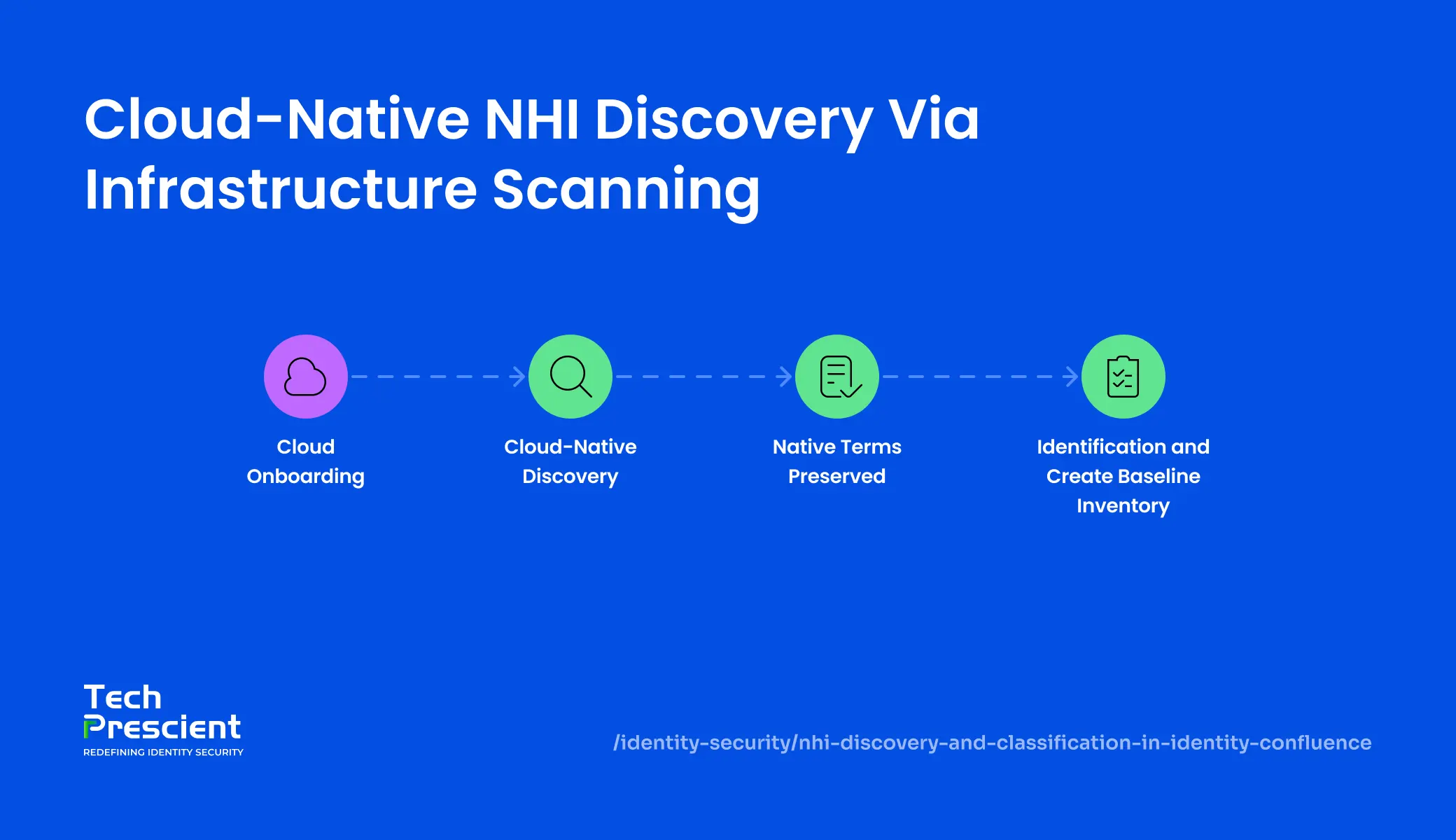
Method 2. Cloud-Native NHI Discovery via Infrastructure Scanning
Cloud platforms make non-human identities explicit and first-class. Unlike applications where service accounts may be less distinctly categorized among human users, cloud providers natively support distinct identity types designed for machine-to-machine authentication.
AWS calls them IAM users and roles. Azure calls them service principals and managed identities. GCP calls them service accounts and OAuth 2.0 credentials.
The platform itself has already classified these as non-human. Discovery focuses on systematically inventorying what the platform has already declared.
Step 1: Cloud Onboarding
Configure a secure connector to your cloud environment (AWS, Azure, or GCP). Authenticate using API-based authentication with least-privileged access that grants read access to identity resources. Define the discovery scope: which cloud services, regions, or resource tags to include.
Step 2: Cloud-Native Discovery
Identity Confluence scans your cloud infrastructure and pulls all native non-human identity types directly from the platform:
| Identity Type | Example | Typical Count |
|---|---|---|
| Service accounts | infra-automation | 12 |
| API credentials | data-sync-process | 47 |
| System tokens | deployment-service | 8 |
| Access credentials | scheduled-jobs | 23 |
| Total Cloud NHIs | 90 |
Each of these is already defined as non-human by the platform itself. No reconciliation or classification needed - the platform has done that work for you.
Step 3: Preserve Native Terminology
Different cloud platforms use different terminology. We preserve each platform's native terms in your inventory so you see exactly what the platform actually calls these accounts. This matters because platform-specific terminology maps directly to platform-specific governance controls and remediation workflows.
AWS → IAM roles, access keys, federated identities
Azure → service principals, managed identities, app registrations
GCP → service accounts, OAuth 2.0 clients, credentials
Step 4: Build Baseline Inventory
Create a complete baseline inventory of all cloud-native non-human identities. This inventory becomes your foundation for governance. From here, you assign ownership, set rotation policies, and enable compliance proof.
What Changes When You Discover NHIs
Before discovery: You have a vague sense that service accounts exist somewhere. Your security team manages them reactively, fixing connectivity issues when credentials expire and cleaning up accounts only after a breach. Your compliance team dreads auditor questions: "Show us all your service accounts." You can't provide a complete list. You don't know how many exist, who owns them, or when credentials last rotated.
After discovery: You have a complete inventory: exact count, type, location, purpose, and current status of every non-human identity. Your security team can identify forgotten accounts before they become attack vectors. Your compliance team hands auditors a verified list with ownership and rotation history. Your infrastructure teams know exactly which integrations are active and which can be decommissioned.
The shift is fundamental: From invisible to visible. From risky to auditable. From compliance failure to compliance-ready.
From Discovery to Governance
Discovery is the beginning, not the end.
Once you know what exists, you can control it. The next phase is ownership mapping, assigning explicit responsibility for every non-human identity and implementing governance workflows.
Ownership means:
- Someone is accountable: One person or team is responsible for the account's entire lifecycle.
- Rotation happens on schedule: Reminders keep credentials fresh without breaking systems.
- Necessity is confirmed: Quarterly access reviews prove the account is still needed.
- Changes are auditable: Every creation, approval, rotation, and deprovisioning decision is documented.
Once ownership is assigned, you move into lifecycle management: monitoring account usage, confirming necessity during reviews, and revoking credentials that are no longer needed.
This is how discovery becomes governance.
Ready to Discover Your NHIs?
That discovery alone is valuable. Everything after builds on it. Start by reviewing a sample non-human identity inventory to understand what discovery reveals in practice.
Request a walkthrough to see how Identity Confluence identifies and classifies non-human identities in your environment.


GET A PERSONALIZED DEMO
See Identity Confluence in Action
“One platform to govern identities, automate access decisions, and prove compliance; across every app, user, and system in your environment.”



Murli Ramsunder
Senior Architect, Vonage