




On this page
See Tech Prescient in Action
Automate access, reduce risk, and stay audit-ready
A user account is a unique digital identity that enables a person, device, or application to authenticate to a system and access assigned resources. It contains credentials, roles, and permissions that define what actions can be performed once access is granted.
In cybersecurity, user accounts underpin authentication (verifying identity), authorization (controlling access), and accountability (recording activity). They establish how systems determine who is requesting access and what that identity is permitted to do.
User accounts are not inherently privileged. Privilege is determined by the permissions assigned to the account. Some accounts are granted elevated access, while others operate with standard or limited rights. Additional privileged account types may include administrator accounts, service accounts, root accounts, database accounts, and system accounts. Because these accounts provide elevated access, they require stricter controls and oversight.
User accounts are central to enforcing access control and protecting sensitive data. Every login, permission change, and system action is associated with an account, creating traceability across environments. For this reason, user accounts are frequently targeted in identity-based attacks. When an account is compromised, attackers can operate within trusted boundaries and bypass traditional perimeter defenses.
All user accounts require governance, whether assigned to an employee, administrator, machine, or service. Organizations manage millions of identities across cloud services, applications, and infrastructure. Without disciplined lifecycle management, accounts can become inactive, over-privileged, or misconfigured, increasing exposure to breaches and privilege misuse. Effective user account management enforces strong authentication, appropriate access, and reduced identity-related risk.
Key Takeaways
- A user account is a digital identity that verifies users and determines what resources they can access.
- User accounts consist of key elements like credentials, roles, and permissions that govern authorization.
- They form the foundation of access control, helping organizations enforce least privilege and accountability.
- Poorly managed accounts, inactive, shared, or over-privileged, pose significant security risks.
- Strong user account management prevents unauthorized access and identity-based attacks, especially when combined with IAM and IGA.
User Account Definition and Purpose
A user account is an individual digital identity assigned to a person, device, or a software service to validate and grant the appropriate level of access within an application, device, or network. User accounts allow individuals or systems to log in, set preferences, and access only the resources their assigned permissions allow.
A typical user account contains basic components such as:
- Username - the unique identifier used to identify the user
- Password or credentials - used to validate identity
- Permissions and privileges - describe what the user may be able to do
- Profile and metadata - department, role, contact information, and other attributes
At the level of security, user accounts have two primary purposes:
- Authentication (validating who the user is)
- Authorization (deciding what the user can access once authenticated)

Pro Tip:
If authentication proves who you are and authorization defines what you can do, test your environment by reviewing both separately. Many breaches occur because one is strong while the other is weak.
From a security perspective, user accounts serve two primary functions: authentication, which verifies the identity of the requesting entity, and authorization, which determines what resources and actions are permitted after authentication. Strong authentication reduces the risk of impersonation, while properly enforced authorization limits excessive or inappropriate access.
In modern identity security, user accounts are managed through IAM and governance processes to ensure that every account is correctly provisioned, monitored, and deprovisioned. When managed appropriately, user accounts provide accountability, enable least privilege and reduce the risk of unauthorized access, making them among the most fundamental building blocks of any secure digital footprint.
Types of User Accounts (with Examples)
User accounts perform various functions and have different risk levels. Understanding these account types helps your organization assign appropriate permissions, expose different risk levels, and implement appropriate access control measures.
Standard User Accounts
Standard user accounts are primarily used by employees for commonly accepted daily activities (e.g. email, collaboration applications, and access to internal systems at a more basic level).
- Purpose: Operational or daily activity with limited permissions
- Risk Level: Low
- Example: Employee accesses their workstation, logs in, and accesses internal applications.
Standard user accounts serve to minimize accidental changes to systems and less exposure if a user account is compromised.
Privileged Accounts
Privileged accounts have additional permissions to perform changes to systems/applications. Privileged accounts are more often viewed as a high-value target for attackers, as they would typically involve significant changes to applications or systems.
- Purpose: System administration, making configuration changes, or sensitive data access
- Risk Level: Very high
- Examples: Domain admins, root accounts, database admins.
Privileged accounts require a governance framework, e.g., log review, oversight, and multifactor authentication, and must be monitored closely.
System Accounts
System accounts are created by the operating system to run core services and background processes. They are designed to support system functionality rather than interactive user access. These accounts typically operate with elevated privileges to access system-level resources required for service execution. Because they are scoped at the operating system level, they play a critical role in maintaining system stability and continuity.
Although not intended for interactive login, system accounts require strict control and monitoring. Misuse or compromise can expose sensitive system components and increase operational risk.
Service Accounts
Service accounts are used to communicate with systems on behalf of applications, scripts, or services. These accounts typically have very high permissions and run in the background, with little or no user interaction.
- Purpose: Enables automated actions and application communication
- Risk Level: High risk (especially if passwords are not managed and periodically rotated)
- Example: Backup service accounts, database connection accounts
Many breaches occur when service accounts become overprivileged and poorly managed.
Risk Reality:
Service accounts often outnumber human users in cloud environments. If they're not centrally governed, they quietly become your largest unmanaged attack surface.
Guest or Temporary Accounts
Guest or temporary accounts provide short-term access with very restricted permissions and rarely include administrative rights. These accounts are typically used for contractors, interns, external auditors, or short-duration vendors who require access for a limited period.
- Purpose: To provide temporary access to guests, contractors, or interns
- Risk Level: Moderate
- Example: A contractor receives access to a limited subset of systems for several days or even a week to perform a project.
Temporary accounts introduce elevated risk due to their external or short-lived nature. For this reason, modern operating systems and infrastructure platforms disable guest accounts by default. Access should be enabled only when operationally required and supported by defined controls.
These accounts must be governed through:
- Explicit approval workflows
- Time-bound access policies
- Continuous monitoring
- Formal deprovisioning immediately upon completion of access requirements
Failure to enforce lifecycle controls increases the likelihood of orphaned credentials and unauthorized persistence.
Local vs. Domain Accounts
Account configuration and management models directly affect identity hygiene, access consistency, and risk exposure.
- Local Accounts: Reside on only one device, and you can't use them to log in to any other computer. Their permissions and validity apply only to that specific machine. Examples: a local admin account on a laptop or server.
- Domain Accounts: Work across all domain-joined computers in the network (or Entra ID–joined devices), providing single sign-on (SSO) access to shared resources like file servers, printers, and enterprise applications. Provide a consistent and possibly granular level of access across systems on a network. Examples: Corporate email accounts, enterprise workstation logins, or internet-based accounts tied to a domain account configuration.
Domain accounts simplify the management of accounts because they can restrict access across the entirety of a network, while local accounts are riskier if not managed properly.
Remote Accounts
Remote accounts allow users to authenticate to systems over a network connection using protocols such as RDP, SSH, or VPN. Because remote authentication extends access beyond physical boundaries, it expands the attack surface and requires layered security controls.
Required safeguards include:
- Multi-factor authentication (MFA)
- Conditional access or network restrictions
- Session monitoring and logging
- Privileged access controls where applicable
Examples:
- A remote administrative account used for infrastructure maintenance
- An SSH-enabled account for cloud-hosted workloads
Remote access must be treated as a controlled privilege, not a default capability. Proper governance ensures remote connectivity does not become an unmonitored entry point.
What Is a Privileged User Account?
A privileged user account is an identity assigned elevated permissions beyond standard user access. These permissions allow direct control over systems, security configurations, sensitive data, and other identities.
Privileged accounts are high risk because they can:
- Modify security controls and system configurations
- Access regulated or confidential data
- Create, modify, or delete user accounts
- Override standard access restrictions
The scope of these capabilities makes privileged accounts a primary target in identity-based attacks.
Examples include:
- Domain administrator accounts
- Root accounts
- Database administrator accounts
- Cloud platform super-administrator accounts
Because of their elevated authority, privileged accounts require enhanced governance controls, including:
- Multi-factor authentication (MFA)
- Just-in-time (JIT) access provisioning
- Session monitoring and logging
- Periodic access certification and review
Privileged access must be tightly scoped, time-bound, and continuously monitored to reduce exposure and prevent misuse.
How User Accounts Work in Cybersecurity
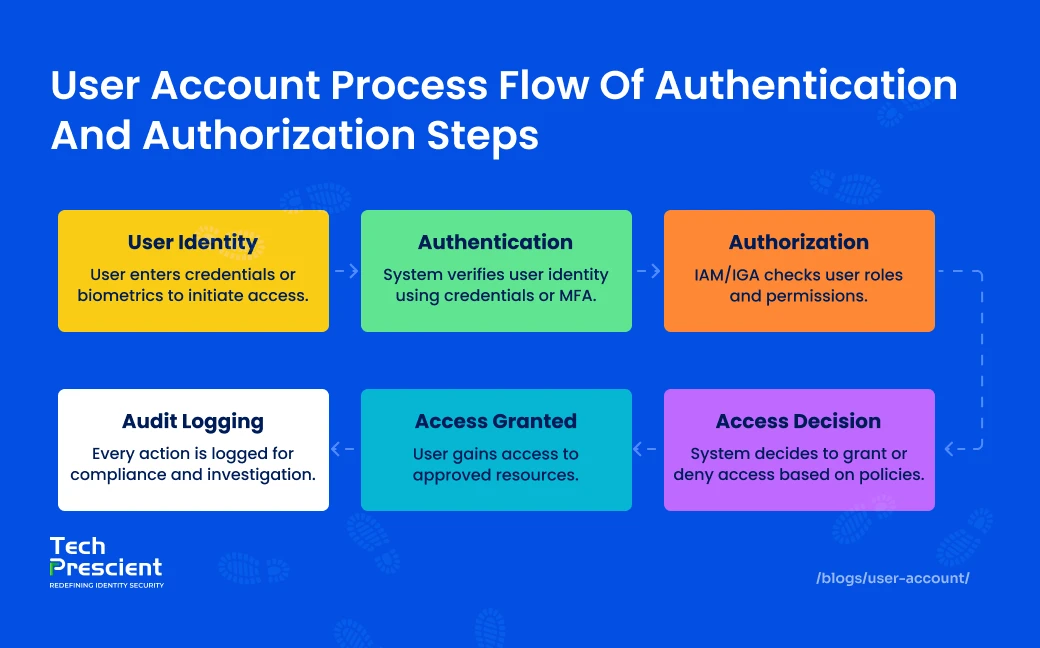
User accounts provide the basic entry point for secure access to an organization. They authenticate a person's (or system's) identity, determine what can be done, and log how the environment is being used. This ultimately helps establish security, accountability, and compliance in your systems.
The following step-by-step description explains how it works:
1. Account Creation
Account creation is the first step in creating a user's digital identity. A unique profile is created in a directory or directory service such as Active Directory or Azure AD. The profile stores information such as a username, email address, department, manager, and group memberships. Access rights may then be granted manually or automatically, through role-based provisioning (RBAC/ABAC) or triggered by an HR system.
2. Authentication
Authentication is a method of confirming that a user is who they claim to be prior to granting access. Modern environments may use authentication methods such as passwords, MFA, biometrics, and even passwordless alternatives such as FIDO2 keys. Many organizations utilize risk-based or adaptive authentication, which adds additional checks when something appears out of the ordinary, such as login attempts using a new device or from a different location.
3. Access Control
After validating identity, access control begins to define what that user can do.
This begins to touch on our authorization policies. IAM, PAM, and Zero Trust systems ensure least-privilege rules are in effect through role-based, attribute-based, and conditional-access policies. Sensitive actions, such as administrative actions, may require temporary privilege elevation with additional checks.
4. Audit Logging & Monitoring
Every action that the user takes creates logs. The logs are ingested into SIEM systems and UEBA systems to analyze behavior for anomalies, such as spikes in failed logins, out-of-hours access, sudden privilege escalation, or access attempts for restricted systems.
Service Account vs User Account: What's the Difference?
A user account is assigned to an individual for interactive system access. A service account is assigned to an application, workload, or automated process to enable system-to-system communication.
The distinction is operational, but the risk implications differ significantly.
| Sr No | Feature | User Account | Service Account |
|---|---|---|---|
| 1 | Used By | Human users | Applications or scripts |
| 2 | Login Type | Interactive login | Non-interactive, background |
| 3 | Password Rotation | Managed by user | Often static (higher risk) |
| 4 | Risk Level | Medium–High | High if unmanaged |
Governance Insight:
Human accounts generate behavior signals; service accounts do not. That difference alone should justify stricter credential rotation and tighter permission scoping.
Why Service Accounts Present Elevated Risk
Service accounts frequently introduce greater exposure because:
- Credentials are not consistently rotated
- Permissions may exceed operational requirements
- Activity occurs in the background, limiting visibility
Unlike human identities, service accounts do not inherently trigger behavioral detection controls tied to user interaction. Without centralized governance, they can become persistent, high-privilege entry points.
Governance Considerations
Both user and service accounts must adhere to:
- Least privilege enforcement
- Credential rotation policies
- Lifecycle management controls
- Continuous monitoring and auditing
Service accounts, in particular, require automated credential management and scoped access policies to reduce long-lived risk.
Importance of User Account Security
User accounts are the entry point to your entire digital environment, and if the entry point is weak, everything behind it is compromised. Strong user account security is the essential proof point that the proper people (or services) access the right resources at the right time, and the least amount of privilege necessary. It's one of the most effective ways to protect against breaches, data theft, and unauthorized lateral movement within your environment.
Why Does User Account Security Matter
User accounts don't just authenticate users with credentials; they apply identity-based controls, which range from login challenges to what the user is allowed to do. When properly securing accounts, organizations can:
- Prevent unauthorized access
- Limit the number of privileges exposed
- Reduce the blast radius of compromised credentials
- Maintain visibility and accountability across user activity for all users
Good user account security is foundational for Zero Trust, least privilege, IGA, and modern enterprise security.
Core Security Practices to Strengthen Accounts
User Access Controls (UAC)
User Access Controls determine what a user can do by defining the permissible actions each account can or cannot take. This includes permission sets for an account, restrictions preventing a standard user from executing administrative-level user actions, and role-based access.
Having strong UAC reduces the potential for misuse, limits insider risks, and prevents attackers from acquiring a "tap in" to high-privilege access if they compromise a standard user account.
Multi-Factor Authentication (MFA)
Multi-Factor Authentication refers to a second layer when verifying identity. This could mean something the user knows, possesses, or is. MFA affords one of the simplest and effective ways to defend against compromised credentials. If an attacker compromises the user's password, they may not gain access without the second factor.
Password Hygiene
Weak passwords and reused passwords remain one of the top reasons attackers can breach enterprise systems.
Good password hygiene includes:
- Strong password complexity
- Regular rotation
- Not using the same password
- Blocking breached passwords or common passwords
Passwordless methods (biometric, or security keys) are also ways to reduce risk further.
Real-World Example: The Snowflake 2024 Data Breach
Real-world breaches consistently demonstrate that weak user account security is one of the leading causes of enterprise compromise.
In 2024, Snowflake, an enterprise-level cloud data platform, experienced a high-volume data breach that impacted over 160 organizations. Access was gained by hackers who compromised employee user accounts lacking reasonable multi-factor authentication and employed information-stealing malware to retrieve credentials.
Once access was obtained, the hackers produced session tokens and moved laterally within each customer environment without triggering standard MFA checks. This access put sensitive data in Snowflake customer accounts at their disposal, and they clearly navigated the breadth of the accounts without triggering any authentication alerts.
This data breach shows how vulnerable user accounts, especially missing or poorly designed identity controls, can lead to catastrophic and indiscriminate exposure of previously protected data.
Best Practices for Managing User Accounts
Effective user account management is key to risk minimization, compliance, and making sure that only the right individuals have the right access at the right time. Positive account hygiene helps organizations adhere to least privilege, automate regular identity management tasks and eliminate blind spots, which are often exploited by intruders.
1. Use Least Privilege & Role-Based Access Control (RBAC)
Only assign users the least amount of access necessary to accomplish their job functions. Implementing RBAC will help organize and streamline permissions by providing the appropriate access by role and not by person, limiting unnecessary accidental over-privileging. Effective role-based access ensures revenue, compliance, and security functions have consistent access policies throughout the organization. It also restricts damages suffered by the organization if any individual account is compromised.
2. Enable Account Lifecycle Automation
Automating the user account creation process, updates, and removal will help reduce the mistakes from manual work and eliminate the entry points where "zombie" or inactive accounts can build up. An automated provisioning process enforces the creation of accounts through HR or organizational workflows so that the user access is retaken at the moment they assume that new role. The same automated function would deprovision accounts the moment an employee exits, so there is no possible access for the user.
3. Conduct Regular Audit and Access Reviews
Periodic access reviews will ensure you identify excessive or unused permissions or accounts that violate policy. Performing these reviews quarterly (or more often in regulated populations) will help ensure users have access to the relevant their job duties or responsibilities. These reviews will also help you identify accounts that are considered high-risk and require additional governance.
4. Combine IAM with IGA for Governance Visibility
IAM tools can help manage authentication and authorization; however, they typically do not provide a deep understanding of who has access to what across your entire environment. Integrating IAM with Identity Governance and Administration (IGA) tools can provide a more top-down view into access rights, conflicts of separation of duties, policy violations and risky privileges. You can reference more on this here: IAM and IGA integration
5. Enforce Strong Credential Policies
You should mandate MFA for all accounts, notably privileged and service accounts. This should also be complemented by strong password requirements, session timeouts, and account lock-out policies to mitigate brute-force compromise attempts. You may also consider biometric authentication methods or other passwordless flows to enhance assurance of identity.
6. Use Just-in-Time (JIT) & Just-Enough-Access (JEA) Privilege Models
Rather than offering users permanent admin access, provide elevated access only when needed and for only that specific task. JIT eliminates long-term risky access, while JEA reduces the access scope associated with elevated activity. This greatly minimizes the risks to the organization if accounts are compromised.
7. Implement Continuous / Adaptive Authentication
Static multi-factor authentication (MFA) provides baseline protection, but it does not account for real-time risk conditions. Adaptive authentication evaluates contextual risk signals, such as device posture, geographic location, behavioral patterns, and access context, to determine whether additional verification is required.
Instead of applying uniform friction to every authentication event, adaptive controls adjust dynamically based on calculated risk. When risk indicators exceed defined thresholds, step-up authentication is enforced.
This approach:
- Strengthens security posture through context-aware decision-making
- Reduces unnecessary user friction during low-risk access attempts
- Improves detection of anomalous or high-risk behavior
Continuous authentication models extend this principle by reassessing trust throughout the session lifecycle, not only at initial login.
Adaptive authentication should be implemented as part of a broader identity security strategy that integrates device trust, behavioral analytics, and policy-based access enforcement.
8. Centralize Account Monitoring and Alerting
Continuously monitoring user activity by reviewing logs from IAM, IGA, and directory services can help mitigate account compromise risk. You should monitor for users logging in during abnormal hours, privilege escalation, access to high-value assets, and numerous failed login attempts. Automated alerts or behavioral analysis tools can help quickly identify suspicious activity associated with potentially compromised accounts.
Common User Account Mistakes to Avoid
Even a well-conceived security program can be undermined by the mismanagement of user accounts. Simple oversights alter the security posture of your organization. For instance, the repeated occurrence of leaving an account active too long or the difficult choice to provide all users with high levels of access results in user accounts being compromised. Following best practices in managing user accounts, practicing strong access control minimizes the risk of insider threats and credential-based attacks.
1. Account Sharing
Sharing login credentials eliminates accountability and undermines identity-based security controls. When multiple individuals use the same account, it becomes impossible to accurately attribute actions to a specific user.
This lack of traceability:
- Obscures malicious or unauthorized activity
- Weakens audit integrity
- Violates the majority of regulatory and compliance frameworks
Every identity, human or non-human, must be uniquely assigned, authenticated, and auditable. Shared credentials directly conflict with foundational identity governance principles.
2. Not Enabling MFA
Password-only authentication significantly increases the likelihood of account compromise due to credential reuse, phishing, and brute-force attacks.
Multi-factor authentication (MFA) adds an additional verification layer that reduces the effectiveness of stolen or exposed credentials. Even if a password is leaked, reused, or intercepted, MFA materially limits unauthorized access.
MFA should be enforced as a baseline control across all user populations, particularly for privileged and remote access scenarios.
3. Not Deprovisioning Inactive or Orphaned Accounts
Inactive accounts and orphaned identities, accounts no longer associated with an active user, system, or business function, create unmanaged access paths within the environment.
These accounts present elevated risk because:
- They are less likely to be monitored
- They often retain unnecessary permissions
- They may persist beyond legitimate operational need
Delayed or inconsistent deprovisioning results in residual access that can function as an unmonitored entry point. Effective identity governance requires automated lifecycle management, including timely deactivation, access revocation, and periodic review of dormant accounts.
4. Over-Privileging Admin Users
When users are granted admin privileges "just because," it creates unnecessary risk. Privileged accounts must be restricted, monitored, and only used by those who require elevated privileges. It only takes one unmanaged admin account for an attacker to gain full privileges.
Conclusion
A user account is not merely a username and password. It is the enforcement point that defines identity, access boundaries, and accountability within modern security architectures. When governed through strong authentication controls, least privilege enforcement, continuous monitoring, and integrated IAM and IGA frameworks, user accounts function as structured security controls rather than unmanaged risk vectors.
However, over-privileged or poorly governed accounts remain one of the most common initial access paths in identity-based attacks. Organizations that treat user account management as a governance discipline, rather than an operational IT task, materially reduce identity exposure and strengthen overall security posture.
FAQs
A user account is a digital identity assigned to an individual or an automated process, allowing them to authenticate (validate their identity) and access particular applications, systems, or data. It is a determinant of what users can and cannot do based on the permissions assigned.
There are different types of user accounts, each created for a different purpose. Standard accounts are considered regular accounts for typical day-to-day activities, while privileged accounts are generally for administrative use and provide users with administrative (powerful) controls. Service accounts exist to provide user-like accounts that support applications and are also not meant for a user's general use. Guest accounts are for temporary users and not for people with frequent access. Each account type comes with various rules for acceptable use and access, and comes with various security risks.
User account security refers to intentional protections of users' accounts through the application of control mechanisms such as multi-factor authentication (MFA) mechanisms, strong password policies, role-based access control (RBAC) and continuous monitoring. The intention of user account security is to prevent unauthorized access, account compromises, and unauthorized use of privileges.
A username is merely the identifier you log in with. A user account is everything behind the username: permissions, roles, credentials, and settings. A username identifies the user of the account. The user account defines what the user can access.
Proper user account management ensures that only authorized users have access to sensitive systems. For example, taking a strategic approach to user account management prevents insider threats, reduces the risk of exposure from accounts that were never utilized or are over-permissioned, helps with regulatory compliance, and ultimately improves access control in an organization.
Share



Rashmi Ogennavar
Content Strategist
A content strategist translating complex Tech and SaaS concepts into compelling narratives for business and technical audiences. With a strategic, data-informed approach, the work bridges content and product storytelling, crafting messaging that resonates and drives decisions across the buyer journey.
Most Popular Blogs
Identity Security· 21 min read
Data Access Governance Solutions: How to Secure Sensitive Data at Scale
Compare data access governance solutions for 2026: how DAG platforms discover sensitive data, run access reviews, automate remediation, and prove compliance.
Brinda Bhatt· September 7, 2026
Identity Security· 24 min read
What Is Zero Trust Network Access (ZTNA)?
Learn what Zero Trust Network Access (ZTNA) is, how it works, and why it’s replacing VPNs for secure, identity-based access control.
Yatin Laygude· August 14, 2026
Identity Security· 24 min read
Cyber Essentials Certification: Complete Guide
Learn Cyber Essentials certification, cost, requirements, and steps. Compare Cyber Essentials vs Plus and get certified faster.
Yatin Laygude· August 10, 2026